Mapper: Add/modify/delete points on line on tablet PC (no keyboard)
Fieldwork with OOM 0.6.1 on a pad Windows 8.1.
I miss (or can't find) how to add/delete/change points on a line. Since I have no keyboard I can't push CTRL+SHIFT/CTRL/SPACE at the same time as I klick on a spot on a line. I tried with the "on-screen" keyboard but no, it doesn't take command from both keyboard and pen on the screen at the same time. Even if it worked it would be very annoying method.
It would be great if some buttons in the program did it possible to use these commands also on a pad.
 Zerbembasqwibo
All 17 comments
For testing purposes, the "mobile mode" (used on Android) is also available with the desktop app. You must set the environment variable "MAPPER_MOBILE_GUI" to "1" before running Mapper.exe. This will give you extra buttons for some tools. Unfortunately, adding/deleting points might still be impossible.
(There was a request to add the buttons to the desktop version, but I can't find it in the issues.)
 dg0yt
on 16 Jun 2016
dg0yt
on 16 Jun 2016
Oh, yes button in desktop would be usefull, especially for testing mobile GUI directly on PC without need install it on Android device.
 Symbian9
on 16 Jun 2016
Symbian9
on 16 Jun 2016
For testing purposes, the "mobile mode" (used on Android) is also available with the desktop app. You must set the environment variable "MAPPER_MOBILE_GUI" to "1" before running Mapper.exe.
Is it possible enable "mobile mode" for Mapper on Linux desktop?
Is there special variable for that in configuration file?
../.config/OpenOrienteering.org/Mapper.conf
(There was a request to add the buttons to the desktop version, but I can't find it in the issues.)
Maybe, it requested here:
Symbian9
on 16 Oct 2018
Is it possible enable "mobile mode" for Mapper on Linux desktop?
Replace "Mapper.exe" with "Mapper" in:
For testing purposes, the "mobile mode" (used on Android) is also available with the desktop app. You must set the environment variable "MAPPER_MOBILE_GUI" to "1" before running Mapper.exe
Is there special variable for that in configuration file?
No. And don't assume there is a configuration file the user can edit.
dg0yt
on 17 Oct 2018
Replace "Mapper.exe" with "Mapper" in:
So, what command should I input in Terminal then?
Just tried $ Mapper -set MAPPER_MOBILE_GUI=1 — it does not work and return errors.
What is wrong?
No. And don't assume there is a configuration file the user can edit.
Then it would be cool if "Mobile UI" would be added as option in Mapper settings dialog. Especially for users that use tablets with Windows & Linux.
Symbian9
on 17 Oct 2018
Just tried $ Mapper -set MAPPER_MOBILE_GUI=1 — it does not work and return errors.
What is wrong?
The command line syntax. MAPPER_MOBILE_GUI is an environment variable that is checked by Mapper. So, assuming POSIX compliant shell, either use:
$ MAPPER_MOBILE_GUI=1 Mapper
or
$ export MAPPER_MOBILE_GUI=1
$ Mapper
Then it would be cool if "Mobile UI" would be added as option in Mapper settings dialog. Especially for users that use tablets with Windows & Linux.
Even my Android based tablet displays cursor when I connect USB mouse via OTG adapter. Recently I acquired a Bluetooth keyboard too. With this equipment it has the same input as a desktop computer and it might make sense to start the desktop UI on the tablet. In short, it looks like mobile UI might be useful on desktop-like machines and desktop UI might be usable on tablets. The proposal for a switch therefore sounds attractive to me. I'd place the switch at the welcome screen though.
[FTR, the tablet has also mini-HDMI port, and is 4k capable, but I haven't bought the adapter cable yet.]
 lpechacek
on 17 Oct 2018
lpechacek
on 17 Oct 2018
@lpechacek +1 for a switchable GUI!
 jmacura
on 19 Oct 2018
jmacura
on 19 Oct 2018
Originally I added this option to help me testing the mobile UI without needing the slow Android emulator. Making the "switch" generally available means to actively support two UIs on desktop. But I don't really want to receive even more tickets about what can be improved in the proof-of-concept mobile UI - while nobody works on reducing the backlog. The documentation will need an update, too.
Anyway, what kind of switch do you want as user?
a) a separate start menu entry/executable
a1) named "Mapper mobile"
a2) named "Mapper Touch"
b) a switch on the (Desktop) home screen.
c) a regular setting?
Something like option a) can already be achieved by a little batch file/script. For Windows, put this into a text file named Mapper Touch.cmd in the same folder as Mapper.exe:
~
@set MAPPER_MOBILE_GUI=1
@start .Mapper.exe
~
Now a doubleclick on the new file starts the mobile mode.
(And remember, the original post here is about adding the key button bar to the desktop UI.)
dg0yt
on 19 Oct 2018
b) a switch on the (Desktop) home screen.
+1. It would be good for testers and for those who want use "Desktop" app with "Mobile UI" or want use "Mobile" app (on Android) with "Desktop UI".
Symbian9
on 20 Oct 2018
c) a regular setting?
It would be the best, but, think, this is v1.0 task.
Symbian9
on 20 Oct 2018
@Symbian9 Please limit your answers to what you would actually use yourself, not what you think others would use.
dg0yt
on 20 Oct 2018
Mostly, I use Desktop, so +1 go to b).
Symbian9
on 20 Oct 2018
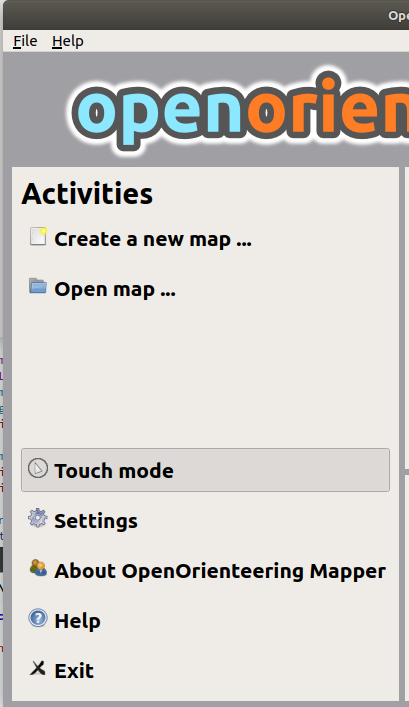
I'm about to add a "Touch mode" button:
dg0yt
on 24 Aug 2019
FTR, iconized buttons looks tiny on screens with low PPI (e.g., 120 and less)


So, need add option "UI icons size" in "Preferences" dialog for optionally increase size of UI iconized buttons (without changing global PPI) on desktop display with low PPI:
- [x]
1x(depend on PPI, as it's work now) - [ ]
2x(doubling icon size of1xwithout affecting global PPI settings) - [ ]
4x(quadrupling icon size of1xwithout affecting global PPI settings)
Symbian9
on 26 Aug 2019
@Symbian9 According to your FB announcements, you already can change the editor's action button size. (It says "on Android" but it means "touch mode" now.) And it is off-topic, at least from my POV, trying to triage issues as open, solved, duplicate, or invalid.
dg0yt
on 26 Aug 2019
you already can change the editor's action button
I never said that I can change "size of buttons". I said that layout could be switched.
Symbian9
on 26 Aug 2019
Related issues
Symbian9
·
9Comments
 SwStef
·
6Comments
SwStef
·
6Comments
 yevhenmazur
·
7Comments
yevhenmazur
·
7Comments
 mlerjen
·
5Comments
mlerjen
·
5Comments
 reinisberzins
·
7Comments
reinisberzins
·
7Comments
Most helpful comment
I'm about to add a "Touch mode" button: