Mapbox-navigation-android: Navigation UI: Feedback Button
Device: Motorola TC55
The Audio and Feedback Buttons Do Not Align Up - See Below.

 Danny-James
All 16 comments
@Danny-James do you see this on your Samsung Galaxy S8 - Android OS: 7.0 too?
 danesfeder
on 12 Apr 2018
danesfeder
on 12 Apr 2018
@danesfeder No it's fine on any other device I have checked, I think it maybe something to do with the pixel density on this particular device?
Maybe the feedback button has to much right margin?
Danny-James
on 12 Apr 2018
@danesfeder any chance of having this fixed and bumped into Version 13?
Danny-James
on 17 Apr 2018
@Danny-James can you confirm screen dimensions of 4.3 in. Native Resolution. 480 x 800
danesfeder
on 17 Apr 2018
@danesfeder TC55 Specs
Blanview® LCD display, 4.3 in. WVGA, exceptional low power consumption, exceptionally bright image with 700 NITs, 3% transflective, Corning Gorilla Glass 2
@Danny-James this Moto is a troublemaker it seems :) I can't figure out how the margins would be off here. We don't create UI's specific to this lower API level. And when I test on a similar res device, it works fine. I also recreated an emulator that follows the same specs:
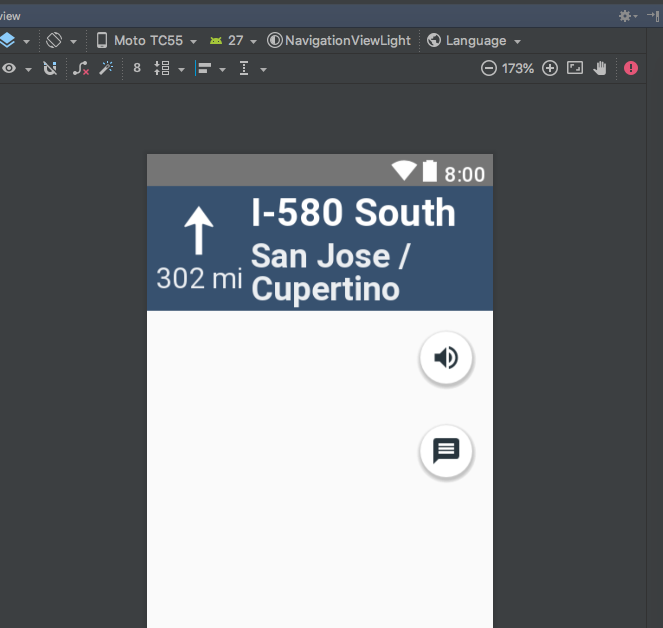
Any other ideas I can try on my side here?
danesfeder
on 18 Apr 2018
@danesfeder No I don't have any other idea's on this, who is in charge of the UI Design/Implementation? Maybe they have some idea's on the issue here.
Danny-James
on 19 Apr 2018
Hey @Guardiola31337, this issue is still present (com.mapbox.mapboxsdk:mapbox-android-navigation-ui:0.13.0):
- Google Nexus 6 (Android 7.1.1 | 2560 x 1440 | 5,96 Zoll (large) | 493 (xxxhdpi))
- MOBISTEL Cynus E4 (Android 5.1 | 800 x 480 | 4 Zoll (normal) | 240 (hdpi)
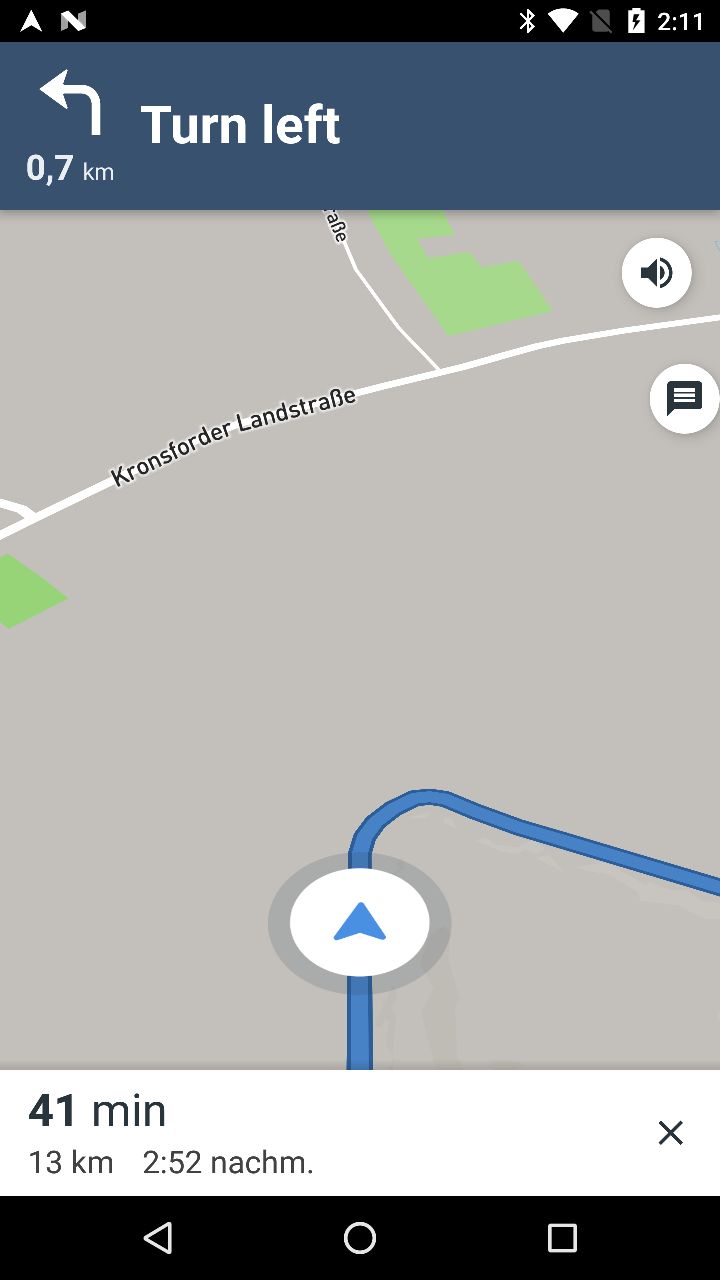
I want to hide this feedback button anyway but I didn't find any option in NavigationLauncherOptions :/
 P-Zenker
on 8 May 2018
P-Zenker
on 8 May 2018
Hey @P-Zenker thanks for reaching out and report your issue.
Could you add some more information for reproducing the issue (minimal example) or any other specifics around your test setup? Do you get that misalignment running for example the Navigation Views activity from the test app using those devices? If there is any sample or pseudo code you can provide, that would be really helpful because without having additional information, I'm unable to reproduce.
I created a couple of emulators with the specs you provided and the Navigation Views activity from the test app but couldn't 👀 any issue on the buttons position 👇
Nexus 6
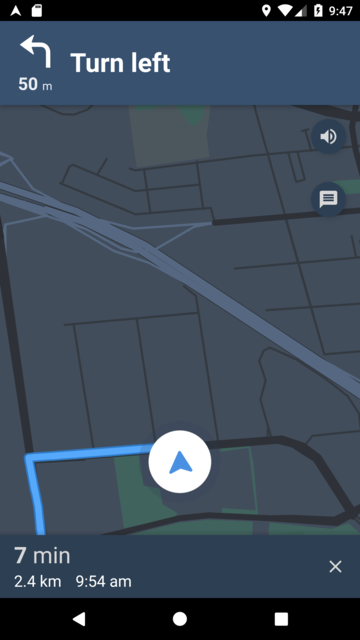
Cynus E4
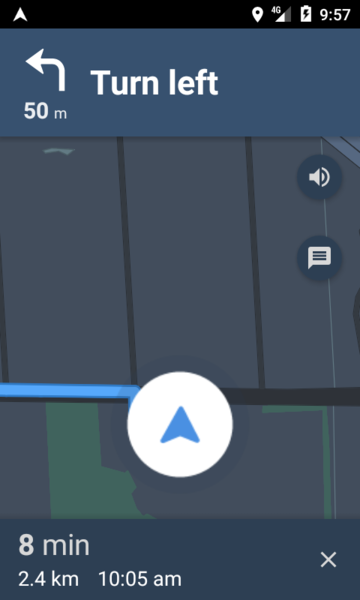
 Guardiola31337
on 14 May 2018
Guardiola31337
on 14 May 2018
It's just:
NavigationLauncherOptions options = NavigationLauncherOptions.builder()
                                .directionsRoute(directionsRoute)
                                .shouldSimulateRoute(true)
                                .enableOffRouteDetection(true)
                                .unitType(NavigationUnitType.TYPE_METRIC)
                                .destination(Point.fromLngLat(CUNavigationUtil.Companion.getZiel().getLng(), CUNavigationUtil.Companion.getZiel().getLat()))
                                .locale(Locale.GERMAN)
                                .build();

NavigationLauncher.startNavigation(CUActivityNavigation.this, options);
I don't know which issue it was, but a issue months ago was only visible on physical devices.
P-Zenker
on 14 May 2018
but a issue months ago
What do you mean? Is https://github.com/mapbox/mapbox-navigation-android/issues/859#issuecomment-387413283 still present? What device was used to take the screenshot shown in https://github.com/mapbox/mapbox-navigation-android/issues/859#issuecomment-387413283? Do you get the same misalignment using both devices (Nexus 6 and Cynus E4)?
only visible on physical devices
Do you get that misalignment running for example the
Navigation Viewsactivity from the test app using those devices?
Could you test ☝️ with the mentioned devices? I don't have them physically 😬
Guardiola31337
on 14 May 2018
@P-Zenker Hello, I had the exact same issue and resolved it just a while ago.
In my case, it was because of using higher version of Support.ConstraintLayout. I had used its ver. 1.1.0 and found out that the Navigation UI sample app uses ver. 1.0.2. I downgraded it to 1.0.2.2 and buttons are aligned.
Hope that this would help you :)
 BradKwon
on 14 May 2018
BradKwon
on 14 May 2018
Hope that this would help you :)
Thank you, that's the solution!
@Guardiola31337, the issue is now "fixed" :)
But is there a way to hide this feedback button?
P-Zenker
on 14 May 2018
@BradKwon thanks 🙏
Thank you, that's the solution!
@P-Zenker great to hear! Thanks for the update.
But is there a way to hide this feedback button?
We're keeping track of that feature request in https://github.com/mapbox/mapbox-navigation-android/issues/634
Thanks again!
Guardiola31337
on 14 May 2018
FYI @BradKwon and @P-Zenker https://github.com/mapbox/mapbox-navigation-android/pull/938 landed (bumps ConstraintLayout to 1.1.0 version and fixes the misalignment issue). It'll be included in the next release. In the meantime, you could retest this using 0.14.0-SNAPSHOT.
Guardiola31337
on 15 May 2018
@Guardiola31337 Thank you for the quick update! 💯
BradKwon
on 15 May 2018
Related issues
 hmkum
·
4Comments
hmkum
·
4Comments
 diegolaballos
·
4Comments
diegolaballos
·
4Comments
 jethromay
·
7Comments
jethromay
·
7Comments
 headbanggg
·
5Comments
headbanggg
·
5Comments
 skienzl
·
5Comments
skienzl
·
5Comments
Most helpful comment
FYI @BradKwon and @P-Zenker https://github.com/mapbox/mapbox-navigation-android/pull/938 landed (bumps ConstraintLayout to
1.1.0version and fixes the misalignment issue). It'll be included in the next release. In the meantime, you could retest this using0.14.0-SNAPSHOT.