Upon executing pip install manimlib, on windows, the following is seen.
   Complete output from command C:\Users\sysad\AppData\Local\Programs\Python\Python37-32\python.exe -u -c "import setuptools, tokenize;__file__='C:\\Users\\sysad\\AppData\\Local\\Temp\\pip-install-pe8apgh0\\pycairo\\setup.py';f=getattr(tokenize, 'open', open)(__file__);code=f.read().replace('\r\n', '\n');f.close();exec(compile(code, __file__, 'exec'))" install --record C:\Users\sysad\AppData\Local\Temp\pip-record-wtzb25f0\install-record.txt --single-version-externally-managed --compile:
    running install
    running build
    running build_py
    creating build
    creating build\lib.win32-3.7
    creating build\lib.win32-3.7\cairo
    copying cairo\__init__.py -> build\lib.win32-3.7\cairo
    copying cairo\__init__.pyi -> build\lib.win32-3.7\cairo
    copying cairo\py.typed -> build\lib.win32-3.7\cairo
    running build_ext
    building 'cairo._cairo' extension
    error: Microsoft Visual C++ 14.0 is required. Get it with "Microsoft Visual C++ Build Tools": https://visualstudio.microsoft.com/downloads/

    ----------------------------------------
Command "C:\Users\sysad\AppData\Local\Programs\Python\Python37-32\python.exe -u -c "import setuptools, tokenize;__file__='C:\\Users\\sysad\\AppData\\Local\\Temp\\pip-install-pe8apgh0\\pycairo\\setup.py';f=getattr(tokenize, 'open', open)(__file__);code=f.read().replace('\r\n', '\n');f.close();exec(compile(code, __file__, 'exec'))" install --record C:\Users\sysad\AppData\Local\Temp\pip-record-wtzb25f0\install-record.txt --single-version-externally-managed --compile" failed with error code 1 in C:\Users\sysad\AppData\Local\Temp\pip-install-pe8apgh0\pycairo\
The solution for this is already given in the README.md file, which is to install the wheel for newer version of pycario (1.18.0), but how would that work with pip installation?
I tried installing the wheel as given in the instructions, but nevertheless, pip installation fails.
 purusharths
All 16 comments
After installation of pycairo you have to change to pycairo==1.18.0 in requirements.txt or it will try to downgrade to the older version and maybe try to install Microsoft Visual C++. I had the same troubles over the last few days, so I'm new too, to manim. I hope I could help...
elmiba
 elmiba
on 14 May 2019
elmiba
on 14 May 2019
But I am trying to install it from pypi, how can I change the version there?
purusharths
on 14 May 2019
I couldn't install it via pypi, I tried it and it didn'nt work but here is a quite nice additional guide for problems with the setup of manim: https://www.reddit.com/r/3Blue1Brown/comments/b1porr/how_to_run_manim_on_windowsguide/ In this reddit post is your problem mentioned as well.
elmiba
on 14 May 2019
Hi. I tryed Install Package Wheels (whl) Offline using Christoph Gohlke's whl files for Windows installations.
I searched for Pycairo, a set of bindings for the cairo graphics library.
https://www.lfd.uci.edu/~gohlke/pythonlibs/#pycairo
I download pycairo-1.18.0-cp37-cp37m-win_amd64.whl
I save the file on the next location. Previosly I created a folder called Pycairo, and save the .whl file in
C:\Users\W\AppData\Local\Programs\Python\Python37\Lib\Pycairo
I use pycairo‑1.18.0‑cp37‑cp37m‑win_amd64.whl and it works for me.
I ran terminal (cmd) as administrator and copy "pip install pycairo-1.18.0-cp37-cp37m-win_amd64.whl"
 jpl860
on 16 May 2019
jpl860
on 16 May 2019
As for jpl860, the wheel that worked for me was "pycairo‑1.18.0‑cp37‑cp37m‑win_amd64.whl"
I suggest you follow the installation procedure described under "Directly (Windows)" in the main page. The procedure is pretty straightforward and easy to follow, you should be able to install it without much difficulty.
 MedNait
on 17 May 2019
MedNait
on 17 May 2019
As for jpl860, the wheel that worked for me was "pycairo‑1.18.0‑cp37‑cp37m‑win_amd64.whl"
I suggest you follow the installation procedure described under "Directly (Windows)" in the main page. The procedure is pretty straightforward and easy to follow, you should be able to install it without much difficulty.
Thanks MedNail for your reply. However I'm still trying to install manim
https://github.com/3b1b/manim
I understand, that is just type in a terminal via pip "pip3 install manimlib"
Nevertheless, I got a issue as its describe above in this post with error: Microsoft Visual C++ 14.0 is required. Get it with "Microsoft Visual C++ Build Tools": https://visualstudio.microsoft.com/downloads/
So, I figured it up, that the problema is related with pycairo library. Because, once I tryed to install manim. I don't know why, it unistall pycairo
Found existing installation: pycairo 1.18.0
Uninstalling pycairo-1.18.0:
Successfully uninstalled pycairo-1.18.0
Running setup.py install for pycairo ... error
I search for Microsoft Visual C++ 2015 Redistributable Update 3
https://www.microsoft.com/en-us/download/details.aspx?id=53587
I installed, but still got the same error menssage when I try to install manim
I realized that I have Visual Studio installed, so I found that because these components are the same as the ones installed by the Visual Studio 2015 Update 2 setup, you cannot install the Visual C++ Build Tools on a machine that already has Visual Studio 2015 installed. Therefore, it asks you to uninstall your existing VS 2015 when you tried to install the Visual C++ build tools using the standalone installer. Since you already have the VS 2015, you can go to Control Panel—Programs and Features and right click the VS 2015 item and Change-Modify, then check the option of those components that relates to the Visual C++ Build Tools, like Visual C++, Windows SDK… then install them. After the installation is successful, you can build the C++ projects.
jpl860
on 18 May 2019
Is it possible to fix this by updating the requirements.txt to use pycairo-1.18.0 instead of 1.17.1?
 8BitRobot
on 26 May 2019
8BitRobot
on 26 May 2019
Is it possible to fix this by updating the
requirements.txtto use pycairo-1.18.0 instead of 1.17.1?
Yes, which is what the "Directly (Windows)" section in the README says to do.
Make sure that pycairo==1.17.1 is changed to pycairo==1.18.0 in requirements.txt.
Without this step, pip will try to downgrade by uninstalling pycairo 1.18.0 and installing 1.17.1, which would undo everything we just did to get pycairo installed.
I don't know whether there is a universal and more permanent fix or not. If there is a way to change the requirement to at least instead of exactly 1.17.1, that might be the best way to go.
 yoshiask
on 28 May 2019
yoshiask
on 28 May 2019
Please help
PS C:> pip install manimlib -U --no-cache-dir
Looking in indexes: https://pypi.tuna.tsinghua.edu.cn/simple
Collecting manimlib
Downloading https://pypi.tuna.tsinghua.edu.cn/packages/16/3d/0297d144642077f2ead2df614cfd4be1f0fbd80a174e4ff7e3234428716c/manimlib-0.1.4.tar.gz (2.6MB)
|████████████████████████████████| 2.6MB 726kB/s
ERROR: Complete output from command python setup.py egg_info:
ERROR: ERROR:root:Error parsing
Traceback (most recent call last):
File "c:\users\liyi\appdata\local\temp\pip-install-12v5bnsx\manimlib.eggs\pbr-5.2.0-py3.7.egg\pbr\core.py", line 96, in pbr
attrs = util.cfg_to_args(path, dist.script_args)
File "c:\users\liyi\appdata\local\temp\pip-install-12v5bnsx\manimlib.eggs\pbr-5.2.0-py3.7.egg\pbr\util.py", line 258, in cfg_to_args
pbr.hooks.setup_hook(config)
File "c:\users\liyi\appdata\local\temp\pip-install-12v5bnsx\manimlib.eggs\pbr-5.2.0-py3.7.egg\pbr\hooks__init__.py", line 25, in setup_hook
metadata_config.run()
File "c:\users\liyi\appdata\local\temp\pip-install-12v5bnsx\manimlib.eggs\pbr-5.2.0-py3.7.egg\pbr\hooks\base.py", line 27, in run
self.hook()
File "c:\users\liyi\appdata\local\temp\pip-install-12v5bnsx\manimlib.eggs\pbr-5.2.0-py3.7.egg\pbr\hooks\metadata.py", line 26, in hook
self.config['name'], self.config.get('version', None))
File "c:\users\liyi\appdata\local\temp\pip-install-12v5bnsx\manimlib.eggs\pbr-5.2.0-py3.7.egg\pbr\packaging.py", line 831, in get_version
version = _get_version_from_pkg_metadata(package_name)
File "c:\users\liyi\appdata\local\temp\pip-install-12v5bnsx\manimlib.eggs\pbr-5.2.0-py3.7.egg\pbr\packaging.py", line 799, in _get_version_from_pkg_metadata
pkg_metadata = email.message_from_file(pkg_metadata_file)
File "D:\Program Files\Python37\lib\email__init__.py", line 54, in message_from_file
return Parser(args, *kws).parse(fp)
File "D:\Program Files\Python37\lib\email\parser.py", line 54, in parse
data = fp.read(8192)
UnicodeDecodeError: 'gbk' codec can't decode byte 0x9c in position 1652: illegal multibyte sequence
error in setup command: Error parsing C:\Users\liyi\AppData\Local\Temp\pip-install-12v5bnsx\manimlib\setup.cfg: UnicodeDecodeError: 'gbk' codec can't decode byte 0x9c in position 1652: illegal multibyte sequence
----------------------------------------
ERROR: Command "python setup.py egg_info" failed with error code 1 in C:\Users\liyi\AppData\Local\Temp\pip-install-12v5bnsx\manimlib\
can't install manimlib in Windows.
 liyiliuxingyu
on 28 May 2019
liyiliuxingyu
on 28 May 2019
Please help
PS C:> pip install manimlib -U --no-cache-dir
Looking in indexes: https://pypi.tuna.tsinghua.edu.cn/simple
Collecting manimlib
Downloading https://pypi.tuna.tsinghua.edu.cn/packages/16/3d/0297d144642077f2ead2df614cfd4be1f0fbd80a174e4ff7e3234428716c/manimlib-0.1.4.tar.gz (2.6MB)
|████████████████████████████████| 2.6MB 726kB/s
ERROR: Complete output from command python setup.py egg_info:
ERROR: ERROR:root:Error parsing
Traceback (most recent call last):
File "c:\users\liyi\appdata\local\temp\pip-install-12v5bnsx\manimlib.eggs\pbr-5.2.0-py3.7.egg\pbr\core.py", line 96, in pbr
attrs = util.cfg_to_args(path, dist.script_args)
File "c:\users\liyi\appdata\local\temp\pip-install-12v5bnsx\manimlib.eggs\pbr-5.2.0-py3.7.egg\pbr\util.py", line 258, in cfg_to_args
pbr.hooks.setup_hook(config)
File "c:\users\liyi\appdata\local\temp\pip-install-12v5bnsx\manimlib.eggs\pbr-5.2.0-py3.7.egg\pbr\hooks__init__.py", line 25, in setup_hook
metadata_config.run()
File "c:\users\liyi\appdata\local\temp\pip-install-12v5bnsx\manimlib.eggs\pbr-5.2.0-py3.7.egg\pbr\hooks\base.py", line 27, in run
self.hook()
File "c:\users\liyi\appdata\local\temp\pip-install-12v5bnsx\manimlib.eggs\pbr-5.2.0-py3.7.egg\pbr\hooks\metadata.py", line 26, in hook
self.config['name'], self.config.get('version', None))
File "c:\users\liyi\appdata\local\temp\pip-install-12v5bnsx\manimlib.eggs\pbr-5.2.0-py3.7.egg\pbr\packaging.py", line 831, in get_version
version = _get_version_from_pkg_metadata(package_name)
File "c:\users\liyi\appdata\local\temp\pip-install-12v5bnsx\manimlib.eggs\pbr-5.2.0-py3.7.egg\pbr\packaging.py", line 799, in _get_version_from_pkg_metadata pkg_metadata = email.message_from_file(pkg_metadata_file) File "D:\Program Files\Python37\lib\email__init__.py", line 54, in message_from_file
return Parser(args, *kws).parse(fp)
File "D:\Program Files\Python37\lib\email\parser.py", line 54, in parse
data = fp.read(8192)
UnicodeDecodeError: 'gbk' codec can't decode byte 0x9c in position 1652: illegal multibyte sequenceerror in setup command: Error parsing C:\Users\liyi\AppData\Local\Temp\pip-install-12v5bnsx\manimlib\setup.cfg: UnicodeDecodeError: 'gbk' codec can't decode byte 0x9c in position 1652: illegal multibyte sequence
ERROR: Command "python setup.py egg_info" failed with error code 1 in C:\Users\liyi\AppData\Local\Temp\pip-install-12v5bnsx\manimlib
can't install manimlib in Windows.
建议将操作系统编码改为 utf-8(默认gbk),我win10改编码后安装成功!
 brucelian
on 23 Jun 2019
brucelian
on 23 Jun 2019
Please help
PS C:> pip install manimlib -U --no-cache-dir
Looking in indexes: https://pypi.tuna.tsinghua.edu.cn/simple
Collecting manimlib
Downloading https://pypi.tuna.tsinghua.edu.cn/packages/16/3d/0297d144642077f2ead2df614cfd4be1f0fbd80a174e4ff7e3234428716c/manimlib-0.1.4.tar.gz (2.6MB)
|████████████████████████████████| 2.6MB 726kB/s
ERROR: Complete output from command python setup.py egg_info:
ERROR: ERROR:root:Error parsing
Traceback (most recent call last):
File "c:\users\liyi\appdata\local\temp\pip-install-12v5bnsx\manimlib.eggs\pbr-5.2.0-py3.7.egg\pbr\core.py", line 96, in pbr
attrs = util.cfg_to_args(path, dist.script_args)
File "c:\users\liyi\appdata\local\temp\pip-install-12v5bnsx\manimlib.eggs\pbr-5.2.0-py3.7.egg\pbr\util.py", line 258, in cfg_to_args
pbr.hooks.setup_hook(config)
File "c:\users\liyi\appdata\local\temp\pip-install-12v5bnsx\manimlib.eggs\pbr-5.2.0-py3.7.egg\pbr\hooks__init__.py", line 25, in setup_hook
metadata_config.run()
File "c:\users\liyi\appdata\local\temp\pip-install-12v5bnsx\manimlib.eggs\pbr-5.2.0-py3.7.egg\pbr\hooks\base.py", line 27, in run
self.hook()
File "c:\users\liyi\appdata\local\temp\pip-install-12v5bnsx\manimlib.eggs\pbr-5.2.0-py3.7.egg\pbr\hooks\metadata.py", line 26, in hook
self.config['name'], self.config.get('version', None))
File "c:\users\liyi\appdata\local\temp\pip-install-12v5bnsx\manimlib.eggs\pbr-5.2.0-py3.7.egg\pbr\packaging.py", line 831, in get_version
version = _get_version_from_pkg_metadata(package_name)
File "c:\users\liyi\appdata\local\temp\pip-install-12v5bnsx\manimlib.eggs\pbr-5.2.0-py3.7.egg\pbr\packaging.py", line 799, in _get_version_from_pkg_metadata pkg_metadata = email.message_from_file(pkg_metadata_file) File "D:\Program Files\Python37\lib\email__init__.py", line 54, in message_from_file
return Parser(args, *kws).parse(fp)
File "D:\Program Files\Python37\lib\email\parser.py", line 54, in parse
data = fp.read(8192)
UnicodeDecodeError: 'gbk' codec can't decode byte 0x9c in position 1652: illegal multibyte sequence
error in setup command: Error parsing C:\Users\liyi\AppData\Local\Temp\pip-install-12v5bnsx\manimlib\setup.cfg: UnicodeDecodeError: 'gbk' codec can't decode byte 0x9c in position 1652: illegal multibyte sequence
ERROR: Command "python setup.py egg_info" failed with error code 1 in C:\Users\liyi\AppData\Local\Temp\pip-install-12v5bnsx\manimlib
can't install manimlib in Windows.建议将操作系统编码改为 utf-8(默认gbk),我win10改编码后安装成功!
You'd better use English so that foreigners can understand your words.
 xianfengting
on 29 Jul 2019
xianfengting
on 29 Jul 2019
Please help
PS C:> pip install manimlib -U --no-cache-dir
Looking in indexes: https://pypi.tuna.tsinghua.edu.cn/simple
Collecting manimlib
Downloading https://pypi.tuna.tsinghua.edu.cn/packages/16/3d/0297d144642077f2ead2df614cfd4be1f0fbd80a174e4ff7e3234428716c/manimlib-0.1.4.tar.gz (2.6MB)
|████████████████████████████████| 2.6MB 726kB/s
ERROR: Complete output from command python setup.py egg_info:
ERROR: ERROR:root:Error parsing
Traceback (most recent call last):
File "c:\users\liyi\appdata\local\temp\pip-install-12v5bnsx\manimlib.eggs\pbr-5.2.0-py3.7.egg\pbr\core.py", line 96, in pbr
attrs = util.cfg_to_args(path, dist.script_args)
File "c:\users\liyi\appdata\local\temp\pip-install-12v5bnsx\manimlib.eggs\pbr-5.2.0-py3.7.egg\pbr\util.py", line 258, in cfg_to_args
pbr.hooks.setup_hook(config)
File "c:\users\liyi\appdata\local\temp\pip-install-12v5bnsx\manimlib.eggs\pbr-5.2.0-py3.7.egg\pbr\hooks__init__.py", line 25, in setup_hook
metadata_config.run()
File "c:\users\liyi\appdata\local\temp\pip-install-12v5bnsx\manimlib.eggs\pbr-5.2.0-py3.7.egg\pbr\hooks\base.py", line 27, in run
self.hook()
File "c:\users\liyi\appdata\local\temp\pip-install-12v5bnsx\manimlib.eggs\pbr-5.2.0-py3.7.egg\pbr\hooks\metadata.py", line 26, in hook
self.config['name'], self.config.get('version', None))
File "c:\users\liyi\appdata\local\temp\pip-install-12v5bnsx\manimlib.eggs\pbr-5.2.0-py3.7.egg\pbr\packaging.py", line 831, in get_version
version = _get_version_from_pkg_metadata(package_name)
File "c:\users\liyi\appdata\local\temp\pip-install-12v5bnsx\manimlib.eggs\pbr-5.2.0-py3.7.egg\pbr\packaging.py", line 799, in _get_version_from_pkg_metadata pkg_metadata = email.message_from_file(pkg_metadata_file) File "D:\Program Files\Python37\lib\email__init__.py", line 54, in message_from_file
return Parser(args, *kws).parse(fp)
File "D:\Program Files\Python37\lib\email\parser.py", line 54, in parse
data = fp.read(8192)
UnicodeDecodeError: 'gbk' codec can't decode byte 0x9c in position 1652: illegal multibyte sequence
error in setup command: Error parsing C:\Users\liyi\AppData\Local\Temp\pip-install-12v5bnsx\manimlib\setup.cfg: UnicodeDecodeError: 'gbk' codec can't decode byte 0x9c in position 1652: illegal multibyte sequence
ERROR: Command "python setup.py egg_info" failed with error code 1 in C:\Users\liyi\AppData\Local\Temp\pip-install-12v5bnsx\manimlib
can't install manimlib in Windows.建议将操作系统编码改为 utf-8(默认gbk),我win10改编码后安装成功!
请问安装完之后可以把编码改回GBK吗
 xfdj
on 25 Nov 2019
xfdj
on 25 Nov 2019
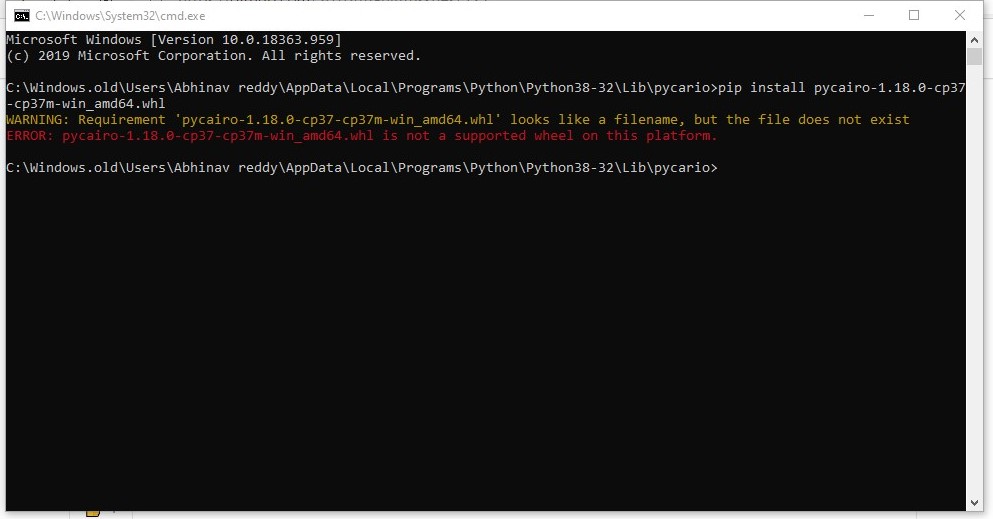
plz help
@charliepark
 abhin-bot
on 25 Jul 2020
abhin-bot
on 25 Jul 2020
plz help
@charliepark
the pycairo you are trying to install is for python 3.7. Hence the name pycairo-1.18.0-cp37.(cpython 3.7). Also it is fo rpython 64 bit. look for pycairo cp38 win32 version.
 imran-1002102
on 25 Jul 2020
imran-1002102
on 25 Jul 2020
plz help
@charliepark
I think you need to download this one
(https://user-images.githubusercontent.com/33374381/88452057-6e995d80-ce7d-11ea-9e68-ce69a598bd98.png)
imran-1002102
on 25 Jul 2020
thanks
@imran-1002102
abhin-bot
on 25 Jul 2020
Related issues
 samsamson33
·
5Comments
samsamson33
·
5Comments
 SuperVegetaSon
·
4Comments
SuperVegetaSon
·
4Comments
 kolibril13
·
4Comments
kolibril13
·
4Comments
 liangpu597
·
5Comments
liangpu597
·
5Comments
 Formicoxenus
·
4Comments
Formicoxenus
·
4Comments
Most helpful comment
建议将操作系统编码改为 utf-8(默认gbk),我win10改编码后安装成功!