I want to make some animated Music theroy videos with latex and manim.
I only need to render the notes proper way.
That was quite a workaround, however I NEARLY got it nice.
So here, here is the code:
And the out2.svg looks perfect in inkscape:

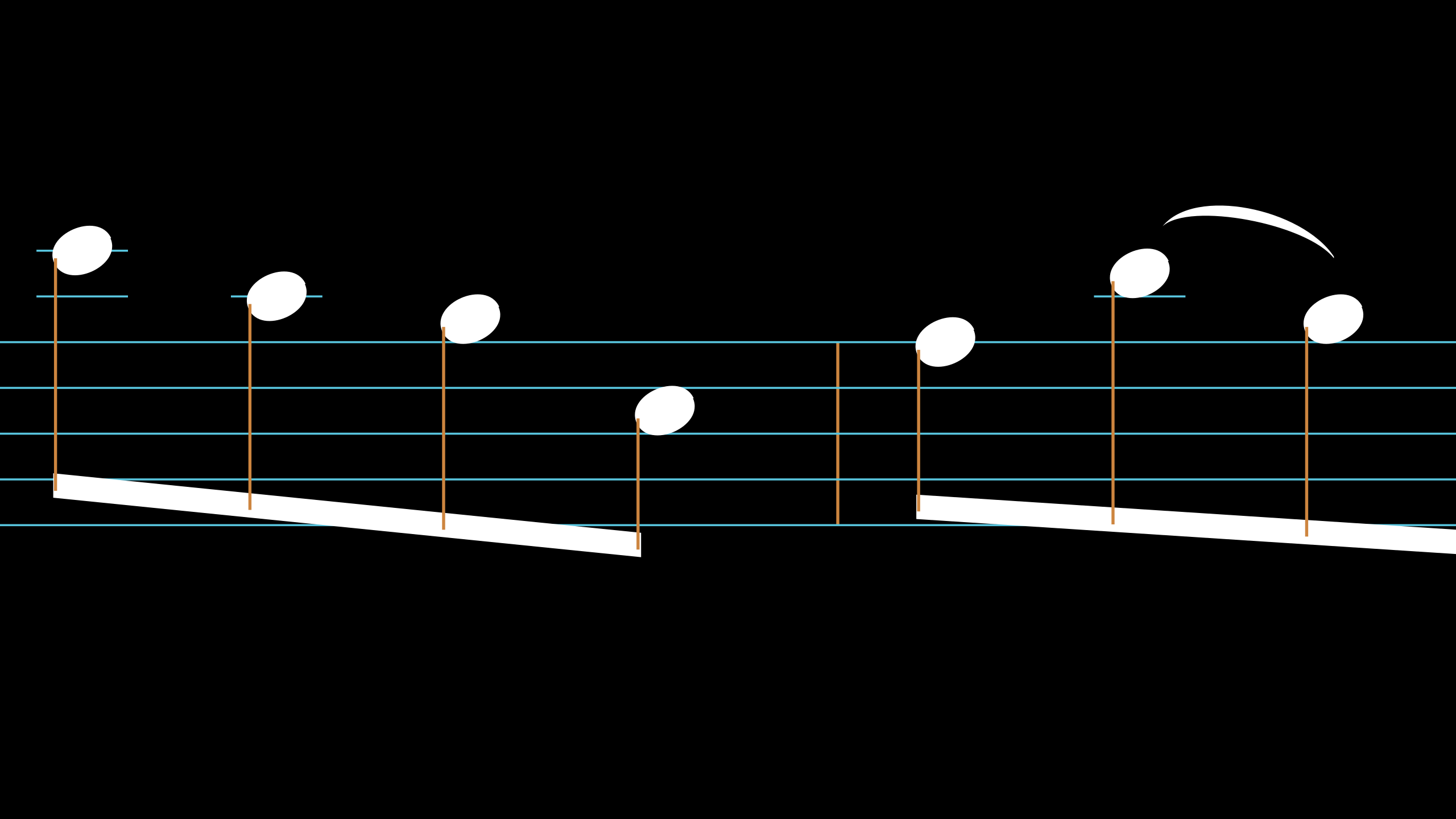
However, when I load the svg to manim, I get this:

Of course I can increase the stroke_width, which will result in this:

Where every outline increased.
from big_ol_pile_of_manim_imports import *
class music(Scene):
    def MuseMobject(self):
        FOLDER = "/home/jan-hendrik/python/projects/manim-new/projects_hendrik/music_template/"
        FILE = "tex_template_music.tex"
        os.system("cd " + FOLDER + "&& latex -shell-escape " + FILE)
        temp1 = "out1.svg"
        os.system("cd " + FOLDER +" && eps2svg out-abc.eps " + temp1)
        temp2=  "out2.svg"
        os.system("cd " + FOLDER + "&& cairosvg "+ temp1 +" -f svg -o " + temp2)
        dat = FOLDER + temp2
        t = SVGMobject(dat,stroke_width=0) # or stroke_width = 2
        t.scale(0.9)
        self.add(t)
    def construct(self):
        self.MuseMobject()
        self.wait(2)
I would like to have a solution, where I can see the grid lines, but all my other objects should be untouched by the stroke_width function.
Any ideas?
Thanks a Lot!
 kolibril13
All 4 comments
You'll need a way to reference the staff separately from the notes. I'm not that familiar with how SVGMobject works, but there's a chance it has a .submobjects attribute that you can index into.
 eulertour
on 29 Apr 2019
eulertour
on 29 Apr 2019
Yes, now it is working properly! Thanks a lot!
I would also like to know if it is worth to try a pull request when I put the framework together.
Is the manim project meant to be extended in this way, or is it meant to be more a "only math" repository?
kolibril13
on 30 Apr 2019
Glad I could help.
Extensions shouldn't be added here, but if you don't mind hosting and maintaining your own repository you could do it there. Manim still changes pretty often, so you'll have to keep the repo up to date if you do decide to do it.
eulertour
on 1 May 2019
I recommend you use MuseScore, when you have your score go to file>export>svg. I did something like this:

In that scene I use MusixTex but you can use svg too. I has created a class to check the elements of svg. Is this:
class CheckSVG(Scene):
    CONFIG={
    "camera_config":{"background_color": WHITE},
    "svg_type":"svg",
    "file":"",
    "svg_scale":0.9,
    "angle":0,
    "flip_svg":False,
    "fill_opacity": 1,
    "remove": [],
    "stroke_color": BLACK,
    "fill_color": BLACK,
    "stroke_width": 3,
    "numbers_scale":0.5,
    "show_numbers": False,
    "animation": False,
    "direction_numbers": UP,
    "color_numbers": RED,
    "space_between_numbers":0,
    "show_elements":[],
    "color_element":BLUE,
    "set_size":"width",
    "remove_stroke":[],
    "show_stroke":[],
    "stroke_":1
    }
    def construct(self):
        if self.set_size=="width":
            width_size=FRAME_WIDTH
            height_size=None
        else:
            width_size=None
            height_size=FRAME_HEIGHT

        if self.svg_type=="svg":
            self.imagen=SVGMobject(
                "%s"%self.file,
                #fill_opacity = 1,
                stroke_width = self.stroke_width,
                stroke_color = self.stroke_color,
                width=width_size,
                height=height_size
            ).rotate(self.angle).set_fill(self.fill_color,self.fill_opacity).scale(self.svg_scale)
        else:
            self.imagen=self.import_text().set_fill(self.fill_color,self.fill_opacity).rotate(self.angle).set_stroke(self.stroke_color,0)
            if self.set_size=="width":
                self.imagen.set_width(FRAME_WIDTH)
            else:
                self.imagen.set_height(FRAME_HEIGHT)
            self.imagen.scale(self.svg_scale)
        self.personalize_image()
        if self.flip_svg==True:
            self.imagen.flip()
        if self.show_numbers==True:
            self.print_formula(self.imagen,
                self.numbers_scale,
                self.direction_numbers,
                self.remove,
                self.space_between_numbers,
                self.color_numbers)

        self.return_elements(self.imagen,self.show_elements)
        for st in self.remove_stroke:
            self.imagen[st].set_stroke(None,0)
        for st in self.show_stroke:
            self.imagen[st].set_stroke(None,self.stroke_)
        if self.animation==True:
            self.play(DrawBorderThenFill(self.imagen))
        else:
            self.add(self.imagen)
        self.wait()
    def import_text(self):
        return TexMobject("")

    def personalize_image(self):
        pass

    def print_formula(self,text,inverse_scale,direction,exception,buff,color):
        text.set_color(RED)
        self.add(text)
        c = 0
        for j in range(len(text)):
            permission_print=True
            for w in exception:
                if j==w:
                    permission_print=False
            if permission_print:
                self.add(text[j].set_color(self.stroke_color))
        c = c + 1

        c=0
        for j in range(len(text)):
            permission_print=True
            element = TexMobject("%d" %c,color=color)
            element.scale(inverse_scale)
            element.next_to(text[j],direction,buff=buff)
            for w in exception:
                if j==w:
                    permission_print=False
            if permission_print:
                self.add(element)
            c = c + 1

    def return_elements(self,formula,adds):
        for i in adds:
            self.add_foreground_mobjects(formula[i].set_color(self.color_element),
                TexMobject("%d"%i,color=self.color_element,background_stroke_width=0).scale(self.numbers_scale).next_to(formula[i],self.direction_numbers,buff=self.space_between_numbers))
In "file": you put the directory of your svg, and the class show you the numbers of the array of the svg.
You can see the code of my animation here, and the code of the scene here
 Elteoremadebeethoven
on 1 May 2019
Elteoremadebeethoven
on 1 May 2019
Related issues
Elteoremadebeethoven
·
6Comments
 ZQiu233
·
3Comments
ZQiu233
·
3Comments
 AliNear
·
3Comments
AliNear
·
3Comments
 Formicoxenus
·
4Comments
Formicoxenus
·
4Comments
 WeiruLin
·
5Comments
WeiruLin
·
5Comments
Most helpful comment
I recommend you use MuseScore, when you have your score go to file>export>svg. I did something like this:

In that scene I use MusixTex but you can use svg too. I has created a class to check the elements of svg. Is this:
In "file": you put the directory of your svg, and the class show you the numbers of the array of the svg.
You can see the code of my animation here, and the code of the scene here