Manim: 2D Mobjects overlapped with 3D objects not displayed properly in 3D scene (at certain angles)
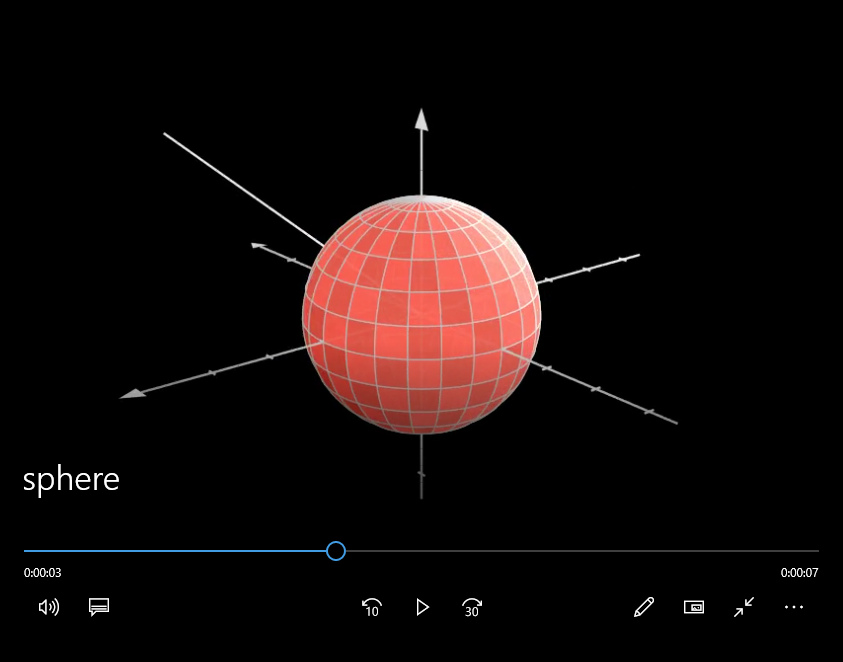
I added a Line and a Sphere object (both centered at the origin). The part of the line that is supposed to be inside the sphere 'pop's out of it' at certain viewing angles (values of theta).
In this image

Things look great. A part of the line is inside the Sphere
However, as the camera turns a little, in this image(2)

you now see the line 'popping out'. It's as if, the line is outside the sphere. 3D doesn't seem to be working here. How do I solve it?
Here is the code
class sphere(ThreeDScene):
    def construct(self):
        r = 2
        sphere = Sphere(radius = r, stroke_width = 2, checkerboard_colors=[RED_D, RED_C], fill_opacity=0.9, fill_color = BLUE)
        line = Line([0,0,0],[3,3,3], color = WHITE)
        axes = ThreeDAxes()

        # This supposedly makes the 2D objects compatible with the 3D scene
        line.set_shade_in_3d(True)

        self.set_camera_orientation(phi = 70*DEGREES, theta = -30*DEGREES)
        self.add(sphere,line,axes)

        #Begin camera rotation - at some angles the line 'pop's out' - However the 3D axes seem fine
        self.begin_ambient_camera_rotation(rate=0.8)

        self.wait(10)
_P.S. I am curious as to why this does not happen with the co-ordinate axes? [I thought the 'shade_in_3D(True)' should have solved it, but apparently it doesn't solve it, completely]_
 SuperVegetaSon
All 4 comments
Hi Super, give this a try and let me know if you have any questions.
from manimlib.imports import *

class sphere(ThreeDScene):
    def construct(self):
        r = 2
        sphere = Sphere(radius = r, stroke_width = 2, checkerboard_colors=[RED_D, RED_C], fill_opacity=0.9, fill_color = BLUE)
        line = Line([0,0,0],[3,3,3], color = WHITE)
        axes = ThreeDAxes()

        # create group for 2d objects needed in 3d
        line_group = VGroup()
        line_group.add(line)
        # increase granularity if you still see "popping" but 20 should be enough
        granularity_3d = 20

        # step through group items and make mobjects needed for propper alpha hiding
        for line_group_3d in line_group:
            line_group_3d.pieces = VGroup(
                *line_group_3d.get_pieces(granularity_3d)
            )
            line_group_3d.add(line_group_3d.pieces)
            line_group_3d.set_stroke(width=0, family=False)
            line_group_3d.set_shade_in_3d(True)

        self.set_camera_orientation(phi = 70*DEGREES, theta = -30*DEGREES)
        # only add 3d group to scene
        self.add(sphere,line_group_3d,axes)

        #Begin camera rotation - at some angles the line 'pop's out' - However the 3D axes seem fine
        self.begin_ambient_camera_rotation(rate=0.8)

        self.wait(10)
 Level-314
on 22 May 2020
Level-314
on 22 May 2020
Hi Alexander,
Thanks a lot for that fix. It works. Now that I think about it, it looks like the same function that's added to the ThreeDAxes right?
Since I am new to programming, could you check if I understand the code correctly?
My guess is, in the original code, the 2D objects are just 1 single piece, so either everything is inside or everything would be outside.
The 'get pieces' attribute breaks all the objects into 20 pieces. And now, since each piece can be rendered separately, it's more accurate
Is that correct?
SuperVegetaSon
on 22 May 2020
Hi SVS, my pleasure. Your comprehension of the fix I made is solid.
1- I realized (just like you) that the axes were rendering correctly in your example.
2- I tracked down the code for the axes.
3- I realized that 3d axes inherit from normal 2d axes.
4- 2d axes is a child of VGroup, and contains a grup of lines, ticks, etc.
5- 3d axes has a similar VGroup but it adds additional lines and ticks for Z
6- most importantly 3d axes breaks down each Mobject in the group into pieces so that the proper visibility (based on depth and opacity) can be calculated when 3D scenes are rendered
A good experiment to do to confirm this is the right way to see the problem and fix is to change the value of granularity_3d to 1 and re-render. Then change it to 2, then 4. If you pay close attention to each render, you will notice the improvement at each step.
Let me know if you have other questions and happy coding!
Level-314
on 22 May 2020
Thanks a lot buddy. Closing the issue now
SuperVegetaSon
on 23 May 2020
Related issues
 BhupalaSriHari
·
5Comments
BhupalaSriHari
·
5Comments
 OGALI
·
3Comments
OGALI
·
3Comments
 GrouperTamaki
·
5Comments
GrouperTamaki
·
5Comments
 Glidos
·
5Comments
Glidos
·
5Comments
 Campanulata
·
4Comments
Campanulata
·
4Comments