Manageiq-ui-classic: Strange padding at Request page
Recently we've implemented a new request type - PhysicalServerProvisionRequest (see here) - which gets displayed with a strange padding at the top of the page:
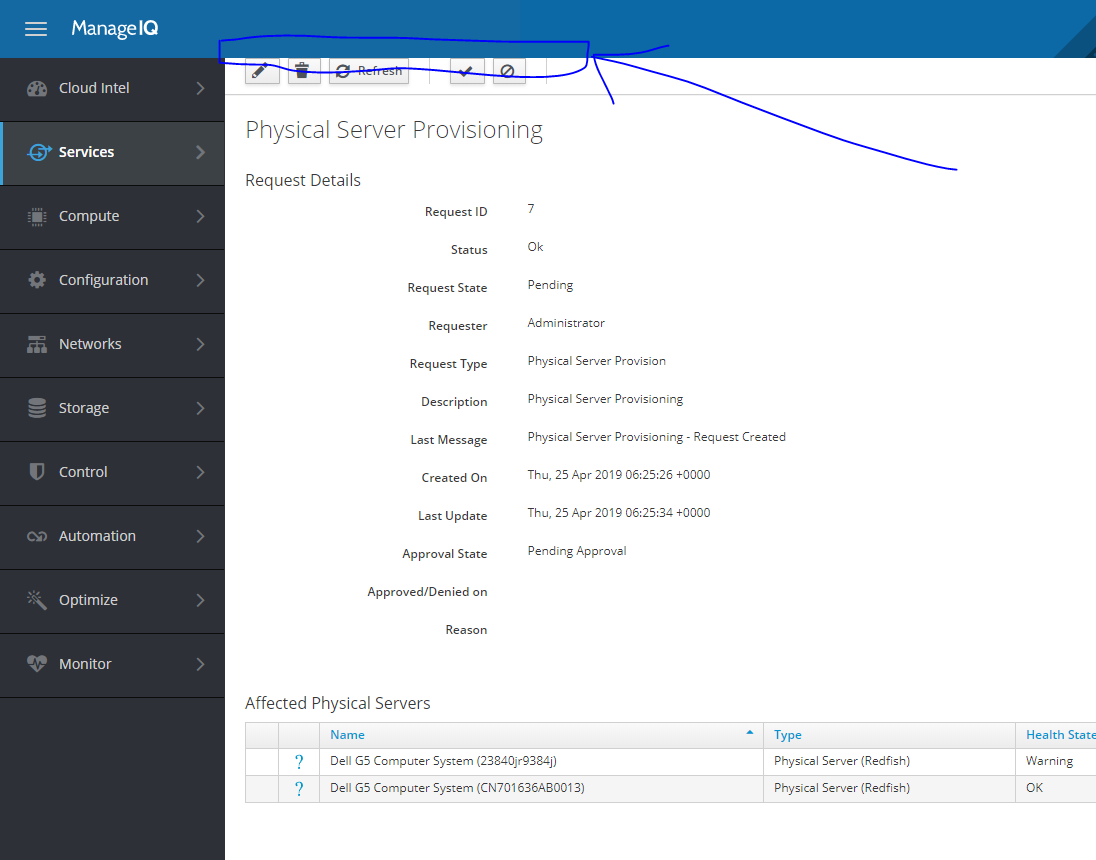
As @skateman suggested, there is a breadcrumb missing, but I'm not sure how to fix it. Kindly ask for pointer or, better yet, a fix :)
@miq-bot assign @rvsia
 miha-plesko
All 6 comments
Hi, thanks for creating this issue! :+1: Could you please provide steps how to get to this page?
 rvsia
on 25 Apr 2019
rvsia
on 25 Apr 2019
Hi, sorry, it's not merged upstream yet.. here's the list of all related PRs. Please let me know if you're willing to sacrifice and checkout a few branches and trigger provisioning request via API and I'll provide you with further instructions. Alternatively, you could give me some advice on where the breadcrumbs are defined, and I'll check if I'm smart enough to fix it myself :)
miha-plesko
on 25 Apr 2019
I was asking for more general steps, even after 8 months working on MiQ I am still learning how to find specific pages. :smiley:
Here you can find a little documentation about the breadcrumbs: https://github.com/ManageIQ/manageiq-ui-classic/wiki/Breadcrumbs
the breadcrumbs are rendered by a react component ...breadcrumbs/index.js
However, this looks as the template is missing the breadcrumbs partial (there should be always something rendered (title...) and I suppose there are no javascript errors)
Quick summary how to set up breadcrumbs
- The template should contain
= render :partial => "layouts/breadcrumbs_new" - The controller should include
include Mixins::BreadcrumbMixin - The controller should def
def breadcrumbs_optionsto set up basic configuration (menu path) (see wiki)
rvsia
on 25 Apr 2019
@rvsia go to http://localhost:3000/miq_request/show_list , have some requests there, and click the detail of one.
You'll get to an URL like http://localhost:3000/miq_request/show/299 (request id) where you can see it break
( rails r 'p MiqRequest.first.id' should help if you don't see anything in the list, you can just go to the right url directly)
 himdel
on 25 Apr 2019
himdel
on 25 Apr 2019
I see where the problem is:
- Miq_report_controller is used at two places in MiQ so there is a (probably) wrong condition how to get know which place it is (it is asking for params)
- That means on Request page it doesn't know where the page is (so menu breadcrumbs are missing)
- The React component gets an empty array and tries to render a title of the last item in the empty array... and it fails. :ghost:
I will fix it.
rvsia
on 25 Apr 2019
Thank you for a fast response 👍
miha-plesko
on 25 Apr 2019
Related issues
 h-kataria
·
5Comments
h-kataria
·
5Comments
 skateman
·
11Comments
skateman
·
11Comments
 hstastna
·
7Comments
hstastna
·
5Comments
hstastna
·
5Comments
hstastna
·
7Comments
hstastna
·
5Comments
hstastna
·
5Comments
Most helpful comment
@rvsia go to http://localhost:3000/miq_request/show_list , have some requests there, and click the detail of one.
You'll get to an URL like http://localhost:3000/miq_request/show/299 (request id) where you can see it break
(
rails r 'p MiqRequest.first.id'should help if you don't see anything in the list, you can just go to the right url directly)