Mahapps.metro: [Enhancement] MarkdownTextBlock
In one o the recent releases to the UWP Toolkit, a MarkdownTextBlock control was introduced, and it looks pretty awesome. Would anyone else find this useful (thought - it could be used in the MetroDemo rework to display a user guide)
 amkuchta
All 7 comments
+1. Great idea
 avechuche
on 3 May 2017
avechuche
on 3 May 2017
@amkuchta @avechuche This is a huge control and can not add line by line from UWPCommunityToolkit. There is a lot of code which is only available now in UWP.
 punker76
on 3 May 2017
punker76
on 3 May 2017
@punker76 I figured it would be a lot - I took a second to look at the code, and it is definitely intimidating.
If you want to say no to this, I completely understand. I'd offer to take a shot at implementing, but I don't have the time right now to commit to it.
amkuchta
on 3 May 2017
@punker76 you can also "on hold" this, if you want - maybe I can pick it up another time.
amkuchta
on 3 May 2017
There's a nice markdown control available, Markdig.wpf.
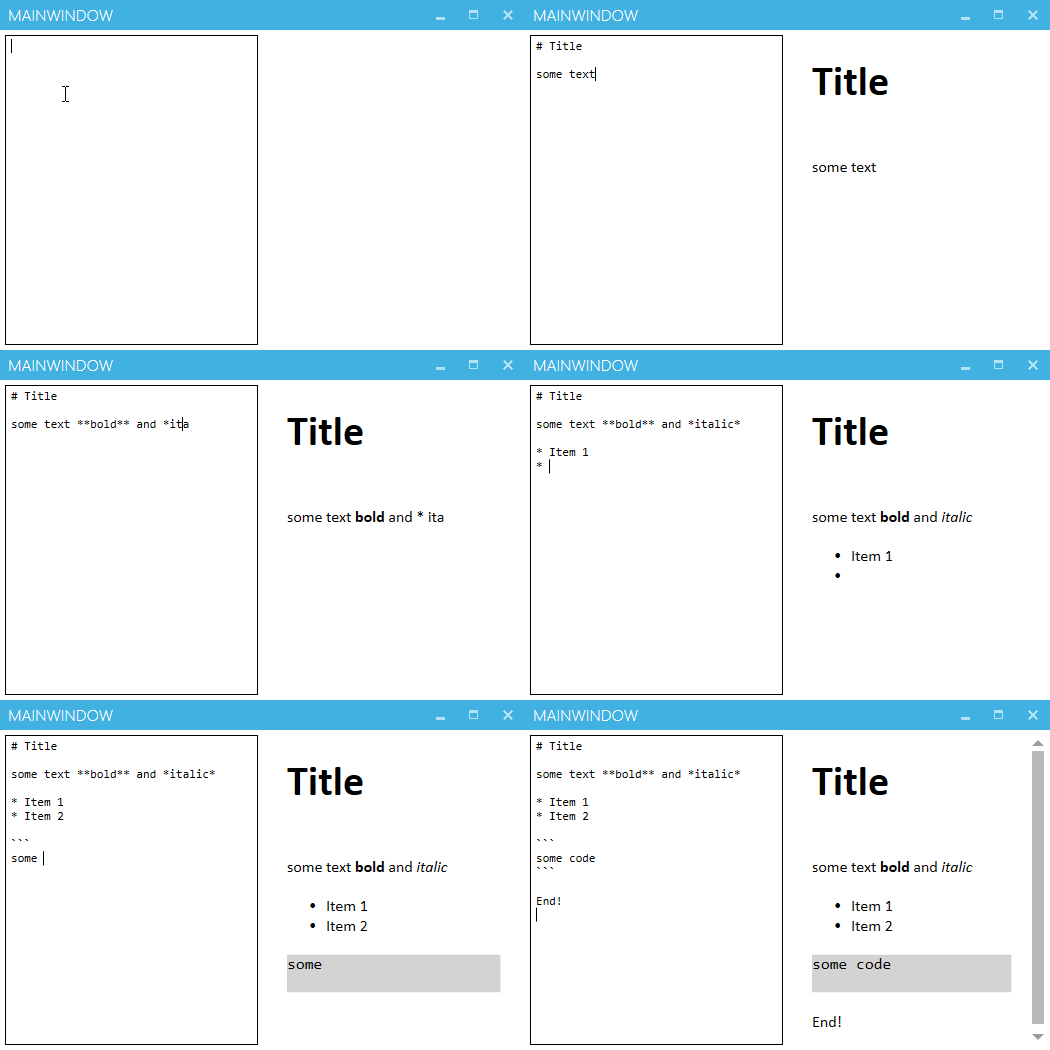
I created a demo app using the MahApps's Quick Start guide and added following lines to MainWindow.xaml:
<Grid>
    <Grid.ColumnDefinitions>
        <ColumnDefinition Width="*" />
        <ColumnDefinition Width="*" />
    </Grid.ColumnDefinitions>
    <TextBox
        x:Name="source"
        Grid.Column="0"
        Margin="5"
        AcceptsReturn="True"
        FontFamily="Consolas" />
    <wpf:MarkdownViewer
        Grid.Column="1"
        Margin="5"
        Markdown="{Binding ElementName=source, Path=Text, UpdateSourceTrigger=PropertyChanged, Mode=OneWay}" />
</Grid>
Here's the result:
 thoemmi
on 8 Oct 2017
thoemmi
on 8 Oct 2017
@thoemmi congratulations, you're my favorite person today (for whatever that is worth :laughing:)
amkuchta
on 10 Oct 2017
Thanks, but the credits go to Nicolas Musset, the author of Markdig.wpf. 😉
thoemmi
on 10 Oct 2017
Related issues
 SamOxyPlot
·
14Comments
SamOxyPlot
·
14Comments
 seb30
·
12Comments
seb30
·
12Comments
 patriksvensson
·
18Comments
patriksvensson
·
18Comments
 ghost
·
18Comments
ghost
·
18Comments
 StickNitro
·
11Comments
StickNitro
·
11Comments
Most helpful comment
There's a nice markdown control available, Markdig.wpf.
I created a demo app using the MahApps's Quick Start guide and added following lines to
MainWindow.xaml:Here's the result:
