Magisk: 20.4+ Direct Install environment fails on Samsung Android 6.0.1
My Samsung Galaxy On7, running Android 6.0.1 Marshmallow, is rooted with Magisk 20.3. When I try to install the latest update to Magisk via Magisk Manager, the update fails. Tried rebooting, problem persists. The log file is attached. Please look into this.
 WrichikBasu
All 25 comments
Yikes. That log is rough.
@topjohnwu, looks like could be some kind of issue related to standalone mode in an upgrade install via Manager?
- Target image: /dev/block/mmcblk0p16
- Device platform: armeabi-v7a
2034+0 records in
2034+0 records out
2082816 bytes (2.0MB) copied, 0.034829 seconds, 57.0MB/s
1410+1 records in
1410+1 records out
1443916 bytes (1.4MB) copied, 0.026153 seconds, 52.7MB/s
boot_patch.sh: line 61: chmod: Permission denied
boot_patch.sh: line 64: ./magiskinit: Permission denied
- Unpacking boot image
boot_patch.sh: line 73: ./magiskboot: Permission denied
- Checking ramdisk status
- Stock boot image detected
boot_patch.sh: line 104: cat: Permission denied
- Patching ramdisk
boot_patch.sh: line 136: ./magiskboot: Permission denied
boot_patch.sh: line 148: rm: Permission denied
- Repacking boot image
boot_patch.sh: line 181: ./magiskboot: Permission denied
! Unable to repack boot image!
boot_patch.sh: line 51: rm: Permission denied
boot_patch.sh: line 52: rm: Permission denied
! Installation failed
 osm0sis
on 29 Mar 2020
osm0sis
on 29 Mar 2020
hi guyz,
i'm on samsung N910F android stock 6.0.1, magisk 20.3 and magisk manager 7.5.1(267) stable channel
i recieved notification to update to 20.4 when i launch the update in magisk manager it fail
it's the first time fail here is the log
 daniholz
on 29 Mar 2020
daniholz
on 29 Mar 2020
hi
I also have Samsung N910C android stock 6.0.1, magisk 20.4 and magisk manager 7.5.1(267) stable channel
and have the same issue just like the other guys.
 ANDREASVAKA
on 29 Mar 2020
ANDREASVAKA
on 29 Mar 2020
My Galaxy Nexus is on Lineage Marshmallow (Android 6.0.1). Upgrading from 20.3 to 20.4 worked fine there, so I guess it's fine on AOSP but maybe Samsung TouchWiz/Marshmallow has some conflict with busybox standalone or something?
osm0sis
on 29 Mar 2020
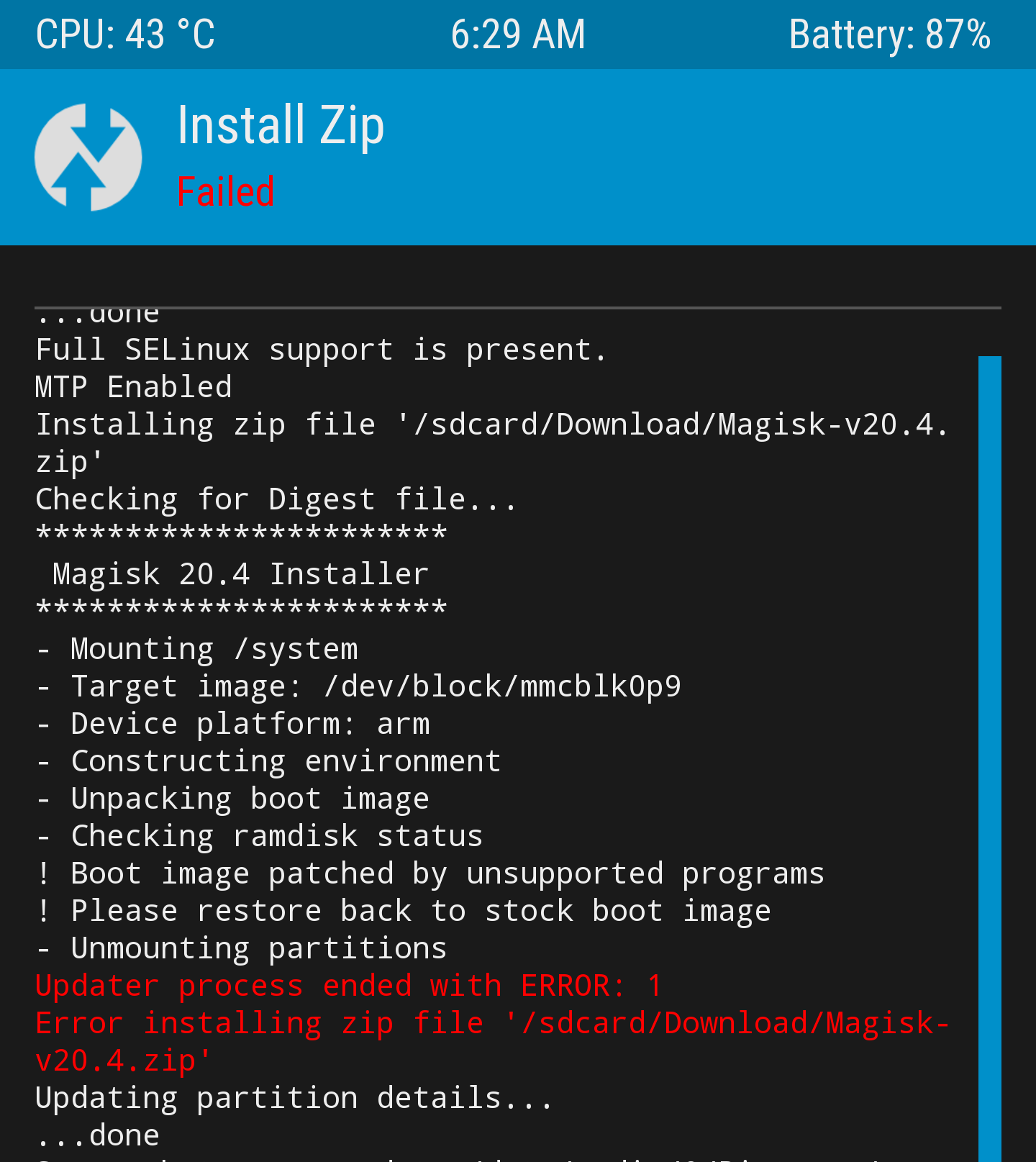
In my situation, I have already downloaded the final version of Magisk which means 20.4 and 7.5.2. The problem is that that I installed latest TWRP (3.3.1-0)on my device and when I try to install the zip from Magisk (20400) file which is not yet installed, when using the TWRP 3.3.1-0 version and starting to install the zip file it shows boot image patched by unsupported programs and please restore back to stock boot image and it stops me from installing with error 1 failing to install zip file. My phone has android 6.0.1 and it is note 4 SM-N910C european version .
Is there any solution, thank you ?
ANDREASVAKA
on 29 Mar 2020
Pretty obviously we're trying to figure it out. Be patient. Your information has been helpful.
Interesting that it also doesn't appear to work in recovery for you.
osm0sis
on 29 Mar 2020
@ANDREASVAKA Doesn't sound like you have the same issue. "Boot image patched by other program" usually means you have already patched the boot image with something like SuperSU.
You should likely ask for support on XDA instead.
 Didgeridoohan
on 29 Mar 2020
Didgeridoohan
on 29 Mar 2020
@ANDREASVAKA mentioned first that they have the same issue with updating while booted as the others, but then also has that issue in recovery, if I understood correctly.
osm0sis
on 29 Mar 2020
Yes, exactly guys.
On Sun, 29 Mar 2020, 22:17 Chris Renshaw, notifications@github.com wrote:
@ANDREASVAKA https://github.com/ANDREASVAKA mentioned first that they
have the same issue with updating while booted as the others, but then also
has that issue in recovery, if I understood correctly.—
You are receiving this because you were mentioned.
Reply to this email directly, view it on GitHub
https://github.com/topjohnwu/Magisk/issues/2609#issuecomment-605703033,
or unsubscribe
https://github.com/notifications/unsubscribe-auth/AO7M5IBBDYO4A6QUFZO3PK3RJ63F7ANCNFSM4LV22UKA
.
ANDREASVAKA
on 30 Mar 2020
@ANDREASVAKA please provide the full TWRP recovery.log after an install attempt.
osm0sis
on 30 Mar 2020
Maybe also the log from the installation attempt from the Manager, for comparison.
Didgeridoohan
on 30 Mar 2020
In addition to our other 2 outstanding information requests, what happens if you guys try to use the latest Canary Manager to patch your boot.img?
@WrichikBasu, @daniholz, @ANDREASVAKA, please help us so we can help you.
osm0sis
on 31 Mar 2020
Closing this since you guys haven't provided any of the further information requested.
osm0sis
on 5 Apr 2020
@osm0sis Sorry for not responding. I was busy with something else and didn't find time to check back this issue.
please provide the full TWRP recovery.log after an install attempt.
I downloaded the zip file through the Manager and attempted an install through TWRP. The install was successful, no bootloop or any mishap till now. On rebooting, Magisk Manager properly identifies the installed Magisk. The recovery log is attached.
recovery.log
WrichikBasu
on 6 Apr 2020
@WrichikBasu, now please try a dirty Magisk update (Direct install) through Manager. Does that work now too?
osm0sis
on 6 Apr 2020
@WrichikBasu, now please try a dirty Magisk update (Direct install) through Manager. Does that work now too?
Nope, that still doesn't work. The problem is exactly the same as what I reported in the first post. Attached the installation log.
magisk_install_log_2020-04-07T14_06_10Z.log
WrichikBasu
on 7 Apr 2020
sorry if i didn't tested with TWRP i don't have twrp installed on my phone. i just have magisk manager
i use the clean stock recovery partition
daniholz
on 7 Apr 2020
In addition to our other 2 outstanding information requests, what happens if you guys try to use the latest Canary Manager to patch your boot.img?
Since you had requested this @osm0sis, I updated the manager to the latest canary build. Carried out a direct install, and got the same error. The log is attached.
magisk_install_log_2020-04-08T00_03_37Z.log
WrichikBasu
on 7 Apr 2020
@WrichikBasu, can you confirm the last working Canary build?
osm0sis
on 20 Apr 2020
@osm0sis I installed the latest canary manager from the link given in the readme.md of this repository. Tried a direct install of 20.4 stable version of Magisk, and it failed. The log is attached.
magisk_install_log_2020-04-20T16_28_45Z.log
Note that all of us who have reported the problem are using Magisk in the stable channel. @topjohnwu closed #2717 stating that with the canary manager I should use the latest Magisk. So perhaps the tests done above with the canary manager were useless because I never switched from stable channel to beta or canary while working with the canary manager.
But also note that the problem continues in the stable manager as stated earlier.
WrichikBasu
on 20 Apr 2020
To test old versions you need to download them from the Canary channel here: https://github.com/topjohnwu/magisk_files/commits/canary
Then flash them in recovery.
Please see what the last Canary that works for you is.
osm0sis
on 20 Apr 2020
I'm having the same issue with samsung A5 duos, maybe if i try to install it via twrp should work?
Here's the log:
- Target image: /dev/block/mmcblk0p16
- Device platform: armeabi-v7a
2034+0 records in
2034+0 records out
2082816 bytes (2.0MB) copied, 0.038222 seconds, 52.0MB/s
1410+1 records in
1410+1 records out
1443916 bytes (1.4MB) copied, 0.024221 seconds, 56.9MB/s
boot_patch.sh: line 61: chmod: Permission denied
boot_patch.sh: line 64: ./magiskinit: Permission denied
- Unpacking boot image
boot_patch.sh: line 73: ./magiskboot: Permission denied
- Checking ramdisk status
- Stock boot image detected
boot_patch.sh: line 104: cat: Permission denied
- Patching ramdisk
boot_patch.sh: line 136: ./magiskboot: Permission denied
boot_patch.sh: line 148: rm: Permission denied
- Repacking boot image
boot_patch.sh: line 181: ./magiskboot: Permission denied
! Unable to repack boot image!
boot_patch.sh: line 51: rm: Permission denied
boot_patch.sh: line 52: rm: Permission denied
! Installation failed
 Oporiun
on 7 May 2020
Oporiun
on 7 May 2020
Mine crashed too, I had to flash it from TWRP and wipe the caches for it too take. Now Busybox In Magisk 20.4 eats the battery like no tomorrow even when the phone is completely idle it has extremely high CPU usage.
 twindragon6
on 28 May 2020
twindragon6
on 28 May 2020
Try getting the stock rom of your device firstly restore your phone using odin(samsung) without patching or changing anything and then install twrp on your freshly flashed phone and download the stable/canary build from @topjohnwu 's magisk stable/canary repos and then try flashing them if one fails, for example stable then restore your phone again to stock using odin and install twrp again and then try the canary build and if this fails too then proceed to the next line:
Firstly copy your boot.img(or create one if you have only ramdisk.img and zImage) and firstly patch it using stock magisk and then flash/restore it using odin if this fails instead of flashing the boot.mg only flash the whole rom along with the patched boot.img if this does'nt work then take your unpatched and stock boot.img and patch it using the canary magisk manager and flash the whole rom again if these methods do not work then, maybe try newer versions of odin or check for a newer version of twrp for your device(if newer versions of twrp are available for your device, try them).
 LCCR193
on 13 Jun 2020
LCCR193
on 13 Jun 2020
Fixed with 6150055a05e8a91487e137b1b3fbb5a0612b5553
 topjohnwu
on 28 Jun 2020
topjohnwu
on 28 Jun 2020
Related issues
 okij1
·
39Comments
okij1
·
39Comments
 sabpprook
·
62Comments
sabpprook
·
62Comments
 vdbhb59
·
44Comments
vdbhb59
·
44Comments
 DeltaOn3X
·
48Comments
DeltaOn3X
·
48Comments
 usmanmughalji
·
49Comments
usmanmughalji
·
49Comments
Most helpful comment
Since you had requested this @osm0sis, I updated the manager to the latest canary build. Carried out a direct install, and got the same error. The log is attached.
magisk_install_log_2020-04-08T00_03_37Z.log