Would be nice if macpass could just run some shell scripts.
I've tried make some scripts using automator and change on preferences to open URLs on terminal, but no success arguments does not work.
I always used keepass to open some portable programs with arguments and it is amazing but nothing on mac does it.
Or could have something like in keepass(override URLs) so we could do something like:
fire:// to open firefox
chrome:// to open on chrome
shell:// to open terminal or run script
 hpellegrini
All 15 comments
I did a workaround thats work I installed LinCastor and with this program is possible to create URI Schemes and run a program or bash or Applescript.
So I installed and create a CMD:// URI Scheme and put to open a Applescript, on this applescript I put to URL_VALUE (all command after cmd://) to open Terminal and execute it.
and on Macpass I changed default open program to Finder, so now is everething perfect my macpass is a strong tool who can execute programs, terminals, commands, etc.
hpellegrini
on 9 Feb 2018
If you set MacPass to open an URL instead of copying it on double click you get sort of this behaviour. But I guess it is limited to the app handling the URL request. So override URLs might be nice.
 mstarke
on 13 Mar 2018
mstarke
on 13 Mar 2018
Michael,
I was using similar approach to the one described by hpellegrini.
"cmd://" URLs were forwarded to Applescript which was checking last part of string and redirecting to specific application. This is workaround to make one database URLs working on MacOS and Win platforms. Case is applicable for distributed teams working on different OSs.
After update to 0.7.7 "Open URL" do not work anymore for "cmd://" URL.
Was something changed here?
 Niko-CZ
on 29 Mar 2019
Niko-CZ
on 29 Mar 2019
0.7.3 did precent-escape URLs before usage e.g. if you had a space, it was converted to %20 before usage. This was removed in 0.7.4 to allow for more characters in URLs so you need to store them in escaped format. Then they should work again.
mstarke
on 29 Mar 2019
See #743 and #889
mstarke
on 29 Mar 2019
Oh...before I was really decoding back URL stings exchanging %NUM to symbols before transferring command to exact application. Now I need to exchange all spaces to %20 in custom URLs to make it work. Without is URL part in not recognized by OS. I have around 1500 entries only in 1 DB, so will have to:
export all DBs --> perform exchange --> import all DBs.
Also this will break compatibility with Win which I mentioned above. %20 symbol in Keepass for WIN of course not able to interpret it.
Looks like I need to return back to 0.7.3 :(
Niko-CZ
on 29 Mar 2019
See #743 and #889
Hi Michael,
any chance one day you will create settings option "URL storage format":
1) with escaped symbols
2) without escaped symbols
?
This will make databases more universal and available for both WIN and Mac environments when "2" is chosen.
Regards,
Nikolay
Niko-CZ
on 3 Apr 2019
I suggest something like that:
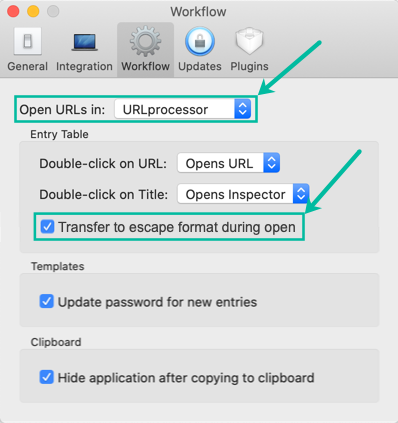
I thought, that with handler change in options - I will get same behavior like it was in 0.7.3, but it is not.
Could you please consider this option, which will make DBs more cross-platform again?
Niko-CZ
on 6 Nov 2019
I will look into this but I suspect the problem is a tad more complicated so it might take some time to takle this correctly.
mstarke
on 7 Nov 2019
I've encountered a new API in 10.11 which might fix the issue. I will have to test this out and this will not work on 10.10 but I suspect no one is actually using MacPass under 10.10 anymore.
mstarke
on 18 Nov 2019
Hi Michael,
I was waiting for the mentioned behavior change in 0.7.11, but it was not released.
Could you please tell - any plans for future releases?
Niko-CZ
on 30 Jan 2020
@Niko-CZ Sorry for not having commented on this. The API I found did turn out to be not working the way I thought it was. The whole URL escaping/non-escaping setup is rather complex and I need a bit of time to get to a fully working solution.
mstarke
on 3 Feb 2020
@alxdlv,
way to contact you besides GitHub? Maybe, e-mail?
replied to your FB.
Niko-CZ
on 3 Feb 2020
Any News about it?
hpellegrini
on 15 Apr 2020
@Niko-CZ Sorry for not having commented on this. The API I found did turn out to be not working the way I thought it was. The whole URL escaping/non-escaping setup is rather complex and I need a bit of time to get to a fully working solution.
Hi Michael,
any plans for implementation of universal URL storage?
Niko-CZ
on 27 May 2020
Related issues
 kevinpapst
·
3Comments
kevinpapst
·
3Comments
 uwqwxing886
·
5Comments
uwqwxing886
·
5Comments
 trimailov
·
7Comments
trimailov
·
7Comments
 Waldgeister
·
7Comments
Waldgeister
·
7Comments
 ghost
·
6Comments
ghost
·
6Comments