Macpass: "The password and/or the keyfile is wrong" error after 0.7.* upgrade
Issue
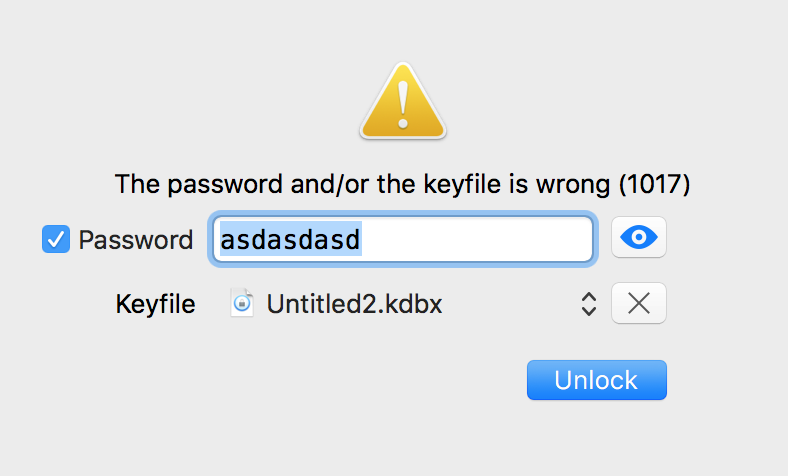
Cannot open password protected .kdbx file after I've upgraded to 0.7.1 this Monday (Nov 20th). It says "The password and/or the keyfile is wrong (1017)". I managed to fix this with a workaround (see appropriate section). Today (Nov 23rd) I was prompted to upgrade to 0.7.2 and then 0.7.3 - the problem returned and workaround does not work anymore.
Workaround
I've though of a workaround. Did an update using Keepas2Android app to my .kdbx file and resynced it to my mac - then it opened.
What I've tried
I thought that somehow .kdbx file got corrupted and MacPass.app upgrade was just a coinsidence.
I've created an empty password protected .kdbx with MacPass.app and closed the app, when reopened - I cannot open the password database. It says "The password and/or the keyfile is wrong (1017)" just as before, with my personal password database.
Both files still opens with Keepass2Android mobile app (my personal DB and the dummy one).
System
MacPass.app - problem persists with 0.7 and 0.7.* versions
macOS - 10.12.6
 trimailov
All 7 comments
In your screenshot you use a KDBX file as the key file - the "key file" is not the database but a file used as key, if you remove the key file can you open the database?
 mstarke
on 23 Nov 2017
mstarke
on 23 Nov 2017
It works.
Feel stupid now.
Thanks for the help.
trimailov
on 23 Nov 2017
No problem. Glad to hear that MacPass didn't mangle your database. I was hoping for a user error since bugs resulting in corrupted data are the worst - especially when dealing with passwords.
mstarke
on 23 Nov 2017
Haha, I just did the same for half an hour... 🤦♂️
 NikolausDemmel
on 5 Jan 2018
NikolausDemmel
on 5 Jan 2018
Same here 🤦♂️🤦♂️
I've updated the Error Codes page in the wiki so that people don't have to dig through issues to find a fix.
 nickmalcolm
on 27 Sep 2018
nickmalcolm
on 27 Sep 2018
Thanks for the Contribution!
mstarke
on 28 Sep 2018
@nickmalcolm I took the liberty to improve upon your image idea. Also now I know how to "trick" GitHub into hosting the images I use in the wiki. So another thank you!
mstarke
on 28 Sep 2018
Related issues
 martinl
·
6Comments
martinl
·
6Comments
 uwqwxing886
·
5Comments
uwqwxing886
·
5Comments
 ghost
·
6Comments
ghost
·
6Comments
 Winter84
·
6Comments
Winter84
·
6Comments
 btxtiger
·
7Comments
btxtiger
·
7Comments
Most helpful comment
Same here 🤦♂️🤦♂️
I've updated the Error Codes page in the wiki so that people don't have to dig through issues to find a fix.