Macpass: [Feature Request] TouchID Support
With the new MacBook Pros having a Touch ID sensor, it might be nice to support it for quick database unlocking. Perhaps have a security setting so that you can force re-typing of the password after sleep/waking.
If I have some time, I might look into this myself, but wanted to get a discussion going in case people had any ideas/concerns.
 nuudles
All 156 comments
Just to state the obvious: TouchBar support might be nice as well :). Would be a nice alternative to the hotkey for Autotype.
 mstarke
on 18 Nov 2016
mstarke
on 18 Nov 2016
@mstarke Touch Bar support only works when the application is active and in the foreground, unless you mean some sort pinned shortcut button that would instantiate the Autotype hotkey. In that case, I don't think we can yet create our own pinned icons. Developer support is limited to the active application area.
nuudles
on 18 Nov 2016
I was suspecting something like this, but I thought Xcode has a "pinned" control?
mstarke
on 18 Nov 2016
I'm honestly not sure. I haven't looked into the new Touch Bar stuff at all. I figured that the pinned icons were special Apple things that only Apple could do. Could be worth doing. I think Touch Bar exploration should be a different ticket though.
nuudles
on 18 Nov 2016
Owning a MBP with Touch ID and having tested the 1Password's implementation, I can confirm it would a cool thing to have in MacPass.
I can only think of two ways this could potentially be implemented:
- the database key would be stored securely by the OS and deployed to decrypt the database whenever a correct fingerprint is detected
- the database is stored decrypted but access to it is temporarily locked requiring a valid fingerprint (this is the same implementation in Keepass2Android)
Both of these approaches would represent an exploitable security vulnerability, though sometimes we would trade some security over more convenience.
 cipnt
on 16 May 2017
cipnt
on 16 May 2017
This would be fantastic. I would hope for @cipnt's option 1 – storing the database key securely in the Keychain protected by TouchID. See https://developer.apple.com/library/content/samplecode/KeychainTouchID/Introduction/Intro.html.
 caesar
on 2 Aug 2017
caesar
on 2 Aug 2017
I would suggest storing the key in the secure enclave instead of the keychain. Here is the documentation for working with the secure enclave
https://developer.apple.com/library/content/documentation/Security/Conceptual/CertKeyTrustProgGuide/SecureKeyGen.html
 jessemx109
on 2 Aug 2017
jessemx109
on 2 Aug 2017
@jessemx109 I don't think that's how the Secure Enclave works. It can only store cryptographic keys, and at that, only ones generated directly within the Secure Enclave. The key can then never be read from it; rather, it is instructed to perform cryptographic operations using the keys and return the result.
For MacPass's usage, I believe it would be necessary to store and retrieve the actual database key (password).
caesar
on 3 Aug 2017
Hello guys. I've been working on adding TouchID support to MacPass and I've got a version running (still needs some polishing on my side). Should I open a PR once it's ready?
What I did:
- If the the device has TouchID ask the user if they want to save their DB password in the Keychain. This happens when the user changed the Master DB Password.
If they say yes, the DB password is saved in the keychain and the DB name is saved in a list of "Touch ID enabled" databases.
When MacPass asks for a locked DB's password, if the DB is in the "TouchID enabled" databases, offer to unlocked with TouchID
If finger authentication is successful, get the password from the keychain and unlock the DB. (otherwise fallback to normal password input)
P.S.: If the user changes the master password and says no to the "Use TouchID dialog", then any previously stored password for that database are removed.
Edit: Created a PR here #638 Suggestions/corrections are very welcome!
 L4grange
on 26 Aug 2017
L4grange
on 26 Aug 2017
Brilliant news!
It does sound like a potential security vulnerability to have the password stored in Keychain but, as I said before, sometimes we would trade some security over more convenience.
FileVault would probably be recommended as an additional security to guard your Keychain and the user should be prompted to enable it when they chose to use TouchID in this way.
Great work L4grange!
cipnt
on 26 Aug 2017
Great work @L4grange!
Just one observation from me; I would like to be able to enable (or later disable) TouchID for my database without changing the password. This seems like an unintuitive way to do it. Could there be an option to enable it at the time of opening (decrypting) the database? Rather like a 'remember this password' option?
caesar
on 31 Aug 2017
I could add an option in the database settings once its decrypted to "Enable Touch ID" (and disable if its enabled) which would ask for your password and save it in the keychain etc. Once I solve some problems mstarke pointed out I'll add this feature :)
L4grange
on 31 Aug 2017
That sounds like a good solution, thanks!
caesar
on 31 Aug 2017
TouchID Supported ?
 coolicer
on 28 Nov 2017
coolicer
on 28 Nov 2017
No.
mstarke
on 28 Nov 2017
I currently use KeeWeb on macOS, and lack of TouchID unlock is one of my main frustrations. If MacPass supported this feature I'd definitely switch over. Fingers crossed for progress on this!
 r0bbie
on 3 Jun 2018
r0bbie
on 3 Jun 2018
Any updates on this feature? Would love to start using this!
 SjamonDaal
on 1 Oct 2018
SjamonDaal
on 1 Oct 2018
I've made some changes to KeePassKit to be able to store the keyfile and the password data in the keychain which then could be retrieved via touch-id. No substantial progress though.
mstarke
on 1 Oct 2018
Hi all,
any progress on this feature? Thanks.
 uniqueinput
on 25 Apr 2019
uniqueinput
on 25 Apr 2019
KeePassXC introduced TouchID support in recent version. Maybe it can be some kind of inspiration for anyone interested in development of this feature.
 orestesgaolin
on 5 May 2019
orestesgaolin
on 5 May 2019
Keepassxc uses TouchID AFAIK only for quick unlock and not to store the actual credentials.
mstarke
on 11 May 2019
No progress since 2016 on this - I guess its time to switch. We will start to switch KeepPassXC world wide for all mac users in December to support TouchID. (As a lot of companies do, since windows users use finger scans to unlock for a while now)
 BananaAcid
on 3 Oct 2019
BananaAcid
on 3 Oct 2019
I am willing to take a stab at it. #638 also mentions this. No guarantees - I don’t have Touch ID Mac. I might try to build it as plugin first just to see if I can get the mechanics of how Touch ID is supposE to operate.
 georgesnow
on 3 Oct 2019
georgesnow
on 3 Oct 2019
I’m sorry if anyone is annoyed the feature isn’t present already. Life sometimes gets in the way and I value the time spent with my family which has grown from non-existent to 4 people over the course of the development of MacPass. Contrary to the Touch Bar AFAIK there is no way to simulate this on machines without Touch ID support. My only development machine is still a trusty 2013 MBPro Retina without any of those things. I was considering an update but the keyboard issues prevented me from pulling the trigger. That said I am also still not sure what the best approach is to support this since it should also include key file support as well. I can try to pull this in and extend it the way I see fit but then I’m dependent on third party support to actually test this.
mstarke
on 4 Oct 2019
Michael, you don't need to apologise at all.
MacPass is a great piece of software and your work on it, as well as that of the other contributors, is incredible. Thank you.
@BananaAcid's comment was a bit harsh I think. We need to consider this is a free, open source application - everyone can contribute to make it better. We mustn't expect feature requests will automatically be implemented. That's not the case with commercial software either. I wish my programming skills extended beyond php or javascript to contribute to the MacPass development.
I agree TouchID would be a nice feature to have, but judging by the 1Password implementation, which I have to use for work, I don't think the benefits would be all that big – you still have to unlock the database with your password after each reboot. If that's the case you might as well leave MacPass open; the macOS lock screen, with TouchID, will be your defence. Just change "require password: Immediately" in Security and Privacy and set the screen saver/display sleep delay to a lower value.
cipnt
on 4 Oct 2019
@mstarke i agree no need to be sorry. This is open source project. I think it’s people realize how important it is for others to contribute. And it’s pretty amazing how far Macpass has come.
That being said I did take stab at Updating @L4grange Code to objective-c. I put link in his close pull request to my fork and branch. I also hve the same thing no Touch ID to test with so I can only get it so far.
georgesnow
on 4 Oct 2019
@georgesnow I have briefly used Xcode a few years back and I remember the simulator had the ability to replicate various hardware buttons or gestures. It seems you can do the same with TouchID: https://stackoverflow.com/questions/41741640/using-touchid-on-emulator/41741784
I will be happy to test a compiled dev version of MacPass on real TouchID hardware for you.
cipnt
on 4 Oct 2019
I would happily help to test the solution on my MBP with TB, but unfortunately don't know the Obj-C to help to develop the feature.
orestesgaolin
on 4 Oct 2019
Awesome the first item i am curious about confirming. Is the id it used to store the credential in your keychain. If it works. could each of you check your keychain and compare it to the root group UUID? And let me know if it matches. I couldn’t quite discern which element I could call on to get the UUID. So this will most likely the first thing that needs to get addressed.
As I noted everywhere please only use test databases.
georgesnow
on 4 Oct 2019
@georgesnow Not sure in what environment you want us to look for this.
The database in MacPass has no UUID displayed. Each child group or entry in it has its own UUID.
In Keychain there is no entry for MacPass or com.hicknhacksoftware.MacPass
In ~/Library/Preferences/com.hicknhacksoftware.MacPass.plist there is a
<key>LastDatabasePath</key>
<string>file:///Users/path/to/database.kdbx</string>
Ah ok Great that’s Actually helpful. Let me take look and see if fix it. But this good.m at least we know we are saving to the keychain successfully. Now just need to provide the proper data
georgesnow
on 4 Oct 2019
Ok Misread that. But I do have idea why it didn’t save anything to keychain
georgesnow
on 4 Oct 2019
Just to confirm - I am using the public 0.7.9 (21570) version
Do you want me to test a different version?
cipnt
on 4 Oct 2019
I would love to help testing, (Using a MBP + TouchID). Preferring an update instead of a software switch (https://github.com/MacPass/MacPass/issues/514#issuecomment-537731678)
BananaAcid
on 4 Oct 2019
georgesnow
on 4 Oct 2019
How can touchID be activated/be testet in that specific build?
BananaAcid
on 4 Oct 2019
It should trigger a prompt when saving/changing your master password for your database
georgesnow
on 4 Oct 2019
creating a new db shows some alert with keys "ALERT_TOUCH_ID_MESSAGE", so I guess it triggered. But pressing "YES" still stays at the master PW prompt. "NO" closes the alert and the master-pw-prompt.
Future: To get touchID support on an existing DB, would that require changing the master-pw?
BananaAcid
on 4 Oct 2019
I believe you could just re-enter the same password for the existing password. and I think it should also trigger offering Touch ID.
@BananaAcid couple questions:
so did it create an entry in your keychain? if so what is contained in the keychain entry?
with the new database when you go to unlock it does it request Touch ID?
did it successfully unlock the database?
georgesnow
on 4 Oct 2019
if you don't mind sharing screenshots that would be helpful for some context for me
georgesnow
on 4 Oct 2019
The UUID idea stems from being able to map databases independently since each root group as a unique UUID which works like a fingerprint of the database. However this UUID is not readable from outside the file. It might be possible to add a different UUID in public header part to make this work better and be move-agnostic. I think this might be the best way to implement it. KDBX3.1 already support custom public data so this should be doable. Using this approach even survives writes from other clients (that honour the KDBX format correctly).
mstarke
on 4 Oct 2019
Additionally I was hesitant to include this feature as it should be combined with the ability to simply store the password/keyfile in the keychain.
mstarke
on 4 Oct 2019
@mstarke ah ok. I agree with what you are saying. the way I implemented this is it should use keychain to store the databases master password. I am going to modify it for my own testing and remove the Touch ID requirement. that way I can just see if it will save a master password in my keychain.
and yes, the UUID thing is the area I am really most concerned about. mainly because MacPass needs to validate this file matches the credential it has stored in keychain. and then unlock said database.
georgesnow
on 4 Oct 2019
made a mistake so it won't save the credential in keychain. relatively straightforward to fix this small issue.
georgesnow
on 4 Oct 2019
ok, so I got the keychain part working (no Touch ID i.e.. commented out), but shouldn't be hard to add the pieces back for Touch ID.
however, error handling on this is non-existent and it uses the database name and if you don't have that database saved in your keychain MacPass crashes.
if I have time at lunch I will try to upload a new build, but I forgot to push my earlier commits from before work this morning. otherwise, it won't be until tonight or this weekend for a new build.
georgesnow
on 4 Oct 2019
here it is:
https://github.com/georgesnow/MacPass/releases/tag/CRUDEBuild-B
please read the notes thanks
georgesnow
on 4 Oct 2019
creating a new database, there is no database file yet ...
What I did:
- opened app
- created new database
- added an entry
-> popup: no master password, create one - did set pw
"test" - touchid popup -> YES
- saved DB as
"test.kdbx" - closed app
- reopened app, selected recent ... keepass store file
- regular pw prompt.
... keychain:
- searching for "macpass"
- found "MacPass" -> password is set to
"test"
shouldn't there be any test.kdbx be mentioned anywhere?
BananaAcid
on 4 Oct 2019
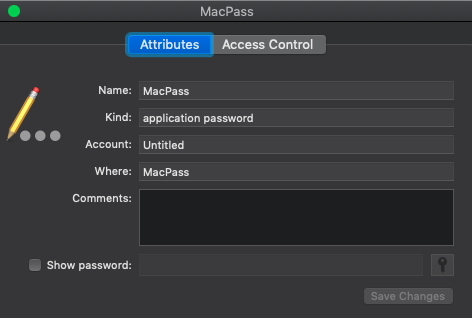
are you using a key file?
you should have entry like this and the "Account" is the name of the keepass file
UPDATE: it won't have the file extension so test.kdbx would should just "test" under account
georgesnow
on 4 Oct 2019
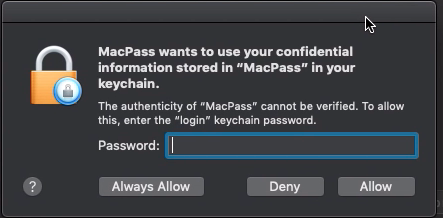
did keychain prompt you to allow MacPass access to your login keychain?
georgesnow
on 4 Oct 2019
- not using a keyfile
- yes, looks the same
- no, did not prompt
BananaAcid
on 4 Oct 2019
so you don't get this?
georgesnow
on 4 Oct 2019
... I might have entered my pw brainlessly ... but anyhow, i have the pw in the keychain.
BananaAcid
on 4 Oct 2019
cause what should happen is you get that prompt above. if click type allow your database should unlock upon opening. if choose "Always Allow" when re-opening a database that has a store credential in keychain it will just unlock it and not prompt you (unless you lock your login keychain)
georgesnow
on 4 Oct 2019
the second tab "access control" states, macpass has unrestricted access (macpass is in that list)
BananaAcid
on 4 Oct 2019
oh i get it: the "Account" field refers to the database file ?
BananaAcid
on 4 Oct 2019
yup
georgesnow
on 4 Oct 2019
ok - so it got into the keychain - your readme states: "If your login keychain is unlocked upon opening that database with MacPass it will automatically unlock
your keepass database"
.. how do i unlock it?
BananaAcid
on 4 Oct 2019
Touch ID part is not turned yet
I need some people to test make sure this first part works.
- it stores your master password in your keychain for the database you enable it on
- when re-opening this database it automatically requests for the password form keychain
- it actually unlocks the keepass database
- some other small pieces like error checking etc..
THEN
- turn touch id back on in the code and let some people try it
georgesnow
on 4 Oct 2019
Ok so, how do I help you to test #2 ? (That is, what I was talking about.)
-> It did not login (https://github.com/MacPass/MacPass/issues/514#issuecomment-538503835 -> regular pw prompt)
BananaAcid
on 4 Oct 2019
so open Console.app and filter on Process:MacPass
you should seem logs getting generated. start back at step one and create new database with a different name. and take note of what the logs say and report them back here.
Example:
"Saved DB (Untitled) password in the keychain."
"DB (Untitled) password deleted from keychain."
georgesnow
on 4 Oct 2019
this might probably be helpful : https://gitter.im/home/explore#createcommunity
BananaAcid
on 4 Oct 2019
After CHANGING the password, closing the app and reopening it, it does what you said.
Opening the password file right away.
So #2 & #3 works ...
Second run output:
standard    21:35:50.721283 +0200   MacPass Current system appearance, (HLTB: 2), (SLS: 1)
standard    21:35:50.727804 +0200   MacPass Post-registration system appearance: (HLTB: 2)
standard    21:35:50.785613 +0200   MacPass NSApp cache appearance:
-NSRequiresAquaSystemAppearance: 0
-appearance: (null)
-effectiveAppearance: <NSCompositeAppearance: 0x6000002e5860
 (
    "<NSDarkAquaAppearance: 0x6000034f3bc0>",
    "<NSSystemAppearance: 0x6000034f3580>"
)>
standard    21:35:51.032911 +0200   MacPass Sparkle explicitly disabled!!!
standard    21:35:51.055899 +0200   MacPass [WARNING] could not find container for id: <private>
standard    21:35:51.056331 +0200   MacPass [WARNING] could not find container for id: <private>
standard    21:35:51.060053 +0200   MacPass [WARNING] could not find container for id: <private>
standard    21:35:51.091842 +0200   MacPass Faulting in NSHTTPCookieStorage singleton
standard    21:35:51.091877 +0200   MacPass Faulting in CFHTTPCookieStorage singleton
standard    21:35:51.091897 +0200   MacPass Creating default cookie storage with process/bundle identifier
standard    21:35:51.092970 +0200   MacPass Task <8B593FAD-472B-422E-A3AE-2ADA1DE42D2A>.<1> {strength 1, tls 8, ct 0, sub 0, sig 0, ciphers 1, bundle 0, builtin 0}
standard    21:35:51.093920 +0200   MacPass TIC Enabling TLS [1:0x6000014ea4c0]
standard    21:35:51.094337 +0200   MacPass TIC TCP Conn Start [1:0x6000014ea4c0]
standard    21:35:51.094533 +0200   MacPass [C1 Hostname#95e28d90:443 tcp, url hash: db8c0545, tls] start
standard    21:35:51.095051 +0200   MacPass nw_connection_report_state_with_handler_locked [C1] reporting state preparing
standard    21:35:51.158021 +0200   MacPass Adding presenter AB2BE11B-E723-4234-B8B0-D126A54DADE3 for URL: <private>
standard    21:35:51.158554 +0200   MacPass Adding presenter AB2BE11B-E723-4234-B8B0-D126A54DADE3 for URL: <private>
standard    21:35:51.178439 +0200   MacPass TIC TLS Event [1:0x6000014ea4c0]: 1, Pending(0)
standard    21:35:51.221561 +0200   MacPass TIC TLS Event [1:0x6000014ea4c0]: 11, Pending(0)
standard    21:35:51.221872 +0200   MacPass TIC TLS Event [1:0x6000014ea4c0]: 14, Pending(0)
standard    21:35:51.234692 +0200   MacPass UNIX error exception: 17
standard    21:35:51.239951 +0200   MacPass UNIX error exception: 17
standard    21:35:51.251772 +0200   MacPass System Trust Evaluation yielded status(0)
standard    21:35:51.257878 +0200   MacPass TIC TLS Trust Result [1:0x6000014ea4c0]: 0
standard    21:35:51.260731 +0200   MacPass TIC TLS Event [1:0x6000014ea4c0]: 2, Pending(0)
standard    21:35:51.296787 +0200   MacPass TIC TCP Conn Event [1:0x6000014ea4c0]: 1
standard    21:35:51.296807 +0200   MacPass TIC TCP Conn Event [1:0x6000014ea4c0]: 8
standard    21:35:51.296824 +0200   MacPass TIC TLS Handshake Complete [1:0x6000014ea4c0]
standard    21:35:51.297411 +0200   MacPass new connection to <private> config 0x6000021d8ca0
standard    21:35:51.299776 +0200   MacPass Task <8B593FAD-472B-422E-A3AE-2ADA1DE42D2A>.<1> now using Connection 1
standard    21:35:51.299892 +0200   MacPass Task <8B593FAD-472B-422E-A3AE-2ADA1DE42D2A>.<1> sent request, body N
standard    21:35:51.299943 +0200   MacPass nw_endpoint_flow_protocol_connected [C1.1 IPv4#04a51d29:443 ready socket-flow (satisfied)] Output protocol connected
standard    21:35:51.347876 +0200   MacPass Task <8B593FAD-472B-422E-A3AE-2ADA1DE42D2A>.<1> received response, status 304 content U
standard    21:35:51.347918 +0200   MacPass Task <8B593FAD-472B-422E-A3AE-2ADA1DE42D2A>.<1> done using Connection 1
standard    21:35:51.527695 +0200   MacPass UNIX error exception: 17
standard    21:35:51.542806 +0200   MacPass UNIX error exception: 17
standard    21:35:51.760981 +0200   MacPass Looking for external plugins at /Users/nabil/Library/Application Support/MacPass.
standard    21:35:51.761184 +0200   MacPass Looking for internal plugins
standard    21:35:51.761318 +0200   MacPass No internal plugins found!
standard    21:35:52.162923 +0200   MacPass Claim 4EC2442E-D94B-4031-93D3-986352AD79F7 granted in client
standard    21:35:52.162950 +0200   MacPass Claim 4EC2442E-D94B-4031-93D3-986352AD79F7 invoked in client
standard    21:35:54.528185 +0200   MacPass 27366555: RECEIVED OUT-OF-SEQUENCE NOTIFICATION: 100 vs 234, 513, <private>
standard    21:36:00.871697 +0200   MacPass LSExceptions shared instance invalidated for timeout.
standard    21:36:02.312114 +0200   MacPass Removing presenter AB2BE11B-E723-4234-B8B0-D126A54DADE3
standard    21:36:02.312238 +0200   MacPass Removing presenter AB2BE11B-E723-4234-B8B0-D126A54DADE3
This is the 1st run output (incomplete):
standard    21:29:54.976274 +0200   MacPass Current system appearance, (HLTB: 2), (SLS: 1)
standard    21:29:54.981113 +0200   MacPass Post-registration system appearance: (HLTB: 2)
standard    21:29:55.027552 +0200   MacPass NSApp cache appearance:
-NSRequiresAquaSystemAppearance: 0
-appearance: (null)
-effectiveAppearance: <NSCompositeAppearance: 0x600000d9e9e0
 (
    "<NSDarkAquaAppearance: 0x600003bb4640>",
    "<NSSystemAppearance: 0x600003bb4740>"
)>
standard    21:29:55.266944 +0200   MacPass Read options: 0 -- URL: <private> -- purposeID: FEA11180-DCF5-4FEF-ACC8-9DECF6D5B20E -- claimID: 8142846B-75BD-42B9-AC1C-C1C8255224E5
standard    21:29:55.285321 +0200   MacPass Adding presenter BF889D5B-A86E-44B7-9174-9742FA3A99E7 for URL: <private>
standard    21:29:55.285843 +0200   MacPass Adding presenter BF889D5B-A86E-44B7-9174-9742FA3A99E7 for URL: <private>
standard    21:29:55.570159 +0200   MacPass UNIX error exception: 17
standard    21:29:55.576397 +0200   MacPass UNIX error exception: 17
standard    21:29:55.583003 +0200   MacPass UNIX error exception: 17
standard    21:29:55.586658 +0200   MacPass UNIX error exception: 17
standard    21:29:55.596718 +0200   MacPass UNIX error exception: 17
standard    21:29:55.995131 +0200   MacPass Looking for external plugins at /Users/nabil/Library/Application Support/MacPass.
standard    21:29:55.995314 +0200   MacPass Looking for internal plugins
standard    21:29:55.995431 +0200   MacPass No internal plugins found!
standard    21:29:56.288945 +0200   MacPass Making presenter BF889D5B-A86E-44B7-9174-9742FA3A99E7 observe change
standard    21:29:56.289109 +0200   MacPass Read options: 1 -- URL: <private> -- purposeID: BF889D5B-A86E-44B7-9174-9742FA3A99E7 -- claimID: 9EB2A263-12F1-4CC7-88B7-236603C3C9D7
standard    21:29:56.290736 +0200   MacPass Claim 9EB2A263-12F1-4CC7-88B7-236603C3C9D7 granted in client
standard    21:29:56.290755 +0200   MacPass Claim 9EB2A263-12F1-4CC7-88B7-236603C3C9D7 invoked in client
Anything I can do to help on #4 and #5 (https://github.com/MacPass/MacPass/issues/514#issuecomment-538526862)?
BananaAcid
on 4 Oct 2019
btw: having 2 keychain entries now:
- Account =
testfrom the create-db-with-new-password steps - Account =
test.kdbxfrom the change-master-password steps
BananaAcid
on 4 Oct 2019
ok, yeah it looks it actually uses the full file name. Sorry, I implmenetate @L4grange code and my initial test made it look like it was just the name excluding the file extension.
so this is good. hopefully a few other people can try it out to make sure there isn't any critical issues I am missing.
Technically 4 & 5 can happen concurrently.
so:
4 - well, if you have objc-c experience and understand the proper way to do error checking. the code needs to be able to deal with exceptions (eg...Touch ID fails etc...) this is for sake of reliability and usability.
5- Well, I can go back and re-add the Touch ID functionality and I will post another build. This shouldn't take too long, but I don't think I will have time tonight or this weekend. so we maybe in holding pattern for a few days.
georgesnow
on 4 Oct 2019
4 - to help collect console output, I am in, but I do not have enough time for any coding
5 - As soon as you have it out, I am happy to test. Just describe any test case to go for
BananaAcid
on 4 Oct 2019
@mstarke what about performing md5 on the database file and using that to store in keychain? then a user can change the file name all they want, and if the integrity of file is intact the md5sum will be the same
georgesnow
on 4 Oct 2019
@georgesnow Changing the file contents: adding entries, will change its hash - requiring to update the keychain ...
If it got changed on another device (iOS KeePass Touch), it won't, match anymore ..
BananaAcid
on 4 Oct 2019
haha right 🤦♂️ that's what happens at the end of day when you are getting tired.
georgesnow
on 4 Oct 2019
Using a key in the public data is possible but KDB does not allow for that. I might find some space in the header of the KDB format to make this work on all containers. But in the other hand it is just a local setting that should not intervene with the database file whatsoever.
mstarke
on 5 Oct 2019
updated to support Touch ID (and I also included the ability to save your keychain). It uses the same prompts, but that should get cleaned up before merging.
https://github.com/georgesnow/MacPass/releases/tag/CrudeBuild-D
georgesnow
on 7 Oct 2019
updated to support Touch ID (and I also included the ability to save your keychain). It uses the same prompts, but that should get cleaned up before merging.
https://github.com/georgesnow/MacPass/releases/tag/CrudeBuild-D
Could you please provide sample steps to test it? I think I enabled TouchID support but cannot trigger the unlock prompt with TouchID.
orestesgaolin
on 7 Oct 2019
make sure you test on a test database not a production one.
Steps:
- Open Database and unlock it
- Select File=> Change Master Password
- Enter your password twice - you can re-use the same password
- Click OK
- Prompt to enable Touch ID (non-Touch ID Macs get the same prompt, but instead just save the password in your keychain) click OK for the prompt to save it
- Close your database
- Re-open Database and you should be prompted to use Touch ID to unlock (non-touchID Macs will just request your login keychain password)
- Database is hopefully unlocked...
georgesnow
on 7 Oct 2019
Thanks! Unfortunately it crashes while launching the app again after performing the above steps i.e.:
1-8. done, close MacPass
- Open MacPass
- Prompt to use TouchID appears
- Touch the fingerprint reader
- App crashes
Moreover, the production release of MacPass was running in the background. I don't know if it's important.
Here you can find full logs from macOS console: https://gist.github.com/orestesgaolin/0ed39779ab59ebd17f0a8fd62e38ca76
orestesgaolin
on 7 Oct 2019
So this will be the hard part cause I don’t have a Touch ID Mac. Can you open console and filter on process for Macpass. And see what log messages you get.
georgesnow
on 7 Oct 2019
Definitely close the other instance of macpass. I will take a look at those logs
georgesnow
on 7 Oct 2019
The attached log is filtered for MacPass https://gist.github.com/orestesgaolin/0ed39779ab59ebd17f0a8fd62e38ca76
The final error in console is:
MacPass *** Assertion failure in NSISCol _engineVarCol(NSISEngineVar)(), /BuildRoot/Library/Caches/com.apple.xbs/Sources/Foundation/Foundation-1575.19/Foundation/Layout.subproj/IncrementalSimplex/NSISEngine.m:674
Hmm it looks like it successfully got your password from keychain using Touch ID.
I would close the other instance of macpass retry. Also did you move the application after you launched?
georgesnow
on 7 Oct 2019
I closed the other instance and the app still crashes. The app persists in Downloads directory since the beginning.
Here is the new log https://gist.github.com/orestesgaolin/4dd242efa26c55e9f8cfc535f8be2c7d
And final error:
MacPass * Terminating app due to uncaught exception 'NSInternalInconsistencyException', reason: 'Tried accessing the col index for a variable that is a row head:(null)'
orestesgaolin
on 7 Oct 2019
so I think it's the check for Touch ID on retrieving the password. I had to modify the other implementation because the method that was used was depreciated. Cause when I tested with a Mac without Touch ID it works.
I see what I can figure out.
georgesnow
on 7 Oct 2019
@georgesnow I finally got the time to download and test your build, it's really nice seeing progress being made :)
Adding a password and enabling Touch ID seems to work, but when I try to unlock my test DB with Touch ID the app crashes. Keep in mind, that the first time, there was a problem and keychain already had my previous password (from the DB I was using to test back when I was trying to make this work), so the unlocking was failing, but the password field was being filled in successfully. Thus, I believe there are 2 bugs right now:
When creating a new DB, and adding a password, MacPass asks to enable Touch ID. This means that the password is saved to the keychain before the DB has a name, thus retrieving it doesn't work for new databases. (It saves the password under the account "Untitled")
After enabling TouchID for a database with a name, successfully retrieving the password and trying to unlock it, throws an exception, which on 3 different tests were 3 different exceptions. Very interesting. I may need to download your branch and run it with exception breakpoints in order to see whats really going on, since Console is not helping.
I see a lot of logs saying that "This application is modifying the autolayout engine from a background thread after the engine was accessed from the main thread. This can lead to engine corruption and weird crashes."
and then the app crashes with:
*** Terminating app due to uncaught exception 'NSInternalInconsistencyException', reason: 'Engine marked as needing optimization even though it's already in progress.'
*** First throw call stack:
(
    0   CoreFoundation                      0x00007fff4ec992fd __exceptionPreprocess + 256
    1   libobjc.A.dylib                     0x00007fff7938fa17 objc_exception_throw + 48
    2   CoreFoundation                      0x00007fff4ecb4016 +[NSException raise:format:arguments:] + 98
    3   Foundation                          0x00007fff50f53791 -[NSAssertionHandler handleFailureInMethod:object:file:lineNumber:description:] + 194
    4   Foundation                          0x00007fff50ec170a -[NSISEngine _optimizeIfNotDisabled] + 293
    5   Foundation                          0x00007fff50ec0245 -[NSISEngine tryToAddConstraintWithMarkerEngineVar:row:mutuallyExclusiveConstraints:] + 567
    6   Foundation                          0x00007fff50ebf648 -[NSISEngine tryToAddConstraintWithMarker:expression:mutuallyExclusiveConstrai<…>
L4grange
on 7 Oct 2019
yeah I did a dumb thing. I forgot to add back in the your dispatch to main thread for submitting the password when using touch id....🤦♂️
georgesnow
on 7 Oct 2019
No worries, its really hard finding things you forgot like that when you can't run the piece of code yourself. Let us know when a new build is up so I can give you feedback.
Did we find a better way of storing the password in the keychain, rather than the file name? I remember not having figured that out with @mstarke
Hopefully though this does not break anything but the Touch ID unlocking itself, although it could leat to false positive unlocks if a user deletes a DB and renames another one to use the other's name, as I reported in bug 1.
L4grange
on 7 Oct 2019
so I am hoping that's the main issue. simple fix. I can quickly commit those changes and make a new build.
what's strange is it works on my non-touch id Mac with existing databases and new ones.
so I am maybe those 2 issues are effects of this.
georgesnow
on 7 Oct 2019
I added that back in and remember why I remove it. I am getting this error:
Thread 1: EXC_BAD_INSTRUCTION (code=EXC_I386_INVOP, subcode=0x0)
georgesnow
on 7 Oct 2019
Hmmm, without changing anything, and using your previous build, it seems to work now without crashing, although the app seems to "hang" while it's trying to unlock the DB from all the This application is modifying the autolayout engine from a background thread after the engine was accessed from the main thread. This can lead to engine corruption and weird crashes. messages.
L4grange
on 7 Oct 2019
I think I figured it out. building a new copy now...
georgesnow
on 7 Oct 2019
georgesnow
on 7 Oct 2019
yes, working now.
I am able to unlock with fingerprint (after I entered my laptop's password to allow access to keychain; allowed it permanently for now).
After locking the DB I am able to re-unlock with fingerprint.
After closing the DB the touch-ID pop up does not re-appear (have to enter pw).
after restarting MacPass touch-ID pop up comes up again
 BrainBug0815
on 7 Oct 2019
BrainBug0815
on 7 Oct 2019
interesting, so once the database has been unlocked for the life of the application while it is running the authentication seems valid. Which I believe is the case with keychain access. if you select "Always Allow" the app has "unfettered" access until the application is closed. (someone correct me if I am wrong, but that's the behavior I have noticed).
You have to close MacPass to re-auth with Touch ID. Hmm..not sure that's how people wanted it to work.
georgesnow
on 7 Oct 2019
the interesting part is the different behaviour
- when locking/unlocking (fingerprint feature available)
- when closing db/reopening db (fingerprint not available)
- when restarting app (fingerprint feature available)
BrainBug0815
on 7 Oct 2019
yeah I believe that's because of how I implmentated the keychain component. I believe @L4grange had added a button, which you would click then you get prompted for Touch ID. I was hoping for better streamline process.
I am going to have to think about how that works.
georgesnow
on 7 Oct 2019
I was able to test this last build and it all works ok for me: locking, closing the db, relaunching the app they all trigger the TouchID prompt and it works.
The very first time I enabled TouchID for the db it would not initiate a prompt after the closing the db or relaunching the app. I had to change the password again and enable TouchID once more
cipnt
on 7 Oct 2019
@cipnt did you click the "Always Allow" option when keychain prompted you? curious if that's why @BrainBug0815 had to close MacPass in order to get prompted again.
georgesnow
on 7 Oct 2019
No I didn't. I can see in Keychain that two entries were created.
The first (probably the one that failed) has Account: Untitled
The second has Account: test.kdbx
I tried deleting both in order to attempt to replicate, but the app still launched with the TouchID prompt and after unlocking it with TouchID it crashed
cipnt
on 7 Oct 2019
Works for me too! Thanks a lot.
Would it be possible to have some extra button to trigger unlocking with fingerprint after cancelling the first prompt?

orestesgaolin
on 7 Oct 2019
I am not able to reproduce my remaining issue any more.
Meaning: closing DB / reopening DB now brings fingerprint pop up (and it works)
But @orestesgaolin is right: after cancelling the touchID popUp it does not come back until closing DB and reopening it.
BrainBug0815
on 7 Oct 2019
While trying to reproduce my bug, I discovered another.
I created a fresh macOS user to try it, BUT I forgot to set up TouchID for it.
MacPass behaved as expected, offered me to open the database with TouchID and I accepted.
I relaunched the app and the password field was pre-filled and viewable (by clicking the view button).
And that's only because I didn't save the DB with the new password (ie Keychain had the wrong password for the db). But if the correct password is in Keychain MacPass automatically opens the last db without any prompt for password or TouchID.
It seems to me that MacPass is checking if TouchID is available but not if it is enabled.
cipnt
on 7 Oct 2019
Would it be possible to have some extra button to trigger unlocking with fingerprint after cancelling the first prompt?
This would also be the logical place to put a checkbox to "Enable TouchID for this database".
Similar to how a website login page would have a "remember me" checkbox.
You can grey it out if TouchID isn't available. Users will this way be aware of the feature.
cipnt
on 7 Oct 2019
@cipnt thats correct it looks to see if the Mac has Touch ID. However once the password is in your keychain it’s unlocking the database without additional prompting until re-auth is needed ie closing macpass, rebooting etc..
Again this was intentional on my part. Layering each piece of functionality to test since I don’t have Touch ID Mac. I needed a way valid each part of the process.
That being said it looks like all the pieces work. So now I can implement the last pieces, which is user preferred/workflow.
It sounds like the preference would be to have a button or check box to enable Touch ID and it would ask everytime. Is that people are thinking?
georgesnow
on 8 Oct 2019
My concern is that as it stands, if TouchID is not active in macOS (ie TouchID is present, but no fingerprints are registered) and the option is enabled in MacPass, then the database will always be automatically opened bypassing the password and severely compromising the security of the database.
If there is a way to check if any fingerprints are registered in macOS then that should be added as a condition
if ( TouchID == enabled && TouchID.fingerprints > 0 ) { proceed }
cipnt
on 8 Oct 2019
Sorry If I wasn’t clear. Your point is well taken and it is not intention to leave this way. I am implementing @L4grange previous work. In doing so I am trying to make sure I don’t bork anything. And since this uses the keychain I was trying to add the functionality for those who don’t have Touch ID, but wanted to save their master password in their keychain.
Anyway, It should be doable to have a button (@L4grange had that I believe). I thinking the button should appear next to the unlock button _if_ the database has been setup for Touch ID.
georgesnow
on 8 Oct 2019
https://github.com/georgesnow/MacPass/releases/tag/CrudeBuild-F
Please read the notes. Constraints for the button aren't right. I am not good setting those correctly. So hopefully someone else can do that before completing the merge into the core code.
and it works for keychain users as well. BEWARE of the "Always Allow" option if you choose this Touch ID and Keychain won't ask again when locking. Your database will just unlock as long as your login keychain is unlocked.
georgesnow
on 8 Oct 2019
also this is from early morning coding before work. so hopefully I got everything 🥴
georgesnow
on 8 Oct 2019
Thank you very much @georgesnow.
Maybe I'll take a look at those constraints later today.
As for the keychain unlocking as long as you are logged in, I'm still not sure that this is the desired behaviour. I'll see how it works edit this if I don't think the user flow is right.
L4grange
on 8 Oct 2019
@L4grange that _only occurs_ _if_ you click the "Always Allow" button when prompted. Once you have done that MacPass doesn't need to request permission to access your login keychain.
If you just click "Allow" it will ask _every time_ there is a locked database
georgesnow
on 8 Oct 2019
just a as note - I have come across workflow that will crashes MacPass when using the keychain option (not Touch ID). If you press Escape when prompted for keychain access instead of selecting Always Allow, Allow, or Deny MacPass crashes. I am going to have to work on a fix for that. I know what's causing it, but not sure of the exact fix.
georgesnow
on 8 Oct 2019
I can reproduce the issue also using Touch ID:
I have removed permanent access to keychain.
When I open the database with touchID enabled, it accepts my fingerprint.
If I now abort the keychain password popup with ESC, MacPass crashes.
BrainBug0815
on 8 Oct 2019
Beside that: Starting MacPass with reopening last used DB, closing DB / reopening DB, locking / Unlocking DB, aborting TouchID dialog and reopening it with Touch ID Button => all is working as expected.
BrainBug0815
on 8 Oct 2019
Question: Is there an other way to enable TouchID option on existing databases?
The only way I was able to find is, File -> change master password.
After entering new PW and click on "Change Password" I am prompted to enable Touch ID.
Sure, I can reenter my existing PW, but what do you think about adding a checkbox for Touch ID to Database settings -> advanced tab?
BrainBug0815
on 8 Oct 2019
@BrainBug0815 yes, open, unlock the database. Select file => change Master password. enter the same password you will be prompted.
also I have the fix committed, but I don't have time to make a new test build. its on my fork under the touchid branch if people want to build their own using the instructions from the main MacPass page
georgesnow
on 8 Oct 2019
oops sorry I didn't see the whole thing you posted. so not currently. I am not really sure the best way to offer it to be honest...My first thought is having a checking box near where the key file is to enable "Touch ID" or "Keychain" access, but that makes the UI messy. I think that's @mstarke question cause GUI is not my area of expertise.
georgesnow
on 8 Oct 2019
The point is, that, without reading your releasenotes, it can take a while to find the way how to enable it.
Imagine someone updates to latest version "now with TouchID support".
User would wonder how to enable it.
Not sure what the best place is. I just have seen that it would help.
In my first attempt I was searching for it - I have to admit that I didn't read your releasenotes first :-)
BrainBug0815
on 8 Oct 2019
another idea: I now have disabled Touch ID (reenter master password and select NO for TouchID)
When now opening the DB I have to enter the password. but still the TouchID button is there.
But it is without any function.
Instead of disabling/removing the button in such cases:
What if the label (and function) is changed to "Unlock and enable TouchID"?
(if TouchID is available and not enabled yet for that db)
BrainBug0815
on 8 Oct 2019
@BrainBug0815 funny I was just thinking that.
Your point is 100% valid. Just so people are aware these "alpha/beta" builds. Literally, my objective is does x button actually do x...
Now that I think I worked out _most of the bugs_. And now the refinement can happen for a better user experience.
georgesnow
on 8 Oct 2019
I do think on the database itself is probably best. The functionality I added provides for both keychain and Touch ID, but are separate in their application. so 2 check boxes. Touch ID and/or Keychain
I would think the button/checkbox would still appear if the password was previously saved and ask if you want to update it or remove Touch ID if you don't want to use it anymore.
Also currently the database is stored in user prefs only by filename. This presents a bunch of possibly broken situations. What if you open 2 databases from different locations that happen to have the same name? what happens? one will work and the other won't.
so as my last comment. the user experience part needs some refinement now. _(and I need to make sure that crash bug is gone...)_
georgesnow
on 8 Oct 2019
Agree, you are right. separate options are necessary.
And yes, filename alone is not enough for uniqueness.
But the path is also a problem if you move the database into a new folder...
what about including a unique part of the file header?
BrainBug0815
on 8 Oct 2019
Filenames are the easy solution right now. If we want to allow for uniqueness then only KDBX containers will be supported since KDB does not offer any way to add unencrypted data to the file (e.g. inside the header). To allow for support of KDBX files KeePassKit needs some modifications as it’s currently not supported to read the unencrypted header of a file without the rest. This might take a while. Additionally storing the key inside the keychain then requires a date of the database to add the uuid in the header.
mstarke
on 9 Oct 2019
should consider including the path? It provides a layer of uniqueness and it will help if you happen to try to open 2 files with the same name.
Then add info notice that says something like:
"Touch ID (or Keychain) once it has been enabled. It will only work for as long as the filename and path remain unchanged - if you move or rename the file you will need to re-setup this feature"
georgesnow
on 9 Oct 2019
should consider including the path? It provides a layer of uniqueness and it will help if you happen to try to open 2 files with the same name.
Then add info notice that says something like:
"Touch ID (or Keychain) once it has been enabled. It will only work for as long as the filename and path remain unchanged - if you move or rename the file you will need to re-setup this feature"
For me as user this sounds like reasonable trade-off.
orestesgaolin
on 9 Oct 2019
so what's left in order to merge:
_I am going to open separate issues for these on my fork. If other people could do the same it will be easier for me to track the left over pieces until I make a merge request_
However, I will post here when I publish new builds. Since most people are tracking this thread.
- Ensure crash when pressing Escape is gone
- User preference for Touch ID
- User preference for Keychain - independent option
- Change from just using filename to file path (not sure - if I should have it resolve aliases/symlinks and perform hash on string to at least obscure the info in user defaults?)
- Provide user notification about changing the name and location will cause Touch ID/Keychain to stop working
- User preference should toggle on the database preference - ie add touchid/keychain access and also remove the entry from the users Keychain
- Make decision about placement about user preference.
- Ensure complete workflow works
georgesnow
on 10 Oct 2019
just an update. I haven't forgotten about finishing this. I just haven't' had chance to finalize the above items. I am thinking I will finish the Touch ID part first and put in the merge request. Since it appears the Touch ID is in higher demand. Then I will go back and finish the Keychain as second phase. It just depends how much time I get to work on it.
georgesnow
on 21 Oct 2019
https://github.com/georgesnow/MacPass/releases/tag/Build-G
please read release notes - still prelease/beta
georgesnow
on 22 Oct 2019
I don't get how to use it:
I create a new database, configure master password and enable touchID support.
OR I open an already existing db with touchID enabled.
I reopen the db, enter my password, select the touchID checkbox which brings up the touchid popup to enable touchID (again)
I close this popUP with YES, the touchID checkbox is disabled again....the touchID button is still disabled.....and now?
When I hit the unlock button I am in, but with my master password and not via touchID
What do I miss here?
Update: after closing those DBs and reopen them again I now get the "use touchID to unlock" popUp.
but when I provide my fingerprint to unlock, the touchID popUp simply closes and I am again back at dialog to enter the password
BrainBug0815
on 23 Oct 2019
You just click Touch ID button (which should only show if that database is set up for Touch ID) without entering your password. You will be prompted to use Touch ID
georgesnow
on 23 Oct 2019
open DB which is set up for touchID:
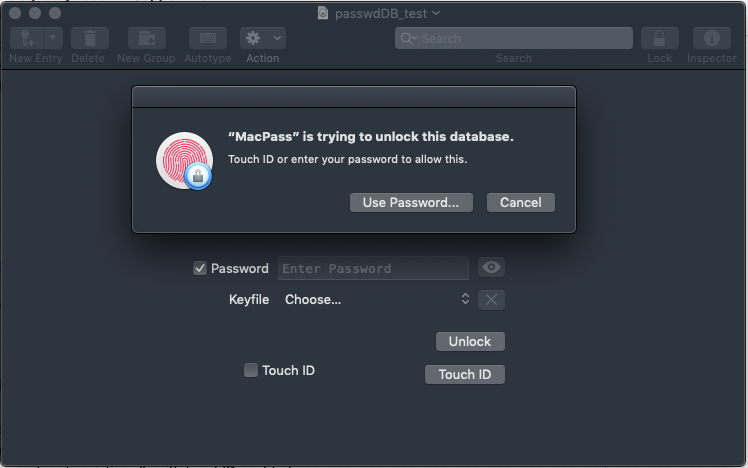
provide fingerprint results in:
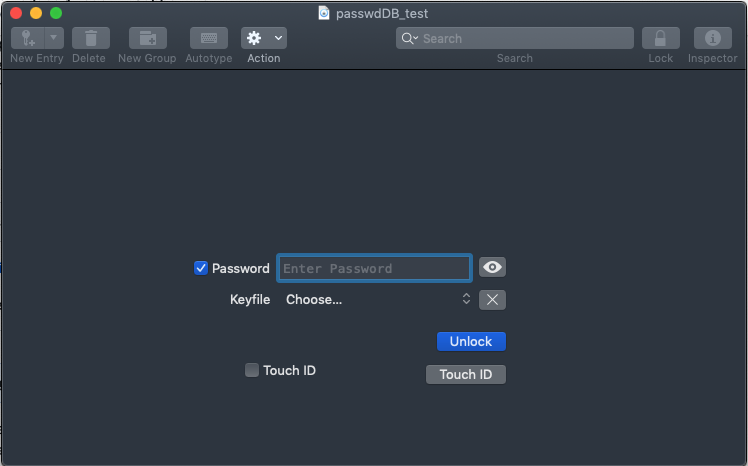
BrainBug0815
on 23 Oct 2019
So I noticed the preference option is not selected on that particularly database. You found a state where you have set up database and preferences show it’s available but since preference box is unchecked it won’t fill your password.
Try toggling that preference. The first time nothing should happen unless you look at the logs in console. It say removing password. Then enter your password check the box and click the unlock. Then the next lock your database and try to reopen just click the Touch is button.
Curious was this a previously setup database from a previous build? I need figure out how you got into that state. After implementating this it seems as though above work flow is leaving a lot to be desired.
georgesnow
on 23 Oct 2019
No matter what I do, the TouchID Checkbox and Button do not stay checked/enabled
The password is added to the keychain, but when unlocking with keychain, it is not entered.
just to ensure - a step by step guide what I have done:
1 removed all passwords regarding macpass from keychain and restart MacPass
2 create new DB
3 set master password
3a agree to use touchID to unlock db
3b do not agree to use touchID to unlock db (as you can do it also at unlock step)
4 safe new db as
5 lock
6 enter password
7 check touchID checkbox
8 agree to use touchID to unlock db
=> popUp closed, touchID checkbox disabled again (as well as touchID button)
=> password is still entered, so I am able to unlock with just hitting "Enter" or click to unlock; click on Touch ID Button without any effect
lock again => "use touchID to unlock popUp" is there but without any effect (touchID button disabled / checkbox unchecked)
BrainBug0815
on 23 Oct 2019
@BrainBug0815 on step 4 did you leave the filename/database name unchanged? or did you rename or give it a different name?
georgesnow
on 23 Oct 2019
As I have created a new database, there was no filename yet. So I had to enter something as a filename here initially.
And in other cases where I tried to test with already existing databases I did not change the file name or location.
Not sure if it is important: I've already several versions of your app in Downloads folder.
If I use one of your previous snapshots, after using my fingerprint I am getting asked to enter my password to unlock the keychain (once or permanently - depending what I select)
But in the latest one, this step is missing.
When I check the items in the keychain, "confirm before allowing access" is selected, but "ask for keychain password" is not checked.
When I set "confirm before allowing access" and restart MacPass, I get the fingerprint popUp as usual, but still I am not asked for the keychain password.
BrainBug0815
on 23 Oct 2019
so ok 2 parts.
The first item is an actual bug. if you leave the database named "Untitled", save the database, and allow Touch ID it will work. I discovered this after I posted the build, but I hadn't figured what the root cause was. You happen to find it before I figured it out. But now I know it is not my setup.
That leads to number 2. I am in the process of removing the unlock your database with keychain (and don't have Touch ID so this how I was testing). The unlock with keychain seems to require 2 steps, which you noted. In the case of the Touch ID workflow it appears it doesn't need the keychain password to access the the protected entry. Unfortunately, this is going to require some further testing by people with Touch ID and refining the workflow.
georgesnow
on 23 Oct 2019
I looked at this a little deeper. I think I am going to move the Touch ID setting/checkbox off the lock screen (leaving the button to re-trigger for convenience) where it currently is. Its new home will be in Database Settings=>Security. This will also mean moving the prompt out from the password change/new setting window.
This will take some more work. However, this seems like better UI experience. It means you won't save the wrong password in keychain, which can happen on the lock screen with the current implementation. Security wise it seems more appropriate to have database specific setting that uses your password in the database settings window. Lastly, it will also ensure the correct database name is store in your keychain.
georgesnow
on 3 Nov 2019
@georgesnow : any news on this?
can't wait to start testing it :-)
BrainBug0815
on 28 Jan 2020
Hi, just wanted to check back, if there is a working solution - like having touch id with current existing databases.
BananaAcid
on 23 Feb 2020
I merged the most recent changes from the main MacPass repo into my touhid branch, but there is an open issue on my repo. It was reported that there was issue with getting password from the keychain. it remains unsolved/fixed.
I also had to update my Xcode. So I have few things working against me here. If any one is confident in building and testing my touchid branch on Mac that has touchid. It would extremely helpful to know where the current code stands.
georgesnow
on 30 Mar 2020
@georgesnow there are still version control conflict markers left (e.g. in MPPasswordInputController.m) and Xcode won't build because of this
 Knapoc
on 2 Apr 2020
Knapoc
on 2 Apr 2020
@Knapoc ok cool. I didn’t know/notice that. I also am having issue with Xcode that is claiming it can’t find a header file in one of the sub modules (DDHotkey) even though it’s there
georgesnow
on 2 Apr 2020
@Knapoc thanks that fixed majority of the issues. I realized I had just forgotten the recursive flag, which fixed the header issue. The only issue I have left is I am getting a code sign error.
georgesnow
on 2 Apr 2020
I saw that you pushed some fixes but I experience the same code signing error.
Knapoc
on 2 Apr 2020
so I had to add the --deep flag to sign the keepasskit before building.
not sure why other then that maybe part of the framework is a binary?? maybe @mstarke can provide some info?? I am not sure that's really the right thing to do here.
georgesnow
on 4 Apr 2020
Thanks... that did the trick for me.
So I tested it a little bit and have the following observations:
- touchid unlock only works when the database is titled 'Untitled' - afaik this is a known issue
- the touchid UI is gone completely: neither in the unlock window nor in the database settings I can find a reference to touchid
Knapoc
on 4 Apr 2020
I noticed that as well. I can’t remember if I did that in my last commit a few months ago. I had decided to move stuff around or it was the merge. Either way I still need to work on that. I will add that item on the to do list.
And sounds like the keychain part is still working. So it is better shape now, but still some work to do.
By way are building from the command line or from Xcode? It only build for me from the command line.
georgesnow
on 4 Apr 2020
I built it with Xcode.. that's where I set the flag:
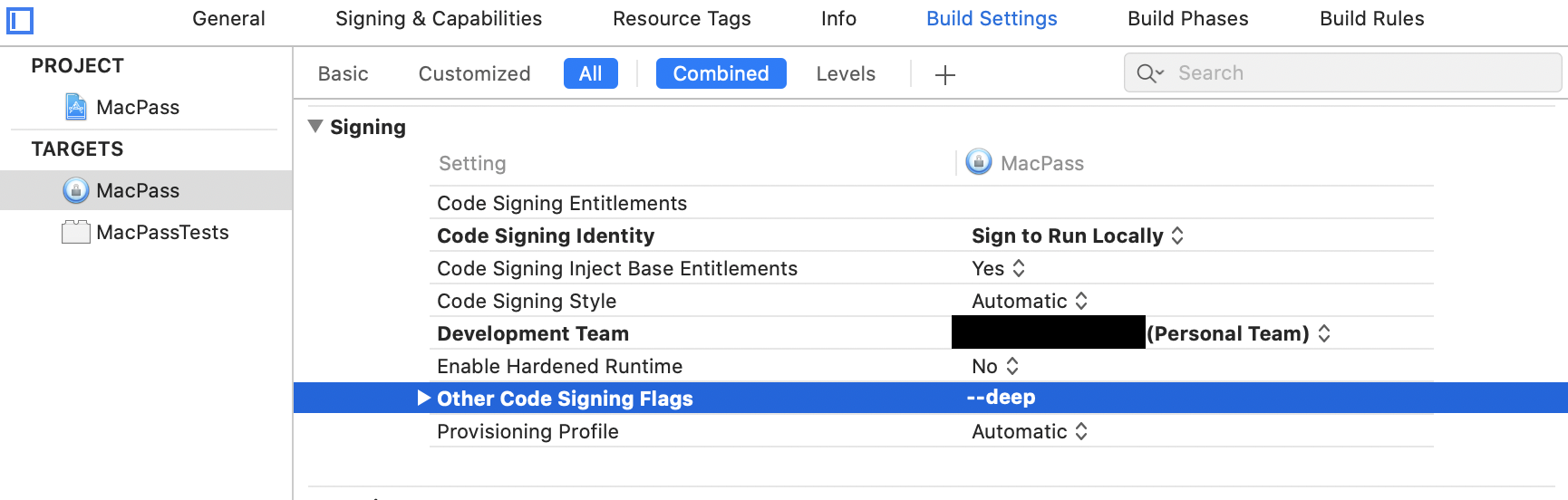
Knapoc
on 4 Apr 2020
@georgesnow I just read through most of these comments. what do you still need to build/test/fix before you're comfortable creating a PR? Is it just the things in your TODO of your pre-release?
 MrPickles2009
on 10 May 2020
MrPickles2009
on 10 May 2020
@MrPickles2009 i believe so. There is also clean up work that will need to happen at the end. You can take a look at my fork and get an idea where I am at. Any dev help would be great particularly if you have access to Mac with Touch ID.
georgesnow
on 12 May 2020
@georgesnow i do have a mac with touch id so i can help you out. I’ll try and get a pr your way
MrPickles2009
on 12 May 2020
https://stackoverflow.com/questions/40414077/how-can-you-test-touch-id-for-macos
Came across this for testing. I might try it out. It’s in swift so I will need to convert it to ObjC
georgesnow
on 13 May 2020
@MrPickles2009 I did a quick test of 1Password way to fake Touch ID. it works for non-touch id Macs it basically adds Keychain integration which was requested in another issue. It basiclly works it way down. It appears it would also allow Apple Watch support. Eg.. it will first look to see if the Mac supports Touch ID, if not, then it tries to see if there is Apple Watch, then finally user password.
The only thing that is left is to decide where the UI interactions should go.
georgesnow
on 19 May 2020
@georgesnow so when i authenticate with my fingerprint is it supposed to retrieve my database password from keychain and automatically fill it in?
MrPickles2009
on 20 May 2020
Correct. However, the only way to add your password to use Touch ID/keychain is under “Change Master Password”. When you change your password(or just type the same password again twice). It will prompt and ask if you want to use Touch ID
georgesnow
on 20 May 2020
@georgesnow is the retrieval and autofill currently working? i can see that my database pw is successfully stored in keychain, it just doesn't ever autofill when i authenticate with my finger when i am prompted. The gif below shows me opening keypass, being prompted for my fingerprint, authenticating with my fingerprint and then nothing happens

MrPickles2009
on 20 May 2020
@georgesnow do you have an easier way to chat where we can quickly discuss bugs and get on the same page?
MrPickles2009
on 20 May 2020
georgesnow
on 20 May 2020
FYI, there is an alternative implementation for TouchID on #1089, which could use more testers.
 corporate-gadfly
on 23 Aug 2020
corporate-gadfly
on 23 Aug 2020
@corporate-gadfly I’ll help you test. anything specific you need tested?
MrPickles2009
on 27 Aug 2020
@MrPickles2009 Nothing in particular. Just wanted to get more eyes on it. Thx.
corporate-gadfly
on 27 Aug 2020
Related issues
 btxtiger
·
7Comments
btxtiger
·
7Comments
 uwqwxing886
·
5Comments
uwqwxing886
·
5Comments
 kevinpapst
·
3Comments
kevinpapst
·
3Comments
 ghost
·
6Comments
ghost
·
6Comments
 Lapin
·
5Comments
Lapin
·
5Comments
Most helpful comment
I currently use KeeWeb on macOS, and lack of TouchID unlock is one of my main frustrations. If MacPass supported this feature I'd definitely switch over. Fingers crossed for progress on this!