Macpass: [Feature request] Run in background / hide from dock
Hey, very much enjoying MacPass so thank you first of all
I would like to be able to close the main MacPass window and hide it from my dock, and still have it run (with the .kdbx unlocked) in the background with the top menu item available for reopening the window.
I understand the if (window open) .kdbx is unlocked design intent but perhaps this could be covered by the idling features in the preferences?
Cheers
 jarmitage
All 8 comments
On first thought this is rather simple, but: What's so bad about just hiding MacPass? Is the menu item so much better than the icon in the dock? The second thing is, I would have to hide/show the App icon every time you click on the menu item since app hidden from the dock do not get any Menu Bar support, that is, it won't show any menus until the dock Icon reappears.
 mstarke
on 20 Jun 2016
mstarke
on 20 Jun 2016
Yeah, I guess I have a thing about closing windows and apps that I'm 'not using'!
Are you sure? The reason I suggested it is that I know of apps that appear as menu items instead of on the dock, and when you click the menu item the first option is 'Show App' or 'Show Window' etc. For example (although based on Electron I think): https://qotoqot.com/qbserve/
jarmitage
on 21 Jun 2016
I'd also like to see such a feature. I'd suggest it makes sense cuz with my browsers connected via MacPassHTTP I'm not really using MacPass as an application but rather for the service it's providing.
The point about the menu bar makes sense which made me think of how other apps manage this and a good example I found is LittleSnitch: there's a modular window that's triggered by the menu bar icon, but if you want to do anything more involved than basic interactions you still have to launch the main app.
Another example would be the native OSX Keychain Access application that has a menu bar feature with limited options in the drop down allowing you to lock/unlock keychains and launch the app.
 jinnko
on 25 Jun 2016
jinnko
on 25 Jun 2016
+1. I am currently running a temporary 'fix' that hides the dock icon by editing Info.plist:
<key>LSUIElement</key>
<true/>
I then minimise the window and forget about it (letting MacPassHTTP do its work).
For me, the ultimate workflow would be
- When ChromeIPass/Passifox sees a login form, and can't connect to the server, it (somehow) automatically opens MacPass and prompts for my password.
- Then the window/dock icon is hidden until I double click on the MacPass app or search for it in Spotlight.
Part 1 would require support from the browser extension and I'm not sure how to implement if browser extensions can even open native apps. Part 2 could be quite easily implemented and toggle in the preferences (use NSApp setActivationPolicy or something)
 neon64
on 28 Jul 2016
neon64
on 28 Jul 2016
@neon64 not related to this bug really, but I had to change my workflow when I switched from lastpass and after a short time I was a lot happier with my new workflow.
-> use https://addons.mozilla.org/en-US/firefox/addon/url-in-title/ to have the URL in the tab (after the title, so you don't see it in fact)
-> use global autotype
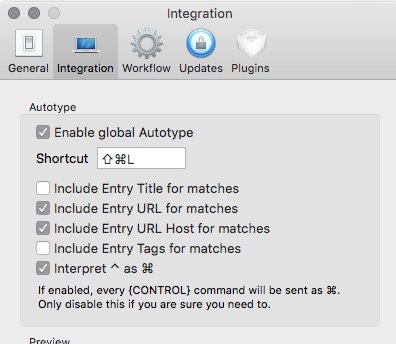
-> keep macpass hidden (but do not close the windows)
Then to login use the shortcut directly from your browser.
The advantage:
- secure (no link between your browser and macpass)
- light (no script injected in web page to detect form)
- fast (only one shortcut)
Disadvantage:
- you have to enter a new entry from macpass (but lastpass mostly failed on that anyway)
 gagarine
on 14 Mar 2018
gagarine
on 14 Mar 2018
+1.
Sharing a screen a lot: demos, conferences, etc.
Personally do not want to make potential attacker aware about my password manager :)
 Neve
on 10 Jun 2019
Neve
on 10 Jun 2019
You should check out these 2 plugins: AutotypeURL and MacPassRevealer
Now I wouldn’t call these “production or prime time ready”. They do provide some of the functionality that is being described. The MPR plugin I am working on hiding the dock icon with just having the menubar. However in my initial tests I had some strange behavior with the windows being displayed correctly while hiding the dock icon. I haven’t delved into further as I am trying to refine the other functionality first.
 georgesnow
on 11 Jun 2019
georgesnow
on 11 Jun 2019
Same problem here in 4.33.5. It wasn't the case in 4.4.x.
 andybergon
on 1 Oct 2019
andybergon
on 1 Oct 2019
Related issues
 btxtiger
·
7Comments
btxtiger
·
7Comments
 magebarf
·
3Comments
magebarf
·
3Comments
 trimailov
·
7Comments
trimailov
·
7Comments
 Lapin
·
5Comments
Lapin
·
5Comments
 aliok
·
7Comments
aliok
·
7Comments
Most helpful comment
+1. I am currently running a temporary 'fix' that hides the dock icon by editing
Info.plist:I then minimise the window and forget about it (letting MacPassHTTP do its work).
For me, the ultimate workflow would be
Part 1 would require support from the browser extension and I'm not sure how to implement if browser extensions can even open native apps. Part 2 could be quite easily implemented and toggle in the preferences (use NSApp setActivationPolicy or something)