Machinelearning: TextLoader Load From Multiple Files Inconsistent Behavior
System information
- OS version/distro: Windows 10
- .NET Version (eg., dotnet --info): 3.1
- ML.NET Version (eg., dotnet --info): 1.5.0-preview2
Issue
When loading data that is in multiple files, whether the data is in a single folder or multiple folders, the behavior in inconsistent. When the data is in a single folder, wildcards can be used. That, however is not the case when the data is in separate folders/subfolders.
The non-working examples don't work for various reasons. However, in general, the behavior appears inconsistent depending on the structure of the folder.
Source code / logs
Data Folder Structure:
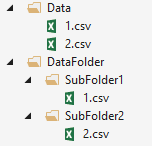
Data Sample:
Size (Sq. ft.), HistoricalPrice1 ($), HistoricalPrice2 ($), HistoricalPrice3 ($), Current Price ($)
700, 100000, 3000000, 250000, 500000
Source code:
class Program
    {
        static void Main(string[] args)
        {
            MLContext ctx = new MLContext();

            TextLoader textLoader = ctx.Data.CreateTextLoader<HousingData>(separatorChar: ',', hasHeader: true);

            IDataView dvSingleFolder = textLoader.Load("Data/*");
            IDataView dvMultipleFoldersNotWorking = textLoader.Load("DataFolder/*/*");
            IDataView dvMultipleFoldersNotWorking2 = textLoader.Load("DataFolder/SubFolder1/*", "DataFolder/SubFolder2/*");
            IDataView dvMultileFoldersWorking = textLoader.Load("DataFolder/SubFolder1/1.csv", "DataFolder/SubFolder2/2.csv");

            var singleFolderPreview = dvSingleFolder.Preview();
            var multipleFolderPreview = dvMultipleFoldersNotWorking.Preview();
            var multipleFolderPreview2 = dvMultipleFoldersNotWorking2.Preview();
            var multipleFoldersWorkingPreview = dvMultileFoldersWorking.Preview();
        }
    }

public class HousingData
    {
        [LoadColumn(0)]
        public float Size { get; set; }

        [LoadColumn(1, 3)]
        [VectorType(3)]
        public float[] HistoricalPrices { get; set; }

        [LoadColumn(4)]
        [ColumnName("Label")]
        public float CurrentPrice { get; set; }
    }
 luisquintanilla
All 2 comments
Adding zipped directory with code and files.
luisquintanilla
on 30 Mar 2020
Hey @luisquintanilla , the method used to retrieve the full paths of files using wildcards, StreamUtils.Expand does not currently support retrieving wildcard files from wildcard folders, like "DataFolder/*/*". I'm working on integrating this feature.
Edit: Actually this feature is currently supported, with the usage of "..." to indicate the recursive directory(s). So the following path "DataFolder/.../*" is supported, and the usage of "DataFolder/*/*" is wrong.
 mstfbl
on 7 Apr 2020
mstfbl
on 7 Apr 2020
Related issues
 rebecca-burwei
·
3Comments
rebecca-burwei
·
3Comments
 aslotte
·
3Comments
aslotte
·
3Comments
 pgovind
·
3Comments
pgovind
·
3Comments
 lionelquirynen
·
3Comments
lionelquirynen
·
3Comments
 daholste
·
4Comments
daholste
·
4Comments
Most helpful comment
Hey @luisquintanilla , the method used to retrieve the full paths of files using wildcards,
StreamUtils.Expanddoes not currently support retrieving wildcard files from wildcard folders, like"DataFolder/*/*". I'm working on integrating this feature.Edit: Actually this feature is currently supported, with the usage of
"..."to indicate the recursive directory(s). So the following path"DataFolder/.../*"is supported, and the usage of"DataFolder/*/*"is wrong.