Lvgl: lv_ list roll mode: switch last>top and opposite (top>last)
Hi.
Is it possible to make automatic switchin in lv_list to last position when top is detected?
When press UP, last position should be selected:
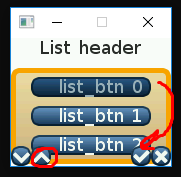
And similar for bottom
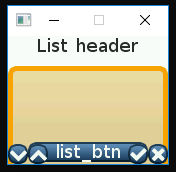
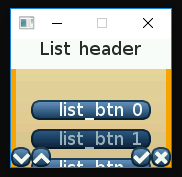
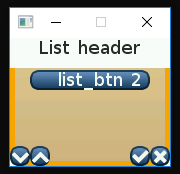
I found similar issue for lv_roller object https://github.com/littlevgl/lvgl/issues/511 and tried add "fake"
two list items on top and bottom, but it looks pretty weird in list, even with small object sizes:
. . .
    //Create the list
    lv_obj_t * list = lv_list_create(lv_scr_act(), NULL);
    lv_obj_set_size(list, 160, 98);
    lv_obj_align(list, NULL, LV_ALIGN_IN_TOP_MID, 0, 30);
    lv_list_set_sb_mode(list, LV_SB_MODE_OFF);

    sprintf_s(buf, 5, "");
    list_btn = lv_list_add(list, NULL, buf, sel_action);
    lv_obj_set_size(list_btn, 0, 1);

    for (uint8_t i = 0; i < 3; i++) {
        sprintf_s(buf, 15, "list_btn %d", i);
        list_btn = lv_list_add(list, NULL, buf, sel_action);
        lv_obj_set_free_num(list_btn, i);
        lv_btn_set_fit(list_btn, false, false);
        lv_obj_set_size(list_btn, 120, 20);
    }
    sprintf_s(buf, 5, "");
    list_btn = lv_list_add(list, NULL, buf, sel_action);
    lv_obj_set_size(list_btn, 0, 1);
. . .
 MichaelVLV
All 4 comments
I have found reason of huge blank spaces, need to disable buffer completely, not just set it clear:
list_btn = lv_list_add(list, NULL, buf, sel_action);
to
list_btn = lv_list_add(list, NULL, NULL, sel_action);
And also implemented "rolling", but this is really bad way (need extra task to track list, keep unneccessary objects globally):
Somewhere in main
. . .
lv_task_create(check_list_task, 100, LV_TASK_PRIO_MID, NULL);
. . .
````
Checker itself
```C
void check_list_task()
{
    gl_list_btn_to_check= lv_list_get_btn_selected(list);
    printf("%d\n", lv_list_get_btn_index(list, gl_list_btn_to_check));
    if (lv_list_get_btn_index(list, gl_list_btn_to_check) == 4)
    {
        lv_list_set_btn_selected(list, list_btn[1]);
    }

    if (lv_list_get_btn_index(list, gl_list_btn_to_check) == 0)
    {
        lv_list_set_btn_selected(list, list_btn[3]);
    }
}
Screen itself:
lv_obj_t * gl_list_btn_to_check= NULL;
lv_obj_t * gl_list = NULL;
lv_obj_t * gl_list_btn[5];
static void list_menu(menu_scr_t group_idx)
{
    lv_obj_t * scr = lv_obj_create(NULL, NULL);
    lv_scr_load(scr);

    lv_obj_t * label = lv_label_create(lv_scr_act(), NULL);
    lv_label_set_text(label, "List header");
    lv_obj_align(label, NULL, LV_ALIGN_IN_TOP_MID, 0, 0);

    //Create the list
    gl_list = lv_list_create(lv_scr_act(), NULL);
    lv_obj_set_size(gl_list, 160, 98);
    lv_obj_align(gl_list, NULL, LV_ALIGN_IN_TOP_MID, 0, 30);
    lv_list_set_sb_mode(gl_list, LV_SB_MODE_OFF);

    gl_list_btn[0] = lv_list_add(gl_list, NULL, NULL, sel_action);
    lv_obj_set_size(gl_list_btn[0], 0, 0);
    lv_obj_set_free_num(gl_list_btn[0], 88); // 88 index for TOP invisible list item

    for (uint8_t i = 1; i < 4; i++)
    {
        sprintf_s(buf, 15, "list_btn %d", i);

        gl_list_btn[i] = lv_list_add(gl_list, NULL, buf, sel_action);
        lv_obj_set_free_num(gl_list_btn[i], i);
        lv_btn_set_fit(gl_list_btn[i], false, false);
        lv_obj_set_size(gl_list_btn[i], 120, 20);
    }

    gl_list_btn[4] = lv_list_add(gl_list, NULL, NULL, sel_action);
    lv_obj_set_size(gl_list_btn[4], 0, 0);
    lv_obj_set_free_num(gl_list_btn[4], 99); // 99 index for BOTTOM invisible list item

    lv_group_add_obj(groups[group_idx], gl_list);

    kaypad_create();
}
So are there any adequate ways to make list rolling? 😄
MichaelVLV
on 26 Feb 2019
@MichaelVLV At the moment, as you discovered in #511, it's not currently supported.
I'll also ping @kisvegabor; maybe he has an idea.
 embeddedt
on 26 Feb 2019
embeddedt
on 26 Feb 2019
@embeddedt
It's not the same as the roller issue. For the roller, it'd be very difficult to implement infinite scrolling. For the list, it's quite simple.
It can be added here: https://github.com/littlevgl/lvgl/blob/master/lv_objx/lv_list.c#L817
If the next/prev element is NULL select the first/last one instead.
 kisvegabor
on 26 Feb 2019
kisvegabor
on 26 Feb 2019
Thanks for help, I have made little modification and its working :)
MichaelVLV
on 27 Feb 2019
Related issues
 pekalicious
·
6Comments
pekalicious
·
6Comments
 banshanju
·
3Comments
banshanju
·
3Comments
 mianhuacar
·
5Comments
mianhuacar
·
5Comments
 thepolygongo
·
3Comments
thepolygongo
·
3Comments
 puzrin
·
5Comments
puzrin
·
5Comments
Most helpful comment
@embeddedt
It's not the same as the roller issue. For the roller, it'd be very difficult to implement infinite scrolling. For the list, it's quite simple.
It can be added here: https://github.com/littlevgl/lvgl/blob/master/lv_objx/lv_list.c#L817
If the next/prev element is
NULLselect the first/last one instead.