Hi,
I have two issues and would appreciate some guidance please,
- Trying to align objects side by side on buttons. Alignment is always centered and one above the other regardless of alignment set by lv_obj_align.
- Placing a base object on a button, when a click occurs on that object the button itself does not register a click, can this be set up so that it does ?
Please see the attached code and PNG screenshot.
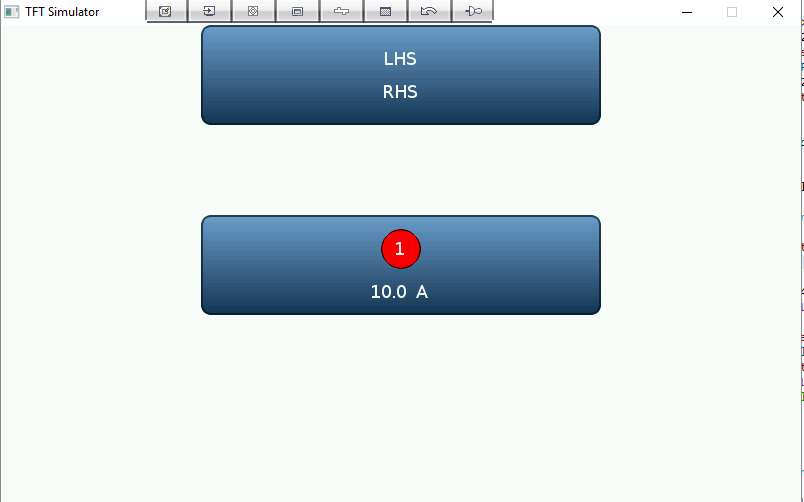
lv_obj_t * create_button_with_2_labels_side_by_side ( lv_obj_t * pPar, const char * pTxtLeft, const char * pTxtRight )
{
    lv_obj_t * pBtn = lv_btn_create( pPar, NULL );
    lv_obj_set_size( pBtn, 400, 100 );

    lv_obj_t * pLbl = lv_label_create( pBtn, NULL );
    lv_label_set_static_text( pLbl, pTxtLeft );
    lv_obj_align( pLbl, NULL, LV_ALIGN_IN_LEFT_MID, 0, 0 );

    pLbl = lv_label_create( pBtn, NULL );
    lv_label_set_static_text( pLbl, pTxtRight );
    lv_obj_align( pLbl, NULL, LV_ALIGN_IN_RIGHT_MID, 0, 0 );

    return pBtn;
}

static lv_obj_t * create_idobj ( lv_obj_t * pPar, lv_style_t * pStCir, const char * pTxt )
{
    lv_obj_t * pCir = lv_obj_create( pPar, NULL );
    lv_obj_set_style( pCir, pStCir );
    lv_obj_set_size( pCir, 40, 40 );

    lv_obj_t * pLbl = lv_label_create( pCir, NULL );
    lv_label_set_static_text( pLbl, pTxt );
    lv_obj_align( pLbl, NULL, LV_ALIGN_CENTER, 0, 0 );

    return pCir;
}

lv_obj_t * create_button_with_idobj_and_label_side_by_side ( lv_obj_t * pPar, lv_style_t * pStCir, const char * pTxtIdLeft, const char * pTxtRight )
{
    lv_obj_t * pBtn = lv_btn_create( pPar, NULL );
    lv_obj_set_size( pBtn, 400, 100 );

    lv_obj_t * pIdobj = create_idobj( pBtn, pStCir, pTxtIdLeft );
    lv_obj_align( pIdobj, NULL, LV_ALIGN_IN_LEFT_MID, 0, 0 );

    lv_obj_t * pLbl = lv_label_create( pBtn, NULL );
    lv_label_set_static_text( pLbl, pTxtRight );
    lv_obj_align( pLbl, NULL, LV_ALIGN_IN_RIGHT_MID, 0, 0 );

    return pBtn;
}

void buttons_test ( void )
{
    lv_obj_t * pBtn = create_button_with_2_labels_side_by_side( lv_scr_act(), "LHS", "RHS" );
    lv_obj_align( pBtn, NULL, LV_ALIGN_IN_TOP_MID, 0, 0 );

    static lv_style_t stCirRed;
    lv_style_copy( &stCirRed, &lv_style_plain_color );
    stCirRed.body.shadow.width = 0;
    stCirRed.body.radius = LV_RADIUS_CIRCLE;
    stCirRed.body.border.width= 1;
    stCirRed.body.border.opa = LV_OPA_100;
    stCirRed.body.main_color = LV_COLOR_HEX( 0xff0000 );
    stCirRed.body.grad_color = LV_COLOR_HEX( 0xff0000 );
    stCirRed.body.border.color = LV_COLOR_HEX( 0x000000 );
    stCirRed.body.shadow.color = LV_COLOR_HEX( 0x000000 );

    pBtn = create_button_with_idobj_and_label_side_by_side( lv_scr_act(), &stCirRed, "1", "10.0 A" );
    lv_obj_align( pBtn, NULL, LV_ALIGN_CENTER, 0, 0 );
}
 DeonMarais64
All 4 comments
Hi,
By default the buttons has
LV_LAYOUT_CENTER. To turn it off use:lv_btn_set_layout(btn, LV_LAYOUT_OFF)You can register a callback for click event like this
lv_btn_set_action(btn, LV_BTN_ACTION_CLICK, my_callback)
Please have a look at this documentation: https://littlevgl.com/object-types/button-lv_btn
 kisvegabor
on 25 Jun 2018
kisvegabor
on 25 Jun 2018
Thank you for your response, That has resolved the first issue I had.
Perhaps I did not explain the second problem I have carefully enough. If click happens to occur on the red circle (which is on the button) it is not registered as a click. The question I am asking can that be set so that it does.
lv_res_t btn_click_action ( lv_obj_t * pBtn )
{
    static lv_obj_t * pLbl;
    static int8_t ctr;
    static const char * pTxt[] = { "A", "B", "C", "D" };

    if( pLbl == NULL )
        pLbl = lv_label_create( pBtn, NULL );

    lv_label_set_static_text( pLbl, pTxt[ctr] );
    lv_obj_align( pLbl, NULL, LV_ALIGN_CENTER, 0, 0 );

    ctr = (ctr < 3) ? ctr + 1 : 0;

    return LV_RES_OK;
}

static lv_obj_t * create_idobj ( lv_obj_t * pPar, lv_style_t * pStCir, const char * pTxt )
{
    lv_obj_t * pCir = lv_obj_create( pPar, NULL );
    lv_obj_set_style( pCir, pStCir );
    lv_obj_set_size( pCir, 40, 40 );

    lv_obj_t * pLbl = lv_label_create( pCir, NULL );
    lv_label_set_static_text( pLbl, pTxt );
    lv_obj_align( pLbl, NULL, LV_ALIGN_CENTER, 0, 0 );

    return pCir;
}

lv_obj_t * create_button_with_idobj_and_label_side_by_side ( lv_obj_t * pPar, lv_style_t * pStCir, const char * pTxtIdLeft, const char * pTxtRight )
{
    lv_obj_t * pBtn = lv_btn_create( pPar, NULL );
    lv_obj_set_size( pBtn, 200, 50 );
    lv_btn_set_layout( pBtn, LV_LAYOUT_OFF );

    lv_obj_t * pIdobj = create_idobj( pBtn, pStCir, pTxtIdLeft );
    lv_obj_align( pIdobj, NULL, LV_ALIGN_IN_LEFT_MID, 10, 0 );

    lv_obj_t * pLbl = lv_label_create( pBtn, NULL );
    lv_label_set_static_text( pLbl, pTxtRight );
    lv_obj_align( pLbl, NULL, LV_ALIGN_IN_RIGHT_MID, -10, 0 );

    lv_btn_set_action( pBtn, LV_BTN_ACTION_CLICK, btn_click_action );

    return pBtn;
}
Oh, I see:
You can disable the "clickable" attribute of the red circle. This way the object behind it will be clicked. You can do it like this: lv_obj_set_click(red_circle, false)
kisvegabor
on 25 Jun 2018
I also met the same problem. Thank you very much.
 zhaojigao
on 13 Jul 2018
zhaojigao
on 13 Jul 2018
Related issues
 Moo2017
·
3Comments
Moo2017
·
3Comments
 banshanju
·
3Comments
banshanju
·
3Comments
 MShahrukh0
·
6Comments
MShahrukh0
·
6Comments
 mharizanov
·
4Comments
mharizanov
·
4Comments
 amirgon
·
6Comments
amirgon
·
6Comments
Most helpful comment
Oh, I see:
You can disable the "clickable" attribute of the red circle. This way the object behind it will be clicked. You can do it like this:
lv_obj_set_click(red_circle, false)