Lottie-web: From PNG sequence to bodymovin JSON
I am trying to create a JSON file from a comp with a PNG sequence inside, but I get a blank page. Nothing is inside the JSON. None of the layers are exported.
Also tried to check HTML in Safari
AE CC 2017
There are multiple comps in the project, three of those I need to export. Every single one of those contain PNG sequences, but all of those JSONs that are created are empty.
 Ishua-issue
All 22 comments
Hi, unfortunately, image sequences are not yet supported by the extension and player
 bodymovin
on 31 May 2018
bodymovin
on 31 May 2018
Hey @bodymovin , is there any chance of bodymovin being updated with png sequences, or particle effects soon?
 AnaeronBaggins
on 8 Jun 2018
AnaeronBaggins
on 8 Jun 2018
I would like more information regarding Json and particle plugins in After Effects.
Are any particle system plugins (CC particle, Trapcode particular, etc.) compatible and exportable in json?
I'm trying to confirm this since i'm not clear whether particles are compatible.
 merc28
on 8 Jun 2018
merc28
on 8 Jun 2018
Hi, particles are not supported and won't be in the near future.
They would have a big impact on performance so until a webgl renderer is ready it doesn't make sense.
png sequences could be supported but there is no play for it for now.
What would be the use case?
bodymovin
on 8 Jun 2018
I've found to get a PNG sequence to work in AE with Bodymovin you need to:
- Drag and drop the PNG sequence individual PNGs into your composition (instead of importing as a grouped PNG sequence)
- Reduce each PNG's layer to a single frame
- With all of the PNG layers selected, right click on the layers in the timeline -> Keyframe Assistant -> Sequence Layers
Each PNG layer will act as a single frame, Bodymovin will export out an images folder with the PNGs, and render the animation as usual.
 nickmadedesign
on 17 Jul 2018
nickmadedesign
on 17 Jul 2018
Can export in json?
 nabilfx
on 25 Nov 2018
nabilfx
on 25 Nov 2018
@bodymovin Hi
Bodymovin do not render any image format. (png, jpeg)
what's wrong
 NikoYusu
on 25 Jan 2019
NikoYusu
on 25 Jan 2019
I've found to get a PNG sequence to work in AE with Bodymovin you need to:
- Drag and drop the PNG sequence individual PNGs into your composition (instead of importing as a grouped PNG sequence)
- Reduce each PNG's layer to a single frame
- With all of the PNG layers selected, right click on the layers in the timeline -> Keyframe Assistant -> Sequence Layers
Each PNG layer will act as a single frame, Bodymovin will export out an images folder with the PNGs, and render the animation as usual.
do the pngs have to be hosted on the website in a folder or just the json?
 thearkadia
on 19 Feb 2019
thearkadia
on 19 Feb 2019
I've found to get a PNG sequence to work in AE with Bodymovin you need to:
- Drag and drop the PNG sequence individual PNGs into your composition (instead of importing as a grouped PNG sequence)
- Reduce each PNG's layer to a single frame
- With all of the PNG layers selected, right click on the layers in the timeline -> Keyframe Assistant -> Sequence Layers
Each PNG layer will act as a single frame, Bodymovin will export out an images folder with the PNGs, and render the animation as usual.
do the pngs have to be hosted on the website in a folder or just the json?
It could depend on your export settings, but by default, it should export the PNGs to the default image folder to pair alongside the JSON file.
Aside from a PNG sequence, I've also managed to set up a PNG sprite and updated its position in AE but I'm not sure of the limits of that approach in production. It may be more effective to load a single asset for animation rendering than separate PNG sequence files.
nickmadedesign
on 19 Feb 2019
@nickmadedesign - thank you very much, this is excellent !
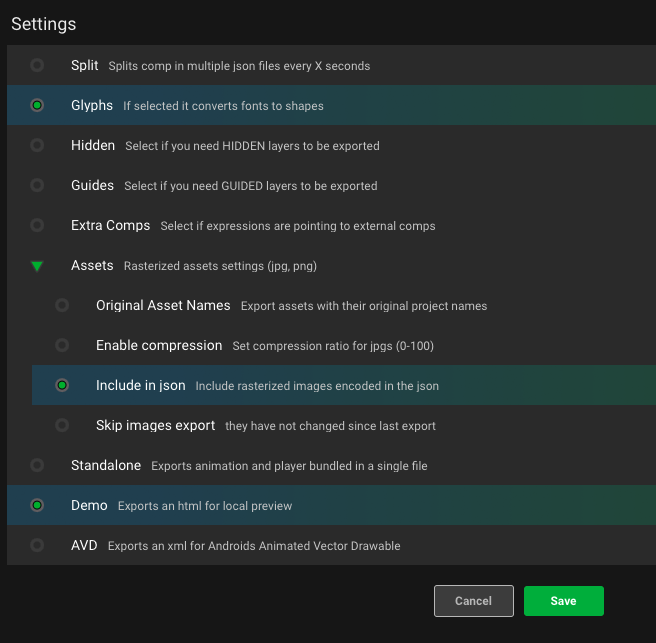
By the way, if somebody wants to include all image-sequence-data inside the json-file (and not deal with a separate image-folder) then please select Include in json under the bodymovin-Settings-Assets menu.
Everything in the json-file might simplify an integration into Mobile Apps.
Here are my bodymovin settings: (demo is optional)
 iKK001
on 22 Feb 2019
iKK001
on 22 Feb 2019
@nickmadedesign Thanks it works.
 Shahzainali
on 18 Jul 2019
Shahzainali
on 18 Jul 2019
I've found to get a PNG sequence to work in AE with Bodymovin you need to:
- Drag and drop the PNG sequence individual PNGs into your composition (instead of importing as a grouped PNG sequence)
- Reduce each PNG's layer to a single frame
- With all of the PNG layers selected, right click on the layers in the timeline -> Keyframe Assistant -> Sequence Layers
Each PNG layer will act as a single frame, Bodymovin will export out an images folder with the PNGs, and render the animation as usual.
thanks~~!!!! excellent!!!!
 sherry-sun46
on 3 Jan 2020
sherry-sun46
on 3 Jan 2020
image sequences are supported since version 5.5.9
bodymovin
on 3 Jan 2020
Jpeg or PNG Image sequence are not exporting as .json file!
This tutorial shows the .json exported successfully: https://www.youtube.com/watch?v=FdigUlNdU6g&t=977s
I followed same directions but didn't work with me, any advice?
 cyrex81
on 30 Jul 2020
cyrex81
on 30 Jul 2020
I am trying to create a JSON file from a comp with a PNG sequence inside, but I get a blank page. Nothing is inside the JSON. None of the layers are exported.
Also tried to check HTML in Safari
AE CC 2017There are multiple comps in the project, three of those I need to export. Every single one of those contain PNG sequences, but all of those JSONs that are created are empty.
Jpeg or PNG Image sequence are not exporting as .json file!
This tutorial shows the .json exported successfully: https://www.youtube.com/watch?v=FdigUlNdU6g&t=977s
I followed same directions but didn't work with me, any advice?
cyrex81
on 30 Jul 2020
Image sequences JPEG or PNG's are not exporting in Bodymovin version 5.7.1
what is the problem? could it be the plugin problem?
cyrex81
on 2 Aug 2020
Image sequences JPEG or PNG's are not exporting in Bodymovin version 5.7.1
what is the problem? could it be the plugin problem?
check standard
 nazoolol
on 21 Aug 2020
nazoolol
on 21 Aug 2020
I am trying to create a JSON file from a comp with a PNG sequence inside, but I get a blank page. Nothing is inside the JSON. None of the layers are exported.
Also tried to check HTML in Safari
AE CC 2017
There are multiple comps in the project, three of those I need to export. Every single one of those contain PNG sequences, but all of those JSONs that are created are empty.Jpeg or PNG Image sequence are not exporting as .json file!
This tutorial shows the .json exported successfully: https://www.youtube.com/watch?v=FdigUlNdU6g&t=977s
I followed same directions but didn't work with me, any advice?
Did you get a fix for this cyrex? I am having the same issue.
 ghost
on 27 Aug 2020
ghost
on 27 Aug 2020
@betawaxxx what version of AE are you using?
bodymovin
on 29 Aug 2020
PNG sequence layer can not include in json. when i export it, it output image folder instead. (I'v already checked the include.. option)
 umlearn
on 26 Oct 2020
umlearn
on 26 Oct 2020
Son of a B... I did it. Guys if you have problems with exporting PNG sequence check this in After effects options. EDIT>PREFERENCES>SCRIPTING&EXPRESIONS>ALLOW SCRIPTS TO WRITE FILES must be checked. Captian out
 Wnfdiary
on 25 Jan 2021
Wnfdiary
on 25 Jan 2021
Son of a B... I did it. Guys if you have problems with exporting PNG sequence check this in After effects options. EDIT>PREFERENCES>SCRIPTING&EXPRESIONS>ALLOW SCRIPTS TO WRITE FILES must be checked. Captian out
Holy f... thanks Capt
 Zafander
on 4 Feb 2021
Zafander
on 4 Feb 2021
Related issues
 sowmyy
·
18Comments
sowmyy
·
18Comments
 wujekbogdan
·
18Comments
wujekbogdan
·
18Comments
 wyfang
·
36Comments
wyfang
·
36Comments
 balinabbb
·
35Comments
balinabbb
·
35Comments
 margzims
·
21Comments
margzims
·
21Comments
Most helpful comment
@nickmadedesign - thank you very much, this is excellent !
By the way, if somebody wants to include all image-sequence-data inside the json-file (and not deal with a separate image-folder) then please select
Include in jsonunder the bodymovin-Settings-Assets menu.Everything in the json-file might simplify an integration into Mobile Apps.
Here are my bodymovin settings: (demo is optional)