Hi everyone,
I'm trying to install this plugin (I really wanna do this) but I can't find the CEP folder you are talking about, searching on internet I understood that is some sort of adobe sdk but I still can't understand how the folder should be created.
thanks for the help
 wanbinkimoon
All 61 comments
@wanbinkimoon Hi! Are you using CC 2015? and what OS?
 bodymovin
on 8 Oct 2015
bodymovin
on 8 Oct 2015
I'm using cc 2015 and Mac OS X El Capitan
Nicola Bertelloni
Mobile: +39 328 4559247
On 08 ott 2015, at 19:12, hernan [email protected] wrote:
@wanbinkimoon Hi! Are you using CC 2015? and what OS?
—
Reply to this email directly or view it on GitHub.
wanbinkimoon
on 8 Oct 2015
@wanbinkimoon did you try instructions on this page? they seem to work fine.
https://helpx.adobe.com/x-productkb/global/installingextensionsandaddons.html
go to "Install third-party extensions".
where it says:
Run the command ./Contents/Mac OS/ExManCmd --install .zxp to install the extension.
change it to
./Contents/MacOS/ExManCmd --install bodymovin.zxp
bodymovin
on 8 Oct 2015
Yes, i get a dialog box which says that the xml file has been corrupted.
On 8 October 2015 at 21:49:52, hernan ([email protected]) wrote:
@wanbinkimoon did you try instructions on this page? they seem to work fine.
https://helpx.adobe.com/x-productkb/global/installingextensionsandaddons.html
go to "Install third-party extensions".
where it says:
Run the command ./Contents/Mac OS/ExManCmd --install .zxp to install the extension.
change it to
./Contents/MacOS/ExManCmd --install bodymovin.zxp
—
Reply to this email directly or view it on GitHub.
wanbinkimoon
on 9 Oct 2015
@wanbinkimoon can you attach a screenshot of the dialog box?
bodymovin
on 9 Oct 2015
May want to consider submitting this to the adobe add-ons portal
https://creative.adobe.com/addons
This way users can install it automatically through the creative cloud, extension manager is EOL (https://www.adobeexchange.com/resources/27).
 cjgammon
on 13 Oct 2015
cjgammon
on 13 Oct 2015
@cjgammon I tried to do it twice. but I got an email informing me that zxp extensions are not accepted for AE plugins and I should create another type of installer. I haven't figured out what installer is acceptable. I guess they mean native installers.
Do you have any idea about this?
bodymovin
on 13 Oct 2015
Hi,
I tryied againg and again and again.
I made some progresses but, still not working, at the moment I'm dealing with an error 403 given by the ExManCmd, I did find any documentation on the web regarding ExManCmd errors, can you help me?
wanbinkimoon
on 13 Oct 2015
@wanbinkimoon Hi.
Another user told me it happened the same to him. But he tried again and it worked. Here is a list of error codes.
http://www.adobeexchange.com/resources/19#errors
Have you tried editing the registry key?
bodymovin
on 13 Oct 2015
Hi,
I tried a lot of times but the error still come up, what do you mean editing the registry key?
wanbinkimoon
on 13 Oct 2015
@bodymovin sent you an e-mail
cjgammon
on 14 Oct 2015
Can you send it again, I never receive it :)
On 14 October 2015 at 17:30:48, CJ Gammon ([email protected]) wrote:
@bodymovin sent you an e-mail
—
Reply to this email directly or view it on GitHub.
wanbinkimoon
on 14 Oct 2015
I sent an e-mail to bodymovin, regarding submitting the plug-in to the adobe add-ons portal. sorry for the confusion.
cjgammon
on 14 Oct 2015
I'm using cc 2015 and Mac OS X El Capitan
it doesn not show up on window>extentions
 KyleDEV
on 22 Nov 2015
KyleDEV
on 22 Nov 2015
@KyleDEV how did you install it?
Instructions here usually work well.
https://helpx.adobe.com/x-productkb/global/installingextensionsandaddons.html
ignore first part and go directly to "Install third pary extensions"
bodymovin
on 22 Nov 2015
@bodymovin
just before your answer, I succeeded.
I find out this link: https://www.adobeexchange.com/resources/27
and that takes me to: https://www.adobeexchange.com/resources/28
I followed the instructions
Although the command accually was..
cd THEPATHofMY_ExMan_root
./Contents/MacOS/ExManCmd --install bodymovin.zxp
./Contents/MacOS/ExManCmd --list all
I think it is basically the same as your answer.
Thank you for your help
KyleDEV
on 22 Nov 2015
@bodymovin
I've tried installing the plugin using the above instructions as well as trying to install it manually, but when I copy the code into terminal, I get an error:
Failed to install, status = -156!
I've tried the troubleshooting area of the Adobe website but can't seem to find this error anywhere.
I've edited the registry key.
Can you please explain the installation process as if I am 5 years old!
I'm using AE2015 on OSX Yosemite.
 ratchetdrums
on 26 Nov 2015
ratchetdrums
on 26 Nov 2015
@ratchetdrums that error usually means the zxp file is missing or corrupted.
can you copy the command you are running to install it?
If you want to try it manually, you can follow instructions on this video:
https://vimeo.com/144533677
they are in spanish but you can follow them visually :)
bodymovin
on 26 Nov 2015
Ahh I've got it working now, thank you for that video link :)
I hadn't renamed the extension folder in the CEP extensions to 'bodymovin'
ratchetdrums
on 26 Nov 2015
You can have a look at this ZXP Installer. And the extension seems to load perfectly fine without debug mode on (CC14 & 15), since it's signed. I was wondering why you ask the user to turn on debug mode?
 Klustre
on 9 Dec 2015
Klustre
on 9 Dec 2015
@Klustre nice! I didn't know about it. I'll try it out.
I ask to set debug mode to tru because if you install it manually, you need debug mode for it to work.
bodymovin
on 9 Dec 2015
@bodymovin Actually as long as it's signed and none of the files are changed by the user, you can simply copy an extension's root folder to the extensions folder and it works, without setting debug mode to true.
Klustre
on 10 Dec 2015
@Klustre I'm not sure that is enough. I've received many mails telling me the extension was visible on the menu but wouldn't open. When they added the debug mode, it started working.
But I'll look further into it.
bodymovin
on 10 Dec 2015
@bodymovin What I've found is that it depends on how the ZXP is being extracted. On OSX when extracting the ZXP using The Unarchiver, everything runs just fine. But when changing .zxp to .zip and extracting it with the native unzipper corrupts the package and therefore it shows up in the menu, but doesn't work.
What I do is extract the ZXP myself and send that along with the package, so that I'm sure it's not corrupted by the extraction method of the user.
I'd be happy to hear your findings!
Klustre
on 10 Dec 2015
Confirmed had the same ting on OSX ElCaptain you need to use a 3rd party extractor.
From: Klustre [email protected]
Reply-To: bodymovin/bodymovin [email protected]
Date: Friday, 11 December 2015 at 3:37 AM
To: bodymovin/bodymovin [email protected]
Subject: Re: [bodymovin] Can't install the plugin (#17)
@bodymovin What I've found is that it depends on how the ZXP is being extracted. On OSX when extracting the ZXP using The Unarchiver, everything runs just fine. But when changing .zxp to .zip and extracting it with the native unzipper corrupts the package and therefore it shows up in the menu, but doesn't work. I'd be happy to hear your findings!
—
Reply to this email directly or view it on GitHub.
 mcpdob
on 10 Dec 2015
mcpdob
on 10 Dec 2015
Hey there,
I followed the tutorial you shared : https://vimeo.com/144533677
Everything looks fine except that the "Extensions" Tab doesnt show up in "Window". Anyone ?...
Thx a lot,
 bgkillertavu
on 28 Dec 2015
bgkillertavu
on 28 Dec 2015
@bgkillertavu Which After Effects version are you using?
Klustre
on 28 Dec 2015
CS6 and CC v.12.2.1.5
I've changed both plist and checked them.
The extension tab doesnt show up in AE. I've read that Extension Manager was needed to install extensions (even third party extensions, not sure about it), so i installed it, but the tab still doesnt shows up.
http://img15.hostingpics.net/pics/329128Capturedecran20151228a161953.png
Same error than @wanbinkimoon if i try installing it using the terminal:
./Contents/MacOS/ExManCmd --install bodymovin.zxp
Failed to install, status = -403!
Should i try with CC2015 ?
bgkillertavu
on 28 Dec 2015
It works just fine with CC15...
bgkillertavu
on 29 Dec 2015
@bgkillertavu Extensions have been supported only since AE CC14, so that's why. And Extension Manager has been killed, also never supported AE. Use the ZXP Installer as noted a few posts up.
Klustre
on 29 Dec 2015
I was getting the -403! error with ExManCmd also.
I unzipped the ZXP file and moved the resulting folder into /Library/Application Support/Adobe/CEP/extensions/ and then the plugin worked for me.
I'm on OSX 10.9 w/ AE CC 2014
 etx
on 5 Feb 2016
etx
on 5 Feb 2016
still open? nobody fixed this?
wanbinkimoon
on 4 Mar 2016
@wanbinkimoon Do you mean none of the above options worked for you?
Klustre
on 4 Mar 2016
@wanbinkimoon it's available on the adobe addons store.
https://creative.adobe.com/addons/products/12557
If that doesn't work for you and need to do it manually I'd suggest using instructions on this video.
https://vimeo.com/144533677
They are in spanish but you can follow them visually.
bodymovin
on 4 Mar 2016
When I try install it manually, Adobe Extensions Manager gives me this error when I try to open the .zxp file (I'm on Windows 10, if that's relevant):

Installing through the addons store works fine
 ZachSaucier
on 6 Jun 2016
ZachSaucier
on 6 Jun 2016
it's available on the adobe add ons store
This link was working recently, now i'm getting an error message, and am unable to find bodymovin anywhere.
 shaneparsons
on 14 Jul 2016
shaneparsons
on 14 Jul 2016
Yes, no idea what happened, it disappeared completely from the addons store.
I'm trying to find out what is going on.
bodymovin
on 14 Jul 2016
I don't know if it helps, but I'm able to find it at https://creative.adobe.com/addons/patches/29687 when i'm logged in. The fact that it's at _patches_ rather than _products_ make me think something may have gone wrong with an update or something.
shaneparsons
on 14 Jul 2016
so if i install it manually successfully and still don't see extension in the window drop down what do I do????
 l3omtz
on 14 Jul 2016
l3omtz
on 14 Jul 2016
@l3omtz can you check in Windows > Extensions ?
bodymovin
on 14 Jul 2016
Yeah I'm in AE and at the top I see Windows but when I click on it there is no Extensions section
l3omtz
on 14 Jul 2016
what AE version are you using?
bodymovin
on 14 Jul 2016
CC 2015
l3omtz
on 14 Jul 2016
@l3omtz os version?
bodymovin
on 14 Jul 2016
El Capitan
l3omtz
on 14 Jul 2016
someone made a video on how to install it in Mac.
They're in spanish but you can follow them visually.
https://vimeo.com/144533677
let me know if the help.
bodymovin
on 14 Jul 2016
lol well good thing I understand spanish, I'll let you know thank you!
l3omtz
on 14 Jul 2016
AH! I had to update AE, I SEE IT NOW!!!
l3omtz
on 14 Jul 2016
Hi there,
I'm looking forward to use this incredible extension but unfortunately I've encountered some problems. Here is what I did so far:
- I've tried to install addons via adobe site (totally not working).
- Extension manager doesnt work at all for AE CC15 it doesn't even show after effects on the left panel and it gives me an error.
- Exman gives me an -160 error aswell.
Finally I got to the point where manual installation (copying files into CEP folder) caused that "Bodymovin" button finally showed in the after effects menu (screen attached). However clicking the button doesnt do anything and I've edit the regedit (however I'm not sure if I did it properly thats why I'm attaching a screen). I've also check the box "allow scripts to write files and acces network".
I am running AE CC2015 on win7
Thanks for your help.
 jvvnsk
on 13 Sep 2016
jvvnsk
on 13 Sep 2016
@jvvnsk Hi I'm attaching a screenshot of my reg editor.On the left panel, click on the CSXS.6 folder and on the right panel right click and select new > String value
Also make sure you don't have extra spaces on the name.
Then close AE and restart it.

bodymovin
on 13 Sep 2016
Worked! Thank you very much :)
jvvnsk
on 13 Sep 2016
Hey All,
First off, incredible plugin! I'm on MacOS El Capitan 10.11.6 running After FX 2015.3, and was able to get the plugin installed manually following the Vimeo link above. Clicking on the extension in Windows > Extension produced no plugin window however. Renaming the plugin folder seemed to do the trick:
~/Library/Application Support/Adobe/CEP/extensions/bodymovin
~/Library/Application Support/Adobe/CEP/extensions/com.bodymovin.bodymovin
Hope this helps anyone that was having the same issue I was. Cheers and keep animating!
 jaramos99
on 23 Oct 2016
jaramos99
on 23 Oct 2016
To anyone still having problems with the ZXP: have a look at the aescripts ZXP installer. It has matured and is available to the public. There should be no problems installing any ZXP with it.
@bodymovin Perhaps you want to mention this in readme.md instead of the manual installation description?
Klustre
on 23 Oct 2016
whether this plugin can work in adobe after effect cs6 ?
 Ibadnf
on 28 Oct 2016
Ibadnf
on 28 Oct 2016
@Ibadnf Yeah, I agree
 kiroskirin
on 14 Mar 2017
kiroskirin
on 14 Mar 2017
Hi guys,
I have tried everything and still cannot get the extension menu to show up. I'm using Adobe After Effects CS6 on Windows 10. I have tried ZPX installer, aescripts + aeplugins zpx installer, and exman, all of them seem to fail. I have also done manual installation, please look at the attached images. Any help would be highly appreciated.
Menu

C Drive

Regedit

Regedit

 atherkhan
on 12 May 2017
atherkhan
on 12 May 2017
Hi, CS6 is not supported. CC2014 and up.
bodymovin
on 12 May 2017
Hello everyone,
I have CC, and I can't download the plugin. I tried through Extension Manager :
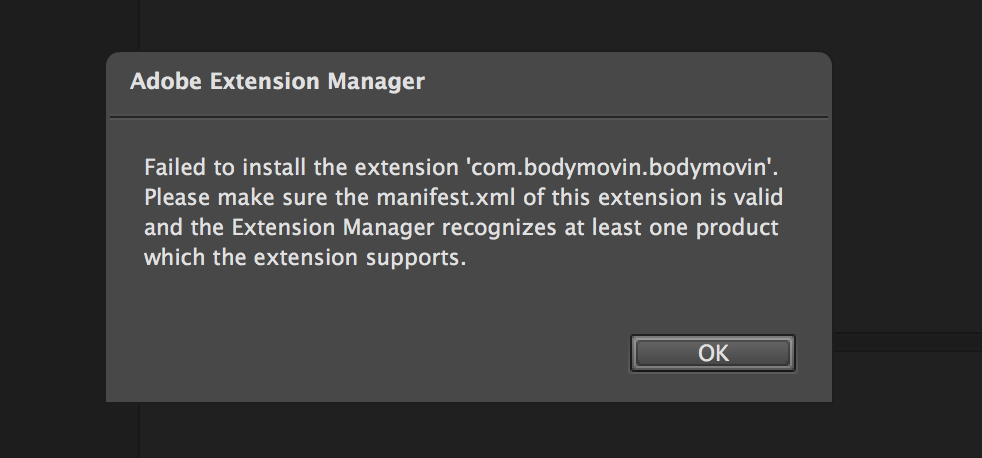
What can i do ?
 clemencegermain
on 26 Jun 2017
clemencegermain
on 26 Jun 2017
@clemencegermain
CC2014 and up
Option 1 (Recommended):
Download it from from AE scripts: http://aescripts.com/bodymovin/
You should use the aescripts installer to install Bodymovin.
Klustre
on 26 Jun 2017
Hello everyone,
After getting -160 and -403 errors using terminal, I used aescripts installer to install bodymovin and succeeded. Now I go to AE window tab and I cannot see extensions tab.
I really want to install this plugin could anyone help?
thx
I'm running AE cc and macOS Sierra
 velask
on 11 Oct 2017
velask
on 11 Oct 2017
@velask Bodymovin supports CC2014 and up
Klustre
on 11 Oct 2017
Related issues
 wujekbogdan
·
18Comments
wujekbogdan
·
18Comments
 Fishfield
·
18Comments
Fishfield
·
18Comments
 YEMacademy
·
22Comments
YEMacademy
·
22Comments
 bruroar
·
36Comments
bruroar
·
36Comments
 Ishua-issue
·
22Comments
Ishua-issue
·
22Comments
Most helpful comment
whether this plugin can work in adobe after effect cs6 ?