Lottie-ios: Inconsistent Speed on iOS
I made a simple "spinning" globe animation (for iOS) by passing a flat map through a circle mask. No effects, nothing special, just a position change (2 keyframes) and an alpha matte.
https://www.lottiefiles.com/share/gJamPA
It plays correctly (consistent speed) on chrome, safari, and android... but not iOS. On iOS it slows down as though there's an ease when it gets to the end of the loop. The keyframes are plain and the graph is straight as shown in the screen below.
Any idea what could be happening?
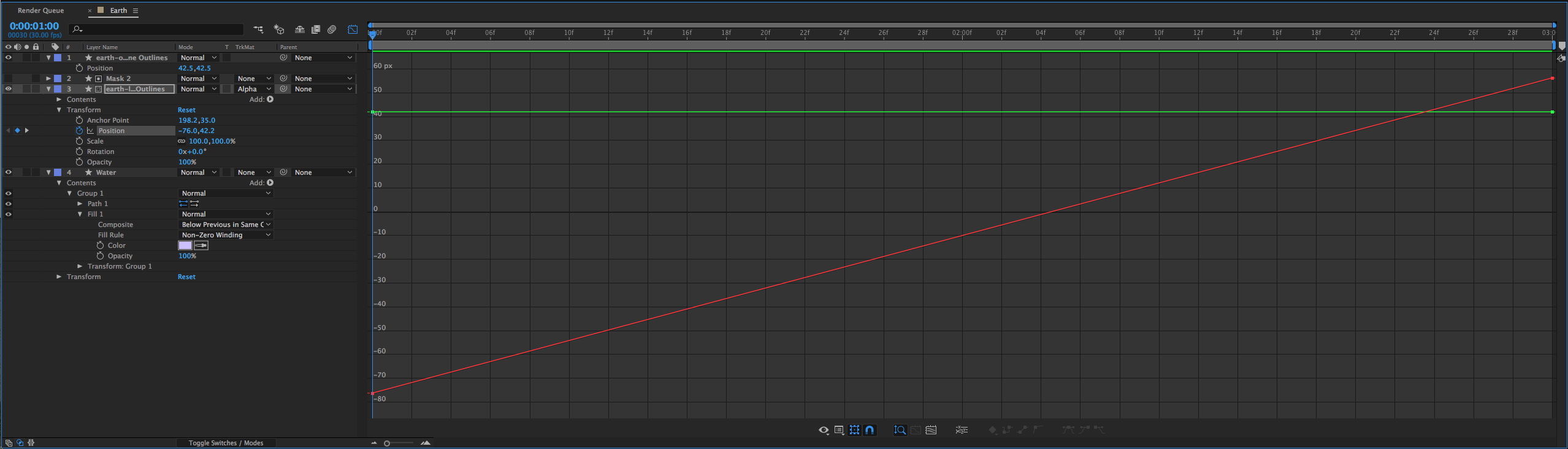
After Effects file (v14.0.1.5) (Bodymovin v5.1.20)
Thanks!
 olohere
All 10 comments
I have observed this as well.
Long movements that should be linear will speed up and slow down in some cases. The only solution we found was lots of short paths but even then it's not ideal. It's a bug with Lottie.
 RamblinWreck77
on 22 Aug 2018
RamblinWreck77
on 22 Aug 2018
Having the same issue on a project, already tried to separate the animation into small paths, but this still doesn't fix the issue. Seems to be very smooth on the desktop and android, but weird "easing" on iOS
@RamblinWreck77
Here's the preview, maybe someone can help us with some advise on how we can fix this issue.
https://www.lottiefiles.com/share/GlWAoi
(please preview on black background)
 YoshyB
on 3 Sep 2018
YoshyB
on 3 Sep 2018
I have the same issue. Very long paths will "ease" on iOS. Android and web doesn't have the issue.
 deluxeroyale
on 2 Oct 2018
deluxeroyale
on 2 Oct 2018
I think I've figured it out. Try this:
Right click on the keyframes (all of them selected) of the layer you want to "fix". Select Keyframe Interpolation and set both temporal interpolation and spatial interpolation to linear
deluxeroyale
on 2 Oct 2018
I think I've figured it out. Try this:
Right click on the keyframes (all of them selected) of the layer you want to "fix". Select Keyframe Interpolation and set both temporal interpolation and spatial interpolation to linear
Good to hear that it worked for you man! However, sadly enough this still did not fix the issue for me. Hoping that the team from Lottie can get back to us with a response.
YoshyB
on 3 Oct 2018
I think I've figured it out. Try this:
Right click on the keyframes (all of them selected) of the layer you want to "fix". Select Keyframe Interpolation and set both temporal interpolation and spatial interpolation to linearGood to hear that it worked for you man! However, sadly enough this still did not fix the issue for me. Hoping that the team from Lottie can get back to us with a response.
Very strange indeed. Is the path masked?
deluxeroyale
on 4 Oct 2018
I think I've figured it out. Try this:
Right click on the keyframes (all of them selected) of the layer you want to "fix". Select Keyframe Interpolation and set both temporal interpolation and spatial interpolation to linearGood to hear that it worked for you man! However, sadly enough this still did not fix the issue for me. Hoping that the team from Lottie can get back to us with a response.
Very strange indeed. Is the path masked?
The path is not masked. Its a path with a trim path which is animated
YoshyB
on 8 Oct 2018
Did you try setting all keyframes to linear interpolation?
deluxeroyale
on 8 Oct 2018
Possibly related: #60
 ThierryVC
on 6 Mar 2019
ThierryVC
on 6 Mar 2019
Lottie has been completely rewritten in Swift as of 3.0 (https://github.com/airbnb/lottie-ios/pull/777)
I am closing all issues prior to this release to reduce the noise. If you continue to run into this issues or any issue with Lottie 3.0 please open a new ticket
For continued support of Lottie Objective-c please point to this branch: https://github.com/airbnb/lottie-ios/tree/lottie/objectiveC
 buba447
on 17 Mar 2019
buba447
on 17 Mar 2019
Related issues
 awschuerholz
·
3Comments
awschuerholz
·
3Comments
 whisterlee
·
3Comments
whisterlee
·
3Comments
 zhangjunmax
·
3Comments
zhangjunmax
·
3Comments
 rdd7
·
4Comments
rdd7
·
4Comments
 webdale
·
5Comments
webdale
·
5Comments
Most helpful comment
I think I've figured it out. Try this:
Right click on the keyframes (all of them selected) of the layer you want to "fix". Select Keyframe Interpolation and set both temporal interpolation and spatial interpolation to linear