Lottie-ios: Unable to set the frame of CompatibleAnimationView
Hello!
Check these before submitting:
[x] The issue doesn't involve an Unsupported Feature
[x] This issue isn't related to another open issue
This issue is a:
- [x] Non-Crashing Bug (Visual or otherwise)
- [ ] Crashing Bug
- [ ] Feature Request
- [ ] Regression (Something that once worked, but doesn't work anymore)
Which Version of Lottie are you using?
Lottie 3.0
What Platform are you on?
[ ] MacOS
[x] iOS
What Language are you in?
- [ ] Swift
- [x] Objective-C
Expected Behavior
CompatibleAnimationView should be the same size as the parent view
Actual Behavior
CompatibleAnimationView is not the same size as the parent view
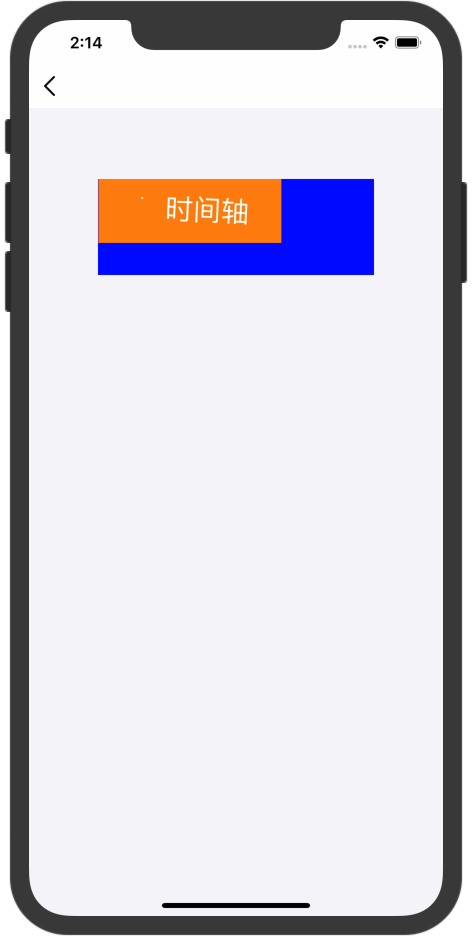
Code Example
(void)viewDidLoad
{
[super viewDidLoad];CGFloat timeLineViewW = 276.f;
CGFloat timeLineViewH = 96.f;
CGFloat timeLineViewX = (self.view.bounds.size.width - timeLineViewW) / 2.f;
CGFloat timeLineViewY = (self.view.bounds.size.width - timeLineViewH) / 2.f;
UIView *timeLineView = [[UIView alloc] initWithFrame:CGRectMake(timeLineViewX, timeLineViewY, timeLineViewW, timeLineViewH)];
timeLineView.backgroundColor = [UIColor blueColor];
[self.view addSubview:timeLineView];CompatibleAnimationView *animationView = [[CompatibleAnimationView alloc] initWithFrame:timeLineView.bounds];
animationView.contentMode = UIViewContentModeScaleAspectFit;
animationView.loopAnimationCount = -1;
animationView.compatibleAnimation = [[CompatibleAnimation alloc] initWithName:@"timeline" bundle:[NSBundle mainBundle]];
[animationView play];
[timeLineView addSubview:animationView];
}
Animation JSON
 whisterlee
All 3 comments
I am facing the same issue. I suppose it comes from the constraints but i have to test
 farfromrefug
on 13 Feb 2020
farfromrefug
on 13 Feb 2020
@whisterlee actually found a fix! set translatesAutoresizingMaskIntoConstraints to true on the CompatibleAnimationView
farfromrefug
on 13 Feb 2020
@farfromrefug Thank you so much, you just saved me!
But I want to clarify, you need to fix this line:
https://github.com/airbnb/lottie-ios/blob/934954c378fbd49f3798931cd314740ff3176972/lottie-swift/src/Public/iOS/Compatibility/CompatibleAnimationView.swift#L296
not in setUpViews()
 damikdk
on 4 Mar 2020
damikdk
on 4 Mar 2020
Related issues
 RamblinWreck77
·
3Comments
RamblinWreck77
·
3Comments
 rdd7
·
4Comments
rdd7
·
4Comments
 JanSzala
·
5Comments
JanSzala
·
5Comments
 albertoNovo
·
3Comments
albertoNovo
·
3Comments
 JALsnipe
·
4Comments
JALsnipe
·
4Comments
Most helpful comment
@whisterlee actually found a fix! set
translatesAutoresizingMaskIntoConstraintstotrueon theCompatibleAnimationView