Longhorn: UI API request sometimes failed on 1.0.0
Describe the bug
Upgrade of several PVs from 0.8.1 to 1.0.0 fail. Some others upgraded well.
To Reproduce
Steps to reproduce the behavior:
- Kubernetes deployments for PVs scaled to 0
- Crosscheck no pod is running
- Longhorn UI tells the PVs are detached
- Select a PV "upgrade engine", then select the 1.0.0 version, then o.k.
Expected behavior
After a few seconds the upgrade symbol shoud disappear.
Log
Environment:
- Longhorn version: 1.0.0
- Kubernetes version: v1.18.2+k3s1
- Node OS type and version: Ubuntu 18.04.4 LTS
Additional context
Already sent support bundle
 wopl
wopl
All 20 comments
Previous thread: https://forums.rancher.com/t/cannot-upgrade-engine/17580/7
 yasker
on 1 Jun 2020
yasker
on 1 Jun 2020
@wopl It's weird that I didn't see any engine upgrade request in the manager's log.
We normally should see something like this
[longhorn-manager-h787j] 98.210.196.142 - - [01/Jun/2020:15:43:48 +0000] "POST /v1/volumes/test?action=engineUpgrade HTTP/1.1" 200 3052 "https://rancher-master/k8s/clusters/c-sff4g/api/v1/namespaces/longhorn-system/services/http:longhorn-frontend:80/proxy/volume" "Mozilla/5.0 (Macintosh; Intel Mac OS X 10_15_4) AppleWebKit/537.36 (KHTML, like Gecko) Chrome/83.0.4103.61 Safari/537.36"
[longhorn-manager-h787j] time="2020-06-01T15:43:56Z" level=debug msg="Upgrading volume test engine image from longhornio/longhorn-engine:v1.0.0-rc3 to longhornio/longhorn-engine:v1.0.0"
From the support bundle, I saw pvc-c7af46c3-aab0-46ad-ae47-4b2bf33ad73c and pvc-5cb345c7-a33b-46a9-a7f6-ee37274c5daa are not upgraded, others have been upgraded to v1.0.0. Are the other volumes working fine?
Also, I saw a few weird things in the manager's log
[01/Jun/2020:14:34:56 +0000] "GET /v1/engineimages?action=engineUpgrade HTTP/1.1"
[01/Jun/2020:14:34:56 +0000] "GET /v1/volumes?action=engineUpgrade HTTP/1.1"
[01/Jun/2020:14:34:56 +0000] "GET /v1/backupvolumes?action=engineUpgrade HTTP/1.1"
engineUpgrade is not a valid call for any of them. Not sure why UI starts to calling those components for the upgrade. Might be a browser issue? Chrome is the one we tested the most.
yasker
on 1 Jun 2020
You are correct. All have been upgraded except the two you mentioned.
I now removed the deprecated driver.
I am working with Chrome. In addition I tried on Firefox.
All are working fine at the moment. At least I haven't seen any issues yet.
This one worked now (successfully upgraded):
2020-06-01T18:04:43.715197434+02:00 time="2020-06-01T16:04:43Z" level=debug msg="Upgrading volume pvc-c7af46c3-aab0-46ad-ae47-4b2bf33ad73c engine image from longhornio/longhorn-engine:v0.8.1 to longhornio/longhorn-engine:v1.0.0"
2020-06-01T18:04:43.716504578+02:00 10.42.0.1 - - [01/Jun/2020:16:04:43 +0000] "POST /v1/volumes/pvc-c7af46c3-aab0-46ad-ae47-4b2bf33ad73c?action=engineUpgrade HTTP/1.1" 200 4003 "https://longhorn.testtest.de/volume" "Mozilla/5.0 (Windows NT 10.0; Win64; x64; rv:76.0) Gecko/20100101 Firefox/76.0"
I now tried with the pvc-5cb... which failes and there is no entry within longhorn-manager log. Neither in syslog (except a "nameserver limits exceeded" warning)
:-) Only one to go, then the bug is gone ... at least for me.
thanks Wolfram
wopl
on 1 Jun 2020
@smallteeths Do you know why we saw this kind of requests from UI?
logs/longhorn-manager-ndwz5/longhorn-manager.log:2020-06-01T16:34:56.520574071+02:00 10.42.0.1 - - [01/Jun/2020:14:34:56 +0000] "GET /v1/backupvolumes?action=engineUpgrade HTTP/1.1" 200 129 "https://longhorn.xxx/https://longhorn.xxx/v1/volumes/pvc-5cbxxx?action=engineUpgrade" "Mozilla/5.0 (Windows NT 10.0; Win64; x64; rv:76.0) Gecko/20100101 Firefox/76.0"
logs/longhorn-ui-6dcc77fb58-cnkzr/longhorn-ui.log:2020-06-01T16:34:55.729625311+02:00 10.42.0.28 - - [01/Jun/2020:14:34:55 +0000] "GET /https://longhorn.xxx/v1/volumes/pvc-5cbxxx?action=engineUpgrade HTTP/1.1" 200 1021 "-" "Mozilla/5.0 (Windows NT 10.0; Win64; x64; rv:76.0) Gecko/20100101 Firefox/76.0"
logs/longhorn-ui-6dcc77fb58-cnkzr/longhorn-ui.log:2020-06-01T16:34:55.848770453+02:00 10.42.0.28 - - [01/Jun/2020:14:34:55 +0000] "GET /styles.css?774319fd8d25bf6e5c23 HTTP/1.1" 304 0 "https://longhorn.xxx/https://longhorn.xxx/v1/volumes/pvc-5cbxxx?action=engineUpgrade" "Mozilla/5.0 (Windows NT 10.0; Win64; x64; rv:76.0) Gecko/20100101 Firefox/76.0"
logs/longhorn-ui-6dcc77fb58-cnkzr/longhorn-ui.log:2020-06-01T16:34:55.900916024+02:00 10.42.0.28 - - [01/Jun/2020:14:34:55 +0000] "GET /runtime~main.e35f7170.js?774319fd8d25bf6e5c23 HTTP/1.1" 304 0 "https://longhorn.xxx/https://longhorn.xxx/v1/volumes/pvc-5cbxxx?action=engineUpgrade" "Mozilla/5.0 (Windows NT 10.0; Win64; x64; rv:76.0) Gecko/20100101 Firefox/76.0"
logs/longhorn-ui-6dcc77fb58-cnkzr/longhorn-ui.log:2020-06-01T16:34:55.901393607+02:00 10.42.0.28 - - [01/Jun/2020:14:34:55 +0000] "GET /styles.34937d6b.async.js?774319fd8d25bf6e5c23 HTTP/1.1" 304 0 "https://longhorn.xxx/https://longhorn.xxx/v1/volumes/pvc-5cbxxx?action=engineUpgrade" "Mozilla/5.0 (Windows NT 10.0; Win64; x64; rv:76.0) Gecko/20100101 Firefox/76.0"
logs/longhorn-ui-6dcc77fb58-cnkzr/longhorn-ui.log:2020-06-01T16:34:55.901576961+02:00 10.42.0.28 - - [01/Jun/2020:14:34:55 +0000] "GET /main.b5d61a61.async.js?774319fd8d25bf6e5c23 HTTP/1.1" 304 0 "https://longhorn.xxx/https://longhorn.xxx/v1/volumes/pvc-5cbxxx?action=engineUpgrade" "Mozilla/5.0 (Windows NT 10.0; Win64; x64; rv:76.0) Gecko/20100101 Firefox/76.0"
logs/longhorn-ui-6dcc77fb58-cnkzr/longhorn-ui.log:2020-06-01T16:34:56.424176755+02:00 10.42.0.28 - - [01/Jun/2020:14:34:56 +0000] "GET /v1/nodes?action=engineUpgrade HTTP/1.1" 200 2969 "https://longhorn.xxx/https://longhorn.xxx/v1/volumes/pvc-5cbxxx?action=engineUpgrade" "Mozilla/5.0 (Windows NT 10.0; Win64; x64; rv:76.0) Gecko/20100101 Firefox/76.0"
logs/longhorn-ui-6dcc77fb58-cnkzr/longhorn-ui.log:2020-06-01T16:34:56.482650567+02:00 10.42.0.28 - - [01/Jun/2020:14:34:56 +0000] "GET /v1/engineimages?action=engineUpgrade HTTP/1.1" 200 1756 "https://longhorn.xxx/https://longhorn.xxx/v1/volumes/pvc-5cbxxx?action=engineUpgrade" "Mozilla/5.0 (Windows NT 10.0; Win64; x64; rv:76.0) Gecko/20100101 Firefox/76.0"
logs/longhorn-ui-6dcc77fb58-cnkzr/longhorn-ui.log:2020-06-01T16:34:56.483397927+02:00 10.42.0.28 - - [01/Jun/2020:14:34:56 +0000] "GET /v1/settings HTTP/1.1" 200 13892 "https://longhorn.xxx/https://longhorn.xxx/v1/volumes/pvc-5cbxxx?action=engineUpgrade" "Mozilla/5.0 (Windows NT 10.0; Win64; x64; rv:76.0) Gecko/20100101 Firefox/76.0"
logs/longhorn-ui-6dcc77fb58-cnkzr/longhorn-ui.log:2020-06-01T16:34:56.490804255+02:00 10.42.0.28 - - [01/Jun/2020:14:34:56 +0000] "GET /v1/volumes?action=engineUpgrade HTTP/1.1" 200 30957 "https://longhorn.xxx/https://longhorn.xxx/v1/volumes/pvc-5cbxxx?action=engineUpgrade" "Mozilla/5.0 (Windows NT 10.0; Win64; x64; rv:76.0) Gecko/20100101 Firefox/76.0"
logs/longhorn-ui-6dcc77fb58-cnkzr/longhorn-ui.log:2020-06-01T16:34:56.519367015+02:00 10.42.0.28 - - [01/Jun/2020:14:34:56 +0000] "GET /v1/events HTTP/1.1" 200 115857 "https://longhorn.xxx/https://longhorn.xxx/v1/volumes/pvc-5cbxxx?action=engineUpgrade" "Mozilla/5.0 (Windows NT 10.0; Win64; x64; rv:76.0) Gecko/20100101 Firefox/76.0"
logs/longhorn-ui-6dcc77fb58-cnkzr/longhorn-ui.log:2020-06-01T16:34:56.520717996+02:00 10.42.0.28 - - [01/Jun/2020:14:34:56 +0000] "GET /v1/backupvolumes?action=engineUpgrade HTTP/1.1" 200 129 "https://longhorn.xxx/https://longhorn.xxx/v1/volumes/pvc-5cbxxx?action=engineUpgrade" "Mozilla/5.0 (Windows NT 10.0; Win64; x64; rv:76.0) Gecko/20100101 Firefox/76.0"
Well, not sure, A _few_ times (definitely less then 10 attempts) I played a bit with the Browser Debug and copied the statements from below response to see what happens.
` createTypes": {
"volume": "…/v1/volumes",
},
"data": [ 6 items
{
"actions": {
"activate": "…/v1/volumes/pvc-5cb345c7-a33b-46a9-a7f6-ee37274c5daa?action=activate",
"attach": "…/v1/volumes/pvc-5cb345c7-a33b-46a9-a7f6-ee37274c5daa?action=attach",
"cancelExpansion": "…/v1/volumes/pvc-5cb345c7-a33b-46a9-a7f6-ee37274c5daa?action=cancelExpansion",
"engineUpgrade": "…/v1/volumes/pvc-5cb345c7-a33b-46a9-a7f6-ee37274c5daa?action=engineUpgrade",
"expand": "…/v1/volumes/pvc-5cb345c7-a33b-46a9-a7f6-ee37274c5daa?action=expand",
"pvCreate": "…/v1/volumes/pvc-5cb345c7-a33b-46a9-a7f6-ee37274c5daa?action=pvCreate",
"pvcCreate": "…/v1/volumes/pvc-5cb345c7-a33b-46a9-a7f6-ee37274c5daa?action=pvcCreate",
"recurringUpdate": "…/v1/volumes/pvc-5cb345c7-a33b-46a9-a7f6-ee37274c5daa?action=recurringUpdate",
"replicaRemove": "…/v1/volumes/pvc-5cb345c7-a33b-46a9-a7f6-ee37274c5daa?action=replicaRemove",
`
If you just see the few entries, might be produced by me. If you see more of them, we might check again.
wopl
on 1 Jun 2020
If you perform a single volume upgrade operation, you can try to debug as shown.
You can see if the value of payload.url is correct @wopl
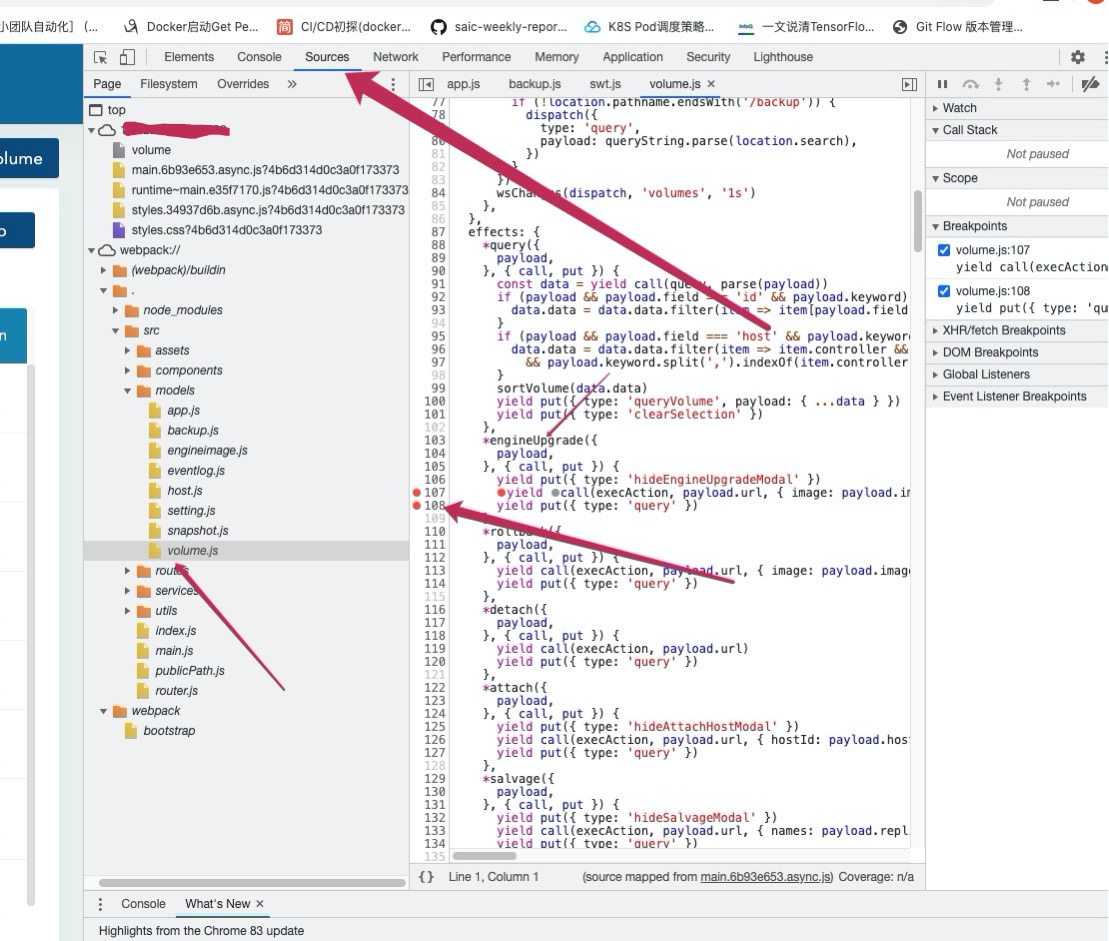
If you perform a batch upgrade operation, you can try to debug as shown.
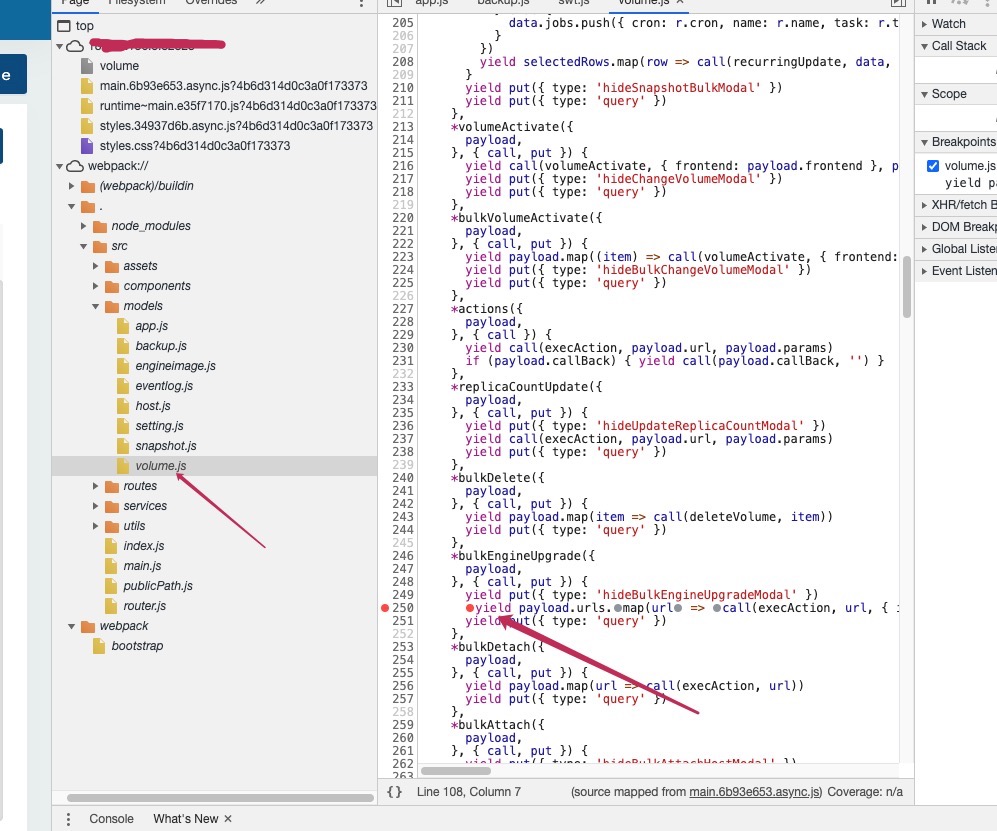
If you have time, would you give me feedback? I also want to know why there is no request to the backend. thanks @wopl
 smallteeths
on 2 Jun 2020
smallteeths
on 2 Jun 2020
Here the url at first breakpoint
url: "wss://longhorn.xxx.de/v1/volumes/pvc-5cb345c7-a33b-46a9-a7f6-ee37274c5daa?action=engineUpgrade"
At second breakpoint I find:
/volume:1 Access to XMLHttpRequest at 'wss://longhorn.xxx.de/v1/volumes/pvc-5cb345c7-a33b-46a9-a7f6-ee37274c5daa?action=engineUpgrade' from origin 'https://longhorn.xxx.de' has been blocked by CORS policy: Cross origin requests are only supported for protocol schemes: http, data, chrome, chrome-extension, https.
I looked around not resuming at the breakpoint. Added a shell. I started again from the base URL.
Now at breakpoint I see
url: "https://longhorn.xxx.de/v1/volumes/pvc-5cb345c7-a33b-46a9-a7f6-ee37274c5daa?action=engineUpgrade"
Different protocol now???
I resumed the breakpoint to complete operation. This time the PV successfully upgraded. Finally all my PV are upgraded and I don't have one 0.8.1 to redo the tests.
Thanks for your help
Wolfram
P.S.: I see other CORS blockers when wss protocol is used. I as well seem to have difficulties with snapshopts caused by CORS.
wopl
on 2 Jun 2020
@smallteeths It seems we're issuing commands over WebSocket?
yasker
on 2 Jun 2020
Seems we are getting closer to the root cause. I am using Traefik as Ingress Controller opening HTTP/HTTPS connection for comms into K3S. In the meantime I simplified to HTTP to ensure not to observe any security side effects. All HTTP get requests seem to work (200) and UI looks good (except some minor missing fields that can be filled by a refresh).
Sending commands to Traefik / K3S I see no HTTP protocol anymore but it changes to WS (websocket) protocol.
Access to XMLHttpRequest at ‘ws://localhost:8087/v1/volumes/pvc-8cac06cc-d203-4248-a3a9-44086974d1dd?action=snapshotCreate’ from origin ‘http://localhost:8087’ has been blocked by CORS policy: Cross origin requests are only supported for protocol schemes: http, data, chrome, chrome-extension, https.
ws protocol in my case now is blocked as seen above. The reason for not reaching the server (and not being logged) is clear now. You could argue: "Change your Traefik rules", but I was not successful here so far (will continue).
Overall question: Wouldn't it be more simple to use regular HTTP/HTTPS requests to transmit the simple commands? Other question: Why did it work "sometimes" before (why "sometimes" the HTTP/HTTPS protocol was used alternatively to the WS/WSS protocol)?
Any other suggestions (temporarily)?
wopl
on 4 Jun 2020
In addition I see
root 9471 6421 1 Jun03 ? 00:28:38 longhorn-manager -d daemon --engine-image longhornio/longhorn-engine:v1.0.0 --instance-manager-image longhornio/longhorn
producing a lot of zombie processes. Any coincidence with above or open this as a new issue?
wopl
on 4 Jun 2020
@wopl regarding zombie processes, please file a separate bug.
Regarding the original issue, https shouldn't change to ws. Something is wrong here. I am not sure if it's frontend or backend though. Can you provide instructions to recreate your environment? If we can reproduce it, it should be much easier to troubleshoot.
yasker
on 4 Jun 2020
Hi Yasker,
of cource https will change to wss. All fine at this side. It seems to be the change of protocol between HTTP/WS or HTTPS/WSS which will lead to a CORS problem. CORS does not allow a protocol change (e.g. from HTTP to WS / from HTTPS to WSS).
As said before, I "could" add some rules to the Ingress Controller, but gave me other challenges (I am in contact with Traefik team as well). Not sure yet, this problem should be on the end-users side.
As said: Traefik is my Ingress controller to the K3S. I povided an HTTP route. No CORS or WS additional headers / routes / middlewares so far. Happy to provide more information, but not sure, what I shoud do at this moment.
You want to discuss offline?
Wolfram
wopl
on 4 Jun 2020
Hi everyone, I solved this issue independently today of your posts. Had the same issues with CORS wss failing. It's related to the default settings of Traefik not correctly setting headers for the websocket connection. Therefore, everything seemed very unreliable.
Adding the following middleware to the route for the Longhorn UI fixed all issues:
apiVersion: traefik.containo.us/v1alpha1
kind: Middleware
metadata:
  name: svc-wss-headers
spec:
  headers:
    customRequestHeaders:
      X-Forwarded-Proto: "https"
The missing forward protocol header when accessing over https seems to break the websockets. Hope this solves it for you too! Maybe add this to the Longhorn docs?
Solution source: https://community.containo.us/t/how-to-make-websockets-work-with-traefik-2-0-setting-up-rancher/1732
 christiaangoossens
on 5 Jun 2020
christiaangoossens
on 5 Jun 2020
Thanks @christiaangoossens ! @wopl Can you verify if it works for you? We would love to add this to the doc.
One question remaining: it seems this cannot be triggered by the normal k3s + traefik installation since we've tried that. What's the reproduce step for the issue?
yasker
on 5 Jun 2020
I think normal k3s uses Traefik 1.x. This issue only appears for Traefik 2.x. That would be the difference. It's not k3s related in any way, only Traefik 2.x and it's Websocket handling.
christiaangoossens
on 5 Jun 2020
yes I can confirm that the X-Forwarded-Proto: "https"solves the problem running longhorn-ui via trafic 2.2.1
 rsoika
on 5 Jun 2020
rsoika
on 5 Jun 2020
@yasker Yes I can confirm, the X-Forwarded-Proto header (either HTTP or HTTPS) solves the problem.
Still not sure it is solely Traefik related (see @rsoika)
Anyway many thanks @christiaangoossens never would have solved that on my own.
@yasker, @smallteeths Thanks a lot for the deep discussions.
wopl
on 6 Jun 2020
It seems to be a particularity in Traefik 2.x that only causes problems with (ex)Rancher products due to some particularities in their websocket implementation. More details and earlier research here, I have only seen this bug in the context of the Rancher UI and Longhorn: https://github.com/containous/traefik/issues/5533#issuecomment-553823512
I guess I would still count this as a bug(?) report to Rancher and Longhorn.. @yasker What do you think?
christiaangoossens
on 6 Jun 2020
I leaning towards considering this as a bug, but I don't have enough knowledge to tell what's the right thing to do here. With @vincent99 's help, we found the problem is the API framework we're using: https://github.com/rancher/go-rancher/blob/5d4e55e3f5de872bd5136d538139fffad238ad3a/api/url.go#L156 .
Let's see if we can fix it on the Rancher side and update the Longhorn dependency after.
yasker
on 12 Jun 2020
Just encountered the same issue with Longhorn v1.0.2, @christiaangoossens solution also worked for me.
 alexgorbatchev
on 29 Nov 2020
alexgorbatchev
on 29 Nov 2020
Related issues
 XzenTorXz
·
4Comments
XzenTorXz
·
4Comments
 JLueke
·
3Comments
JLueke
·
3Comments
 KuroObi
·
8Comments
KuroObi
·
8Comments
 ainiml
·
6Comments
yasker
·
3Comments
ainiml
·
6Comments
yasker
·
3Comments
Most helpful comment
Hi everyone, I solved this issue independently today of your posts. Had the same issues with CORS wss failing. It's related to the default settings of Traefik not correctly setting headers for the websocket connection. Therefore, everything seemed very unreliable.
Adding the following middleware to the route for the Longhorn UI fixed all issues:
The missing forward protocol header when accessing over https seems to break the websockets. Hope this solves it for you too! Maybe add this to the Longhorn docs?
Solution source: https://community.containo.us/t/how-to-make-websockets-work-with-traefik-2-0-setting-up-rancher/1732