Longhorn: Create PV/PVC in Namespace of restored volume for batch operation
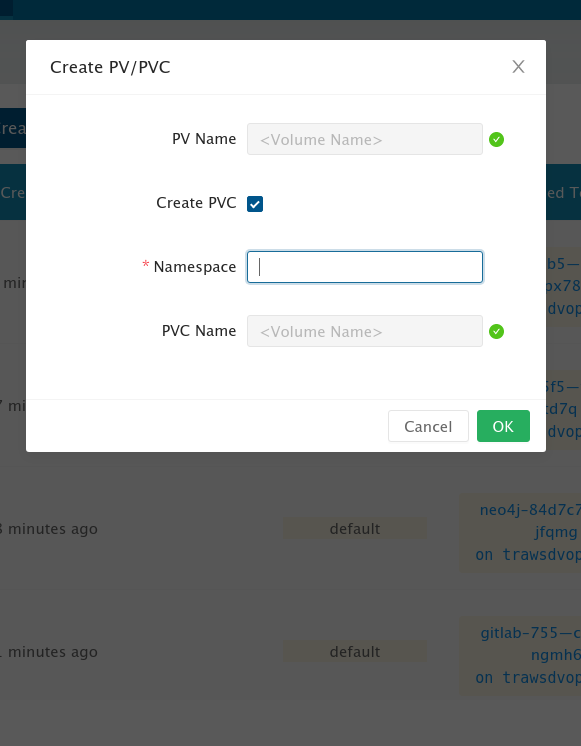
If the restored volume already has a namespace, restore it to that namespace.
 ainiml
All 6 comments
The Namespace field is already restored with volume.
Actually we already have this feature. You are using batch operation (the button on the top) hence there won't contain a default value here. If you create PV/PVC via the button on the right of the volume then check Use Previous PVC, the restored Namespace value will be applied to this blank automatically.

 shuo-wu
on 4 Dec 2019
shuo-wu
on 4 Dec 2019
The
Namespacefield is already restored with volume.Actually we already have this feature. You are using batch operation (the button on the top) hence there won't contain a default value here. If you create PV/PVC via the button on the right of the volume then check
Use Previous PVC, the restoredNamespacevalue will be applied to this blank automatically.
It would have to be individually done to a few hundred volumes?
ainiml
on 5 Dec 2019
@ainiml We will support it in the batch operation too.
 yasker
on 5 Dec 2019
yasker
on 5 Dec 2019
Validation: Partially Failed
- Longhorn UI image:
wangsiye/longhorn-ui:661911d
Steps to test:
- Create a namespace using
kubectl create ns ns1 - Create a StatefulSet in
ns1namespace using:
kubectl apply -n ns1 -f https://raw.githubusercontent.com/longhorn/longhorn/master/examples/statefulset.yaml - Scale StatefulSet up to
3usingkubectl scale statefulset -n ns1 web --replicas=3 - Create backup for each Longhorn volume.
- Scale StatefulSet down to
0usingkubectl scale statefulset -n ns1 web --replicas=0 - Delete all 3 Longhorn volumes.
- In Backup page, restore each volume using the original volume name.
Expected Result: volumes should be restored successfully,
PV/PVCfield should beBound, andNamespacefield should bens1(PASS)
- Scale StatefulSet back to
3
Expected Result: volumes gets attached to newly created StatefulSet pods. (PASS)- In Backup page, restore each volume using the different volume name than its original volume name.
- In volume page, select 2 volumes, and click
Create PV/PVCbutton.- check
Use Previous PVCand clickOK.
Expected Result: a new PV/PVC will be created for each volume inns1namespace. (PASS)- for the 3rd restored volume, using the
Operationmenu on the right, clickCreate PV/PVC
An empty page with the following error on console (FAILED)

 meldafrawi
on 19 Dec 2019
meldafrawi
on 19 Dec 2019
Validation: Partially Failed
- Longhorn UI image:
wangsiye/longhorn-ui:9787bfb
Steps to test:
- Create a namespace using
kubectl create ns ns1 - Create a StatefulSet in
ns1namespace using:
kubectl apply -n ns1 -f https://raw.githubusercontent.com/longhorn/longhorn/master/examples/statefulset.yaml - Scale StatefulSet up to
3usingkubectl scale statefulset -n ns1 web --replicas=3 - Create backup for each Longhorn volume.
- Scale StatefulSet down to
0usingkubectl scale statefulset -n ns1 web --replicas=0 - Delete all 3 Longhorn volumes.
- Delete created PVs and PVCs.
- In Backup page, click
Restore Latest Backupfor each volume using a different volume name than its original volume name. - In volume page, for one volume, using the
Operationmenu on the right, clickCreate PV/PVC - Check
Use Previous PVC, and clicOK
Expected Result: a new PV will be created, and a new PVC will be created using the old PVC name. (PASS)
- Select other two volumes, and click on
Create PV/PVCbutton.- Check
Use Previous PVC, and clicOK
Expected Result: for each volume, a new PV will be created, and a new PVC will be created using the old PVC name (FAILED)
Error: a new PVC is created with different name than the original PVC.
meldafrawi
on 20 Dec 2019
Validation: Passed
Longhorn UI version: wangsiye/longhorn-ui:d629ffe
meldafrawi
on 23 Dec 2019
Related issues
 Angelinsky7
·
8Comments
Angelinsky7
·
8Comments
 lucevers
·
4Comments
lucevers
·
4Comments
 JLueke
·
3Comments
JLueke
·
3Comments
 hillbun
·
6Comments
hillbun
·
6Comments
 XzenTorXz
·
4Comments
XzenTorXz
·
4Comments