Lnpopupcontroller: Memory leak when using presentPopupBar
Weird issue here, as soon as I assign anything to the popupBar of the ViewController, that ViewController doesn't deinit.
For example, first chunk of code works and exerciseVC gets deallocated, when using the second and third chunks it doesn't:
mainController?.presentPopupBar = { [weak self] in
    guard let self = self else { return }
    //self.popupBar.customBarViewController = CustomPopupBar(nibName: "CustomPopupBar", bundle: nil)//self.customBar
    //self.popupContentView.popupCloseButtonStyle = .none
    //self.popupBar.barTintColor = UIColor.blue
    //self.popupBar.backgroundColor = UIColor(named: "N000")
    //self.popupContentView.popupInteractionGestureRecognizer.delegate = self.exerciseVC
    //self.presentPopupBar(withContentViewController: self.exerciseVC!, openPopup: true, animated: true, completion: nil)
    self.present(self.exerciseVC!, animated: true, completion: nil)
}
mainController?.presentPopupBar = { [weak self] in
    guard let self = self else { return }
    //self.popupBar.customBarViewController = CustomPopupBar(nibName: "CustomPopupBar", bundle: nil)//self.customBar
    //self.popupContentView.popupCloseButtonStyle = .none
    //self.popupBar.barTintColor = UIColor.blue
    //self.popupBar.backgroundColor = UIColor(named: "N000")
    //self.popupContentView.popupInteractionGestureRecognizer.delegate = self.exerciseVC
    self.presentPopupBar(withContentViewController: self.exerciseVC!, openPopup: true, animated: true, completion: nil)
    //self.present(self.exerciseVC!, animated: true, completion: nil)
}
mainController?.presentPopupBar = { [weak self] in
    guard let self = self else { return }
    //self.popupBar.customBarViewController = CustomPopupBar(nibName: "CustomPopupBar", bundle: nil)//self.customBar
    //self.popupContentView.popupCloseButtonStyle = .none
    //self.popupBar.barTintColor = UIColor.blue
    self.popupBar.backgroundColor = UIColor(named: "N000")
    //self.popupContentView.popupInteractionGestureRecognizer.delegate = self.exerciseVC
    //self.presentPopupBar(withContentViewController: self.exerciseVC!, openPopup: true, animated: true, completion: nil)
    self.present(self.exerciseVC!, animated: true, completion: nil)
}
I've tried calling this in viewDidAppear instead of within presentPopupBar and also calling dismissPopupBar before parentVC deallocates with no luck. Any help would be appreciated!
 DantePuglisi
All 11 comments
Thanks, I will take a look. I have not seen memory issues in a long time. Does this reproduce in the demo project too?
 LeoNatan
on 22 Sep 2020
LeoNatan
on 22 Sep 2020
It's not that easy to reproduce this issue but I create a project where it happens. This project has a UINavigationController with a rootViewController, once the "PUSH VIEWCONTROLLER" button is tapped, ViewController appears which is a UIViewController with another UIViewController as its child. This child has 2 buttons to show and hide the Popup. Once you show the popup once, there's no way to make ViewController deinit. Let me know if you need more info. Once again thank you so much for this library!
DantePuglisi
on 22 Sep 2020
A demo project can help too, thanks!
LeoNatan
on 22 Sep 2020
Forgot to upload the project 🙈 , here it is:
DantePuglisi
on 22 Sep 2020
Also if it helps, every time the popup is opened this is logged
Unbalanced calls to begin/end appearance transitions
DantePuglisi
on 22 Sep 2020
I will take a look too. There is some playing around so the user gets the correct will/didAppear will/didDisappear calls.
LeoNatan
on 22 Sep 2020
I don't understand what is going on. Xcode's memory graph shows something very odd.
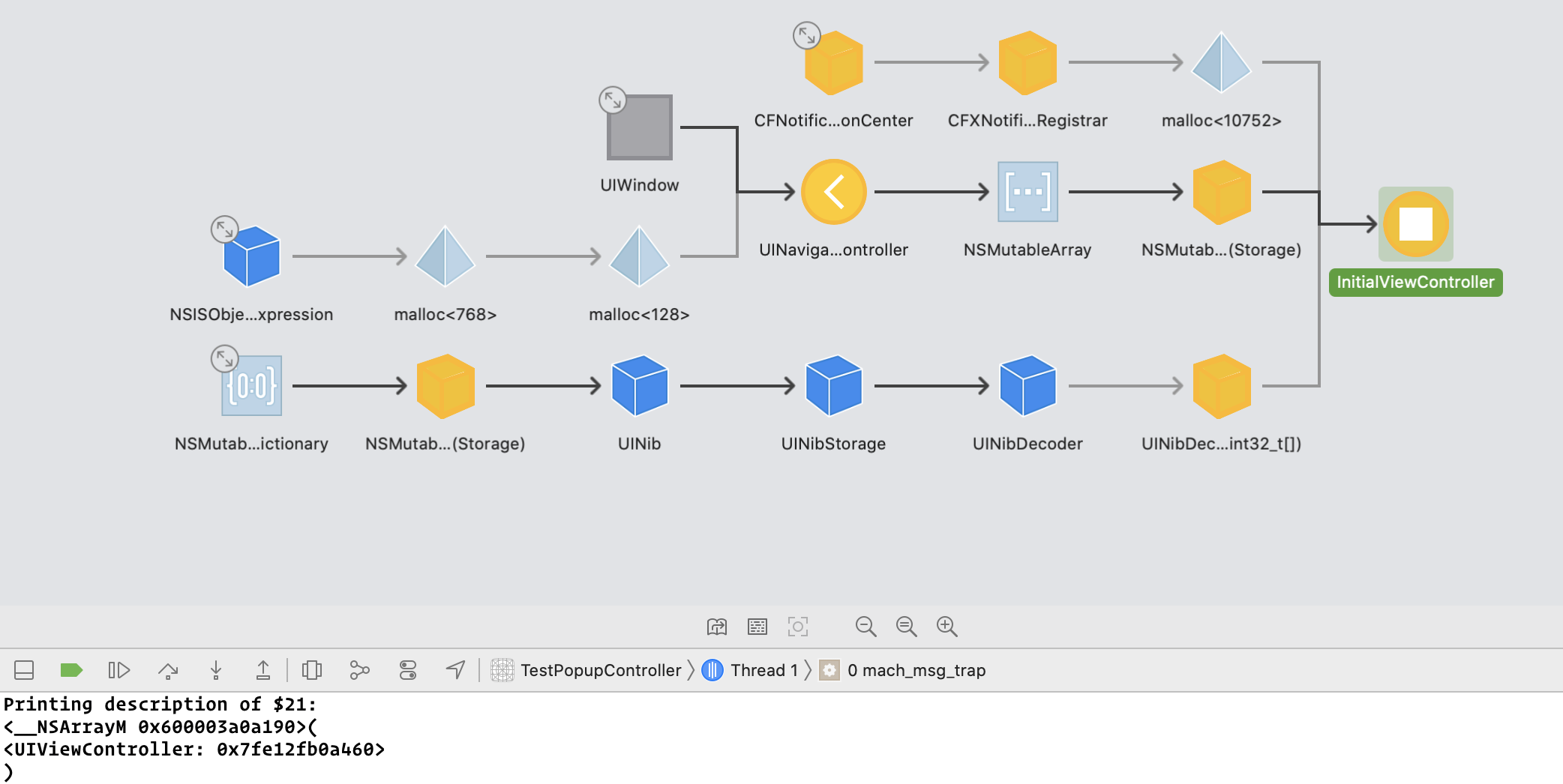
It shows the navigation controller as holding the InitialViewController instance strongly, but the array doesn't hold it. I am unable to reproduce in the demo app (haven't reproduced your complex hierarchy).
LeoNatan
on 25 Sep 2020
Going over the framework, I don't see a strong relationship anywhere. Container controller is captured weakly. Content controller is captured strongly, and is supposed to release when the container deallocates (as means of the sidetable clearance).
LeoNatan
on 26 Sep 2020
Ufff, I think I know what it is. It's an old UIKit bug. Basically, accessing the presentationController of the container controller causes a memory leak inside UIKit. 🤦♂️
I had a fix for this in the 3.0 branch, I'll bring it here.
LeoNatan
on 26 Sep 2020
Fixed.
LeoNatan
on 26 Sep 2020
Thank you so much Leo! Sorry I couldn't help much there, didn't get your responses notifications.
DantePuglisi
on 28 Sep 2020
Related issues
 joaovbalmeida
·
9Comments
joaovbalmeida
·
9Comments
 johnswifttt
·
8Comments
johnswifttt
·
5Comments
johnswifttt
·
6Comments
johnswifttt
·
8Comments
johnswifttt
·
5Comments
johnswifttt
·
6Comments
 nhatduong
·
7Comments
nhatduong
·
7Comments