Lnpopupcontroller: How to Turn Off Automatic Bottom Adjustment
Description
How do I turn off the automatic bottom adjustment (bottom layout)? I have a collectionView that is full screen and when I present the popupBar, the collectionView animates up to make space for the popupBar automatically. I don't want the collectionView to move up. In this case, I want the popupBar to simply go over my collectionView.
I look at your documentation but I could find was this:
The framework attempts to correct the top and bottom layout guides of the container controller and its child controllers as the popup bar is presented and dismissed.
Device, OS and Xcode Versions
iOS 12.1
Xcode 10.1
Swift 4.0
 johnswifttt
All 8 comments
Can't you change the contentInsetAdjustmentBehavior property of the scrollview to be UIScrollViewContentInsetAdjustmentNever?
 LeoNatan
on 14 Mar 2019
LeoNatan
on 14 Mar 2019
Thanks for reply! @LeoNatan
I just tried collectionView.contentInsetAdjustmentBehavior = .never like you suggested but it doesn't work. The entire view still shifts when the popupBar is presented/dismissed. Please see below for what exactly I'm doing.
This is how I set contentInsetAdjustmentBehavior:
override func viewDidLoad() {
     super.viewDidLoad()

     collectionView.contentInsetAdjustmentBehavior = .never
}
This is how I size the collectionView cell. I have two different options. Depending on the option, the cell size is incorrect after dismissing the popupBar.
func collectionView(_ collectionView: UICollectionView, layout collectionViewLayout: UICollectionViewLayout, sizeForItemAt indexPath: IndexPath) -> CGSize {
    // Option 1: After popup dismisses, the size of the cell is incorrect.
    return CGSize(width: collectionView.frame.width, height: collectionView.frame.height)

    // Option 2: After popup dismisses, the size of the cell is correct.
    return CGSize(width: view.frame.width, height: view.frame.height)
}
This is my Storyboard layout. This view controlled is inside a tab bar:

johnswifttt
on 14 Mar 2019
Ah I see, you are layout out the collection view against the safe area. There is no way to disable that. You should lay your collection view out against the super view, and then the contentInsetAdjustmentBehavior should work.
LeoNatan
on 14 Mar 2019
Interesting, that works. It seems that anything that is pinned to the bottom safe area is animated/moved with the popupBar.
I just ran a new test with your suggestion:
- I pinned the
collectionViewto the super view. - I pinned the
imageto the super view - I pinned
MY BUTTONto the bottom safe area.
The only one that now animates/moves when the popupBar is presented/dismissed is 3. MY BUTTON. Everything else stays put.
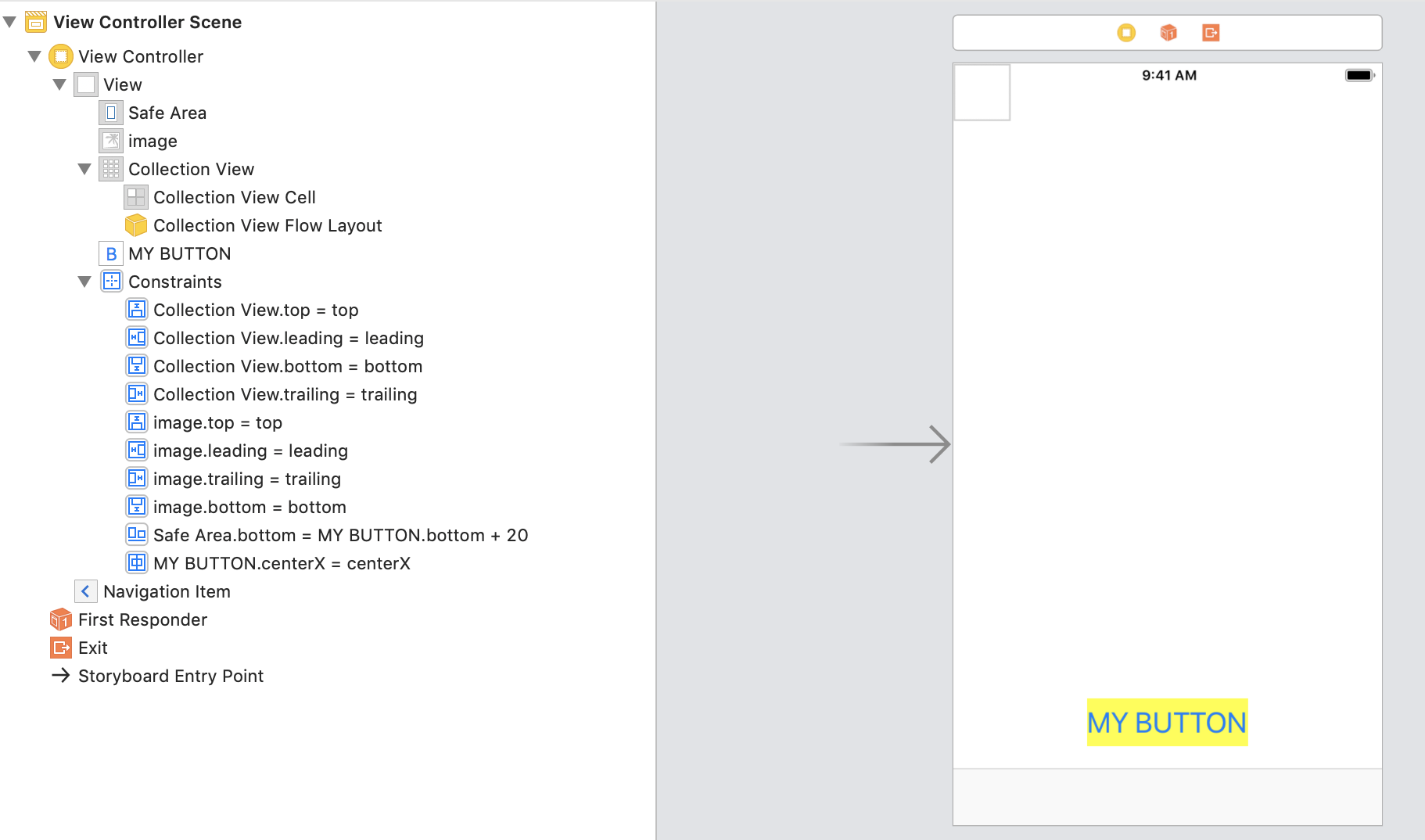
johnswifttt
on 14 Mar 2019
Thank you for helping!! 💯
By the way, is there a way to shut off this behavior with the popupBar? Basically, so that nothing ever moves even if it is pinned to the bottom safe area? Like is there a setting in your library to turn it off. @LeoNatan
johnswifttt
on 14 Mar 2019
No such setting. The whole point of the safe area guide/margin is that it tells the layout system where it is safe to put important elements. Your "My Button" is laid against the safe area, meaning you want it to be placed where it is safe to put content. When the popup bar appears, that safe area is extended to include the bar's height.
BTW, if you are making changes following my recommendation, I strongly suggest you thoroughly check your app, especially on iPhone XS/XS Max devices, in both portrait and landscape.
LeoNatan
on 14 Mar 2019
Closing the issue as it seems to have been resolved. But we can keep the discussion going.
LeoNatan
on 14 Mar 2019
Thanks for explaining!!
johnswifttt
on 14 Mar 2019
Related issues
 funkenstrahlen
·
3Comments
johnswifttt
·
6Comments
johnswifttt
·
5Comments
funkenstrahlen
·
3Comments
johnswifttt
·
6Comments
johnswifttt
·
5Comments
 Kastet
·
6Comments
Kastet
·
6Comments
 antiraum
·
9Comments
antiraum
·
9Comments
Most helpful comment
No such setting. The whole point of the safe area guide/margin is that it tells the layout system where it is safe to put important elements. Your "My Button" is laid against the safe area, meaning you want it to be placed where it is safe to put content. When the popup bar appears, that safe area is extended to include the bar's height.
BTW, if you are making changes following my recommendation, I strongly suggest you thoroughly check your app, especially on iPhone XS/XS Max devices, in both portrait and landscape.