Live-share: Resolved Incident: Unable to sign in
Describe what happened:
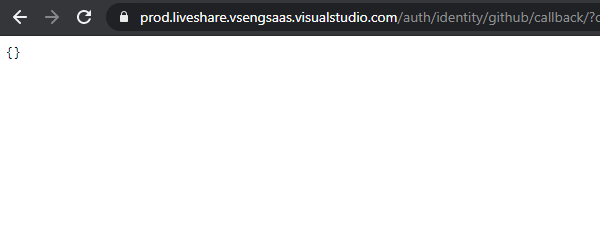
In vs code I try to create a Live Share session which asks me to sign in. Using github to sign in redirects to page that returns empty json object { }
What was your system configuration?
Product and Version [VS/VSCode]: 1.49.0
OS Version[macOS/Windows]: Windows 10
Live Share Extension Version: v1.0.2740
Steps to Reproduce / Scenario:
- Create Live Share session
- Use Github to sign in
- Press Github login page green button "Authorize VisualStudioLiveShare"
- Wait for redirect "You are being redirected to the authorized application."
- On arrival at "https://prod.liveshare.vsengsaas.visualstudio.com/auth/identity/github/callback/?code=REDACTED" the blank page returns { } without signaling vs code that login was successful
NOTE: refreshing that page throws "InternalOAuthError:` Failed to fetch user profile (status: 401 data: {"message":"Bad `credentials","documentation_url":"https://docs.github.com/rest"})" but I suppose that's to be expected because of invalidated expired request.
ADDITIONAL NOTE: at the end of the url "?code=REDACTED" using this code to sign in manually in vs code using this code for "Live Share: Sign In With User Code" doesn't work either.
 shadryck
All 34 comments
The same issue.
 bigslycat
on 14 Sep 2020
bigslycat
on 14 Sep 2020
Same issue, Microsoft auth doesn't work either. (tried both)

 Scong
on 14 Sep 2020
Scong
on 14 Sep 2020
same here
 Gabrielllopes
on 14 Sep 2020
Gabrielllopes
on 14 Sep 2020
I have the same problem, my friend.
 Kiomarou
on 14 Sep 2020
Kiomarou
on 14 Sep 2020
Same issue here! :(
 Sandra-Kennelly
on 14 Sep 2020
Sandra-Kennelly
on 14 Sep 2020
Unable to sign in at all, same issue
 Quiauhxochitli
on 14 Sep 2020
Quiauhxochitli
on 14 Sep 2020
Unable to sign in at Dutch datacenter, live share page is empty json text and VS code hangs on "Signing In..."
Not sure if this is related https://github.com/MicrosoftDocs/live-share/issues/3831
Kind regards,
Stan
 StanHubrick
on 14 Sep 2020
StanHubrick
on 14 Sep 2020
Also having the same problem. Any news on this issue?
 suzynakayama
on 14 Sep 2020
suzynakayama
on 14 Sep 2020
Im having the issue too!!
 lancemccluskey
on 14 Sep 2020
lancemccluskey
on 14 Sep 2020
I am also experiencing this issue!
 Cpanelnikolai
on 14 Sep 2020
Cpanelnikolai
on 14 Sep 2020
Same here, fuck..
 lucswart
on 14 Sep 2020
lucswart
on 14 Sep 2020
ditto
 jahongOf1
on 14 Sep 2020
jahongOf1
on 14 Sep 2020
same here...
 NextWork123
on 14 Sep 2020
NextWork123
on 14 Sep 2020
I am also unable to sign in and get this error in Firefox: prod.liveshare.vsengsaas.visualstudio.com. PR_END_OF_FILE_ERROR
 liubrandon
on 14 Sep 2020
liubrandon
on 14 Sep 2020
me three. 😭 same error as @liubrandon
 amundo
on 14 Sep 2020
amundo
on 14 Sep 2020
Same here
 Pallanez
on 14 Sep 2020
Pallanez
on 14 Sep 2020
Same here
 sansonegonzalo
on 14 Sep 2020
sansonegonzalo
on 14 Sep 2020
Appears to be server based issues and has some characteristics of malicious intent but of course I cannot be sure. Could always just be their NGINX acting very weird.
 xCykrix
on 14 Sep 2020
xCykrix
on 14 Sep 2020
Apologies for the issues. We are fixing the issue and will deploy it soon. Adding @fubaduba @BrunoGuardia
 nandiniYeltiwar
on 14 Sep 2020
nandiniYeltiwar
on 14 Sep 2020
Issue seems to be fixed
Pallanez
on 14 Sep 2020
Issue has been fixed now. Please let us know if you are still hitting it. Thanks!
nandiniYeltiwar
on 14 Sep 2020
Issue has been fixed now. Please let us know if you are still hitting it. Thanks!
Thanks for fixing the sign-in issue but my colleague still can't seem to join the session (he gets an error that says the collaboration session is no longer active).
 AndrewJo
on 14 Sep 2020
AndrewJo
on 14 Sep 2020
Can confirm whatever has been done indeed fixed it on my end. 🎉
shadryck
on 14 Sep 2020
@AndrewJo Can you reshare your session and ask your colleague to join again?
nandiniYeltiwar
on 14 Sep 2020
@nandiniYeltiwar Actually, it seems to be fixed now. Thank you!
P.S. Will there be a retrospective on why this happened to be shared with the community? With the COVID situation we use Live Share for remote pairing on an almost daily basis and would appreciate the transparency on what caused the downtime.
AndrewJo
on 14 Sep 2020
Adding @fubaduba for the question.
nandiniYeltiwar
on 14 Sep 2020
Thank you all for your reports and your patience. The fix is currently underway, and we will provide a more detailed retrospective of what the issue was soon.
 fubaduba
on 15 Sep 2020
fubaduba
on 15 Sep 2020
This issue has now been resolved. Closing this issue to signal resolution. Please let us know if this isn't fixed for you.
We will follow up with a pinned issue explaining the reason for the bug.
Thank you!
fubaduba
on 15 Sep 2020
RCA Update
Live Share had an issue with its service deployment that caused authentication failures. This issue was mitigated and should be resolved for all those affected."
Thank you for your patience, and apologies for the inconvenience caused.
fubaduba
on 15 Sep 2020
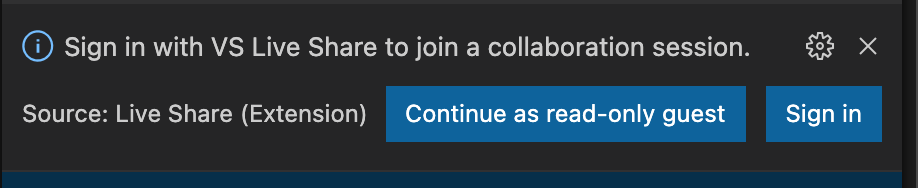
Still having the problem while sharing AND while joining collab sessions.
Even though i sign in can't stay signed in while joinin/sharing
 Greyfourt
on 16 Sep 2020
Greyfourt
on 16 Sep 2020
Same problem as Greyfourt.
 ARM-Visionpool
on 22 Sep 2020
ARM-Visionpool
on 22 Sep 2020
@Greyfourt @ARM-Visionpool - seems you were hitting a different issue, #3835 . That one was fixed a day later than this one; can you confirm your issue is resolved too?
 BrunoGuardia
on 22 Sep 2020
BrunoGuardia
on 22 Sep 2020
@BrunoGuardia, related but different error after log in. Visual Studio Code throws a warning message:
"A second instance of Code is already running as administrator. Please close the other instance and try again." But that is my main window. I have noticed that VSC doesn't like opening new files from the OS when launched this way and using a workspace.

The application just sits stalled:
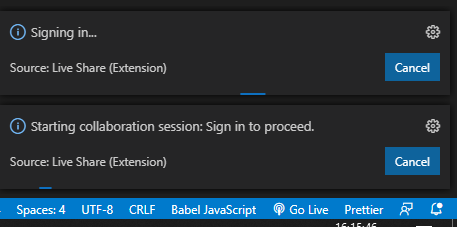
It does the exact same behavior with both MSFT login and Github login, with both Chrome and Edge browsers.
ARM-Visionpool
on 23 Sep 2020
It gives exactly the same errors for me! Even passing by opera, chrome and safari with both Github and Microsoft login. It never signs in plus after some time it stops the log in process and asks to redo it.
Greyfourt
on 23 Sep 2020
Related issues
 csharpfritz
·
4Comments
csharpfritz
·
4Comments
 Chuxel
·
3Comments
Chuxel
·
3Comments
 roblourens
·
4Comments
Chuxel
·
4Comments
roblourens
·
4Comments
Chuxel
·
4Comments
 tamuratak
·
3Comments
tamuratak
·
3Comments
Most helpful comment
Unable to sign in at Dutch datacenter, live share page is empty json text and VS code hangs on "Signing In..."
Not sure if this is related https://github.com/MicrosoftDocs/live-share/issues/3831
Kind regards,

Stan