Live-share: Typescript not working as guest
Issue Type: Bug
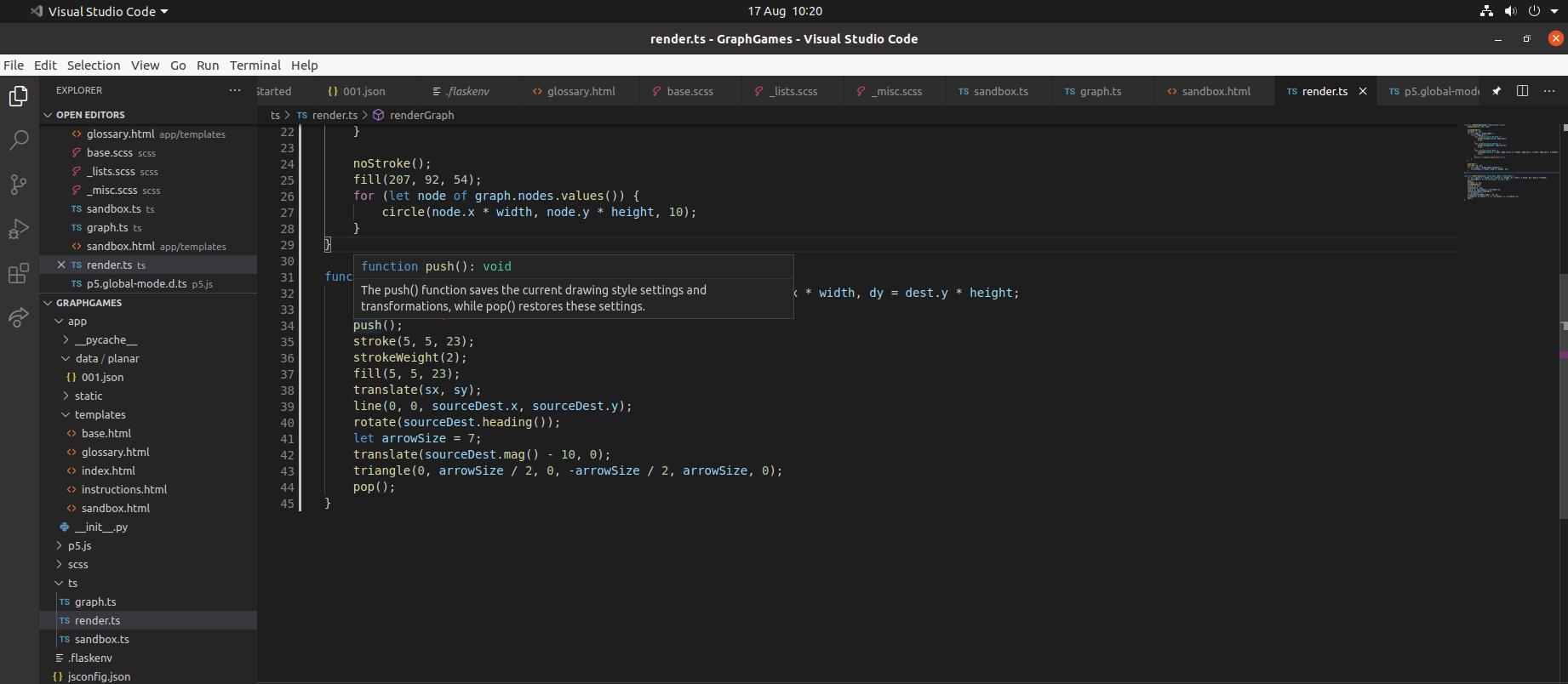
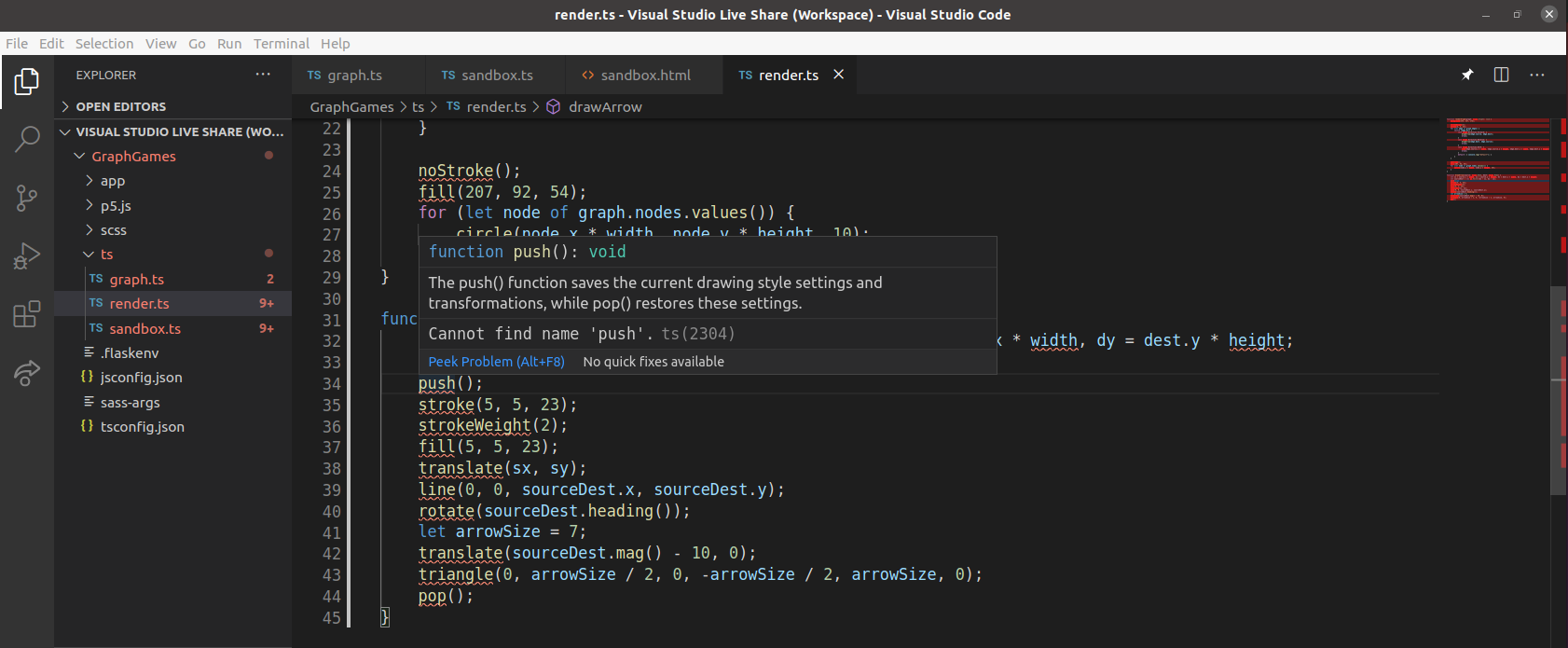
Function, classes, variables and namespaces defined in one typescript file are producing errors (ts(2304), ts(2503)) when used in another file, but only on the guest. However, when hovering over such a function, its type and doc-string is shown.
Host screenshot
Guest screenshot
Guest log
Extension version: 1.0.2619
VS Code version: Code 1.48.0 (db40434f562994116e5b21c24015a2e40b2504e6, 2020-08-13T07:40:55.768Z)
OS version: Linux x64 5.4.0-42-generic
System Info
|Item|Value|
|---|---|
|CPUs|AMD Ryzen 3 1300X Quad-Core Processor (4 x 3527)|
|GPU Status|2d_canvas: enabled
flash_3d: enabled
flash_stage3d: enabled
flash_stage3d_baseline: enabled
gpu_compositing: enabled
multiple_raster_threads: enabled_on
oop_rasterization: disabled_off
protected_video_decode: unavailable_off
rasterization: disabled_software
skia_renderer: disabled_off_ok
video_decode: unavailable_off
viz_display_compositor: enabled_on
viz_hit_test_surface_layer: disabled_off_ok
webgl: enabled
webgl2: enabled|
|Load (avg)|1, 2, 2|
|Memory (System)|7.79GB (0.94GB free)|
|Process Argv|-n /tmp/vsliveshare/tmp-1866C73C2CAEFE9B63472BCEC51720A87899/Visual Studio Live Share.code-workspace|
|Screen Reader|no|
|VM|0%|
|DESKTOP_SESSION|ubuntu|
|XDG_CURRENT_DESKTOP|Unity|
|XDG_SESSION_DESKTOP|ubuntu|
|XDG_SESSION_TYPE|x11|
 c-snail
All 5 comments
+1 I think it has something to do with the most recent update of VS Code
 TimVanDyke
on 17 Aug 2020
TimVanDyke
on 17 Aug 2020
Thanks for reporting! Yes, this is due to the latest update of VS Code - previously the TypeScript extension would not activate for the Live Share guest, and now it is. The errors you're seeing are being produced by the local TypeScript extension, and the correct hover info is being produced by the Live Share extension.
We're working on a fix right now. In the meantime, if you find this truly annoying, you can revert to an older version of VS Code or disable the TypeScript extension for the guest.
 daytonellwanger
on 17 Aug 2020
daytonellwanger
on 17 Aug 2020
@daytonellwanger Can you elaborate on "disable the Typescript extension for the guest"? I disabled mine and then joined as a guest but it's still broken.
 cblaine
on 19 Aug 2020
cblaine
on 19 Aug 2020
I was mistaken - I thought this was possible to do, but it isn't. We've fixed this in the latest version of VS Code Insiders, so you can either update to that or revert to the last version of stable.
daytonellwanger
on 20 Aug 2020
Awesome, will do!
cblaine
on 20 Aug 2020
Related issues
 csharpfritz
·
4Comments
csharpfritz
·
4Comments
 Luchiwis
·
3Comments
Luchiwis
·
3Comments
 tamuratak
·
3Comments
tamuratak
·
3Comments
 arc95
·
3Comments
arc95
·
3Comments
 squillace
·
3Comments
squillace
·
3Comments
Most helpful comment
Thanks for reporting! Yes, this is due to the latest update of VS Code - previously the TypeScript extension would not activate for the Live Share guest, and now it is. The errors you're seeing are being produced by the local TypeScript extension, and the correct hover info is being produced by the Live Share extension.
We're working on a fix right now. In the meantime, if you find this truly annoying, you can revert to an older version of VS Code or disable the TypeScript extension for the guest.