Live-share: Live share on remote host fails
Issue Type: Bug
- Set up the remote extension to work against a linux host
- Install the live share plugin
- Repeat for a second user (on the same remote host)
- Live share fails (saying corrupted install), because it can not write to /tmp/VSFeedbackVSRTCLogs, as it is owned by the first user.
Extension version: 1.0.1742
VS Code version: Code 1.43.0 (78a4c91400152c0f27ba4d363eb56d2835f9903a, 2020-03-09T19:47:57.235Z)
OS version: Windows_NT x64 10.0.14393
Remote OS version: Linux x64 3.10.0-1062.1.1.el7.x86_64
Remote OS version: Linux x64 3.10.0-1062.1.1.el7.x86_64
Remote OS version: Linux x64 3.10.0-1062.1.1.el7.x86_64
 bjorngadde
All 12 comments
Hi @bjorngadde! thank you for reporting this issue. can you check if it is the same as #3251?
 mlacouture
on 13 Mar 2020
mlacouture
on 13 Mar 2020
Yes, it's the same issue.
I would suggest moving to the ~/.vscode directory. Alternatively, modifying the permissions on the dir and adding some uuid-part to the subfolders to avoid collisions.
Also, I suspect the live share plugin creates a few other folders under /tmp, which may have similar issues (based on the folder names only, they were not mentioned as problems in the logfile).
bjorngadde
on 13 Mar 2020
I am hitting the same issue as @bjorngadde. I am trying to install vsliveshare while using the remote-ssh extension on a linux host where there are multiple users connected. The second user who tries to install hits the following error message:
[2020-03-18 08:29:38.859] [exthost] [error] Activating extension ms-vsliveshare.vsliveshare failed due to an error:
[2020-03-18 08:29:38.859] [exthost] [error] Error: Agent terminated with exit code: 0 and signal null: System.UnauthorizedAccessException: Access to the path '/tmp/VSFeedbackVSRTCLogs/20200318_152937_Agent.log' is denied. ---> System.IO.IOException: Permission denied
--- End of inner exception stack trace ---
 xadegunt
on 18 Mar 2020
xadegunt
on 18 Mar 2020
so this is a two-part issue: 1. the extension should not fail to initialize when it can't write logs, and 2. feature request to configure logs location.
mlacouture
on 18 Mar 2020
Thanks for reporting this issue. We apologize for the delay in getting to it. We'll take a look at you're facing this.
 fubaduba
on 23 Mar 2020
fubaduba
on 23 Mar 2020
Cross posting to #180 and #3252.
We have a hacky simple workaround for our particular case.
Can confirm that this is an issue for the limited case of doing Live Share with Remote Development (ssh) on a shared remote machine (the shared compute cluster on our campus). Our use case is remote learning for our students.
We (myself plus @peterbatzel and @Leslie-C) have been banging our heads against this for over a day. The original error is this:
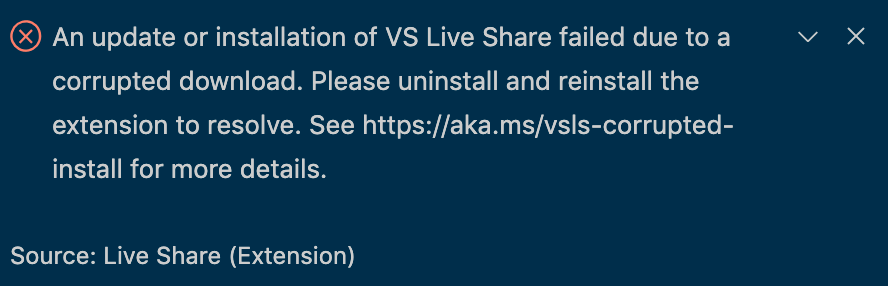
That link (https://aka.ms/vsls-corrupted-install) is just a redirect to #180, which is two years old with maybe hundreds of comments. It looks like there are possibly multiple causes of that error message in #180 that are unrelated to the remote ssh problem we're experiencing (the word "remote" doesn't get mentioned in #180 until Jul 31, 2019).
Everything worked for me (I was the first to install it), but it was corrupt corrupt corrupt for my colleagues @peterbatzel and then @Leslie-C. @peterbatzel then found #3252, and just as @bjorngadde describes it, I (@jasonsydes) had ownership of the /tmp/VSFeedbackVSRTCLogs directory, and @peterbatzel and @Leslie-C couldn't write to it when they tried to install Live Share there.
Our simple hacky solution is to just have the original owner (me in this case) open up permissions to allow everyone to write to that directory:
chmod a+w /tmp/VSFeedbackVSRTCLogs
Again, that directory is not on our laptops, but rather is located on our university's shared compute cluster. Once I ran that command, @Leslie-C was able to install Live Share just fine (no more "corruption", or rather, she was able to write to the directory, see below) and we were able to do a Live Share session together on the compute cluster.

Obviously not a perfect solution (security implications?), would prefer a different fix (e.g. write to ~/.vscode-server/ instead), but works for now.
Thanks VSCode community!
 jasonsydes
on 9 Apr 2020
jasonsydes
on 9 Apr 2020
Same issue. Trying to work on teaching one of my kids how to code.
 mrpoundsign
on 10 May 2020
mrpoundsign
on 10 May 2020
Same issue. Trying to teach a remote-learning programming course like @jasonsydes.
 clarksmr
on 2 Jun 2020
clarksmr
on 2 Jun 2020
Hello everyone, thanks for the feedback regarding the issue. I am not able to successfully reproduce the problem.
For set up, I have two user accounts on a Ubuntu 20.04 virtual machine using Hyper-V. I set up the Remote Development extension and in two separate VS Code windows on my Windows machine, I ssh into each user account. After doing this, I download the live share extension to VS Code for both users. Both install with no error messages.
Are there any additional steps you can recommend to help reproduce this bug?
 alyssajotice
on 22 Sep 2020
alyssajotice
on 22 Sep 2020
@alyssajotice I think a simpler repro of the same issue can be found outside of doing remote development - Live Share tries to interact with files in the tmp directory, which isn't necessarily accessible to the user running Live Share. So you can repro by simply changing the access permissions on the tmp directory so the user running Live Share doesn't have read/write permissions.
 daytonellwanger
on 23 Sep 2020
daytonellwanger
on 23 Sep 2020
I am getting the same error.
VSCode works with local LiveShare, but fails when i use remote SSH.
I have attached screenshot which shows LiveShare Extension pack installed properly in both Remote and Local but the taskbar button does not appear. Clicking on the Share or Join does not work either
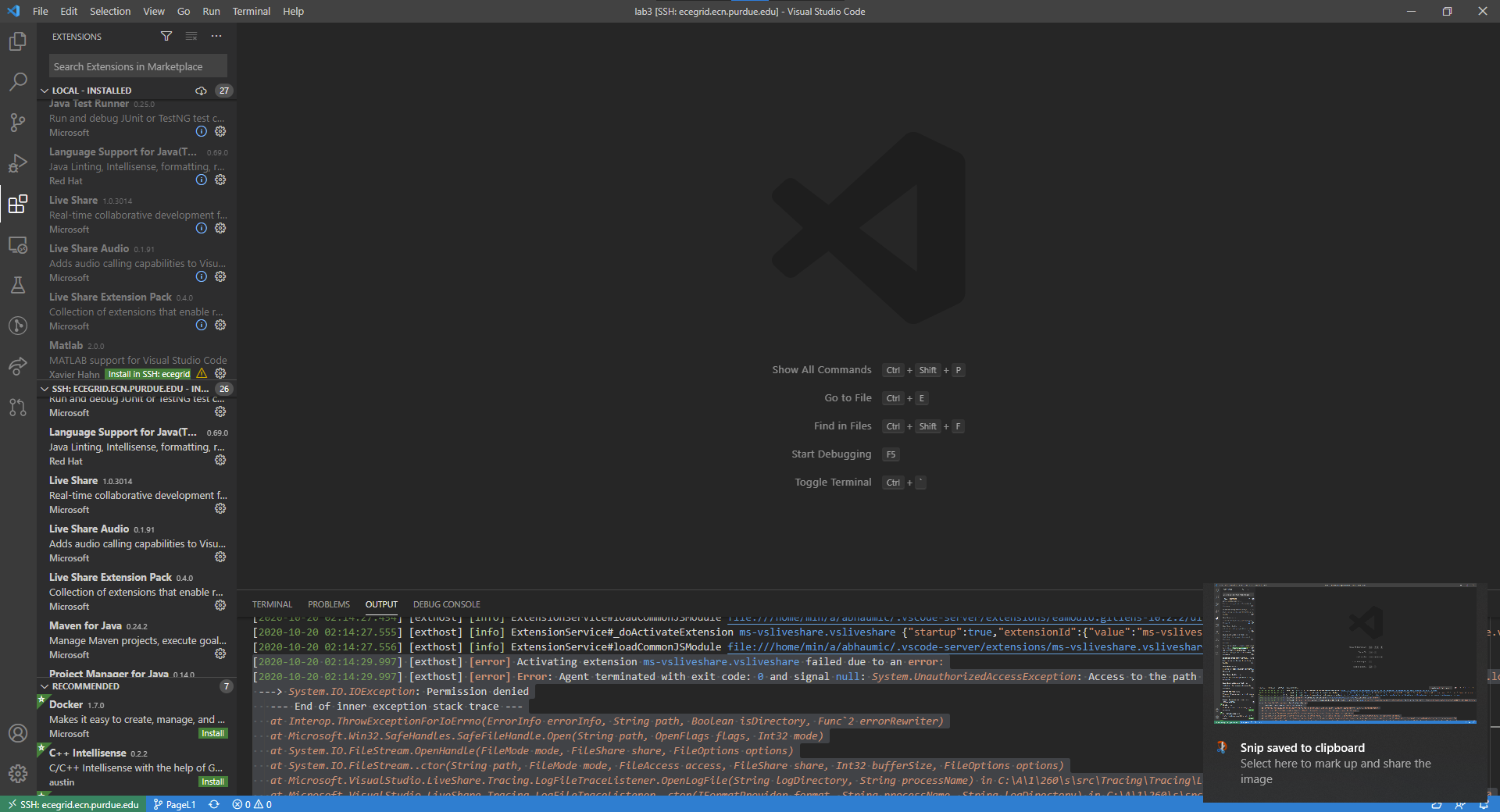
The Remote Extension Host log reveals this:
[2020-10-20 02:14:29.997] [exthost] [error] Activating extension ms-vsliveshare.vsliveshare failed due to an error:
[2020-10-20 02:14:29.997] [exthost] [error] Error: Agent terminated with exit code: 0 and signal null: System.UnauthorizedAccessException: Access to the path '/tmp/VSFeedbackVSRTCLogs/20201020_061428_Agent.log' is denied.
 ---> System.IO.IOException: Permission denied
   --- End of inner exception stack trace ---
   at Interop.ThrowExceptionForIoErrno(ErrorInfo errorInfo, String path, Boolean isDirectory, Func`2 errorRewriter)
   at Microsoft.Win32.SafeHandles.SafeFileHandle.Open(String path, OpenFlags flags, Int32 mode)
   at System.IO.FileStream.OpenHandle(FileMode mode, FileShare share, FileOptions options)
   at System.IO.FileStream..ctor(String path, FileMode mode, FileAccess access, FileShare share, Int32 bufferSize, FileOptions options)
   at Microsoft.VisualStudio.LiveShare.Tracing.LogFileTraceListener.OpenLogFile(String logDirectory, String processName) in C:\A\1\260\s\src\Tracing\Tracing\LogFileTraceListener.cs:line 98
   at Microsoft.VisualStudio.LiveShare.Tracing.LogFileTraceListener..ctor(IFormatProvider format, String processName, String logDirectory) in C:\A\1\260\s\src\Tracing\Tracing\LogFileTraceListener.cs:line 40
   at Microsoft.VisualStudio.LiveShare.Tracing.TracingSourceFactory.CreateTraceSource(String name, Nullable`1 eventIdLogCreated, TraceFilter logFileTraceFilter, Nullable`1 consoleVerbosity, IReadOnlyDictionary`2 consoleSourceLevels, Assembly boostrapAssembly, String logDirectory, IEnumerable`1 unfilteredConsoleEvents, TraceOptions consoleTraceOptions) in C:\A\1\260\s\src\Tracing\Tracing\TraceSourceFactory.cs:line 72
   at Microsoft.Cascade.Tracing.TracingConfig.CreateTraceSource(String name, Nullable`1 consoleVerbosity, IEnumerable`1 unfilteredConsoleEvents) in C:\A\1\260\s\src\Common\Tracing\TracingConfig.cs:line 25
   at Microsoft.Cascade.Agent.Program.ExecuteAsync() in C:\A\1\260\s\src\Agent\Program.cs:line 284
    at ChildProcess.<anonymous> (/home/min/a/abhaumic/.vscode-server/extensions/ms-vsliveshare.vsliveshare-1.0.3014/out/prod/extension-prod.js:151395:32)
    at ChildProcess.emit (events.js:228:7)
    at maybeClose (internal/child_process.js:1021:16)
    at Socket.<anonymous> (internal/child_process.js:430:11)
    at Socket.emit (events.js:223:5)
    at Pipe.<anonymous> (net.js:664:12)
If I understand correctly, the error arise from LiveShare trying to write to a log in the /tmp/VSFeedbackVSRTCLogs directory which it does not have permissions for. The workaround doesnt work for me since I am using a university machine and cannot chmod permissions without su access (which is unlikely).
Any help would be greatly appreciated.
Cheers
 abhaumick
on 20 Oct 2020
abhaumick
on 20 Oct 2020
The fix for this will be out during the next release, thank you for your patience!
Edit: If writing to /tmp/VSFeedbackVSRTCLogs fails, the user will be able to use Live Share without logging.
alyssajotice
on 20 Oct 2020
Related issues
 jleider
·
3Comments
jleider
·
3Comments
 Luchiwis
·
3Comments
Luchiwis
·
3Comments
 squillace
·
3Comments
squillace
·
3Comments
 tamuratak
·
3Comments
tamuratak
·
3Comments
 Chuxel
·
3Comments
Chuxel
·
3Comments
Most helpful comment
Cross posting to #180 and #3252.
We have a hacky simple workaround for our particular case.
Can confirm that this is an issue for the limited case of doing Live Share with Remote Development (ssh) on a shared remote machine (the shared compute cluster on our campus). Our use case is remote learning for our students.
We (myself plus @peterbatzel and @Leslie-C) have been banging our heads against this for over a day. The original error is this:
That link (https://aka.ms/vsls-corrupted-install) is just a redirect to #180, which is two years old with maybe hundreds of comments. It looks like there are possibly multiple causes of that error message in #180 that are unrelated to the remote ssh problem we're experiencing (the word "remote" doesn't get mentioned in #180 until Jul 31, 2019).
Everything worked for me (I was the first to install it), but it was corrupt corrupt corrupt for my colleagues @peterbatzel and then @Leslie-C. @peterbatzel then found #3252, and just as @bjorngadde describes it, I (@jasonsydes) had ownership of the /tmp/VSFeedbackVSRTCLogs directory, and @peterbatzel and @Leslie-C couldn't write to it when they tried to install Live Share there.
Our simple hacky solution is to just have the original owner (me in this case) open up permissions to allow everyone to write to that directory:
Again, that directory is not on our laptops, but rather is located on our university's shared compute cluster. Once I ran that command, @Leslie-C was able to install Live Share just fine (no more "corruption", or rather, she was able to write to the directory, see below) and we were able to do a Live Share session together on the compute cluster.
Obviously not a perfect solution (security implications?), would prefer a different fix (e.g. write to ~/.vscode-server/ instead), but works for now.
Thanks VSCode community!