Live-share: An update or installation of VS Live Share failed due to a corrupted download. Please uninstall and reinstall the extension to resolve. See https://aka.ms/vsls-corrupted-install for more details.
I was using liveshare just fine until yesterday, and all of sudden it's not working. All I did was adding launch to my setting.json(I am in bootcamp program right now). I don't think that's a problem either. I even reinstall the vscode too. Still no use.
 aracpyon
All 28 comments
Hi thank you for reaching out. Are you on mac ? ( We don't support Sierra) if so, which version are you using ? Also, your logs may provide us with helpful information. You can access them via the Live Share: Export Logs command from the command palette (ctrl + shift + p) and attach them to this issue.
 setaskin
on 16 Jan 2020
setaskin
on 16 Jan 2020
cc @IlyaBiryukov
setaskin
on 16 Jan 2020
Thank you for replying! Actually my mac is sierra. I attached the
screenshot below. I have been using live share last two months without
problem though. Do you think it will change it if I update my system? I've
been delaying it since it makes my mac very slow.
Best,
Ara
On Thu, Jan 16, 2020 at 1:01 PM Selen Taskin notifications@github.com
wrote:
cc @IlyaBiryukov https://github.com/IlyaBiryukov
—
You are receiving this because you authored the thread.
Reply to this email directly, view it on GitHub
https://github.com/MicrosoftDocs/live-share/issues/3124?email_source=notifications&email_token=ANQ4U7IMC7V3QHEHVUQY3E3Q6COGNA5CNFSM4KHNHXC2YY3PNVWWK3TUL52HS4DFVREXG43VMVBW63LNMVXHJKTDN5WW2ZLOORPWSZGOEJE7PSI#issuecomment-575272905,
or unsubscribe
https://github.com/notifications/unsubscribe-auth/ANQ4U7MOH3KJ5E2SE3UDQ53Q6COGNANCNFSM4KHNHXCQ
.
--
Ara Cho
www.arachoart.com
312 593-0145
aracpyon
on 16 Jan 2020
No issues expected on Mohave , if you have an issue, quick reinstall of live share would solve it.
setaskin
on 16 Jan 2020
I am sorry. I just want to confirm if my understanding is correct. Are you
suggesting to replace Sierra with Mohave to make it work? In this current
version, deinstalled and installed the live share and vscode 10 times. I
also erased .vscode before I did it. Still not working.
On Thu, Jan 16, 2020 at 2:25 PM Selen Taskin notifications@github.com
wrote:
No issues expected on Mohave , if you have an issue, quick reinstall of
live share would solve it.—
You are receiving this because you authored the thread.
Reply to this email directly, view it on GitHub
https://github.com/MicrosoftDocs/live-share/issues/3124?email_source=notifications&email_token=ANQ4U7KGLQ46IVIVPMWETC3Q6CYD3A5CNFSM4KHNHXC2YY3PNVWWK3TUL52HS4DFVREXG43VMVBW63LNMVXHJKTDN5WW2ZLOORPWSZGOEJFHRVI#issuecomment-575305941,
or unsubscribe
https://github.com/notifications/unsubscribe-auth/ANQ4U7NI2U3PZIYQIMM2CQLQ6CYD3ANCNFSM4KHNHXCQ
.>
Ara Cho
[email protected]
www.arachoart.com
(312) 593-0145
aracpyon
on 16 Jan 2020
@aracpyon LiveShare used to use .NET Core 2.2 and in the latest version switched to .NET Core 3.0. It turns out that .NET Core 3.0 is no longer supported on Sierra and causes this issue. We need to evaluate what percentage of users are on Sierra to see if the benefits of moving to 3.0 are worth it or if we should roll back. We'll come up with up an update on that.
Unfortunately there doesn't seem to be any workarounds to get the latest version working on Sierra. You could go back to the previous version of LiveShare and that should work fine if you didn't want to update the OS.
 srivatsn
on 16 Jan 2020
srivatsn
on 16 Jan 2020
I would definitely wanna try the previous version of LiveShare. Could you
kindly send me a link? I couldn't find the previous version online.
Thank you so much for your help.
On Thu, Jan 16, 2020 at 3:59 PM Srivatsn Narayanan notifications@github.com
wrote:
@aracpyon https://github.com/aracpyon LiveShare used to use .NET Core
2.2 and in the latest version switched to .NET Core 3.0. It turns out that
.NET Core 3.0 is no longer supported on Sierra and causes this issue. We
need to evaluate what percentage of users are on Sierra to see if the
benefits of moving to 3.0 are worth it or if we should roll back. We'll
come up with up an update on that.Unfortunately there doesn't seem to be any workarounds to get the latest
version working on Sierra. You could go back to the previous version of
LiveShare and that should work fine if you didn't want to update the OS.—
You are receiving this because you were mentioned.Reply to this email directly, view it on GitHub
https://github.com/MicrosoftDocs/live-share/issues/3124?email_source=notifications&email_token=ANQ4U7PVA4PBKLEJ7NK6KM3Q6DDCFA5CNFSM4KHNHXC2YY3PNVWWK3TUL52HS4DFVREXG43VMVBW63LNMVXHJKTDN5WW2ZLOORPWSZGOEJFQYLQ#issuecomment-575343662,
or unsubscribe
https://github.com/notifications/unsubscribe-auth/ANQ4U7I22MUNUDO5H7W3MALQ6DDCFANCNFSM4KHNHXCQ
.>
Ara Cho
[email protected]
www.arachoart.com
(312) 593-0145
aracpyon
on 16 Jan 2020
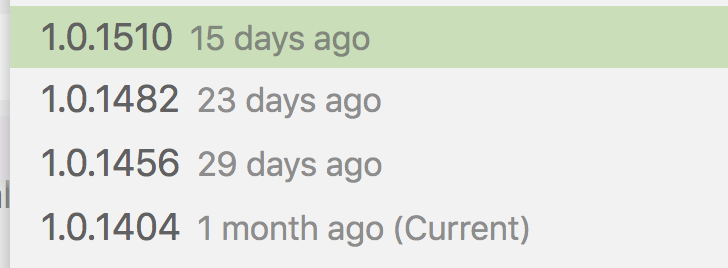
In VSCode, from the extensions tab, right click on the LiveShare extension and you'll find a command to Install Another Version.. and then you can pick a previous version:

srivatsn
on 16 Jan 2020
I am sorry to bother you, but the right click doesn't seem to work on.
Doesn't appear anything. Is there other way?
On Thu, Jan 16, 2020 at 4:13 PM Srivatsn Narayanan notifications@github.com
wrote:
In VSCode, from the extensions tab, right click on the LiveShare extension
and you'll find a command to Install Another Version.. and then you can
pick a previous version:[image: image]
https://user-images.githubusercontent.com/20570/72563199-00d30000-3862-11ea-8a42-52ce5e6cbc80.png—
You are receiving this because you were mentioned.
Reply to this email directly, view it on GitHub
https://github.com/MicrosoftDocs/live-share/issues/3124?email_source=notifications&email_token=ANQ4U7MRRKACSRP64IXTJNLQ6DEYHA5CNFSM4KHNHXC2YY3PNVWWK3TUL52HS4DFVREXG43VMVBW63LNMVXHJKTDN5WW2ZLOORPWSZGOEJFSFMQ#issuecomment-575349426,
or unsubscribe
https://github.com/notifications/unsubscribe-auth/ANQ4U7NZWKN4LHADRFYJHGDQ6DEYHANCNFSM4KHNHXCQ
.
--
Ara Cho
www.arachoart.com
312 593-0145
aracpyon
on 17 Jan 2020
Do you see the option in the gear icon? See this documentation - https://code.visualstudio.com/updates/v1_30#_install-previous-versions
srivatsn
on 17 Jan 2020
I'm using MacOS Sierra(10.12.6) too and was unable to use the extension. The "Corrupted install of the Live Share extension" alert appeared each time I run VSCode #180. After reading through the discussion above I've tried to install previous version of the extension, 1.0.1404 in particular. Now it finally works.
I think a kind of troubleshooting notes for this issue for Sierra users would be nice to have
 embarq
on 30 Jan 2020
embarq
on 30 Jan 2020
Hi, I'm receiving the same "corrupted download" error message in this issue, on Ubuntu 16.04. Should I open a separate issue?
Uninstalling/reinstalling/deleting .extensions/ doesn't seem to help. I also now can't seem to find a previous version (current version 1.0.1510) that works for me, although several months ago I can confirm Live share was working for me.
 benzipperer
on 4 Feb 2020
benzipperer
on 4 Feb 2020
Had the same issue
installed previous version and it works
 qoalu
on 6 Feb 2020
qoalu
on 6 Feb 2020
Hm, when I try an older version, like 1.0.1404, I get the following error:
Agent terminated with exit code: 0 and signal null: System.UnauthorizedAccessException: Access to the path '/tmp/VSFeedbackVSRTCLogs/20200210_151858_Agent.log' is denied. ---> System.IO.IOException: Permission denied
   --- End of inner exception stack trace ---
   at Interop.ThrowExceptionForIoErrno(ErrorInfo errorInfo, String path, Boolean isDirectory, Func`2 errorRewriter)
   at Microsoft.Win32.SafeHandles.SafeFileHandle.Open(String path, OpenFlags flags, Int32 mode)
   at System.IO.FileStream..ctor(String path, FileMode mode, FileAccess access, FileShare share, Int32 bufferSize, FileOptions options)
   at Microsoft.VisualStudio.LiveShare.Tracing.LogFileTraceListener.OpenLogFile(String logDirectory, String processName) in E:\A\_work\67\s\src\Tracing\Tracing\LogFileTraceListener.cs:line 98
   at Microsoft.VisualStudio.LiveShare.Tracing.LogFileTraceListener..ctor(IFormatProvider format, String processName, String logDirectory) in E:\A\_work\67\s\src\Tracing\Tracing\LogFileTraceListener.cs:line 40
   at Microsoft.VisualStudio.LiveShare.Tracing.TracingSourceFactory.CreateTraceSource(String name, Nullable`1 eventIdLogCreated, TraceFilter logFileTraceFilter, Nullable`1 consoleVerbosity, IReadOnlyDictionary`2 consoleSourceLevels, Assembly boostrapAssembly, String logDirectory, IEnumerable`1 unfilteredConsoleEvents, TraceOptions consoleTraceOptions) in E:\A\_work\67\s\src\Tracing\Tracing\TraceSourceFactory.cs:line 70
   at Microsoft.Cascade.Tracing.TracingConfig.CreateTraceSource(String name, Nullable`1 consoleVerbosity, IEnumerable`1 unfilteredConsoleEvents) in E:\A\_work\67\s\src\Common\Tracing\TracingConfig.cs:line 25
   at Microsoft.Cascade.Agent.Program.ExecuteAsync() in E:\A\_work\67\s\src\Agent\Program.cs:line 252
I have the same issue on windows 10, installing a new version works, but the yellow notification by the extensions tab icon to update is kind of annoying
 StormFalcon32
on 12 Feb 2020
StormFalcon32
on 12 Feb 2020
Crisis Averted!
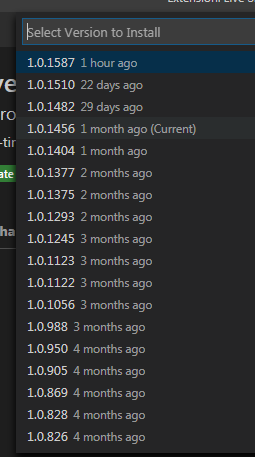
Had the same issue on VScode 1.42.0, Windows 7. Switched back to Live Share 1.0.1456 from non working 1.0.1587 and it works perfectly now. After I initially installed and then selected an older version everything worked. I also instructed the other collaborator to do the same. We had a successful collaboration session afterwards.
For those still not getting it:
- Go to Extensions (Ctrl+Shift+X)
- Install Live Share if not already
- Under "ENABLED" right click on Live Share and select "Install Another Version..."
From my experience you can only select version after initial installation, not before.

 Benargee
on 13 Feb 2020
Benargee
on 13 Feb 2020
My friend just had this issue and he's running Windows 10, VScode 1.42.0. Trying to have him install an older version of live share now..
 lancecarlson
on 13 Feb 2020
lancecarlson
on 13 Feb 2020
I just had the same issue too, trying to install an older version but can't figure it out. This is killing my dev workflow!
 alexrindone
on 13 Feb 2020
alexrindone
on 13 Feb 2020
I just had the same issue too, trying to install an older version but can't figure it out. This is killing my dev workflow!
It's quite easy. Just right click on or it's gear icon it in the list of enabled extensions.
Benargee
on 13 Feb 2020
I 'had' the same issue, installing a previous version of live share resolved it.
 kwarij
on 13 Feb 2020
kwarij
on 13 Feb 2020
I encountered this issue as well. In my case, a colleague and I both have Liveshare installed via remote-ssh. The problem seems to be that the first person who installs the extensions creates the folder /tmp/VSFeedbackVSRTCLogs and (on Linux) permissions are set to 775 with owner:group set to UID and GID of the first person.
Running sudo chmod -R 777 /tmp/VSFeedbackVSRTCLogs seems to have fixed the issue.
 tam116
on 13 Mar 2020
tam116
on 13 Mar 2020
I'm on macOS 10.15.4 now with VS Code 1.43.2. Before the OS update and now the latest version that worked was: 1.0.1615. Stops working from version 1.0.1653 onwards (incl. current version 1.0.1847).
 sPaCeMoNk3yIam
on 26 Mar 2020
sPaCeMoNk3yIam
on 26 Mar 2020
I encountered this issue as well. In my case, a colleague and I both have Liveshare installed via remote-ssh. The problem seems to be that the first person who installs the extensions creates the folder /tmp/VSFeedbackVSRTCLogs and (on Linux) permissions are set to 775 with owner:group set to UID and GID of the first person.
Running sudo chmod -R 777 /tmp/VSFeedbackVSRTCLogs seems to have fixed the issue.
I had the same problem on Linux (Fedora 31), with similar circumstances: two users on the same machine both wanting to use Live Share. Setting those permissions solved my problem.
Edit: For completeness, here are the debug logs of the extension before I tried the solution above:
liveshare_log.zip
 junrrein
on 27 Mar 2020
junrrein
on 27 Mar 2020
I'm on macOS 10.15.4 now with VS Code 1.43.2. Before the OS update and now the latest version that worked was: 1.0.1615. Stops working from version 1.0.1653 onwards (incl. current version 1.0.1847).
Also in the same boat. The latest version of macOS (10.15.4) seems to bork installs of live share from 1.0.1653
 henryhobhouse
on 15 Apr 2020
henryhobhouse
on 15 Apr 2020
I had some luck getting the latest Live Share (1.0.2104) to work with VS Code on macOS 10.15.4. My logfile, attached, indicated there was a hash mismatch. It may have been resolved by the following steps:
- Uninstall LiveShare extension in the VS Code application.
- Remove folder
/Users/$USER/Library/Application Support/Code/User/globalStorage/ms-vsliveshare.vsliveshare - Remove folder
/Users/$USER/.vscode/extensions/ms-vsliveshare.vsliveshare-* - Restart VS Code and reinstall the Live Share extension.
 ctlee
on 30 Apr 2020
ctlee
on 30 Apr 2020
I'm using MacOS Sierra(10.12.6) too and was unable to use the extension. The "Corrupted install of the Live Share extension" alert appeared each time I run VSCode #180. After reading through the discussion above I've tried to install previous version of the extension,
1.0.1404in particular. Now it finally works.I think a kind of troubleshooting notes for this issue for Sierra users would be nice to have
How were you able to install an older version of Live Share to your MacOS Sierra(10.12.6) and where did you find it? Could you send us a link or a step by step on how you did it please? Thank you!
 vem24
on 26 Jun 2020
vem24
on 26 Jun 2020
I have the same problem.
I found that there is "." in my username, so the extensions in the path /Users/s.s./.vscode/extensions.
It will be ok when I create a new user to install Live Share.
Any solution to solve the problem?
 singleseeker
on 11 Jul 2020
singleseeker
on 11 Jul 2020
Closing this as a duplicate of #180.
 lostintangent
on 16 Dec 2020
lostintangent
on 16 Dec 2020
Related issues
 jpopadak
·
3Comments
jpopadak
·
3Comments
 roblourens
·
4Comments
roblourens
·
4Comments
 Chuxel
·
3Comments
Chuxel
·
3Comments
Chuxel
·
3Comments
Chuxel
·
3Comments
 mpearon
·
4Comments
mpearon
·
4Comments
Most helpful comment
I had some luck getting the latest Live Share (
1.0.2104) to work with VS Code on macOS10.15.4. My logfile, attached, indicated there was a hash mismatch. It may have been resolved by the following steps:/Users/$USER/Library/Application Support/Code/User/globalStorage/ms-vsliveshare.vsliveshare/Users/$USER/.vscode/extensions/ms-vsliveshare.vsliveshare-*