Live-share: Starting co-debugging as guest gives error "A project with an Output Type of Class Library cannot be started directly." for web projects
Product and Version
Visual Studio 15.9.3
OS Version
Windows Server 2016
Live Share Extension Version:
0.3.1011.0
Target Platform or Language [e.g. Node.js]:
.NET Framework 4.6.2
Steps to Reproduce / Scenario:
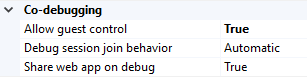
Note: co-debugging is allowed in the extension options.
- Start debugging a web project (.csproj, .NET Framework 4.6.2)
Expected result, for guest and host:
- debugger starts
- launches web browser with start page
Actual result when host launches debugger (F5):
- web project builds on host: ✔️
- debugger starts for both: ✔️
- launches web browser with configured page for host, with root website url for guest: ❌
Actual result when guest launches debugger (selecting correct project from dropdown and pressing 'play'):
- web project builds on host: ✔️ (build succeeded, correct project built, this info is visible for guest and host)
- debugger starts for both: ❌
- launches no web browser with configured page for host: ❌
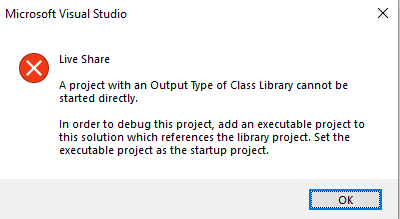
Instead: error dialog:
- Title: Microsoft Visual Studio
- Text:
Live Share A project with an Output Type of Class Library cannot be started directly.
In order to debug this project, add an executable project to this solution which references the library project. Set the executable project as the startup project.
Screenshots
If applicable, add screenshots to help explain your problem.
Host configuration:
Error message on the client when starting debugging there:
 jawn
jawn
All 10 comments
@jawn Hey , thank you for reporting the issue. Would you also attach your logs here for investigation? They should be located at C:\Users\UserName\AppData\Local\Temp\VSFeedbackVSRTCLogs
 setaskin
on 7 Dec 2018
setaskin
on 7 Dec 2018
adding @jramsay for investigation.
setaskin
on 7 Dec 2018
@jawn hello ,is this bug had been resolved?,,if resolved ,how? thanks
 xubb1988
on 9 May 2019
xubb1988
on 9 May 2019
is this has been resolved ?,i set allow guest to start debuggering session on the host, but it is not work,
[https://github.com/MicrosoftDocs/live-share/issues/32] this issue said it been resolved.
@setaskin thanks
xubb1988
on 9 May 2019
@xubb1988/@jawn: thanks for reporting the issue! I tested on the latest version of Visual Studio 2019 using the latest VS Live Share extension (available in the Visual Studio Marketplace). The guest was able to initiate a collaborative debug session. One thing to note though is that you have to select the correct item from the _Select startup item_ dropdown. If it is set to 'default' you'll get a message 'Unable to start debugging. The startup project could not be launched'.

Please let me know if you're still having trouble using the latest VS Live Share extension.
 jramsay
on 9 May 2019
jramsay
on 9 May 2019
@jramsay thanks for you answer,my project is a webapi project, i had set the web as default,and my live share version is 1.0.132.0 ,i think is the lastet version, my host os is win 7,my guest os is win10,

when i set the gcl.serivce.mes. it also not work
xubb1988
on 10 May 2019
hello , i found the project property had a output type options like that:
- window application
- console application
- class library
this is the picture

is this the bug reason ? they no ather option to select, thanks for a lot
@setaskin @jramsay
xubb1988
on 11 May 2019
@jramsay I am having the same problem when trying to start a debugging session from a live share instance in VSCode. The host is Visual Studio 2019 with an ASP.NET MVC project.
VSCode (client) live share extension version: 1.0.540
VS 2019 (host) live share extension version: 1.0.182.1
I have the startup project selected correctly in Visual Studio. In VSCode I switched the selected configuration on the Debug screen to the desired startup project. When I try to start it the project(s) build correctly but then I get the error about starting a class library project.
Here are the exported logs:
live share logs.zip
 ghills
on 18 Jul 2019
ghills
on 18 Jul 2019
@jramsay can we try and repro this please?
 fubaduba
on 10 Feb 2020
fubaduba
on 10 Feb 2020
This issue should have been fixed. Please re-open if you're continuing to experience it. Thanks 👍
 lostintangent
on 24 Mar 2020
lostintangent
on 24 Mar 2020
Related issues
 shadryck
·
34Comments
shadryck
·
34Comments
 avanderhoorn
·
148Comments
avanderhoorn
·
148Comments
 aeperez94
·
33Comments
aeperez94
·
33Comments
 joeynguyen
·
26Comments
joeynguyen
·
26Comments
 LmKupke
·
35Comments
LmKupke
·
35Comments