Live-share: Node.js Debugging Only works if i disable live share extension pack
Debugger no longer works for Node.js unless I disable live share extension pack
See details below
 johnpapa
All 5 comments
Steps to Reproduce:
- Open node project
- Press F5 (choose node)
Does this issue occur when all extensions are disabled?: Yes/No
No - how do i tell which may cause it?
Vs Code Insiders
Version 1.27.0-insider (1.27.0-insider)
When running a simple node express app and starting the debugger, I get this error
Request VSCodeAdapterService.nodeFork failed unexpectedly without providing any details.
and the debugger seems to hang. See video below.

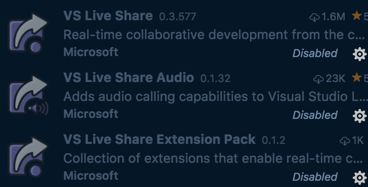
I disabled the VS Live Share Extension pack and the debugger works again.
johnpapa
on 27 Aug 2018
cc @lostintangent for reference
johnpapa
on 27 Aug 2018
@johnpapa Thanks for reporting this! Looks like a regression in VS Code Insiders (this shouldn't impact VS Code Stable). We'll look into this and get a fix out ASAP! Apologies for the issue.
 lostintangent
on 27 Aug 2018
lostintangent
on 27 Aug 2018
Thanks for the quick response, as usual!
johnpapa
on 27 Aug 2018
@johnpapa This has been resolved in the latest Live Share update. Let us know if you continue running into issues after updating. Thanks again for reporting this!
lostintangent
on 30 Aug 2018
Related issues
 tamuratak
·
3Comments
tamuratak
·
3Comments
 evasgit
·
3Comments
evasgit
·
3Comments
 YardGnomeNinja
·
3Comments
YardGnomeNinja
·
3Comments
 lockoncode
·
3Comments
lockoncode
·
3Comments
 Chuxel
·
4Comments
Chuxel
·
4Comments
Most helpful comment
@johnpapa This has been resolved in the latest Live Share update. Let us know if you continue running into issues after updating. Thanks again for reporting this!