Live-share: [VS Code] Timed out waiting for agent process to start.
Product and Version [VS/VSCode]: VSCode
OS Version [macOS/Windows]: macOS
Live Share Extension Version: 0.3.264
Target Platform or Language [e.g. Node.js]: JavaScript, HTML and CSS
Steps to Reproduce / Scenario:
- Whenever I open a new Window it takes a long time to load the plugin, after that, the error message appears.
- I tried to disable and reload the window and then re-enable it again, it didn't work.
I have attached the export logs.
Thanks in advance!
 ManudeQuevedo
All 13 comments
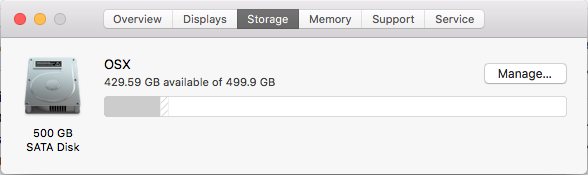
Just confirming if this happen 100% of the time? Also could you give me some indication as to what the specs are of your machine (i.e. type of hard drive, memory, cpu, age, etc)?
 avanderhoorn
on 9 Jun 2018
avanderhoorn
on 9 Jun 2018
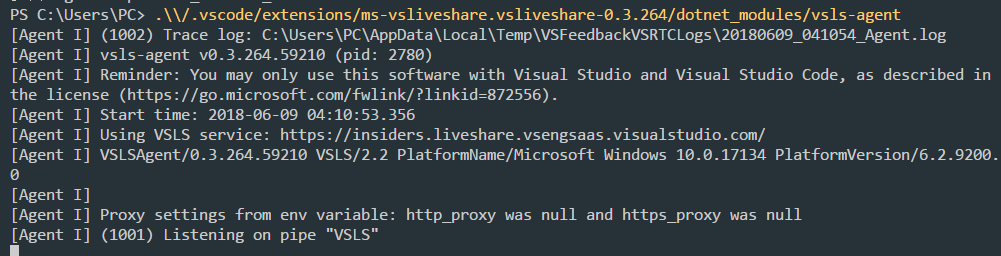
Also when you get a chance, can you try running:
~/.vscode/extensions/ms-vsliveshare.vsliveshare-0.3.264/dotnet_modules/vsls-agent
Note the version number... I'd love to know what the output is.
avanderhoorn
on 9 Jun 2018
Hello @avanderhoorn, thanks for replying back to me, as requested I share the information you've requested me:


After running the command I got this:

ManudeQuevedo
on 9 Jun 2018
same thing
,
1.Whenever I open a new Window it takes a long time to load the plugin, after that, the error message appears.
2.When I run the command sign in with the brower,the error message appears.
.
 hqiwen
on 9 Jun 2018
hqiwen
on 9 Jun 2018
After I executed the script @avanderhoorn requested me to run on my terminal
~/.vscode/extensions/ms-vsliveshare.vsliveshare-0.3.264/dotnet_modules/vsls-agent
The extension started to work perfectly.
ManudeQuevedo
on 9 Jun 2018
@ManudeQuevedo thank you for your infomation.It works for me too.
hqiwen
on 10 Jun 2018
Hello,today I open the vscode,the problem appears again.
After executed the script ~/.vscode/extensions/ms-vsliveshare.vsliveshare-0.3.264/dotnet_modules/vsls-agent .
It works again.
should I executed the script everyday when I open the vscode?
@ManudeQuevedo How about you?Please let me know,thanks a lot.
hqiwen
on 11 Jun 2018
Hello @hqiwen , I executed the command while the VS Code editor was open, after this, the plugin automatically started to reload, and the last step I took was to re-launch VS Code, until now, it is working perfectly.
ManudeQuevedo
on 11 Jun 2018
@hqiwen you shouldn't have to run the command before opening VS Code to get the extension to load, and I'm not sure why it's solving your problem.
@jasongin @avanderhoorn from the logs, the agent is failing to start with the error "Failed to initialize CoreCLR, HRESULT: 0x8007042B" - any ideas?
 daytonellwanger
on 11 Jun 2018
daytonellwanger
on 11 Jun 2018
0x8007042B = "The process terminated unexpectedly."
It's not a very informative error code.
 jasongin
on 11 Jun 2018
jasongin
on 11 Jun 2018
@hqiwen can you give us the details of your machine (i.e. type of hard drive, memory, cpu, age, etc)?
avanderhoorn
on 12 Jun 2018
Sure,here they are.
OS window 10 professional
memory 4GB
CPU Intel Core i5-5200U @ CPU 2.20GHz 2.20GHz

The type of hard drive TOSHIBA MQ01ABF050

And here is the logs.
log.zip
hqiwen
on 13 Jun 2018
Closing as dupe of 360.
daytonellwanger
on 13 Jun 2018
Related issues
 LmKupke
·
35Comments
LmKupke
·
35Comments
 SoftwareApe
·
42Comments
SoftwareApe
·
42Comments
 aracpyon
·
28Comments
aracpyon
·
28Comments
 DanielWright
·
40Comments
DanielWright
·
40Comments
 david50407
·
95Comments
david50407
·
95Comments