Live-share: Stuck on sign in after signing in with Microsoft or GitHub account.
Issue Type: Bug
VSCode gets stuck on sign-in to live share indefinitely. Same for github or microsoft login.
VSCode 1.40.1
LiveShare plugin 1.0.1293
Browsers: Firefox, also tried Edge
Platform: Windows 10
Corporate Proxy with CNTLM
On Linux it doesn't work with Microsoft login, but with GitHub login.
Extension version: 1.0.1293
VS Code version: Code 1.40.1 (8795a9889db74563ddd43eb0a897a2384129a619, 2019-11-13T16:49:35.976Z)
OS version: Windows_NT x64 10.0.17763
System Info
|Item|Value|
|---|---|
|CPUs|Intel(R) Core(TM) i7-8650U CPU @ 1.90GHz (8 x 2112)|
|GPU Status|2d_canvas: enabled
flash_3d: enabled
flash_stage3d: enabled
flash_stage3d_baseline: enabled
gpu_compositing: enabled
metal: disabled_off
multiple_raster_threads: enabled_on
oop_rasterization: disabled_off
protected_video_decode: enabled
rasterization: enabled
skia_renderer: disabled_off
surface_control: disabled_off
surface_synchronization: enabled_on
video_decode: enabled
viz_display_compositor: enabled_on
viz_hit_test_surface_layer: disabled_off
webgl: enabled
webgl2: enabled|
|Load (avg)|undefined|
|Memory (System)|31.81GB (8.62GB free)|
|Process Argv||
|Screen Reader|no|
|VM|0%|
 SoftwareApe
All 42 comments
Thanks for reaching out. We have changed our sign-in flow recently and we are interested in feedback. Can you give us more details about what is the step that failed in the authentication scenario?
Also, please see this issue for a work-around (intented for MacOS users but works on Linux as well): https://github.com/MicrosoftDocs/live-share/issues/2982#issue-522563208
 dlebu
on 22 Nov 2019
dlebu
on 22 Nov 2019
This also isn't working for me meaning I can't use Live Share at all.
With GitHub, I can log in and authorize it but a blank page is all that's shown after I do. With Microsoft, it gives an error as soon as I enter my email:
We're unable to complete your request
invalid_request: The provided value for the input parameter 'redirect_uri' is not valid. The expected value is a URI which matches a redirect URI registered for this client application.
Both of these lead to it just saying "Signing in..." forever.
 patrickmcnamara
on 24 Nov 2019
patrickmcnamara
on 24 Nov 2019
I found out the issue was a misconfiguration of CNTLM (stale password hash). However it would be helpful if the sign in process didn't just appear stuck, but gave a (meaningful) error message. E.g. can't connect to '...' response '...', so that the user has a chance to find the problem.
SoftwareApe
on 26 Nov 2019
@patrickmcnamara What OS and extension version do you use? I want to try reproduce your issue. Also, what is your default browser and version? What version of VSCode do you use?
dlebu
on 26 Nov 2019
@legomushroom Any ideas what this might be?
dlebu
on 26 Nov 2019
@patrickmcnamara could you post/DM the first authentication page URL you get in your browser? That should give us clues on what the redirect_uri is generated.
 legomushroom
on 26 Nov 2019
legomushroom
on 26 Nov 2019
@SoftwareApe we do have a request id for the authentication request and expect that id to match when we get the response. Do you mean that for your case you've use some old browser tab to trigger redirection?
legomushroom
on 26 Nov 2019
I'm currently experiencing the following issue:

Version: 1.41.0-insider
Commit: 9579eda04fdb3a9bba2750f15193e5fafe16b959
Date: 2019-12-10T21:42:59.146Z
Electron: 6.1.5
Chrome: 76.0.3809.146
Node.js: 12.4.0
V8: 7.6.303.31-electron.0
OS: Darwin x64 19.2.0
 conradwt
on 11 Dec 2019
conradwt
on 11 Dec 2019
@conradwt Are you still experiencing this issue? What type of account are you using (GitHub or Microsoft)?
dlebu
on 23 Jan 2020
@dlebu I was able to get things working by uninstalling the extension, quitting the application, restarting the application, and reinstalling the extension. I’m guessing something was silently failing when trying to authenticate with Github and/or a corrupt configuration.
conradwt
on 24 Jan 2020
@legomushroom I'm not sure what you mean. However I think the most important thing would be that it would fail with something that can be diagnosed.
It appears that even if your browser can use the automatically configured proxy, if the proxy in VSCode doesn't work (in my case CNTLM with an old password hash)., It somehow doesn't get any response and just loops infinitely.
SoftwareApe
on 24 Jan 2020
Well the same problem still persists. But you could use the work around. Simple Go to the Command Palette and choose Live Share: Sign in using user code. A browser window will pop up. If it doesn't, go to this location and proceed with authentication. Once the authentication succeeds, you'll get a Ready to collaborate thingy. You'll find a hyperlink which says something about user codes. You'll find the authentication code. Paste it in VSCode (you'll get a text area to enter it as soon as you select the login using user code option from the command palette)
 saurabh000345
on 18 Feb 2020
saurabh000345
on 18 Feb 2020
@saurabh000345 This is still not working for me; After I enter the code, nothing happens. As soon as I click anything related to Live Share, the sign-in prompt reappears.
I've tried with both Microsoft and Github logins, and with the code method for both too.
Are there any logs somewhere I could send you guys ?
 nassimm
on 25 Feb 2020
nassimm
on 25 Feb 2020
@nassimm As far as I understand the issue (might be dumb of me to put it that way, but I think) that the sign in thingy has an issue with the detection of a sign in event. The very fact that you get a code means that the sign in has succeeded, it's only the app that is unable to detect this. I guess you should try it another time, try reinstalling the extension. Restart VSCode and repeat the process. Also, I hope you're using the correct prompt for the code.
saurabh000345
on 25 Feb 2020
I'm thinking this is a connectivity issue. The extension is working fine on
another computer after it asked for a firewall exception. This prompt never
happened on my first computer, I'll look into adding the exception manually.
On Tue, Feb 25, 2020 at 7:10 AM saurabh000345 notifications@github.com
wrote:
@nassimm https://github.com/nassimm are you entering the code in the
correct prompt? As far as I understand the issue (might be dumb of me to
put it that way, but I think) that the sign in thingy has an issue with the
detection of a sign in event. The very fact that you get a code means that
the sign in has succeeded, it's only the app that is unable to detect this.
I guess you should try it another time, try reinstalling the extension.
Restart VSCode and repeat the process. Also, I hope you're using the
correct prompt for the code.—
You are receiving this because you were mentioned.
Reply to this email directly, view it on GitHub
https://github.com/MicrosoftDocs/live-share/issues/3012?email_source=notifications&email_token=AB3FMMRIUYREZG3XZ3UVTATRESY4VA5CNFSM4JQQTB22YY3PNVWWK3TUL52HS4DFVREXG43VMVBW63LNMVXHJKTDN5WW2ZLOORPWSZGOEM2WGOA#issuecomment-590701368,
or unsubscribe
https://github.com/notifications/unsubscribe-auth/AB3FMMUY4IRJ6L6PXD6VU6LRESY4VANCNFSM4JQQTB2Q
.
nassimm
on 25 Feb 2020
For everyone still experiencing sign in issues with Live Share in Visual Studio Code, please try to run Live Share: Disable VSCode account authentication in your command palette. That will change the authentication flow to the legacy one which is still being supported.
dlebu
on 14 Apr 2020
Myself and dozens of coworkers have been blocked by this for several weeks now. Most of us are on macOS Mojave 10.14.6 — some are on Catalina — running VS Code 1.44.2 and VS Live Share 1.0.2104.
We are behind a corporate proxy and we were unable to fix the problem with any adjustments to our network settings or proxy configs, but running the suggested command provided an immediate fix.
Thank you!
How long will this legacy auth flow be supported? We don't want to lose the ability to Live Share again especially now that we're all remote!
ADDENDUM:
I first noticed and reported this behavior when I was running the following earlier versions of Code and Live Share:
VS Code: 1.42.1
VS Live Share: 1.0.1615
 geraldfullam
on 28 Apr 2020
geraldfullam
on 28 Apr 2020
I'm having this error too. I use Ubuntu 20.04 and Live Share doesn't work for my and my friends.
It gets stuck when I try to sign in. I already tried signing in via Microsoft and via Github.

 robaetem
on 30 Apr 2020
robaetem
on 30 Apr 2020
Did you try the work-around noted above about using the legacy auth flow?
 daytonellwanger
on 30 Apr 2020
daytonellwanger
on 30 Apr 2020
I must have read over this post.
Running: Live Share: Disable VSCode account authentication from my command palette indeed solved my issue.
Thanks!
robaetem
on 30 Apr 2020
I'm hitting this as well on MacOS Mojave 10.14.6
I'm also not able to run the Live Share: Disable VSCode account authentication command.
I installed Live Share just today in VS Code, signed in, comes back to VS Code, and says I'm logged in.. but then says I'm not.

Yet at the bottom, it shows that I am logged in... makes no sense.
 routy
on 6 May 2020
routy
on 6 May 2020
Don't know if it could help but when I try to open a link from VSCode and Live Share, it doesn't work (it shows the same messages as above) but when I try to open a link directly in my browser which asks me if I want to open it in VSCode, then asks me to login, it works !
Soo I don't really understand the logic there but anyway
 JustYanns
on 27 May 2020
JustYanns
on 27 May 2020
I'm hitting this as well, on Arch. No combination of disabling VSCode account auth, changing the sign in mode from auto to direct/relay, using user code log in, or signing in with GitHub vs Personal account vs Corporate account seems to fix it. I've attached my logs.
livesharelogs.zip
 333fred
on 15 Jun 2020
333fred
on 15 Jun 2020
Had this problem too...
 jpike88
on 17 Jun 2020
jpike88
on 17 Jun 2020
I have the same issue. I attempt to run the Live Share: Disable command above and now get an error stating:
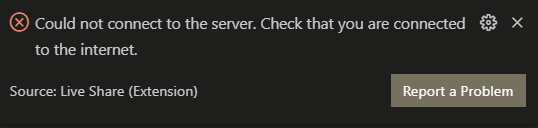
 KyleWestendorf
on 24 Jun 2020
KyleWestendorf
on 24 Jun 2020
I'm having the same issue. Logging in with user code didn't work, nor did disabling account authentication. I'm on Windows 10
 pedrogleta
on 13 Aug 2020
pedrogleta
on 13 Aug 2020
Just found out! Disabling Avast web shield made it work for me
pedrogleta
on 13 Aug 2020
I also got this problem.
Neither run the "Live Share: Disable VSCode account authentication" command nor disable Avast can solve this issue, both on VScode rev1.48.0 and rev1.41.1, OS:win10
What can I do now?
 RobertPCHu
on 18 Aug 2020
RobertPCHu
on 18 Aug 2020
Also having this issue. When I open a normal window (not joining a session) it shows my name in the bottom left corner as normal and my contacts in the extension tab, but when joining a session using any method it refuses to let me sign in.
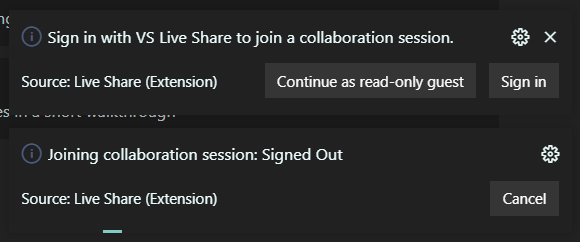
The same exact thing happens using the web editor as well.
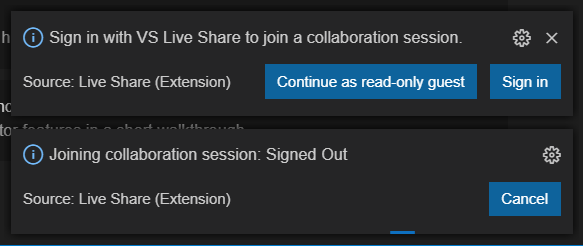
 GlitchMasta47
on 13 Sep 2020
GlitchMasta47
on 13 Sep 2020
We shipped a bunch of authentication fixes this past couple of weeks. I would appreciate if you could try the latest release of our Visual Studio Code extension and let us know if you are still experiencing authentication issues. The fixed issues span all operating systems.
dlebu
on 1 Oct 2020
Still getting this issue on ubuntu
 mcchong
on 13 Oct 2020
mcchong
on 13 Oct 2020

mcchong
on 13 Oct 2020
So I can kind of sign in using the user code workaround, but joining a live share session always asks me to sign in again several times, and gives me this error. Basically cannot use liveshare (v1.0.2902).
Version: 1.49.3
Commit: 2af051012b66169dde0c4dfae3f5ef48f787ff69
Date: 2020-10-02T17:56:11.027Z
Electron: 9.2.1
Chrome: 83.0.4103.122
Node.js: 12.14.1
V8: 8.3.110.13-electron.0
OS: Linux x64 4.15.0-118-generic
mcchong
on 13 Oct 2020
Same problem, after trying everything in this thread, I still cannot connect wen behind the corporate proxy(which requires auth)
 kinwolfqc
on 3 Nov 2020
kinwolfqc
on 3 Nov 2020
Same problem.
If it can help, here is a screenshot of what happen in the console after the redirection of the Github OAuth.

 RealAlphabet
on 18 Nov 2020
RealAlphabet
on 18 Nov 2020
I stumble on this one year old issue today.
Trying to connect the Settings Sync extension of VSCode 1.51.1 and using a GitHub gist fails at login.
 stephaneeybert
on 18 Nov 2020
stephaneeybert
on 18 Nov 2020
FIX
I found a way to fix my problem, in case that helps anyone.
If you have GitDuck installed (another sharing extension), uninstall it and restart VS Code.
I think it overwrite or hook the fetch function, causing the actual issue.
If you don't have the extension, follows these instructions.
- Click on "Help" in the navbar.
- Click on "Toggle Developer Tools".
- Click inside the Devtools and press CTRL + R to reload VS Code.
- If you get a
fetcherror while trying to connect with Github, follow step 5.- Try to figure out which extension conflicts with Liveshare.
Hope it will help.
RealAlphabet
on 26 Nov 2020
Hello Everyone I am suffering from a issue in sign in vs code with GitHub account for Live Share and I got stuck while sign in if some one know the solution then please help
- System - Chrome OS 64-bit
- Linux version - Linux kernel

 devansh123-cloud
on 28 Nov 2020
devansh123-cloud
on 28 Nov 2020
Hello Everyone I am suffering from a issue in sign in vs code with GitHub account for Live Share and I got stuck while sign in if some one know the solution then please help
- System - Chrome OS 64-bit
- Linux version - Linux kernel
Read my answer above if it can help.
RealAlphabet
on 28 Nov 2020
@RealAlphabet Thanks for your help dude but i had tried it but it wasn't worked for me but i had figured out the solution it is very helpful for all os
devansh123-cloud
on 29 Nov 2020
Steps for that -
- When You will sign in through your GitHub Account on vs code for Live Share.
- Then an authorization tab will open .
This one 👇

- Then simply Click on authorize Visual Studio Code Live Share.
- After that a blue link will arrive where there would be a code which you need on paste on the command pallet
of vs code.
*For that simply press F1 key and then on command pallet type Live Share username and signin . - And You will be sign to live share
devansh123-cloud
on 29 Nov 2020
Hey Guys . Actually I wanna little help from you all . I am facing problem in installing git on my chromebook so if some one know how i can install Git on the chromebook so please tell me .
Thankyou.
devansh123-cloud
on 8 Dec 2020
Related issues
 YardGnomeNinja
·
3Comments
YardGnomeNinja
·
3Comments
 dec0dOS
·
4Comments
dec0dOS
·
4Comments
 lockoncode
·
3Comments
lockoncode
·
3Comments
 squillace
·
3Comments
squillace
·
3Comments
 Chuxel
·
4Comments
Chuxel
·
4Comments
Most helpful comment
For everyone still experiencing sign in issues with Live Share in Visual Studio Code, please try to run
Live Share: Disable VSCode account authenticationin your command palette. That will change the authentication flow to the legacy one which is still being supported.