Live-share: [VS Code] Cannot sign in to VS Code LiveShare on Linux - SIGSEGV
Expected Behavior
Sign in successfully to VS Code LiveShare using my user code.
Current Behavior
The extension try to sign in for a second and then it throw:

Steps to Reproduce
1- Click on the extension in the status bar.
2- Sign in with an outlook account which has been accepted into the preview program
3- Copy the generated code
4- Paste in LiveShare box and press enter
Context (Environment)
I am on Linux precisely Deepin OS 15.5. I use the latest version of VS Code (1.23).
Extra comments
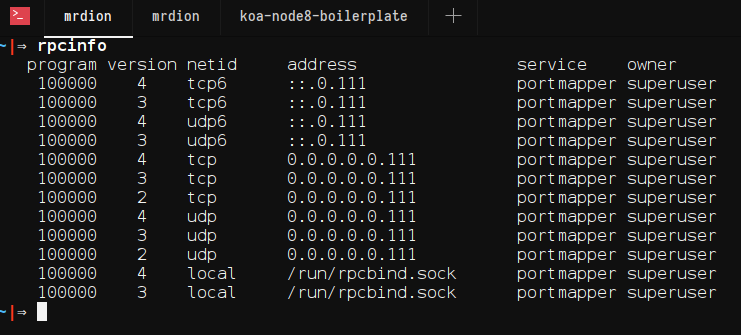
I've followed carefully the instructions in the installation guide and I've installed all the dependencies. I don't have any network issues neither. I tried to install some extensions and everything works well. Here is the output of $ rpcinfo:
 detygon
All 11 comments
@mrdionjr Thanks for reporting the issue. Would you be able to send us your logs? Run "Live Share: Export Logs" and drag-and-drop them here or email them to [email protected].
Also where are you located? (Its possible something is going on with servers in a specific part of the world.)
 Chuxel
on 6 May 2018
Chuxel
on 6 May 2018
Thank for your quick reply. I live in Côte d'Ivoire, West-Africa. Please find attached my logs.
live-share-logs.zip
detygon
on 7 May 2018
I have the same issue. I'm in Italy. These are my logs:
[2018-05-07 13:40:45.305 Client I] Extension, IDE, OS : VSLS/0.3.90 VSCode/1.23.0 Linux/4.16.0-1-amd64
[2018-05-07 13:40:45.316 Client I] Did not find user settings at /home/matiux/.vs-liveshare-settings.json
[2018-05-07 13:40:45.423 Client I] Passed version check for Linux: found 4.16.0-1-amd64
[2018-05-07 13:40:45.450 Client I] No workspace id found.
[2018-05-07 13:40:45.827 Client.Rpc V] Agent connection not completed: Error: connect ENOENT /tmp/CoreFxPipe_407445244c5645c8bf7b87f8311fc44f; Retrying...
[2018-05-07 13:40:45.879 Client.Rpc I] Agent connection success - net.pipe://localhost/407445244c5645c8bf7b87f8311fc44f
[2018-05-07 13:40:45.880 Client.Rpc V] < version.exchangeVersions()
[2018-05-07 13:40:45.882 Client.Rpc V] < telemetry.initialize()
[2018-05-07 13:40:46.234 Client.Rpc V] > version.exchangeVersions() succeeded
[2018-05-07 13:40:46.234 Client I] Client version: 0.3.90 (VSLS/2.2), agent version: 0.3.90.55373 (VSLS/2.2)
[2018-05-07 13:40:46.236 Client.Rpc V] > telemetry.initialize() succeeded
[2018-05-07 13:40:46.236 Client.Rpc.Auth V] < auth.loginWithCachedToken()
[2018-05-07 13:40:46.263 Client.Rpc.Auth V] > auth.loginWithCachedToken() succeeded
[2018-05-07 13:40:54.804 Client.Rpc.Auth V] < auth.getLoginUri()
[2018-05-07 13:40:54.808 Client.Rpc.Auth V] > auth.getLoginUri() succeeded
[2018-05-07 13:40:54.810 Client.Rpc V] < telemetry.initialize()
[2018-05-07 13:40:54.813 Client.Rpc V] > telemetry.initialize() succeeded
[2018-05-07 13:40:54.813 Client.Rpc.Auth V] < auth.loginWithCachedToken()
[2018-05-07 13:40:54.815 Client.Rpc.Auth V] > auth.loginWithCachedToken() succeeded
[2018-05-07 13:41:12.720 Client.Rpc V] < telemetry.initialize()
[2018-05-07 13:41:12.722 Client.Rpc V] > telemetry.initialize() succeeded
[2018-05-07 13:41:12.722 Client.Rpc.Auth V] < auth.login()
[2018-05-07 13:41:13.169 Client.Rpc I] RPC connection closed.
[2018-05-07 13:41:13.172 Client.Agent I] Agent terminated with exit code: null and signal SIGSEGV
[2018-05-07 13:40:45.662 Agent I] vsls-agent v0.3.90.55373 (pid: 3347)
[2018-05-07 13:40:45.667 Agent I] Reminder: You may only use this software with Visual Studio and Visual Studio Code, as described in the license (https://go.microsoft.com/fwlink/?linkid=872556).
[2018-05-07 13:40:45.668 Agent I] Start time: 2018-05-07 13:40:45.556
[2018-05-07 13:40:45.668 Agent I] Using VSLS service: https://insiders.liveshare.vsengsaas.visualstudio.com/
[2018-05-07 13:40:45.757 Agent I] VSLSAgent/0.3.90.55373 VSLS/2.2 PlatformName/Linux 4.16.0 PlatformVersion/4.16.0.1
[2018-05-07 13:40:45.757 Agent I]
[2018-05-07 13:40:45.781 Agent I] Proxy settings from env variable: http_proxy was null and https_proxy was null
[2018-05-07 13:40:45.813 Agent I] (1001) Listening on pipe "407445244c5645c8bf7b87f8311fc44f"
[2018-05-07 13:40:45.895 Agent I] Accepted incoming pipe connection.
[2018-05-07 13:40:45.914 Agent I] RPC session #1 established.
[2018-05-07 13:40:46.140 Agent V] > #1 [0] version.exchangeVersions(<0:>)
[2018-05-07 13:40:46.193 Agent V] < #1 [0] Result: <82:38e48b78>
[2018-05-07 13:40:46.194 Telemetry V] > #1 [1] telemetry.initialize(<0:>)
[2018-05-07 13:40:46.201 Telemetry V] < #1 [1] Result: <19:e97f1665>
[2018-05-07 13:40:46.237 Agent.Rpc.Auth V] > #1 [2] auth.loginWithCachedToken(<0:>)
[2018-05-07 13:40:46.259 Agent.Auth V] secret_password_lookup_sync(<9:43bad8a1>, <9:43bad8a1>) => 0
[2018-05-07 13:40:46.262 Agent.Rpc.Auth V] < #1 [2] Result: <4:ba3ff5e2>
[2018-05-07 13:40:54.805 Agent.Rpc.Auth V] > #1 [3] auth.getLoginUri(<0:>)
[2018-05-07 13:40:54.807 Agent.Rpc.Auth V] < #1 [3] Result: <64:887348ae>
[2018-05-07 13:40:54.810 Telemetry V] > #1 [4] telemetry.initialize(<0:>)
[2018-05-07 13:40:54.810 Telemetry V] < #1 [4] Result: <19:e97f1665>
[2018-05-07 13:40:54.813 Agent.Rpc.Auth V] > #1 [5] auth.loginWithCachedToken(<0:>)
[2018-05-07 13:40:54.814 Agent.Auth V] secret_password_lookup_sync(<9:43bad8a1>, <9:43bad8a1>) => 0
[2018-05-07 13:40:54.814 Agent.Rpc.Auth V] < #1 [5] Result: <4:ba3ff5e2>
[2018-05-07 13:41:12.721 Telemetry V] > #1 [6] telemetry.initialize(<0:>)
[2018-05-07 13:41:12.721 Telemetry V] < #1 [6] Result: <19:e97f1665>
[2018-05-07 13:41:12.723 Agent.Rpc.Auth V] > #1 [7] auth.login(<0:>)
[2018-05-07 13:41:12.783 Agent.Http V] < POST https://insiders.liveshare.vsengsaas.visualstudio.com/auth/token
 matiux
on 7 May 2018
matiux
on 7 May 2018
I have the same issue. I am from Ukraine, Vinnitsa. My logs:
vs-live-share-log.zip
Althought log output:
[Client E] Unhandled error in 'liveshare.signin.browser' command: Error: RPC connection closed.
    at connection.onClose (/home/dmitriy/.vscode/extensions/ms-vsliveshare.vsliveshare-0.3.93/out/src/workspace/service.js:115:38)
    at CallbackList.invoke (/home/dmitriy/.vscode/extensions/ms-vsliveshare.vsliveshare-0.3.93/node_modules/vscode-jsonrpc/lib/events.js:71:39)
    at Emitter.fire (/home/dmitriy/.vscode/extensions/ms-vsliveshare.vsliveshare-0.3.93/node_modules/vscode-jsonrpc/lib/events.js:135:36)
    at closeHandler (/home/dmitriy/.vscode/extensions/ms-vsliveshare.vsliveshare-0.3.93/node_modules/vscode-jsonrpc/lib/main.js:221:26)
    at CallbackList.invoke (/home/dmitriy/.vscode/extensions/ms-vsliveshare.vsliveshare-0.3.93/node_modules/vscode-jsonrpc/lib/events.js:71:39)
    at Emitter.fire (/home/dmitriy/.vscode/extensions/ms-vsliveshare.vsliveshare-0.3.93/node_modules/vscode-jsonrpc/lib/events.js:135:36)
    at StreamMessageWriter.AbstractMessageWriter.fireClose (/home/dmitriy/.vscode/extensions/ms-vsliveshare....
 sdcorp
on 7 May 2018
sdcorp
on 7 May 2018
Same issue:
logsoutput:
[2018-05-08 14:57:08.188 Client I] Extension, IDE, OS : VSLS/0.3.93 VSCode/1.23.0 Linux/4.16.0-1-amd64
[2018-05-08 14:57:08.217 Client I] Did not find user settings at /home/djian/.vs-liveshare-settings.json
[2018-05-08 14:57:08.345 Client I] Passed version check for Linux: found 4.16.0-1-amd64
[2018-05-08 14:57:08.396 Client I] No workspace id found.
[2018-05-08 14:57:08.630 Client.Rpc V] Agent connection not completed: Error: connect ENOENT /tmp/CoreFxPipe_8c49743b4fac4044a6c43a0d392a6209; Retrying...
[2018-05-08 14:57:08.681 Client.Rpc I] Agent connection success - net.pipe://localhost/8c49743b4fac4044a6c43a0d392a6209
[2018-05-08 14:57:08.682 Client.Rpc V] < version.exchangeVersions()
[2018-05-08 14:57:08.685 Client.Rpc V] < telemetry.initialize()
[2018-05-08 14:57:09.103 Client.Rpc V] > version.exchangeVersions() succeeded
[2018-05-08 14:57:09.104 Client I] Client version: 0.3.93 (VSLS/2.2), agent version: 0.3.93.63469 (VSLS/2.2)
[2018-05-08 14:57:09.106 Client.Rpc V] > telemetry.initialize() succeeded
[2018-05-08 14:57:09.107 Client.Rpc.Auth V] < auth.loginWithCachedToken()
[2018-05-08 14:57:09.165 Client.Rpc.Auth V] > auth.loginWithCachedToken() succeeded
[2018-05-08 14:57:23.263 Client.Rpc.Auth V] < auth.getLoginUri()
[2018-05-08 14:57:23.266 Client.Rpc.Auth V] > auth.getLoginUri() succeeded
[2018-05-08 14:57:23.267 Client.Rpc V] < telemetry.initialize()
[2018-05-08 14:57:23.273 Client.Rpc V] > telemetry.initialize() succeeded
[2018-05-08 14:57:23.273 Client.Rpc.Auth V] < auth.loginWithCachedToken()
[2018-05-08 14:57:23.376 Client.Rpc.Auth V] > auth.loginWithCachedToken() succeeded
[2018-05-08 14:58:21.069 Client.Rpc V] < telemetry.initialize()
[2018-05-08 14:58:21.071 Client.Rpc V] > telemetry.initialize() succeeded
[2018-05-08 14:58:21.072 Client.Rpc.Auth V] < auth.login()
[2018-05-08 14:58:22.205 Client.Rpc I] RPC connection closed.
[2018-05-08 14:58:22.210 Client.Agent I] Agent terminated with exit code: null and signal SIGSEGV
 DjianR
on 8 May 2018
DjianR
on 8 May 2018
@davidkpiano @Priya91 I am thinking this #373 (from @BillBillBillBill) and at least part of #363 (from @fschoenm) is the same issue as this one.
Interestingly @fschoenm's log in from one of these other issues indicates a possible source of the issue which is not visible in these other logs: "liveshare.signin.browser"
Full logs are in #363. Thoughts?
/cc: @avanderhoorn
[Client.Agent I] Agent terminated with exit code: null and signal SIGSEGV:
[Client E] Unhandled error in 'liveshare.signin.browser' command: Error: RPC connection closed.
    at connection.onClose (/home/vcs/.vscode/extensions/ms-vsliveshare.vsliveshare-0.3.114/out/src/workspace/service.js:115:38)
    at CallbackList.invoke (/home/vcs/.vscode/extensions/ms-vsliveshare.vsliveshare-0.3.114/node_modules/vscode-jsonrpc/lib/events.js:71:39)
    at Emitter.fire (/home/vcs/.vscode/extensions/ms-vsliveshare.vsliveshare-0.3.114/node_modules/vscode-jsonrpc/lib/events.js:135:36)
    at closeHandler (/home/vcs/.vscode/extensions/ms-vsliveshare.vsliveshare-0.3.114/node_modules/vscode-jsonrpc/lib/main.js:221:26)
    at CallbackList.invoke (/home/vcs/.vscode/extensions/ms-vsliveshare.vsliveshare-0.3.114/node_modules/vscode-jsonrpc/lib/events.js:71:39)
    at Emitter.fire (/home/vcs/.vscode/extensions/ms-vsliveshare.vsliveshare-0.3.114/node_modules/vscode-jsonrpc/lib/events.js:135:36)
    at StreamMessageWriter.AbstractMessageWriter.fireClose (/home/vcs/.vscode/extensions/ms-vsliveshare.vsliveshare-0.3.114/node_modules/vscode-jsonrpc/lib/messageWriter.js:57:27)
    at Socket.<anonymous> (/home/vcs/.vscode/extensions/ms-vsliveshare.vsliveshare-0.3.114/node_modules/vscode-jsonrpc/lib/messageWriter.js:79:63)
    at emitOne (events.js:101:20)
    at Socket.emit (events.js:191:7)
    at Pipe._handle.close [as _onclose] (net.js:510:12)
Folks, one of the things I am seeing is that there appears to be a bug in .NET Core when two versions of libssl are installed particularly on Debian 9.
- dotnet/core#973
- https://stackoverflow.com/questions/48358732/dotnet-core-segmentation-fault-on-linux
Can you see if you have both libssl1.0.0 and libssl1.0.2 installed? If so, removing libssl1.0.0 (or ssl1.0.0.0) should resolve the problem from what we can see here.
Chuxel
on 17 May 2018
@Chuxel It helped. VS Live Share works now.
But when i removed libssl1.0.0 - entire dotnet sdk have been removed too.
So, I reinstalled dotnet-sdk-2.1.200 and i see, that libssl1.0.0 is part of latest dotnet-sdk-2.1.200 .
What I am doing wrong?
sdcorp
on 17 May 2018
@sdcorp I believe that if you use either libssl1.0.0 or 1.0.2 it should work fine. It's having both installed that causes the problem from what I see in the .NET Core bug.
Chuxel
on 17 May 2018
@Chuxel Thanks I've removed libssl1.0.0 and it works now.
detygon
on 17 May 2018
Woohoo! That one was tricky. We'll try to cover this in docs and add a check to let everyone know when this situation occurs.
Chuxel
on 17 May 2018
Related issues
 david50407
·
95Comments
david50407
·
95Comments
 tfenster
·
29Comments
tfenster
·
29Comments
 jtokoph
·
34Comments
jtokoph
·
34Comments
 DanielWright
·
40Comments
DanielWright
·
40Comments
 shadryck
·
34Comments
shadryck
·
34Comments
Most helpful comment
@Chuxel Thanks I've removed libssl1.0.0 and it works now.