Live-share: Feature request: Allow AL debugging
Product and Version [VSCode]: 1.21.0
OS Version [Windows]: Server 2016 1607 (14393.2007)
Live Share Extension Version: 0.2.206
Target Platform or Language [e.g. Node.js]: AL
Steps to Reproduce / Scenario:
1a. Go through https://docs.microsoft.com/en-us/dynamics-nav/developer/devenv-get-started to get the AL environment up and running.
1b. Alternatively, if you have docker running, you can do docker run -e accept_eula=y microsoft/dynamics-nav:devpreview. The docker log will tell you the ip, user and password as well as where you find the correct vsix. With the vsix installed you can call "AL: Go!" to get an initial project and deploy it with F5
- If that works, stop the debugging session
- Activate a live share
- The following error appears for me
One or more errors occured. (Exception has been thrown by the target of an invocation.)
The logs are here: vsls-logs.zip
 tfenster
All 29 comments
@tfenster Thanks for reporting this! We’ve done quite a bit of work to support collaborative debugging across the various languages/platforms, but this is a scenario we haven’t tested yet, so I appreciate the bug report.
 lostintangent
on 15 Mar 2018
lostintangent
on 15 Mar 2018
@lostintangent Did you have a chance to look into this yet? I understand that AL is not the most widely used language but as Live Share breaks AL debugging even if you don't share your session, it is quite annoying. Maybe you could look into a first fix that would at least not break AL debugging even if it is not possible to share?
tfenster
on 28 Mar 2018
@tfenster Yep, we were able to repro this, and as you suggested, we’re planning to release a short-term fix this week that simply disables collaborative debugging for AL projects, (until we can fully support it). That way, having Live Share installed doesn’t break your local debug workflow, and you can still collaboratively edit your code with your team.
Longer-term, we want to allow sharing AL debug sessions as well, so we’ll keep this issue open to track the full solution. I’ll update this issue as we make progress. Thanks again!
lostintangent
on 28 Mar 2018
@lostintangent perfect, thanks. I don't know if that is possible but if we could still keep the sharing part while not debugging, that would be nice. The full use including debugging obviously is far superior but it would be nice to be able to share the workspace without debugging while you are working on a solution for the debugging part
tfenster
on 28 Mar 2018
@tfenster Good news on that one. You can start sharing a port independent of debugging and it will then keep active. In VS you can do this via the context menu when clicking on the share state button in the upper right hand corner. In VS Code you can use Share Local Server by clicking on the session state status bar item or using the command palette.
 Chuxel
on 28 Mar 2018
Chuxel
on 28 Mar 2018
Yep, with the fix I’m proposing, everything about Live Share will continue to work as-is. Except, when you start AL debugging (all other debuggers would work), your guests won’t enter debug mode with you. But you could still edit and navigate files, share servers, etc. Eventually, when we support AL debugging, then you’re Live Share guests will naturally enter into debugging sessions with you as well. We’ll try to get to this ideal solution as soon as possible!
lostintangent
on 28 Mar 2018
@lostintangent @Chuxel Perfect, thanks!
tfenster
on 28 Mar 2018
@tfenster The temporary fix we discussed has been released, so if you update your Live Share extension, you’ll be able to debug locally again! However, we’ll keep this issue open to track making the AL debugger fully shared/collaborative.
lostintangent
on 3 Apr 2018
@lostintangent Works for me, thanks!
tfenster
on 3 Apr 2018
@tfenster FYI, we've got a fix out right now to enable AL debugging with Live Share. It's cool that even though the host has to be on Windows (the Docker container currently requires Windows right?), they can share and debug with folks on Linux and macOS :)
We'll try to get this fix out in an extension update next week. Thanks for your patience!
lostintangent
on 18 May 2018
Yes, but afaik the NAV/BC dev team is working on enabling the AL extension on VS Code for Mac and Linux. But Live Share is amazing anyway :) Thanks for your fix! 👍
tfenster
on 18 May 2018
I see 0.3.198, which doesn´t include the fix yet, right?
tfenster
on 26 May 2018
@tfenster The fix will be in the release we do this coming week (should be Tuesday). I’ll ping you on this issue as soon as it’s out 👍
lostintangent
on 26 May 2018
Perfect, thanks!
tfenster
on 26 May 2018
@tfenster We just released an update to the marketplace that includes support for AL debugging 😄 Thanks again for your feedback here, and please let us know if you run into any issues!
lostintangent
on 29 May 2018
@lostintangent It worked for me once but on every subsequent try to create a new debug session I get the following error
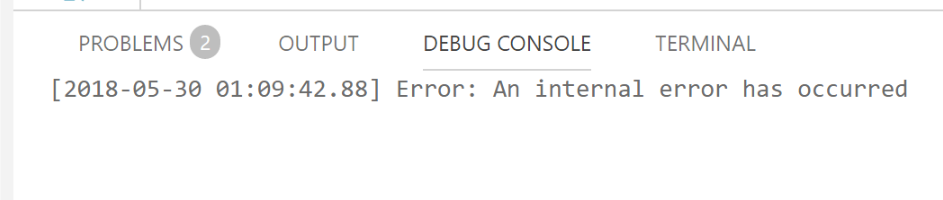
If I disable the Live Share extension, it works fine. If I enable it again, the error is back. I tried with three different AL extension releases, so it seems to me like it is a live share issue. I don't see any more detailed error logs and the dev tools console inside VS Code also doesn't show new entries when the error occurs. I randomly see the following there but not at the same time as the error when starting the debug session occurs
ERR Illegal argument, contents must be defined: Error: Illegal argument, contents must be defined
at new
at asHover (C:\Users\tfenster.vscode\extensions\Microsoft.al-0.17.16611\node_modules\vscode-languageclient\lib\protocolConverter.js:63:16)
at
Do you have any ideas what might cause this problem? The one time when I could use the extension with AL, I really loved it 👍
tfenster
on 30 May 2018
@tfenster Hmm, that doesn't look like a debugging issue, but it may be unrelated. Are you seeing any issues using Live Share + AL, without debugging? Like just trying to edit some files? Or does this error only start once you start debugging?
lostintangent
on 30 May 2018
@lostintangent Sharing works fine, I just can't start a debugging sessions anymore if the Live Share extension is enabled. It doesn't make a difference if a live share is in progress and someone else has joined or not. In the meantime I tried on Win 10 as well as on Windows Server 2016, both with the same result
tfenster
on 30 May 2018
I also disabled all other extensions and only kept AL and Live Share enabled, but I still get the error when trying to start a debugging session. Running VS Code as admin also didn't help
tfenster
on 30 May 2018
OK, we clearly have another issue there. Let us look into it. In the meantime, you can set the liveshare.excludedDebugTypes setting to ["al"], which should unblock you to use Live Share, without it breaking your debugging.
lostintangent
on 30 May 2018
ok, thanks. More info: I also tried with the minimal project you can generate from the AL extension as described in my initial repro steps. With that project, it works. With my still only very moderately complex project, it doesn't. If it helps, I could share my source code with you, just not in the public forum here
tfenster
on 30 May 2018
Ah that's interesting. That's probably why we didn't catch this issue. No one on our team is that familiar with AL, so we had just been validating this fix with the hello-world project :( Yeah, if you can, you can e-mail me at [email protected], and we can investigate this issue further. Thanks!
lostintangent
on 30 May 2018
I've sent it. Thanks for investigating
tfenster
on 30 May 2018
Hi @lostintangent, any new status on this?
tfenster
on 4 Jul 2018
Hi @lostintangent, seeing all the amazing new features with the latest release, it hurts even more to not have support for AL :) Do you see a chance for progress with this problem?
tfenster
on 6 Dec 2018
@tfenster Hey! Good news: we have the fix for this, and will be releasing it next week 🚀 I'll ping you as soon as it's out. Apologies for the long delay here. We had to completely re-architect the way our co-debugging worked in order to accomodate AL, and some other debuggers.
lostintangent
on 6 Dec 2018
Thanks! Can't wait to test :)
tfenster
on 7 Dec 2018
@tfenster If you update to the latest version of VS Code and Live Share, this should hopefully be resolved. Could you give it a try and let us know? Thanks!
lostintangent
on 20 Dec 2018
@lostintangent It works now, thanks! I still get a couple of warnings but I seems to work anyway
tfenster
on 21 Dec 2018
Related issues
 YardGnomeNinja
·
3Comments
YardGnomeNinja
·
3Comments
 dec0dOS
·
4Comments
dec0dOS
·
4Comments
 lockoncode
·
3Comments
lockoncode
·
3Comments
 jleider
·
3Comments
jleider
·
3Comments
 arc95
·
3Comments
arc95
·
3Comments