Live-share: Add the ability mark certain files or folders as "host only" that are not visible to guests
Currently all files and folders related to the root or solution are shared with guests. However, there may be circumstances where certain files like certificates or config files with secrets should not be accessible by guests. Live Share should have the ability to hide certain files from the file tree for guests and not appear when using jump-to, pinning, or debugging if the file is opened by the host/debugger.
 Chuxel
All 16 comments
As an additional use case for this, I may have an .env file with the application secrets I don't want to share.
 m1guelpf
on 1 Feb 2018
m1guelpf
on 1 Feb 2018
@m1guelpf Makes sense! Yeah that would be a canonical file/example for this sort of capability. Since .env is such a defacto standard filename, it's also possible that we could provide a "smart default" by restricting this from the share session by default (and of course allowing you to remove that restriction), without needing to take an explicit action.
 lostintangent
on 1 Feb 2018
lostintangent
on 1 Feb 2018
Whoops, looks like I made a duplicate, I'll leave my suggestion in here then to contribute, anyone on the Live-share team, feel free to delete/mark my other request as a duplicate. #93
Suggestion:
There also should be a visual indicator, to show a particular file is not being shared, on the file explorer and/or the open file itself.
As for configurability think similarly to .gitignore. Something flexible enough to use wildcard/regex. But maybe with some GUI elements, to easily hide/show a specific file on the fly.
 WillFM
on 10 Feb 2018
WillFM
on 10 Feb 2018
Building and Debugging is done on host computer then what is the need of sharing binary /node_modules and some other unnecessary/private files with guests.
in the case ofnode_modules it always large in file numer/size.
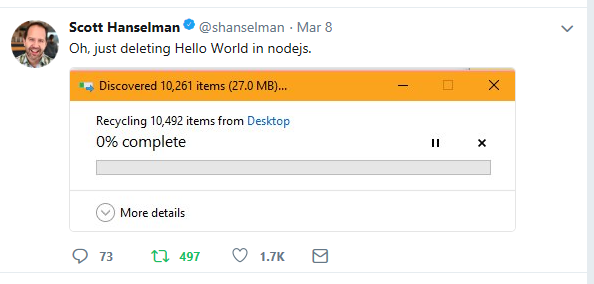
So I think VS live share Ignore Fileis better option to solve these kind of problems.
 iAmBipinPaul
on 13 Mar 2018
iAmBipinPaul
on 13 Mar 2018
@iambipinpaul Note that the guest only actually downloads files they open, so the fact that the node_modules folder is shared doesn’t impact the speed or cost to join.
That said, our current thinking is that if the shared project has a .gitignore file, then Live Share would automatically respect it, and prevent any matching files from being shared. For most Node.js/web projects, that would have the affect of hiding the node_modules folder (as well as any binaries, secrets, etc.) from guests, without needing to do anything special for Live Share (yay!)
Does that design sound like it would work for your use cases? We would likely also need a way to specify files that are ignored specifically for Live Share, but ideally, we could satisfy a majority of app needs by just respecting the .gitignore (just like how NPM ignore, Prettier, etc. behave)
lostintangent
on 13 Mar 2018
@lostintangent
Does that design sound like it would work for your use cases?
Looks like it's perfect for my use cases(gitignore and tfignore) , instead of managing separate ignore file with almost same data will be just an extra file/stuff without any extra benefit so using already existing files is the best option I think.
🆒
iAmBipinPaul
on 13 Mar 2018
This should now be available in v0.3.392/v.0.393. However, there is a known issue on Linux (and in rare cases with macOS if you have a case sensitive filesystem) we are tracking with #301.
Chuxel
on 7 May 2018
Awesome 👍 !
Great work !
iAmBipinPaul
on 7 May 2018
How to mark certain files or folders as "host only"?
 mittalyashu
on 4 Aug 2018
mittalyashu
on 4 Aug 2018
I don't thik you can mark any file as host only as of now but you can add that to .gitignore file and it should not be visible to guest. Later you may have to remove that from .gitignore so that git can track your file.
iAmBipinPaul
on 5 Aug 2018
@mittalyashu @iamBipinPaul By default, files that are listed in your .gitignore are hidden from guests. That is, they don’t show up in their file tree, but they could open them if needed, such as when doing a “go to definition” on a variable located in a hidden file.
However, if you want to mark a file as being completely “host only” (and therefore, never accessible), you can create a .vsls.json file and specify files (via globs) that are excluded from the file access that guests have. This is recommended for files such as secrets.
Does that sound like what you’re looking for? You can check out more details here
lostintangent
on 5 Aug 2018
@iAmBipinPaul But I think guests can open the .gitignore file so using Ctrl + p command they can open the file or folder.
However, if you want to mark a file as being complete “host only” (and therefore, never accessible), you can create a .vsls.json file and specify files (via globs) that are excluded from the file access that guests have. This is recommended for files such as secrets.
Sounds interesting.
Be aware that this is inclusive of scenarios like a guest following or jumping to your edit location, stepping into a file during collaborative debugging, any code navigation features like go to definition, and more.
Can someone explain this?
mittalyashu
on 6 Aug 2018
@mittalyashu
Can someone explain this?
So basically if we have two file , one is ClassA and another is ClassB ,if we are explicitly saying to ignore this ClassB from source control ( .gitIgnore) means that ClassB will not be visible to guests but if we have reference or using some of the methods from ClassB , then in that case guest will be able to navigate to that method implementation inClassB.
is this clear now?
iAmBipinPaul
on 7 Aug 2018
@iAmBipinPaul Yes.
But what if we add ClassB file in .vsls.json.
mittalyashu
on 7 Aug 2018
@mittalyashu
However, if you want to mark a file as being completely “host only” (and therefore, never accessible), you can create a .vsls.json file and specify files (via globs) that are excluded from the file access that guests have. This is recommended for files such as secrets.
I think , It won't be accessible to guests in that case. (Check this out yourself and let us know).
iAmBipinPaul
on 7 Aug 2018
@mittalyashu The documentation explains the concept pretty completely. https://docs.microsoft.com/en-us/visualstudio/liveshare/reference/security#controlling-file-access-and-visibility
By default, the contents of .gitignore are "hidden" not "excluded". Hidden files are not visible in the file explorer, but are available to step into during operations like debugging. For example, if you are using Node.js, the node_modules folder is likely in .gitignore and hidden, but you can step into one of the modules during debugging.
You can then do two things with .vsls.json.
- Change the .gitignore contents to be "excluded" so you don't even step in during debugging
- Add other patterns to be either excluded or hidden that are not in .gitignore
Chuxel
on 7 Aug 2018
Related issues
 Lasutriv
·
4Comments
Lasutriv
·
4Comments
 evasgit
·
3Comments
evasgit
·
3Comments
 mpearon
·
4Comments
mpearon
·
4Comments
 roblourens
·
4Comments
roblourens
·
4Comments
 dec0dOS
·
4Comments
dec0dOS
·
4Comments
Most helpful comment
Whoops, looks like I made a duplicate, I'll leave my suggestion in here then to contribute, anyone on the Live-share team, feel free to delete/mark my other request as a duplicate. #93
Suggestion:
There also should be a visual indicator, to show a particular file is not being shared, on the file explorer and/or the open file itself.
As for configurability think similarly to .gitignore. Something flexible enough to use wildcard/regex. But maybe with some GUI elements, to easily hide/show a specific file on the fly.