Live-share: Allow host to share a terminal / command prompt session with guests
While development tools like VS and VS Code provide a solid base to work from, modern development often involves working with command line tools. In addition, there can be environment specific config issues ranging from environment variables to configuration files and more.
While providing unrestricted access to a terminal or command prompt to all participants has security implications, allowing the host to start up a shared terminal session that guests can then access as well could provide a good middle ground. The host and guests would all be able to enter commands into the terminal and see the output. The host would be able to terminate the session at any point.
 Chuxel
All 18 comments
Especially for VSCode, I find this to be fairly necessary. While building and running programs may be integrated into the IDE for VS, it's fairly common for compiles and testing to be kicked off from the terminal when I use VSCode.
 Chillee
on 2 Feb 2018
Chillee
on 2 Feb 2018
@Chillee That's great feedback! We definitely see the terminal as a core "primitive for sharing" that is necessary for enabling arbitrary developer scenarios (e.g. collaborating on a CLI that you want guests to interact with, diagnosing environment issues, etc.) and workflows (e.g. preferring the terminal directly instead of VS Code "tasks").
I'd love to hear your thoughts on how you'd expect to share a terminal. Share read-only access to stdout for a specific terminal process? Read-write? Both with an option to control it? Additionally, do you typically use the integrated terminal in VS Code, or would you want to be able to share an arbitrary terminal from an external process (e.g. Terminal.app, Hyper, etc.)?
 lostintangent
on 2 Feb 2018
lostintangent
on 2 Feb 2018
I've typically used tmate.io when doing terminal sharing previously, and it's worked fine for me.
For my use cases, I think I don't really need any granular controls over read/write on terminal processes. It's not like we'll also be collab editing on vim through Live Share. Of course, I'm sure security is a concern, but I'm not sure how that'll be handled.
One thing I will be saying is that as the guest, I've almost always also needed input from the host for something, usually for sudo.
At the risk of being shortsighted, I'll say that I only need sharing from within the integrated terminal. For me, there's no difference between the integrated terminal and my regular shell.
Chillee
on 2 Feb 2018
👍 , this would be huge for the PowerShell extension where a large portion of the development experience is done through the console.
 SeeminglyScience
on 9 Feb 2018
SeeminglyScience
on 9 Feb 2018
For running tests a shared read-only access to stdout would work pretty well. The host could start a testing session that watches for file changes, and the results of the tests could be shown to all participants.
 chuntley
on 16 Feb 2018
chuntley
on 16 Feb 2018
@chuntley That’s definitely a use case we’d like to support with this. Out of curiousity: how are you kicking off tests currently? Via an integrated IDE experience (e.g. the Test Explorer or Task Runner Explorer in VS, or a task in VS Code) or by runnning a command directly in the terminal (e.g. “npm test”)?
lostintangent
on 17 Feb 2018
I am running tests directly in the terminal.
chuntley
on 19 Feb 2018
For terminal access, I think read-only would be a perfectly reasonable starting point. That would cover most scenarios for me. If this was limited to only being able to share terminals hosted by Visual Studio Code itself, that would be fine, too. (It's honestly easier to reason about that way, from a 'what am I sharing?' point of view).
Many of our builds and commands are heavily command-line driven - helping diagnose build failures would be something I'd use this for. Right now there's a lot of copy-paste (or worse, screenshots) of terminals that get sent when developers try to figure something out.
Build tasks could be added to VSCode tasks, that's true, but the command-line method works the same everywhere, regardless of how any given developer has their VSCode tasks set up. :)
 rhencke
on 22 Feb 2018
rhencke
on 22 Feb 2018
This was the missing ingredient in our attempt at Live Share last week. Read-only terminal access for the guest would have been enough.
I'd find it a little unsettling if Live Share gave a guest shell access on my machine or the ability to trigger tests or other resource-intensive tasks without my knowledge. As a host, I want to control the shell.
 cainlevy
on 26 Feb 2018
cainlevy
on 26 Feb 2018
@cainlevy Thanks for the feedback. Re: control, if you were the only person that could spin up a shared terminal and terminal sessions were by default not shared would that address your concern?
Chuxel
on 26 Feb 2018
@Chuxel If my guest can see test results without requiring me to share write access to the terminal session, then yes, I feel in control.
Questions that I would have as a host if my guest had full terminal access include:
- Can I monitor and intervene? Is that the default, or would I need to pin them?
- What if I toggle the panel or open a second terminal session? Do they retain access?
- Are my tests and processes resilient to parallel execution?
cainlevy
on 26 Feb 2018
@cainlevy Really the capability we're talking about is a fully shared terminal. Meaning that the host can start up a session both the host and guests can use collaboratively at the same time. Guests would not be given exclusive write control to any terminal session. So:
- The host would retain full rights to terminate the session from their end at any point.
- The host could intervene at any point by simply typing in the terminal window given it is basically a "co-edited terminal session" rather than single user.
- Presumably you would be running your tests in the collaborative session and thus would not need parallel execution in this case (unless I'm missing your meaning).
- If you opened a second terminal session, you could do that as either a shared or non-shared (host only) session as you saw fit.
Does that make sense?
Another thing we have been thinking about is shared output rather than a shared terminal. One of the core use cases has been for build output as captured in #48 but that could be extended to test runs or other tasks as well. (For VS there's also Test Explorer integration as an option in #33). So this is really useful info for us to understand what the core needs are for a capability like this one.
Chuxel
on 27 Feb 2018
Yep, I think that could make sense. I may need a little time to acclimate since a fully shared terminal goes a little bit beyond screen sharing, but you make good points that the host is still in control and can choose how much attention the terminal deserves.
If I've pinned a guest and they jump to the terminal, will my screen continue to track them?
cainlevy
on 27 Feb 2018
@cainlevy Yes, the existing pinning feature would definitely need to support jumping to a shared terminal (once we added them). Pinning is meant to track a user’s cursor, and since a terminal can be given focus and “edited”, they would need to participate in the pinning behavior.
lostintangent
on 27 Feb 2018
I've ran into this multiple times. In the past few weeks and is the only feature I sorely miss compared to a screen share.
When pair programming on frontend code (compiled/transpiled with a watch command), the guest often breaks the builder without realizing they've introduced an issue. They refresh the shared server in their browser and are confused why they don't see their change.
They often think (usually in this order):
- The build is slow
- Did LiveShare not save my change?
- Did LiveShare stop working?
- I keep refreshing and I'm seeing the response from the host, so LiveShare must be working
- Maybe I made a typo (or broke it in some other way)
Having even a read only shared terminal would allow the remote user to see build errors/success immediately and prevent this uncertainty chain.
 codycraven
on 18 Apr 2018
codycraven
on 18 Apr 2018
This feature has been shipped in the latest Live Share release! We’ve seeded a few new issues to track some remaining work with terminal sharing, but it’s ready for folks to start using. Thanks again for all the great feedback 😁
lostintangent
on 8 May 2018
Agree I just tested Live Share http://quickrun.red/editors/vscode/live-share, it's really great except for this huge caveat example for
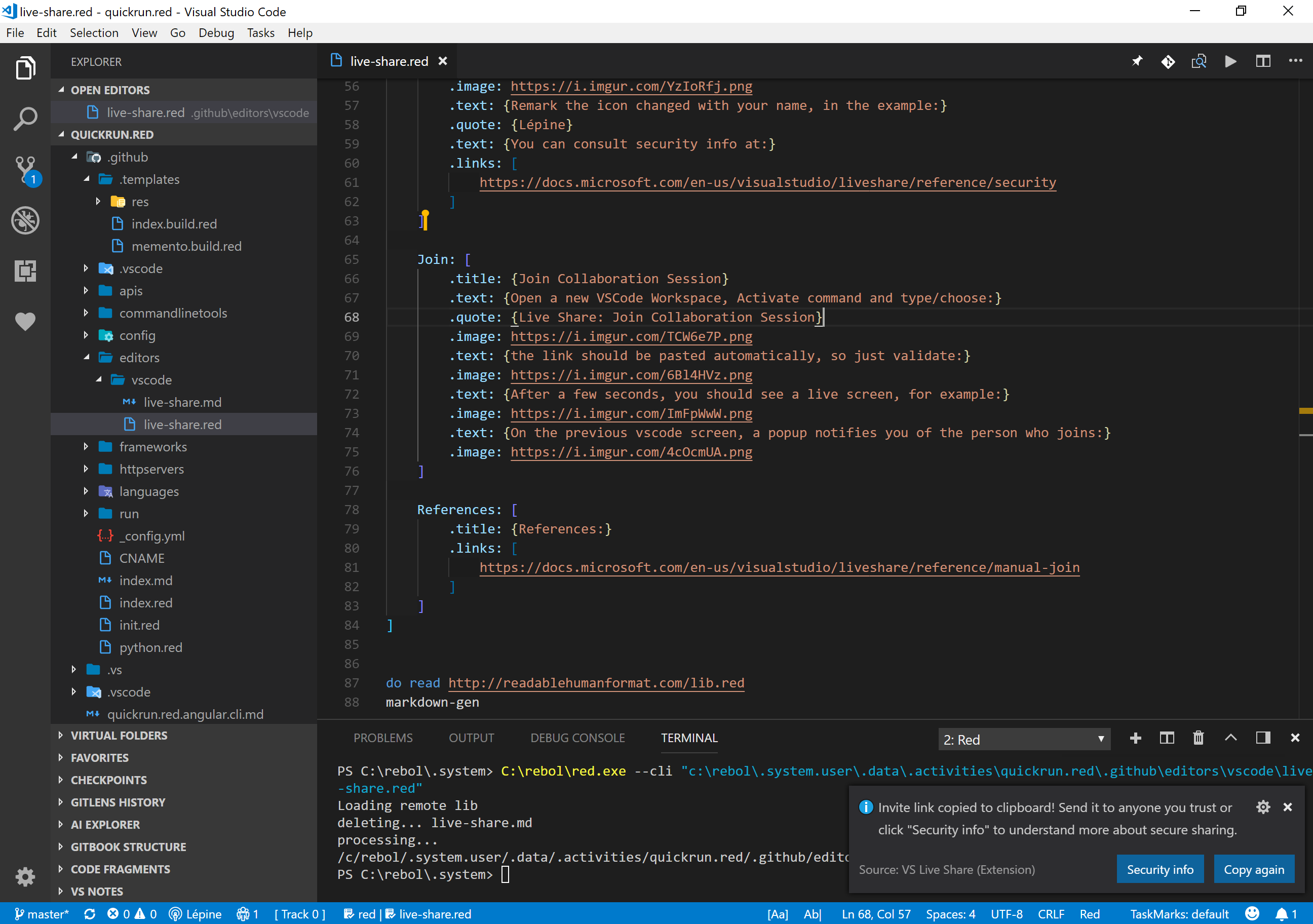
I cannot see the terminal:

 lepinekong
on 27 Jun 2018
lepinekong
on 27 Jun 2018
@lepinekong Just to double check - Did you start a new shared terminal (there's a command palette command or you can click on your name in the lower right and select it)? We don't share all terminals by default for security reasons. This way you can choose when you do / do not want to share one. Otherwise this could be a bug.
Chuxel
on 27 Jun 2018
Related issues
 hez2010
·
4Comments
hez2010
·
4Comments
 tamuratak
·
3Comments
Chuxel
·
3Comments
tamuratak
·
3Comments
Chuxel
·
3Comments
 jpopadak
·
3Comments
jpopadak
·
3Comments
 PranavGPR
·
3Comments
PranavGPR
·
3Comments
Most helpful comment
Especially for VSCode, I find this to be fairly necessary. While building and running programs may be integrated into the IDE for VS, it's fairly common for compiles and testing to be kicked off from the terminal when I use VSCode.