Kiwix-android: Unable to build the project - Gradle pluggin version issue
Describe the bug
The project gives me this error
Could not get unknown property 'androidGradlePluginVersion' for object of type org.gradle.api.internal.artifacts.dsl.dependencies.DefaultDependencyHandler.
when I try to build the code.
Expected behavior
the project is supposed to run properly , as I haven't changed it a bit.
Screenshots

Environment
- Version of Kiwix Android :
- Device : Galaxy J6
- OS version : Ubuntu 18.0.4
 ShankarNara
All 20 comments
Before building do make sure you have done this:
Build Variants select Kiwix-debug
delete .idea folder
and build again
 gptshubham595
on 26 Mar 2019
gptshubham595
on 26 Mar 2019
or simply use 3.3.0 there
gptshubham595
on 26 Mar 2019
If this persists please provide significantly more detail.
 mhutti1
on 26 Mar 2019
mhutti1
on 26 Mar 2019
@gptshubham595 I have tried everything you had mentioned , but nothing seems to work
I am not able to chose the build variant (the option isn't highlighted)
the build.gradle file inside has problems in multiple import statements
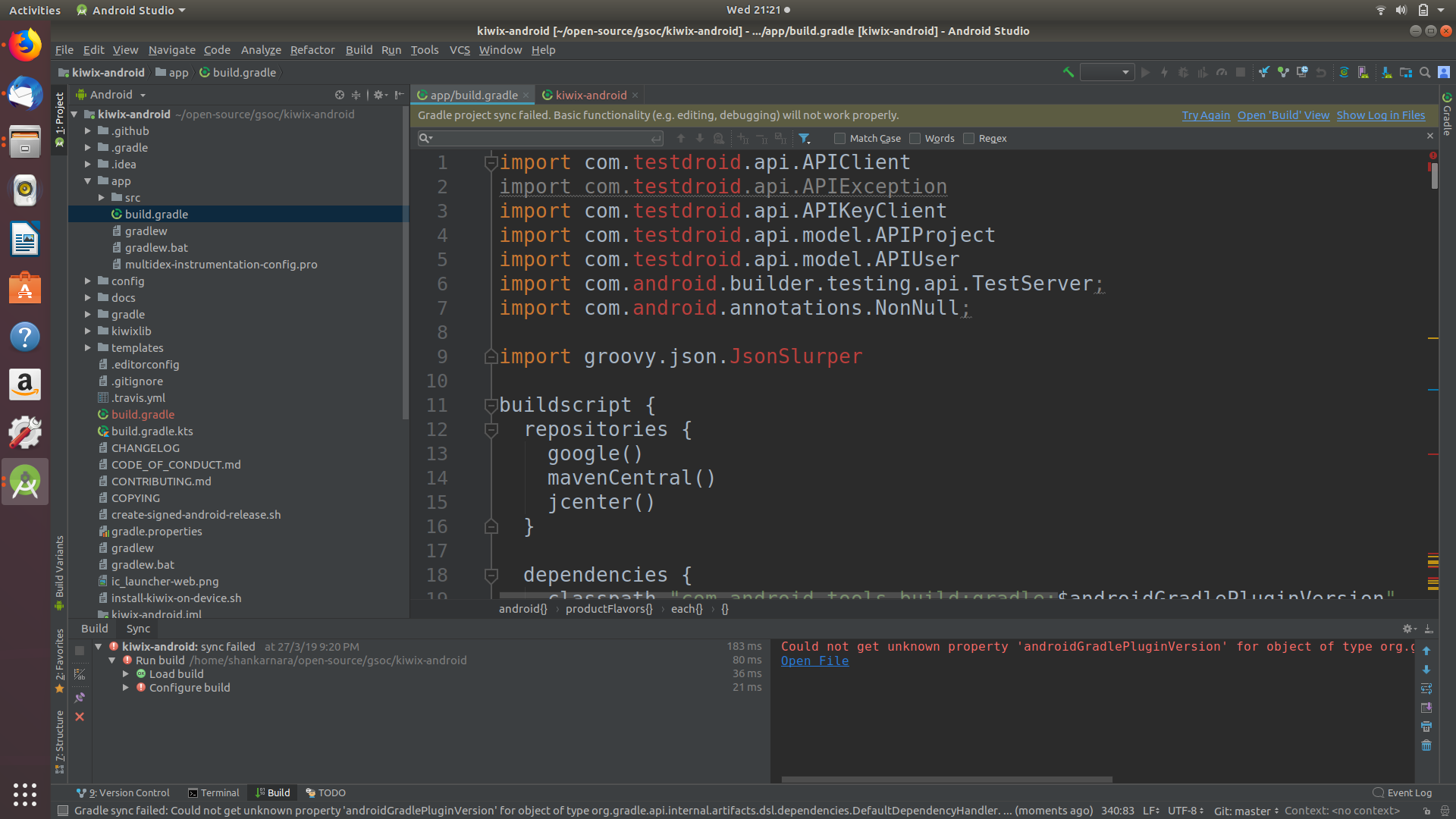
There also seems to be 2 different build.gradle files , the outside one is empty
ShankarNara
on 27 Mar 2019
Empty? It shouldn't be empty. Can you screenshot the build variant list?
mhutti1
on 27 Mar 2019
the build.gradle file outside the app folder

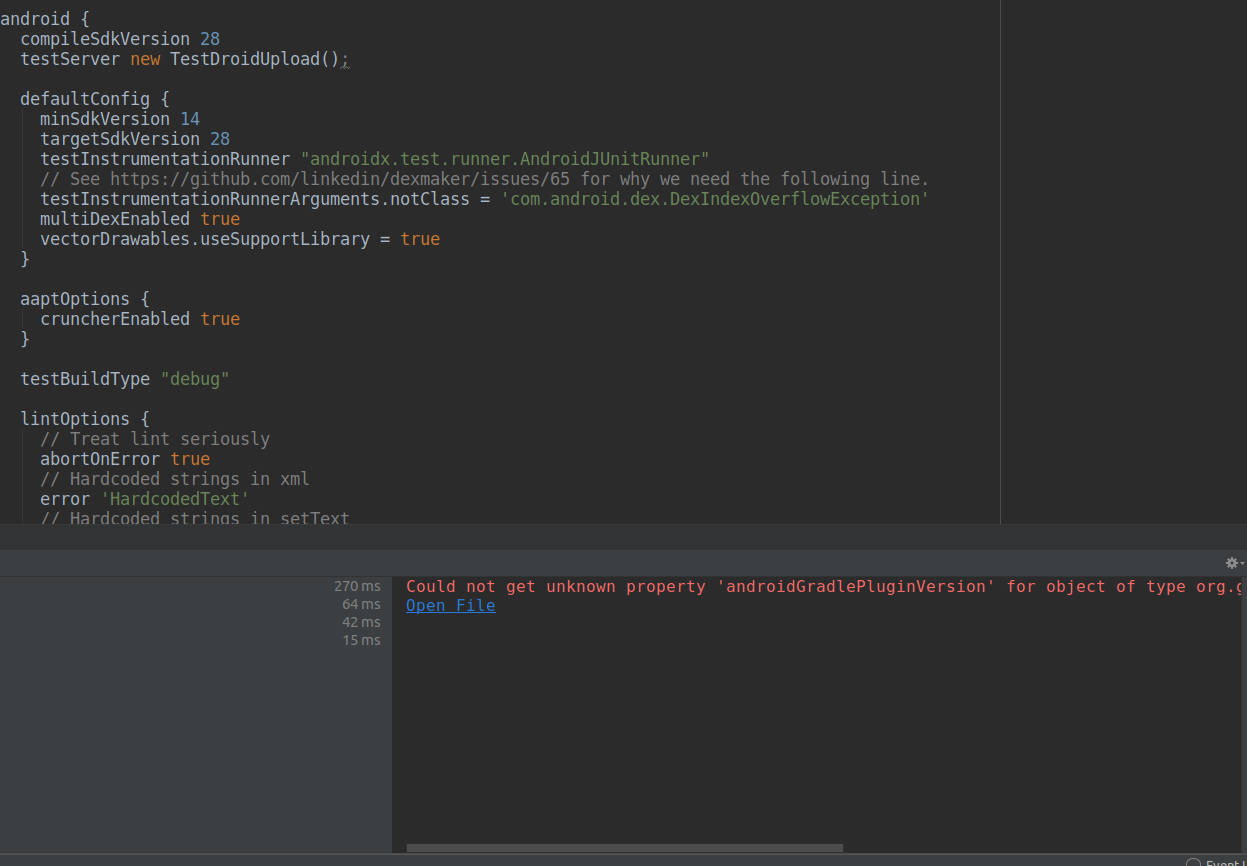
The build.gradle file inside the app folder
Build->select build variant
option is disabled
ShankarNara
on 27 Mar 2019
I am actually lost now
Nothing in stack overflow seems to be working
To your knowledge is there anything else left to try?
Thank you for your time
On Wed, 27 Mar 2019 at 21:32, Isaac Hutt notifications@github.com wrote:
Empty? It shouldn't be empty. Can you screenshot the build variant list?
—
You are receiving this because you authored the thread.
Reply to this email directly, view it on GitHub
https://github.com/kiwix/kiwix-android/issues/1129#issuecomment-477226753,
or mute the thread
https://github.com/notifications/unsubscribe-auth/AjY0l-D7NT8crasxBlzWQ-x2AtjPFsg-ks5va5YbgaJpZM4cL75i
.
ShankarNara
on 29 Mar 2019
I am also facing the same issue, someone please guide me on how to import the project in Android studio properly
 NitishGadangi
on 30 Mar 2019
NitishGadangi
on 30 Mar 2019
Make sure you are using the latest version of android studio and you are importing the project from its root. If that doesn't work try ./gradlew build and report what the output from that is.
mhutti1
on 30 Mar 2019
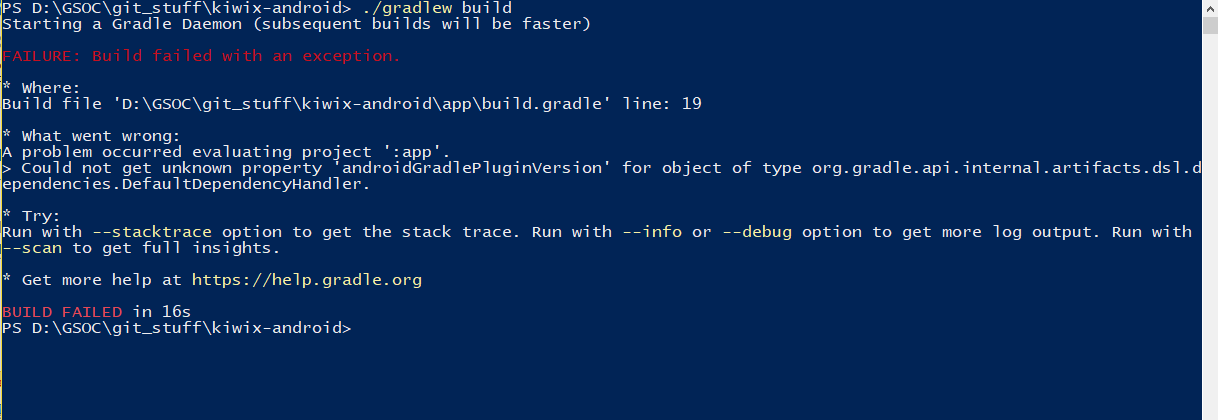
A problem occurred evaluating project ':app'.
Could not get unknown property 'androidGradlePluginVersion' for object of type org.gradle.api.internal.artifacts.dsl.dependencies.DefaultDependencyHandler.
This is the error that we are facing
NitishGadangi
on 30 Mar 2019
I think the issue is that you created a build.gradle file in the outer directory. This shouldn't be there. You should be using the build.gradle.kts delete it and reimport
mhutti1
on 30 Mar 2019
Updating our gradle wrapper version to 5.2 should hopefully smooth the process a bit.
mhutti1
on 30 Mar 2019
I tried deleting the build.gradle in the outer directory .
But it just gets created again
I am continuously getting this "Could not get unknown property
'androidGradlePluginVersion'" error no matter what I do.
On Sun, 31 Mar 2019 at 02:21, Isaac Hutt notifications@github.com wrote:
Updating our gradlew wrapper version to 5.2 should hopefully smooth the
process a bit.—
You are receiving this because you authored the thread.
Reply to this email directly, view it on GitHub
https://github.com/kiwix/kiwix-android/issues/1129#issuecomment-478288311,
or mute the thread
https://github.com/notifications/unsubscribe-auth/AjY0l1tdo7wObnPWDpKiQJNV3yinxFREks5vb849gaJpZM4cL75i
.
ShankarNara
on 31 Mar 2019
So I finally build the project successfully
Here is what I did..
- first delete .idea folder
- in the root folder delete the automatically created build.gradle file and rename build.gradle.kts file to build.gradle
- in build.gradle file remove the last four lines starting from tasks.create.. line and save
- Now select import in android studio and select the folder
- After completion of gradle build and indexing click on build variants option on left corner of android studio
- Over there select app as kiwix-debug
- Thats it. Now,you can run the project successfully.
NitishGadangi
on 31 Mar 2019
Same thing i said 😅
gptshubham595
on 31 Mar 2019
Hey Nitish
I tried exactly what you told , Did you get any error like
org.jetbrains.plugins.gradle.tooling.util.ModuleComponentIdentifierImpl.getModuleIdentifier()Lorg/gradle/api/artifacts/ModuleIdentifier;
On Sun, 31 Mar 2019 at 19:57, Shubham gupta Ggps notifications@github.com
wrote:
Same thing i said 😅
—
You are receiving this because you authored the thread.
Reply to this email directly, view it on GitHub
https://github.com/kiwix/kiwix-android/issues/1129#issuecomment-478346695,
or mute the thread
https://github.com/notifications/unsubscribe-auth/AjY0l7BGWq9UobEiPdhrqiIlSQKMFhksks5vcMXBgaJpZM4cL75i
.
ShankarNara
on 31 Mar 2019
No I didn't got any error like that except few warnings,
Which doesn't cause any issues actually
NitishGadangi
on 31 Mar 2019
If you can't build then I suggest recloning with a new directory. It seems there is now a fix so I am closing this.
mhutti1
on 3 Apr 2019
What's the point of kiwix-android/app/gradle/wrapper ? This will throw off fdroidbuilder and tries to use Gradle 3.3 to build and fails, since it's too old.
Ref: https://gitlab.com/fdroid/fdroiddata/blob/master/metadata/org.kiwix.kiwixmobile.txt#L96
 licaon-kter
on 6 Aug 2019
licaon-kter
on 6 Aug 2019
@licaon-kter I would recommend to open a new ticket, commenting on old closed ticket is not recommended, in particular if this is unclear if your question is related (It is for me at least).
 kelson42
on 7 Aug 2019
kelson42
on 7 Aug 2019
Related issues
 RaiLokesh
·
4Comments
RaiLokesh
·
4Comments
 yashk2000
·
5Comments
yashk2000
·
5Comments
 abdulwd
·
4Comments
abdulwd
·
4Comments
 chstdu
·
6Comments
kelson42
·
6Comments
chstdu
·
6Comments
kelson42
·
6Comments