Kitematic: docker-compose support in Kitematic UI
Is it possible for kitematic to provide support for docker-compose?
 saulshanabrook
All 163 comments
This would be awesome to help bootstrap non-devs in to testing environments in Docker. I'm thinking of scenarios around customer service and QA. Specifically where the ops team can provide Kitematic and a repository for them to build and run the entire application (not just one container) similar to how developers just do fig up today.
 andyshinn
on 19 Dec 2014
andyshinn
on 19 Dec 2014
I do agree, especially now that docker-compose is fully supported by docker ;)
 gorghoa
on 12 Mar 2015
gorghoa
on 12 Mar 2015
Is there any interest in moving this issue onto the roadmap?
saulshanabrook
on 12 Mar 2015
:+1:
 rweald
on 12 Mar 2015
rweald
on 12 Mar 2015
:+1:
 nickblt
on 12 Mar 2015
nickblt
on 12 Mar 2015
Yes Please. Maybe add a visual Interface to compose and connect the containers.
 g12n
on 12 Mar 2015
g12n
on 12 Mar 2015
:+1:
 metra
on 12 Mar 2015
metra
on 12 Mar 2015
:+1:
 DieterReuter
on 12 Mar 2015
DieterReuter
on 12 Mar 2015
+1
 dtornow
on 12 Mar 2015
dtornow
on 12 Mar 2015
:+1: (bundled with Kitematic - as docker-machine and others - should be enough for me, UI support would be nice)
 mainiak
on 12 Mar 2015
mainiak
on 12 Mar 2015
:+1:
 JanJakes
on 13 Mar 2015
JanJakes
on 13 Mar 2015
:+1:
 Globegitter
on 13 Mar 2015
Globegitter
on 13 Mar 2015
:+1:
 karellm
on 13 Mar 2015
karellm
on 13 Mar 2015
:+1:
 bmbroom
on 13 Mar 2015
bmbroom
on 13 Mar 2015
:+1:
 IanVS
on 13 Mar 2015
IanVS
on 13 Mar 2015
:+1:
 pnegahdar
on 15 Mar 2015
pnegahdar
on 15 Mar 2015
:thumbsup:
 bruienne
on 17 Mar 2015
bruienne
on 17 Mar 2015

 miguelpuyol
on 30 Mar 2015
miguelpuyol
on 30 Mar 2015
:thumbsup:
 emilkje
on 30 Mar 2015
emilkje
on 30 Mar 2015
:+1:
 jacksoncage
on 4 Apr 2015
jacksoncage
on 4 Apr 2015
:+1:
 offlinehacker
on 10 Apr 2015
offlinehacker
on 10 Apr 2015
:+1:
 fabarea
on 13 Apr 2015
fabarea
on 13 Apr 2015
:+1:
 ludekslevercz
on 13 Apr 2015
ludekslevercz
on 13 Apr 2015
 droidment
on 16 Apr 2015
droidment
on 16 Apr 2015
:+1:
 GerDner
on 17 Apr 2015
GerDner
on 17 Apr 2015
:+1:
As a starting point it would be great that kinematic pulls in latest stable release of docker-compose / swarm to have them available at the console
 djsly
on 17 Apr 2015
djsly
on 17 Apr 2015
:+1:
 alfonsfoubert
on 20 Apr 2015
alfonsfoubert
on 20 Apr 2015
:+1:
 florentb
on 21 Apr 2015
florentb
on 21 Apr 2015
Our development stack uses docker-compose, and it would be nice for our less CLI/Docker-savvy developers and QA people to be able to use Kitematic to manage it. Big :+1:
 naneau
on 21 Apr 2015
naneau
on 21 Apr 2015
:+1:
 funkytaco
on 27 Apr 2015
funkytaco
on 27 Apr 2015
:+1:
 yingbo
on 29 Apr 2015
yingbo
on 29 Apr 2015
:+1:
 paulstanyer
on 2 May 2015
paulstanyer
on 2 May 2015
:+1:
 sheats
on 2 May 2015
sheats
on 2 May 2015
:+1:
 zdexter
on 3 May 2015
zdexter
on 3 May 2015
:+1: come on :heart:
 tillsanders
on 4 May 2015
tillsanders
on 4 May 2015
:+1:
 joostfarla
on 4 May 2015
joostfarla
on 4 May 2015
:+1:
 StalkingKillah
on 7 May 2015
StalkingKillah
on 7 May 2015
:+1:
 RSSGergelyMunkacsy
on 7 May 2015
RSSGergelyMunkacsy
on 7 May 2015
:+1:
 DougThwaites
on 15 May 2015
DougThwaites
on 15 May 2015
:+1:
 szubtsovskiy
on 20 May 2015
szubtsovskiy
on 20 May 2015
 thecb4
on 20 May 2015
thecb4
on 20 May 2015
:+1:
 fsimmend
on 21 May 2015
fsimmend
on 21 May 2015
 leolara
on 24 May 2015
leolara
on 24 May 2015
:+1:
 syrusakbary
on 29 May 2015
syrusakbary
on 29 May 2015
:+1:
 christopherlakey
on 31 May 2015
christopherlakey
on 31 May 2015
:+1:
 preflightsiren
on 4 Jun 2015
preflightsiren
on 4 Jun 2015
:+1:
 kusmierz
on 4 Jun 2015
kusmierz
on 4 Jun 2015
:thumbsup:
 telemakhos
on 7 Jun 2015
telemakhos
on 7 Jun 2015
I think it is clear how damaging for the application usage would be to implement this feature so disliked by everyone.
leolara
on 7 Jun 2015
@leolara could you explain?
kusmierz
on 7 Jun 2015
@kusmierz I was ironically expressing the overwhelming support of this feature request.
To be clear, what I literally was trying to say is:
"The support for this feature request is overwhelming and its inclusion would increase the user base"
leolara
on 7 Jun 2015
To give more constructive tip, than just liking this pull request, someone
could just probably integrate lorry.io from centruylink labs, which is
bacisally a docker compose file editor:
https://github.com/CenturyLinkLabs/lorry-ui and this blog post
http://www.centurylinklabs.com/lorry-io-pathway-to-docker-composable-apps/
On Sun, Jun 7, 2015 at 9:55 PM Leo Lara [email protected] wrote:
@kusmierz https://github.com/kusmierz I was ironically expressing the
overwhelming support of this feature request.
To be clear, what I literally was trying to say is:"The support for this feature request is overwhelming and its inclusion
would increase the user base"—
Reply to this email directly or view it on GitHub
https://github.com/kitematic/kitematic/issues/137#issuecomment-109793303
.
offlinehacker
on 7 Jun 2015
I would be happy if Kitematic simply included docker-compose in it's command line distribution.
The current install overwrites the brew installed version of docker and doesn't include the docker-compose executable. Perhaps there is a separate ticket about playing nice with brew docker.
christopherlakey
on 7 Jun 2015
:+1:
 ArondeParon
on 17 Jun 2015
ArondeParon
on 17 Jun 2015
docker-compose in kitematic would be sweeeeeet
 chewmanfoo
on 18 Jun 2015
chewmanfoo
on 18 Jun 2015
:+1:
 roelvanduijnhoven
on 18 Jun 2015
roelvanduijnhoven
on 18 Jun 2015
:+1:
 aaronlks
on 24 Jun 2015
aaronlks
on 24 Jun 2015
+1
 pbearne
on 24 Jun 2015
pbearne
on 24 Jun 2015
:+1:
 afoucret
on 24 Jun 2015
afoucret
on 24 Jun 2015
:+1:
 buremba
on 30 Jun 2015
buremba
on 30 Jun 2015
:+1:
 estahn
on 30 Jun 2015
estahn
on 30 Jun 2015
:+1:
 englandrp
on 30 Jun 2015
englandrp
on 30 Jun 2015
+1
 theoplatt
on 2 Jul 2015
theoplatt
on 2 Jul 2015
+1
 halit
on 3 Jul 2015
halit
on 3 Jul 2015
:+1:
 ybouhjira
on 10 Jul 2015
ybouhjira
on 10 Jul 2015
:+1: times :100:
 jjasonclark
on 16 Jul 2015
jjasonclark
on 16 Jul 2015
:+1:
 jasonreich
on 17 Jul 2015
jasonreich
on 17 Jul 2015
:+1:
 tomluczak
on 17 Jul 2015
tomluczak
on 17 Jul 2015
:+1:
 NoiSek
on 22 Jul 2015
NoiSek
on 22 Jul 2015
:+1:
 eristoddle
on 25 Jul 2015
eristoddle
on 25 Jul 2015
:+1:
 mgenereu
on 27 Jul 2015
mgenereu
on 27 Jul 2015
:+1:
 ghost
on 28 Jul 2015
ghost
on 28 Jul 2015
:+1:
ybouhjira
on 28 Jul 2015
:+1:
 cansik
on 29 Jul 2015
cansik
on 29 Jul 2015
:+1:
 maechler
on 29 Jul 2015
maechler
on 29 Jul 2015
:+1:
 yvoswillens
on 29 Jul 2015
yvoswillens
on 29 Jul 2015
I'm pretty sure none of these thumbs-up are going to make an ounce of difference in the world other than to annoy those who get email notifications. Perhaps you guys could all hit the Subscribe button instead? It's up there at the top right of the page.
 benlangfeld
on 29 Jul 2015
benlangfeld
on 29 Jul 2015
Docker compose is now included with Docker Toolbox, and you can use docker compose through the CLI button inside Kitematic.
Compose is not available on Windows yet, and when it does we will support it on Windows as well.
Thanks!
 mchiang0610
on 12 Sep 2015
mchiang0610
on 12 Sep 2015
This is great news! However, I think people were really looking forward to an integration into the gui.
tillsanders
on 12 Sep 2015
Vote here then: https://github.com/kitematic/kitematic/issues/1034 - docker-composer support in UI
@tillsanders @yvoswillens @maechler @cansik @ybouhjira @lucasmorano @mgenereu
leolara
on 12 Sep 2015
@tillsanders @leolara Thanks, I'll just reopen this issue here and close the other one. Let's continue the discussion here.
mchiang0610
on 12 Sep 2015
@leolara @tillsanders @yvoswillens @maechler @cansik @ybouhjira @lucasmorano @mgenereu
Can we brainstorm what you'd like to see in the UI for compose support? I have my assumptions but want to hear it directly from our users.
mchiang0610
on 12 Sep 2015
I think composer yml should be there in same way like pulled img - in the
sidebar is entry for it and you can just start it or stop.
Can you imagine it? Or should I make some sketch?
Jan Pobořil
2015-09-12 15:01 GMT-05:00 Michael Chiang [email protected]:
@leolara https://github.com/leolara @tillsanders
https://github.com/tillsanders @yvoswillens
https://github.com/yvoswillens @maechler https://github.com/maechler
@cansik https://github.com/cansik @ybouhjira
https://github.com/ybouhjira @lucasmorano
https://github.com/lucasmorano @mgenereu https://github.com/mgenereuCan we brainstorm what you'd like to see in the UI for compose support? I
have my assumptions but want to hear it directly from our users.—
Reply to this email directly or view it on GitHub
https://github.com/kitematic/kitematic/issues/137#issuecomment-139815435
.
 iBobik
on 13 Sep 2015
iBobik
on 13 Sep 2015
That would be a good first step.
Allowing us to start / stop/ restart / rm a stack of containers using a pre defined docker-compose.yml file.
A second step could be to dynamically create a docker-compose.yml from the UI. Drag and dropping existing images or images from the docker hub. Linking them visual et edition their volume / portion the fly
Finally we could save and export our topology to docker- compose.yml or even Visio / JPEG / PDF.
On Sep 12, 2015, at 7:47 PM, Jan Pobořil [email protected] wrote:
I think composer yml should be there in same way like pulled img - in the
sidebar is entry for it and you can just start it or stop.Can you imagine it? Or should I make some sketch?
Jan Pobořil
2015-09-12 15:01 GMT-05:00 Michael Chiang [email protected]:
@leolara https://github.com/leolara @tillsanders
https://github.com/tillsanders @yvoswillens
https://github.com/yvoswillens @maechler https://github.com/maechler
@cansik https://github.com/cansik @ybouhjira
https://github.com/ybouhjira @lucasmorano
https://github.com/lucasmorano @mgenereu https://github.com/mgenereuCan we brainstorm what you'd like to see in the UI for compose support? I
have my assumptions but want to hear it directly from our users.—
Reply to this email directly or view it on GitHub
https://github.com/kitematic/kitematic/issues/137#issuecomment-139815435
.—
Reply to this email directly or view it on GitHub.
djsly
on 13 Sep 2015
Here is cool idea for kitematic + docker-compose integration:
Give the possibility to add "Launch with Kitematic" button on Git/GitHub repositories that resolves to kitematic://up/https://url/to/docker-compose.yml which in turn launches the stack. See GitHub Desktop as an example of such integration.
 dkapanidis
on 13 Sep 2015
dkapanidis
on 13 Sep 2015
Similar issue in Docker Compose; https://github.com/docker/compose/issues/1215
@spiddy also see https://github.com/docker/compose/issues/1818#issuecomment-129081511, https://github.com/docker/hub-feedback/issues/57, https://github.com/docker/compose/issues/1597
 thaJeztah
on 13 Sep 2015
thaJeztah
on 13 Sep 2015
@mchiang0610 I'd quite like a couple of compose features:
- a selection of "composition" icons that relate to compose files rather than docker images, from which I can launch a particular composition;
- a composition editor, in which I can drag container images onto a canvas and then wire them together to create a skeleton for a compose file that can then be filled in with other properties (ideally, graphically).
 psychemedia
on 15 Sep 2015
psychemedia
on 15 Sep 2015
I'd like to see a import from docker-compose.yml option.
 dekz
on 30 Sep 2015
dekz
on 30 Sep 2015
So I have this PR that's gone stale: https://github.com/kitematic/kitematic/pull/898
Should I bring it back up to date since we've now got docker-compose inside the docker toolbox?
 FrenchBen
on 30 Sep 2015
FrenchBen
on 30 Sep 2015
+1 how is this not supported at this point?
 bacheson
on 20 Nov 2015
bacheson
on 20 Nov 2015
:+1:
leolara
on 20 Nov 2015
Don't use Kitematic, use Mindcraft.
http://blog.docker.com/2015/11/dockercraft/
mgenereu
on 20 Nov 2015
I am thinking about it
leolara
on 20 Nov 2015
:+1:
 v1nc3ntlaw
on 10 Dec 2015
v1nc3ntlaw
on 10 Dec 2015
This Sunday the issue will have its first birthday!!
:birthday:
:+1:
leolara
on 10 Dec 2015
:+1:
 lianguan
on 10 Dec 2015
lianguan
on 10 Dec 2015
:+1:
 jruef
on 21 Dec 2015
jruef
on 21 Dec 2015
:+1:
 stkiss
on 9 Jan 2016
stkiss
on 9 Jan 2016
:+1:
 MPJHorner
on 17 Jan 2016
MPJHorner
on 17 Jan 2016
:+1:
ghost
on 18 Jan 2016
:+1:
 ronanguilloux
on 2 Feb 2016
ronanguilloux
on 2 Feb 2016
:+1:
 kristianpaul
on 3 Feb 2016
kristianpaul
on 3 Feb 2016
:muscle: :grin: :+1:
Revisiting Kitematic this weekend in hopes to give our design team an easy way to launch our web app. An ideal workflow would (for my use case) would look something like:
- open Kitematic
- File | Import | browse to docker-compose.yml
- Select any volumes to map on their local drive
- Run!
 defeated
on 6 Feb 2016
defeated
on 6 Feb 2016
:+1:
 jtraulle
on 9 Feb 2016
jtraulle
on 9 Feb 2016
:+1:
 gastounage
on 10 Feb 2016
gastounage
on 10 Feb 2016
:+1:
 vladynet
on 10 Feb 2016
vladynet
on 10 Feb 2016
:+1:
 samnydahl
on 14 Feb 2016
samnydahl
on 14 Feb 2016
:+1:
 andyfleming
on 17 Feb 2016
andyfleming
on 17 Feb 2016
👍
 eduwass
on 17 Feb 2016
eduwass
on 17 Feb 2016
:+1:
 sergeibershadsky
on 17 Feb 2016
sergeibershadsky
on 17 Feb 2016
+1
 etweb37
on 22 Feb 2016
etweb37
on 22 Feb 2016
+1
 riteshnaik
on 23 Feb 2016
riteshnaik
on 23 Feb 2016
+1
 cedricve
on 27 Feb 2016
cedricve
on 27 Feb 2016
+1
 tranvietanh1991
on 27 Feb 2016
tranvietanh1991
on 27 Feb 2016
+1
 rhangelxs
on 29 Feb 2016
rhangelxs
on 29 Feb 2016
+1
 lamjo
on 4 Mar 2016
lamjo
on 4 Mar 2016
+1
 sebastian-alfers
on 14 Mar 2016
sebastian-alfers
on 14 Mar 2016
:+1:
 jackiig
on 24 Mar 2016
jackiig
on 24 Mar 2016
This is what I am thinking...
Getting the compose file
- Import local file
- Search remote database. e.g. https://github.com/docker/compose/issues/1597
Using
- List with containers on the left and show related containers as sub items that could be expanded and collapsed.
- Map all the same basic compose commands that already have UI elements. Start, Stop, Restart. View Logs. Delete. Port bindings?
 chrowe
on 3 Apr 2016
chrowe
on 3 Apr 2016
👍
 frdmn
on 19 Apr 2016
frdmn
on 19 Apr 2016
I know it would beneficial just to support 'raw/native' docker-compose in Kitematic,
but Rancher already has their own compose support so ... integration with Rancher itself I consider neat and just by using Rancher API it might solve compose requirement as well.
I'm sure that should be another issue/ticket for Rancher API support as feature request and maybe another one to docker-machine, maybe?
mainiak
on 26 Apr 2016
:+1:
Something like
option 1:
open file docker-compose.yml
then cd folder && docker-compose up -d
option 2:
paste to input text
only compose this text without building support, only download images for quickcly setting up stacks.
option 3:
paste URL of recipe (docker-compose.yml URL)
curl URL | docker-compose or something like this.
 mercuriete
on 24 May 2016
mercuriete
on 24 May 2016
docker-compse.yml file picker feature will be nice 👍
 mindesik
on 25 May 2016
mindesik
on 25 May 2016
👍
 prateek05
on 14 Jun 2016
prateek05
on 14 Jun 2016
👍 Sorry to be another thumbs up notification.
Learning the world of docker is so much easier with a GUI, Kitematic has been awesome so far, but now I'm at a roadblock cause I can't play with docker-compose without diving into CLI.
CLI doesn't scare me, but it sure frustrates the fuck out of me sometimes, I just need something pretty, it helps me learn.
Please add this. Kitematic needs it, and so do the 91 people I counted above.
 bmwillrath
on 22 Jun 2016
bmwillrath
on 22 Jun 2016
👍
 Badisi
on 2 Jul 2016
Badisi
on 2 Jul 2016
👍
 fortis
on 14 Jul 2016
fortis
on 14 Jul 2016
👍
 ndubbaka
on 15 Jul 2016
ndubbaka
on 15 Jul 2016
👍
FrenchBen
on 15 Jul 2016
:+1:
 SoerenHenning
on 21 Jul 2016
SoerenHenning
on 21 Jul 2016
Probably don't need to keep commenting with thumbs up, guys. GitHub has the reaction feature now.
 janhartigan
on 21 Jul 2016
janhartigan
on 21 Jul 2016
+1
 Gekctek
on 13 Sep 2016
Gekctek
on 13 Sep 2016
+1
 nicbarker
on 30 Sep 2016
nicbarker
on 30 Sep 2016
I am sorry to be posting another thumbs up but need to reiterate that it would be great if we had docker compose feature from the UI itself. Pretty please :heart_eyes:
:thumbsup: :100: times
 gladiatorAsh
on 1 Oct 2016
gladiatorAsh
on 1 Oct 2016
👍
 AlexandrePieroux
on 8 Dec 2016
AlexandrePieroux
on 8 Dec 2016
👍 💯 times
leolara
on 8 Dec 2016
Obviously everyone here wants this - I need feedback on how this should work/behave.
How do I open the file? Can I edit the file once it's been opened? Is there a location where my compose file live? Does it group the containers? If yes, how?
There's a lot involved with the simple 'open docker-compose file' and I need some help to figure out how it should work.
Please Open a new issue with Proposal: Docker-Compose in the title and provide detailed behavior for all cases and also behavior.
If you can provide screenshots, that's even better!
Keep in mind that compose files can provide different output (aggregated) and also can error out with compose-specific issues.
Thanks for the help everyone!
FrenchBen
on 12 Dec 2016
@FrenchBen my initial thoughts:
- There should at the outset be a way to
docker-compose upany particular compose yaml file. - When any
upis run, it should group all containers started by it. There should be a way to quickly view the running logs and current status of each container. This should probably include things like opened ports, volume mappings, and anything else that is relevant that can be defined in the docker compose yaml. - There should be a way of running
downon the entire group of containers, just like you would rundocker-compose downfrom the yaml's directory.
Those are just top-level things I would see as a requirement. When I'm developing a compose file and related docker files, I primarily use the specific container logs and jump into container-specific bash. I couldn't immediately think of a great way to standardize "jump into the bash" since (I think) there's nothing stopping a container from not having a bash. Maybe mapping custom buttons that let you run a docker command on a specific running container?
janhartigan
on 12 Dec 2016
My current workflow for starting up compositions is to use the Kitematic command line to open a tab in a new (Mac) terminal tab where the current tab in the uppermost terminal window is set to the directory containing my YAML file. Then I can simply run a docker-compose up -d/start. Once running, the various containers associated with that compose file are then listed separately in the Kitematic left-hand sidebar.
@FrenchBen, here's a straw man based on that...
At a basic level, this could be replicated by a File->Compose->Run menu option to open a wizard that lets me select a directory (possibly offering recent paths in a drop down), checks that it contains a docker-compose.yml file, and offers me Up/Start/Stop/Down buttons with appropriate switches as check boxes.
The Up and maybe Start option I can imagine using, but not the Stop/Down.
The next step might be to consider a "profile" for each of the paths to docker-compose files, associating a name with that composition (by default, based on the directory name containing the docker-compose.yml file). This gives us a composition instance to talk about.
As far as monitoring running compositions and stopping or restarting them, it would be nice to use the current left hand container sidebar.
To list the running containers, these could either be grouped in the sidebar (in which case, you also need a label somewhere for the composition instance as a whole that can be used to select the composition as such and display information about it), or use a single slot to list each instance of that compose profile along with support for opening a menu or accordion item.
Opening the menu item (either as an according dropping down, or a menu to the right and down) could display a list of the containers in the composition (letting you open info on a single container in the normal way). (This menu model could also work for grouping containers linked to a data volume?)
Currently, container controls have a delete button on each listed container in the left hand side bar. When a container is selected, container info appears in the main panel and start/restart controls etc along the top toolbar.
Selecting (rather than uncollapsing) a composition item in the left hand sidebar should offer up/start/stop/down controls along the top toolbar with some sort of support for switches and in the main panel show information relating to the composition as a whole.
Selecting a container listed under the composition selects info about it in the normal way.
To prevent actions on individual containers within a composition, constraints on allowable actions may need to be applied to containers listed under a particular composition.
To make it easier to re-use docker-compose files, the New/Docker hub listing panel could be split in two, the top half showing container images as per the current model, the lower half displaying links to recent docker-compose locations. Down the line, this might be extended to a composition repository (Panamax has this model, I think?) from which composition files could be selected, downloaded and run.
Down the line, support for creating compositions within Kitematic by selecting and wiring together containers from the Docker hub listing would be nice, maybe in a composition creation area presented as a split screen below the hub listing, allowing containers to be dragged from the hub listing into the composition area.
psychemedia
on 13 Dec 2016
+1 Please make this happen.
 DonRichards
on 21 Apr 2017
DonRichards
on 21 Apr 2017
👍
 maltehuebner
on 3 May 2017
maltehuebner
on 3 May 2017
would love to have this
 akhilputhiry
on 14 May 2017
akhilputhiry
on 14 May 2017
+9000
 moeiscool
on 20 May 2017
moeiscool
on 20 May 2017
That's not even over 9000
On Sat, 20 May 2017, 01:58 Moe, notifications@github.com wrote:
+9000
—
You are receiving this because you commented.
Reply to this email directly, view it on GitHub
https://github.com/docker/kitematic/issues/137#issuecomment-302835661,
or mute the thread
https://github.com/notifications/unsubscribe-auth/AAjvSw1J6XvhG8gXcleU4M1GxBtPW-wwks5r7iyygaJpZM4DICNl
.
offlinehacker
on 20 May 2017
👍
 silverkorn
on 5 Jun 2017
silverkorn
on 5 Jun 2017
+1
 josedacosta
on 9 Jun 2017
josedacosta
on 9 Jun 2017
+1
 kopiro
on 14 Jun 2017
kopiro
on 14 Jun 2017
👎 I like my Kitematic simple. When I need to grow I'll grow into Docker Cloud.
ghost
on 20 Jun 2017
@psychemedia docker-compose up -d/start is not a valid CLI command. Are you sure that isn't a typo? Also, I ran the up sub with the -d flag from the TTY initiated by Kitematic and everything started just fine but I didn't see the containers appear in Kitematic as you described.
Some interesting thoughts though. Maybe _Stacks_ would be more appropriate since Compose v3 is made to support Docker Cloud and supports swarming, unlike v2 and AFAIK. But then again keeping things simple until until the tool comes out of beta would be the best approach to hit a 1.0. IDK.
ghost
on 20 Jun 2017
+1
 openStove
on 20 Jun 2017
openStove
on 20 Jun 2017
@jhabdas Apols: that was probably meant to read as something like docker-compose up -d or docker-compose up start.
As to containers appearing in Kitematic, I've noticed in recent versions sometimes they do, sometimes they don't... Not sure how much I trust Kitematic any more:-( Which is a shame, because I thought it held real promise as an app runner for users who won't go anywhere near the command line...
psychemedia
on 20 Jun 2017
Thanks for the deets @psychemedia. I gotta admit I was scratching my head for a moment there. 😆 As for the tool I can only imagine it's extremely difficult to keep up with Docker. We've got a great base on something for the future. If the scope can be contained to something simple, and a 1.0 shipped, perhaps then it can keep pace with changes in Docker ecosystem and eventually allow more features over time. That's my .02 at least. Though your vision is indeed compelling.
ghost
on 21 Jun 2017
+1
 vladvarna
on 6 Jul 2017
vladvarna
on 6 Jul 2017
:+1: Yes that would be awesome.
 wupmemo
on 8 Sep 2017
wupmemo
on 8 Sep 2017
FYI, some of you may find the following information useful if you're doing more than just toying around with Docker: GitHub Goes All in on Kubernetes - The New Stack
ghost
on 8 Sep 2017
+1
 zanderstrachan
on 6 Oct 2017
zanderstrachan
on 6 Oct 2017
So how many people have to follow this before it's implemented? Or is it even possible? Honestly just wondering.
DonRichards
on 6 Oct 2017
@DonRichards if someone wants to help implement this, it'd be great; that's really the hold-up.
FrenchBen
on 9 Oct 2017
@FrenchBen sorry for the meta. is it possible to add the help-wanted tag to this issue so that's clear for others?
ghost
on 10 Oct 2017
Complementary to docker-compose support is being able to use Kitematic to build and seed a container from a Dockerfile + supporting files.
The original MyBinder project (now part of the Jupyter project as binderhub) would dynamically build an image from a github repo. The O'Reilly Launchbot does something similar on the desktop - but again, without support for docker-compose.
The reason I mention it here is that whilst the proposal for docker-compose support in Kitematic helps those of us wanting to use Kitematic to support use, by non-technical users, of linked Docker containers as part of a personal application workbench, we're still left with the problem of how to distribute things like a files as part of that workbench.
(An example use case might be a non-expert users who knows simple SQL and wants to be able to query across mixed JSON and CSV files from a Jupyter notebook UI using Apache Drill, but who doesn't want to have to worry about installing those applications and setting up the correct links between them. In addition, they may have data files and Jupyter notebooks they want to be able to share with other non-expert users using a similar workbench setup.)
So I'm now imagining the following scenarios:
- Kitematic as an application that can pull down pre-built images and launch them
- Kitematic as an application that could pull down pre-built images and launch them as part of a docker-compose composition
- Kitematic as an application that can build one or more images from a source repo (or config zipfile) and launch them as linked containers
- Kitematic as an application that can pull down a pre-built image and then copy in data files from a source repo or zipfile to a linked volume
psychemedia
on 16 Oct 2017
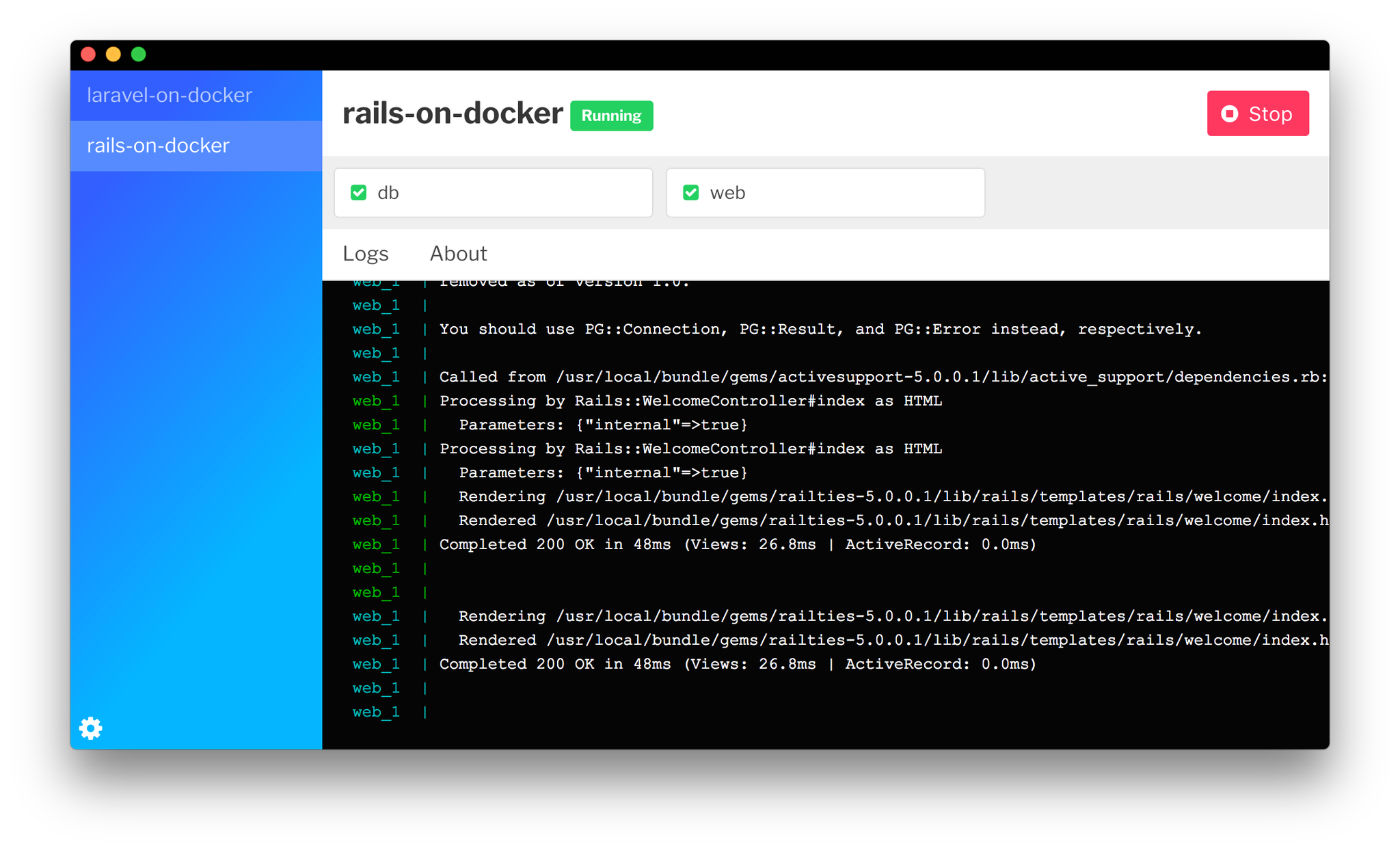
To help ease some of the pain points of working with docker, a coworker created a GUI to launch docker/compose things. Might be helpful to some folks. https://github.com/jplhomer/lifeboat
 okor
on 27 Oct 2017
okor
on 27 Oct 2017
👍
 MisterWang
on 19 Jul 2018
MisterWang
on 19 Jul 2018
Hi, has there been any progress on this? I'd love to get docker-compose supported for being able to easily allow non-developers to easily start using Docker. Thanks!
 vsocrates
on 21 Mar 2019
vsocrates
on 21 Mar 2019
Related issues
 geoffroy-noel-ddh
·
3Comments
geoffroy-noel-ddh
·
3Comments
 albfan
·
3Comments
albfan
·
3Comments
 Ashish0410verma
·
3Comments
Ashish0410verma
·
3Comments
 ClemMakesApps
·
3Comments
ClemMakesApps
·
3Comments
 foverzar
·
4Comments
foverzar
·
4Comments
Most helpful comment
Probably don't need to keep commenting with thumbs up, guys. GitHub has the reaction feature now.