Kirki: Alpha in Color Control not working since v3.1.4
Issue description:
Hi Guys,
Kirki generates [Cannot read property '__' of undefined] error from file wp-color-picker-alpha.js at lines [ 21, 478 ]
This issue happened in the latest version 3.1.4, I've test an old website version was 3.38 and it was working properly then and after update the plugin to the latest version it generates the same error and Alpha has been disabled.
So I'm very sure it's from the last version.
Thanks for the great plugin and for your support.
Version used:
3.1.4
Using theme_mods or options?
theme_mods
Code to reproduce the issue (config + field(s))
Kirki::add_field( MY_PREFIX, array(
    'type'        => 'color',
    'choices'     => array(
        'alpha' => true,
    ),
) );
 Oxibug
All 18 comments
I experienced exactly the same problem, so I also planned to create an issue ;-).
I tested my code with a few versions.
- 3.1.0: displays the alpha slider correctly.
- 3.1.2: displays the alpha slider correctly.
- 3.1.3: doesn't display the alpha slider.
- 3.1.4: doesn't display the alpha slider.
I didn't test with 3.1.1, but I assume it works. My conclusion is that it happens after the update from 3.1.2 till 3.1.3.
I tested the different Kirki versions with the WP Rollback plugin.
The alpha slider is also missing from the background control.
Thanks!
 ralphjsmit
on 10 Aug 2020
ralphjsmit
on 10 Aug 2020
I just saw the 3.1.5 update and it works again. Thank you Aristath!
ralphjsmit
on 10 Aug 2020
GREAT, Working in the new update v3.1.5
Thanks @ralphjsmit
Thanks @aristath
Oxibug
on 10 Aug 2020
Hey guys,
Before close this topic you need to check the Non-Alpha color controls, The second color picker on the right is hidden underneath the main color one.
The Width 100% is too narrow for it so it's gone under the main pallet
File: /plugins/kirki/controls/css/styles.css
.customize-control-kirki-color .kirki-input-container[data-has-alpha=false] .iris-picker.iris-border {
    width: 100% !important;
}
Thanks
Oxibug
on 10 Aug 2020
Hi @Oxibug,
I did check for the non-rgba picker and the 100% width worked fine for me.
Can you attach a screenshot here pls?
Can someone else replicate this issue?
 MapSteps
on 10 Aug 2020
MapSteps
on 10 Aug 2020
Hi @MapSteps
A screenshot from my website
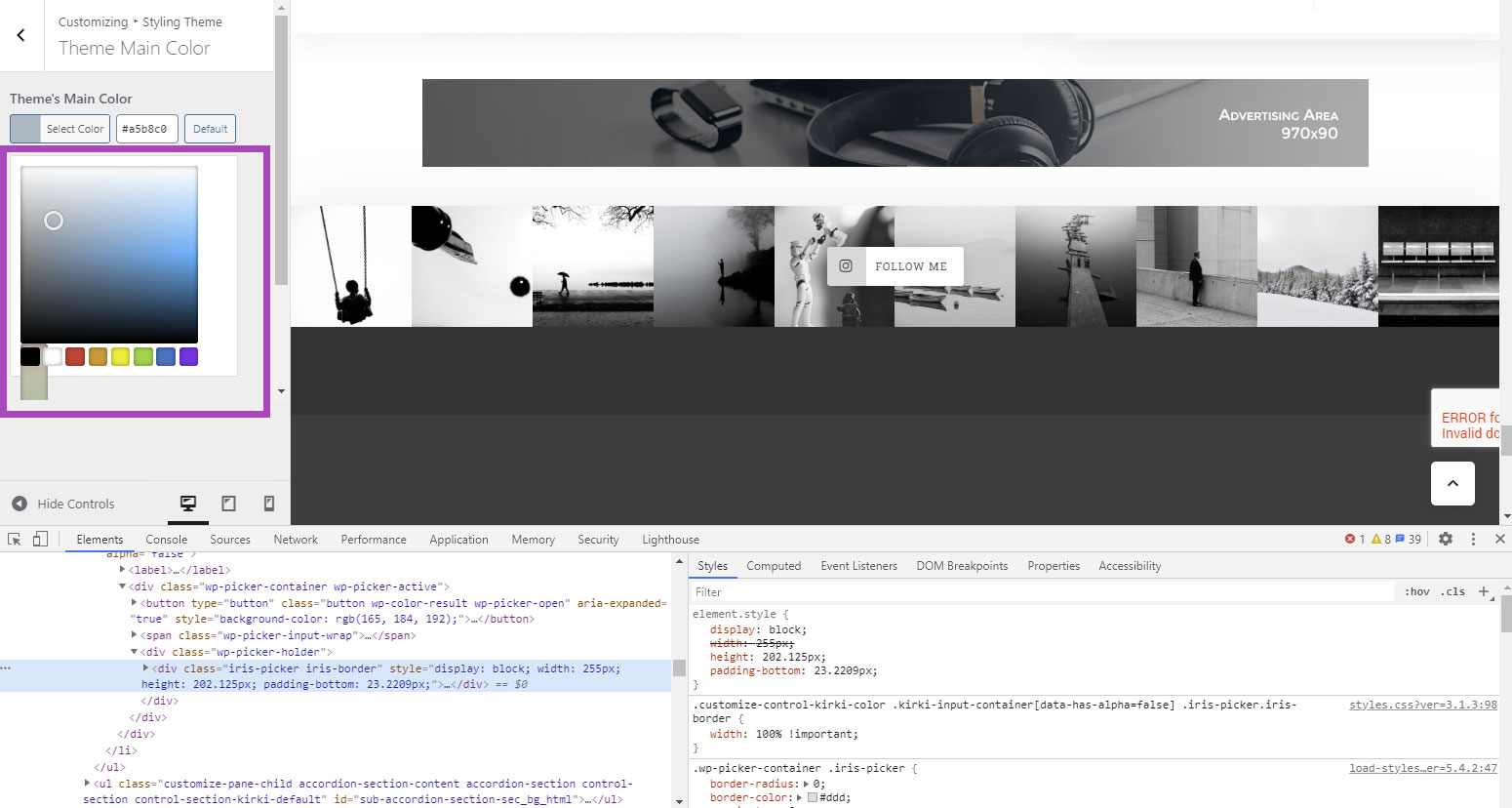
Thanks
Oxibug
on 10 Aug 2020
Can you try to disable all plugins @Oxibug?
It's looking fine over here.
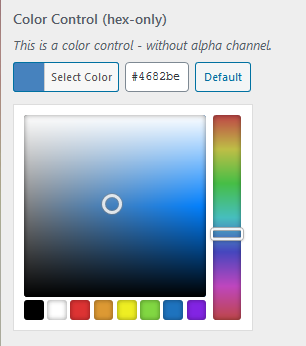
MapSteps
on 11 Aug 2020
I tested it but I can't replicate it either. Both the alpha and non-alpha look fine.
I checked with the browser inspector and for me the
.customize-control-kirki-color .kirki-input-container[data-has-alpha=false] .iris-picker.iris-border {
    width: 100% !important;
}
doesn't cause problems.
ralphjsmit
on 11 Aug 2020
@MapSteps
@ralphjsmit Thanks for test bro,
This issue is very weird, The file [/plugins/kirki/controls/css/styles.css?ver=3.1.3] in the same version 3.1.5 in three different websites is different (in the browser Developer Window only), Which means I noticed the following CSS code in one of them but not in the others so it worked in one website.
The following CSS code is the solution, and I think it generated dynamically from code but it's not generated correctly in some websites, and it's not hard coded inside the CSS file [/plugins/kirki/controls/css/styles.css]
======= Update =========
This code was hard-coded in css file /plugins/kirki/controls/css/styles.css in version 3.1.4
.customize-control-kirki-color .iris-picker .iris-square-handle {
  z-index: 8;
}
.customize-control-kirki-color .iris-picker.iris-border {
  width: 100% !important;
}
.customize-control-kirki-color .iris-picker-inner {
  display: grid;
  grid-template-columns: 1fr 20px;
  grid-gap: 7px;
}
.customize-control-kirki-color .iris-picker-inner > * {
  width: 100% !important;
  margin-left: 0 !important;
  margin-right: 0 !important;
}
@MapSteps @ralphjsmit
You have aggressive cache guys :) Just deactivate Kirki and Hard Reload the home page then reactivate it and hard reload again and you will see the problem.
Oxibug
on 11 Aug 2020
Someone reported a similar issue in the WordPress repo (https://wordpress.org/support/topic/problem-with-color-field/#post-13241626) but I'm still not able to replicate this issue.
@Oxibug, is the site online somewhere? I'd love to look into this. Feel free to reach out and provide me with an admin access - [email protected]
Thanks! :)
MapSteps
on 12 Aug 2020
@MapSteps
Sorry my friend have no time now, I forgot to mention that you MUST delete the plugin and re-install it because I think the browser caching the old version's CSS files then try with Firefox private window and you should see it.
It's very weird for me to see caching like that for a long time.
Oxibug
on 12 Aug 2020
Closing this for now. Please create a separate issue regarding the regular color picker with access to a test installation where I can troubleshoot this. You can reach out directly (https://wp-pagebuilderframework.com/contact/) to send over any credentials.
Thanks!
MapSteps
on 17 Aug 2020
Hi,
I and many others are still facing that issue. You can test with this theme. https://wordpress.org/themes/business-event/
Goto Appearance > Customize > Blog Settings > Category Background Color
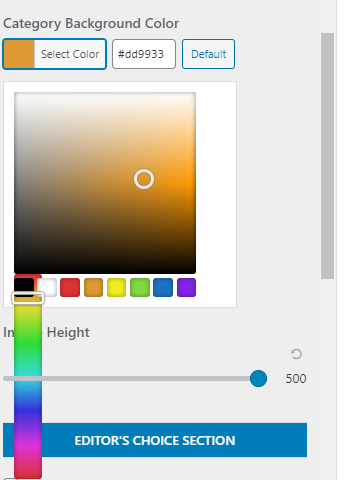
Thank You
 ravishakya
on 7 Sep 2020
ravishakya
on 7 Sep 2020
What browser are you using?
No matter what I try, I'm not able to reproduce this on my end.
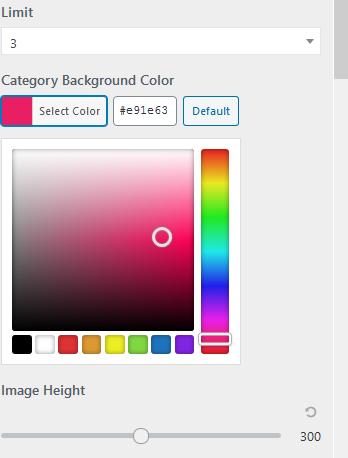
MapSteps
on 7 Sep 2020
You MUST remove Kirki and reinstall it to produce this issue and use private window :) because it seems the caching of CSS files is very strong.
Oxibug
on 7 Sep 2020
That's definitely not the case. Though I just figured this only seems to occur in Chrome and not in Firefox. I'm working on a fix as we speak :)
MapSteps
on 7 Sep 2020
Fixed - https://github.com/kirki-framework/kirki/commit/a9c4ee53d2fc88ba9bed6b7b508443083a3c2de5
Will go live with the next update. Thanks guys! :)
MapSteps
on 7 Sep 2020
Related issues
 allysonsouza
·
3Comments
MapSteps
·
6Comments
allysonsouza
·
3Comments
MapSteps
·
6Comments
 hellor0bot
·
3Comments
hellor0bot
·
3Comments
 stylethemes
·
6Comments
stylethemes
·
6Comments
 rahulv3a
·
3Comments
rahulv3a
·
3Comments
Most helpful comment
Fixed - https://github.com/kirki-framework/kirki/commit/a9c4ee53d2fc88ba9bed6b7b508443083a3c2de5
Will go live with the next update. Thanks guys! :)