Kirki: active_callback UI issues's
Issue description:
I'm using active_callbacks a lot to show/hide options and I've notice the following behaviour.
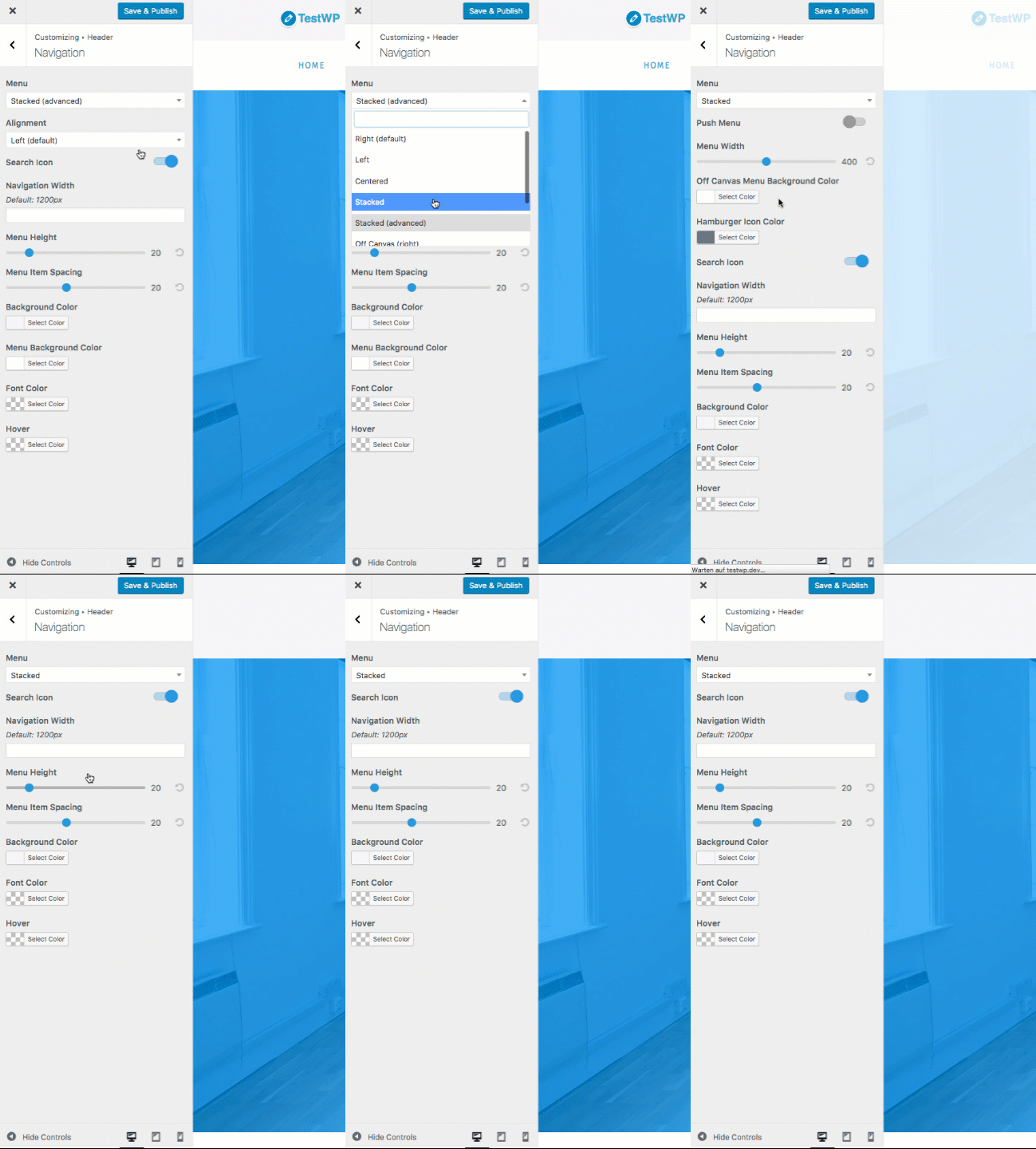
For a moment, all settings are showing up until the page has been refreshed. Maybe it's because of the active_callback is being tied to a select field?
Browser: Firefox
Version used:
3.0.9
Code to reproduce the issue (config + field(s))
Example:
// Menu Search Icon
Kirki::add_field( 'theme_name', array(
    'type'              =>          'toggle',
    'settings'          =>          'search_icon',
    'label'             =>          __( 'Search Icon', 'textdomain' ),
    'section'           =>          'menu_options',
    'priority'          =>          2,
    'active_callback'   =>          array(
        array(
        'setting'       =>          'menu_position',
        'operator'      =>          '!=',
        'value'         =>          'position-1',
        ),
        array(
        'setting'       =>          'menu_position',
        'operator'      =>          '!=',
        'value'         =>          'position-2',
        ),
        array(
        'setting'       =>          'menu_position',
        'operator'      =>          '!=',
        'value'         =>          'position-3',
        ),
    )
) );
I've tested it with required, same behaviour. I wonder if I should use required over active_callback (just in general)?
 MapSteps
All 6 comments
Kirki actually has 2 implementations for active_callback. The 1st one is JS-based and the 2nd one is PHP-based. We used to only have a PHP implementation in older versions, but that wasn't working for fields using postMessage since those fields do everything client-side without any server interaction, so the JS implementation was added to add compatibility with those.
In this case it looks like the JS implementation fails and the PHP implementation succeeds (JS runs before PHP).
Can you please test this with the develop branch too? I think there were a few tweaks for that there, they might also address this issue.
I wonder if I should use required over active_callback (just in general)?
Nope! active_callback is the WordPress implementation which we extended.
The required argument is just an arbitrary name that we used in previous versions of Kirki - and at some point in the future will be deprecated.
Using active_callback is preferable.
 aristath
on 8 Sep 2017
aristath
on 8 Sep 2017
Thanks @aristath,
I'll test it with the latest dev branch and keep you posted!
Best,
David
MapSteps
on 8 Sep 2017
I get the same behaviour with the latest dev branch. I'm sure I'm just missing something.
In the following example I'm trying to show a filed either menu_position is "position-1" OR menu position is "position-2".
Kirki::add_field( 'theme_name', array(
    'type'              =>          'toggle',
    'settings'          =>          'some_setting',
    'label'             =>          __( 'Setting', 'textdomain' ),
    'description'       =>          __('Does Something.', 'textdomain'),
    'section'           =>          'menu_options',
    'default'           =>          '0',
    'priority'          =>          2,
    'active_callback'   =>          array(
        array(
        'setting'       =>          'menu_sticky',
        'operator'      =>          '==',
        'value'         =>          true,
        ),
        array(
        'setting'       =>          'menu_position',
        'operator'      =>          '==',
        'value'         =>          'position-1',
        ),
        // here is where i'd like to say: OR if menu position 2
        array(
        'setting'       =>          'menu_position',
        'operator'      =>          '==',
        'value'         =>          'position-2',
        ),
    )
) );
That doesn't work because the active callback here works like AND, not OR.
The way around would be saying is not ("!=") "position-3" and is not "position-4" and so on listing all other existing menu-positions, as shown in the example on the very top. Maybe this is also causing the UI issues.
I'm sure there is an easier way around but brainfarts. 😆
MapSteps
on 9 Sep 2017
hmmmm...
2 variations you can try:
1st option:
The 1st level is AND, and if you go a level deeper it becomes OR:
'active_callback' => array(
    array(
        'setting'  => 'menu_sticky',
        'operator' => '==',
        'value'    => true,
    ),
    array(
        array(
            'setting'  => 'menu_position',
            'operator' => '===',
            'value'    => 'position-1',
        ),
        array(
            'setting'  => 'menu_position',
            'operator' => '===',
            'value'    => 'position-2',
        ),
    ),
),
2nd option:
Combine the 2 last items in 1:
'active_callback' => array(
    array(
        'setting'  => 'menu_sticky',
        'operator' => '==',
        'value'    => true,
    ),
    array(
        'setting'  => 'menu_position',
        'operator' => 'in',
        'value'    => array( 'position-1', 'position-2' ),
    ),
),
2nd one did the trick, thanks a ton!
I didn't tested option 1 but I'm sure this will work as well.
I'll play around a little and apply these methods to other options to see if that fixes the UI issues.
Will close/report back after I'm done.
Thanks again ari!
MapSteps
on 9 Sep 2017
@aristath,
I've just tested all methods against each other (also with the latest dev version). Unfortunately without success, the UI issue persists.
MapSteps
on 9 Sep 2017
Related issues
 ravishakya
·
5Comments
ravishakya
·
5Comments
 allysonsouza
·
3Comments
allysonsouza
·
3Comments
 fastmarketo
·
4Comments
fastmarketo
·
4Comments
 2one2
·
3Comments
2one2
·
3Comments
 stylethemes
·
6Comments
stylethemes
·
6Comments