Kirki: Upload control in Repeater
Issue description:
Hey @aristath,
It seems like when using an upload control inside a repeater, I cannot select any other files than images. Uploading files (non-images) works.
It also works great outside the repeater field.
Please see the examples below.
Version used:
3.0.33
Using theme_mods or options?
Code to reproduce the issue (config + field(s))
doesn't work:
Kirki::add_field( 'config_id', array(
    'type'              =>          'repeater',
    'label'             =>          esc_attr__( 'Repeater Upload', 'textdomain' ),
    'settings'          =>          'prefix_setting',
    'priority'          =>          '3',
    'section'           =>          'prefix_section',
    'row_label'         =>          array(
        'type'          =>          'text',
        'value'         =>          esc_attr__( 'Row Label', 'textdomain' ),
        ),
    'fields'            =>          array(
        'upload_field'  =>      array(
            'type'      =>      'upload',
            'label'     =>      esc_attr__( 'Upload', 'textdomain' ),
        ),
    ),
));
works:
Kirki::add_field( 'theme_config_id', array(
    'type'        => 'upload',
    'settings'    => 'upload_setting_url',
    'label'       => esc_attr__( 'Upload Control, 'textdomain' ),
    'section'     => 'section_id',
    'default'     => '',
) );
 MapSteps
All 7 comments
After digging a bit deeper, here's what we got:
I was able to make all mime types showing up by adding this to the repeater field above:
'mime_type' => array()
Unfortunately, something like this didn't work and didn't show any files when clicking on the "Add File" button:
'mime_type' => ['application/x-font-woff']
So this is partially resolved since I can show all mime_types. There seems to be a bug or I'm simply doing it wrong with a more specific mime_type setting.
MapSteps
on 16 Aug 2018
Marking as a bug :+1:
 aristath
on 23 Aug 2018
aristath
on 23 Aug 2018
Thanks @aristath! :)
Here's something else I've noticed. I saw there were some other posts on that I think that were resolved but the "remove" text doesn't show up for me.
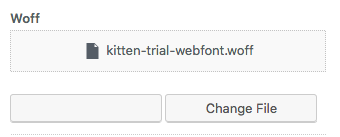
Just letting you know :)
Have a great day!
MapSteps
on 23 Aug 2018
Looks like it's an issue within kirki/controls/php/class-kirki-control-repeater.php.
Line 388 have the correct remove button (used for field.type === 'image' || field.type === 'cropped_image') but line 420 has the remove button without a label (for field.type === 'upload').
The issue can be resolved by simply copying line 388 to 420.
 BenceSzalai
on 2 Jan 2019
BenceSzalai
on 2 Jan 2019
Fix was merged.
 DannyCooper
on 28 Jun 2019
DannyCooper
on 28 Jun 2019
After digging a bit deeper, here's what we got:
I was able to make all mime types showing up by adding this to the repeater field above:
'mime_type' => array()Unfortunately, something like this didn't work and didn't show any files when clicking on the "Add File" button:
'mime_type' => ['application/x-font-woff']So this is partially resolved since I can show all mime_types. There seems to be a bug or I'm simply doing it wrong with a more specific mime_type setting.
Where should i place the mime_type param? i have tried to place it in repeater field, but still can't upload the woff file.
 ariona
on 26 Nov 2019
ariona
on 26 Nov 2019
Solved by filtering upload_mimes
add_filter('upload_mimes', 'add_custom_upload_mimes');
function add_custom_upload_mimes($existing_mimes) {
  $existing_mimes['otf'] = 'application/x-font-otf';
  $existing_mimes['woff'] = 'application/x-font-woff';
  $existing_mimes['woff2'] = 'application/x-font-woff2';
  $existing_mimes['ttf'] = 'application/x-font-ttf';
  $existing_mimes['svg'] = 'image/svg+xml';
  $existing_mimes['eot'] = 'application/vnd.ms-fontobject';
  return $existing_mimes;
}
Related issues
 hussainnayani
·
4Comments
hussainnayani
·
4Comments
 manuelmoreale
·
3Comments
manuelmoreale
·
3Comments
 ravishakya
·
7Comments
MapSteps
·
6Comments
ravishakya
·
7Comments
MapSteps
·
6Comments
 rahulv3a
·
3Comments
rahulv3a
·
3Comments
Most helpful comment
Thanks @aristath! :)
Here's something else I've noticed. I saw there were some other posts on that I think that were resolved but the "remove" text doesn't show up for me.
Just letting you know :)
Have a great day!