Kirki: Styling Sections with Dashicons
It would be a good feature if we can specify icon from Dashicons to each section before section name like this code & image below.
<?php
Kirki::add_section( 'custom_css', array(
    'title'          => __( 'Menu Style' ),
    'priority'       => 160,
    'icon'     => 'dashicons-menu',  //using dashicons class
) );
?>
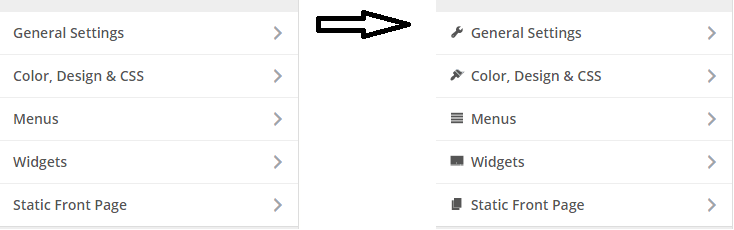
BTW, is there a way to figure out each section unique css class?
i think i can add action to customize_controls_enqueue_scripts with my custom css classes right now if i figured out each section unique class name.
 mshakour
All 13 comments
You can already do that using the icon argument in sections.
Example:
Kirki::add_section( 'theme_options', array(
'title' => esc_attr__( 'Theme Options', '_s' ),
'icon' => 'dashicons-admin-customizer',
) );
By the way this feature has been in Kirki since version 1.0.2, 2 years ago. 😉
 aristath
on 14 Jun 2017
aristath
on 14 Jun 2017
Does it not work in the panel?
 vlthemes
on 23 Jun 2017
vlthemes
on 23 Jun 2017
yes.
aristath
on 23 Jun 2017
It works only in section, yeah?
I tried to add the icon to the panel and it does not work.
Kirki::add_panel('panel_general', array(
'priority' => $first_level++,
'title' => esc_html__('General', 'osmos'),
'description' => esc_html__('General Settings', 'osmos'),
'icon' => 'dashicons-admin-customizer',
));
Kirki::add_section('section_general', array(
'title' => esc_html__('General', 'osmos'),
'panel' => 'panel_general',
'priority' => $second_level++,
'capability' => 'edit_theme_options',
'theme_supports' => '',
'icon' => 'dashicons-admin-customizer',
));
vlthemes
on 23 Jun 2017
There was a typo, fixed it.
It now works for panels too.
aristath
on 23 Jun 2017
Perhaps this is a more correct variant. It would be convenient to insert your custom icons.
icons.js
jQuery( document ).ready( function() {

    'use strict';

    if ( ! _.isUndefined( kirkiIcons.section ) ) {

        // Parse sections and add icons.
        _.each( kirkiIcons.section, function( icon, sectionID ) {

            // Add icons in list.
            jQuery( '#accordion-section-' + sectionID + ' > h3' ).prepend( '<span class="' + icon + '" style="padding-right:.2em;"></span>' );

            // Add icons on titles when a section is open.
            jQuery( '#sub-accordion-section-' + sectionID + ' .customize-section-title > h3' ).append( '<span class="' + icon + '" style="padding-right:.2em; padding-top: 2px; float:left;"></span>' );
        } );

    }

    if ( ! _.isUndefined( kirkiIcons.panel ) ) {

        _.each( kirkiIcons.panel, function( icon, panelID ) {

            // Add icons in lists & headers.
            jQuery( '#sub-accordion-panel-' + panelID + ' .panel-title' ).prepend( '<span class="' + icon + '" style="padding-right:.2em; padding-top: 2px;"></span>' );

            // Add icons on titles when a panel is open.
            jQuery( '#accordion-panel-' + panelID + ' > h3' ).prepend( '<span class="' + icon + '" style="padding-right:.2em;"></span>' );
        } );

    }

});
This code is fully tested and works for me. I hope that it will be accepted into the future update.
Section or panel with dashicons:
Kirki::add_panel('panel_header', array(
    'priority' => $first_level++,
    'title' => esc_html__('Header & Menu', 'theme'),
    'icon' => 'dashicons dashicons-admin-generic'
));
with fa:
Kirki::add_panel('panel_general', array(
    'priority' => $first_level++,
    'title' => esc_html__('General', 'osmos'),
    'description' => esc_html__('General Settings', 'osmos'),
    'icon' => 'fa fa-dribbble',
));
Adding to 3.1, we'll need to examine this in more detail:
- Currently you only need to use
dashicons-controls-play. With that implementation you'd also have to add a prefix for dashicons, which would not be backwards-compatible. - font-awesome is not enqueued by default in the customizer. It is only added if you are also using the
fontawesomecontrol, or of a 3rd-party plugin enqueues them.
aristath
on 25 Jun 2017
Another question, i can't manage to add icons to these default panels (menus/widgets).
It was okay to remove default sections liketitle_tagline and re-adding them with kirki to add icons but when i use $wp_customize->remove_panel( 'nav_menus');a warning appears that remove_panel was called incorrectly.
mshakour
on 8 Jul 2017
@mshakour, try it. It's not good, but it works.
jQuery( document ).ready( function() {

    'use strict';

    // Add icons to custom css.
    jQuery( '#accordion-section-custom_css > h3' ).prepend( '<span class="fa fa-fw fa-plus-square" style="padding-right:.2em;"></span>' );
    jQuery( '#sub-accordion-section-custom_css .customize-section-title > h3' ).append( '<span class="fa fa-fw fa-plus-square" style="padding-right:.2em; padding-top: 2px; float:left;"></span>' );

    // Add icons to static front page.
    jQuery( '#accordion-section-static_front_page > h3' ).prepend( '<span class="fa fa-fw fa-globe" style="padding-right:.2em;"></span>' );
    jQuery( '#sub-accordion-section-static_front_page .customize-section-title > h3' ).append( '<span class="fa fa-fw fa-globe" style="padding-right:.2em; padding-top: 2px; float:left;"></span>' );

    // Add icons to site identity.
    jQuery( '#accordion-section-title_tagline > h3' ).prepend( '<span class="fa fa-fw fa-paperclip" style="padding-right:.2em;"></span>' );
    jQuery( '#sub-accordion-section-title_tagline .customize-section-title > h3' ).append( '<span class="fa fa-fw fa-paperclip" style="padding-right:.2em; padding-top: 2px; float:left;"></span>' );

    // Add icons to widgets.
    jQuery( '#sub-accordion-panel-widgets .panel-title' ).prepend( '<span class="fa fa-fw fa-star" style="padding-right:.2em; padding-top: 2px;"></span>' );
    jQuery( '#accordion-panel-widgets > h3' ).prepend( '<span class="fa fa-fw fa-star" style="padding-right:.2em;"></span>' );

    // Add icons to menus.
    jQuery( '#sub-accordion-panel-nav_menus .panel-title' ).prepend( '<span class="fa fa-fw fa-list" style="padding-right:.2em; padding-top: 2px;"></span>' );
    jQuery( '#accordion-panel-nav_menus > h3' ).prepend( '<span class="fa fa-fw fa-list" style="padding-right:.2em;"></span>' );


});
It was okay to remove default sections liketitle_tagline and re-adding them with kirki to add icons but when i use $wp_customize->remove_panel( 'nav_menus');a warning appears that remove_panelwas called incorrectly.
There are instructions on how to properly remove panels/sections in that error message. If you google it, you'll find it.
aristath
on 8 Jul 2017
@aristath i'm well aware of that instructions provided in that link.
https://developer.wordpress.org/reference/hooks/customize_loaded_components/
but actually it cannot be added to a theme just plugins only.
mshakour
on 8 Jul 2017
For ex it would be convenient to manage this with a kirki.
Kirki::remove_panel('panel_general');
For ex it would be convenient to manage this with a kirki.
Kirki::remove_panel('panel_general');
This now exists - https://github.com/aristath/kirki/blob/cef59367f9a5c2b2092a9f9e975ee25584fadc22/packages/kirki-framework/core/src/Kirki.php#L177
 DannyCooper
on 18 Jun 2019
DannyCooper
on 18 Jun 2019
Related issues
 allysonsouza
·
3Comments
allysonsouza
·
3Comments
 MapSteps
·
6Comments
MapSteps
·
6Comments
 pagelab
·
3Comments
pagelab
·
3Comments
 daviedR
·
6Comments
daviedR
·
6Comments
 ravishakya
·
7Comments
ravishakya
·
7Comments
Most helpful comment
Perhaps this is a more correct variant. It would be convenient to insert your custom icons.
http://take.ms/wCye6
icons.js
This code is fully tested and works for me. I hope that it will be accepted into the future update.
Section or panel with dashicons:
with fa: