Kibana: Monitoring Beats: Instance list too short
Kibana version: 6.3.0
Elasticsearch version: 6.3.0
Server OS version: probably all
Browser version: probably all
Browser OS version: probably all
Original install method (e.g. download page, yum, from source, etc.):
Describe the bug:
As you see here:
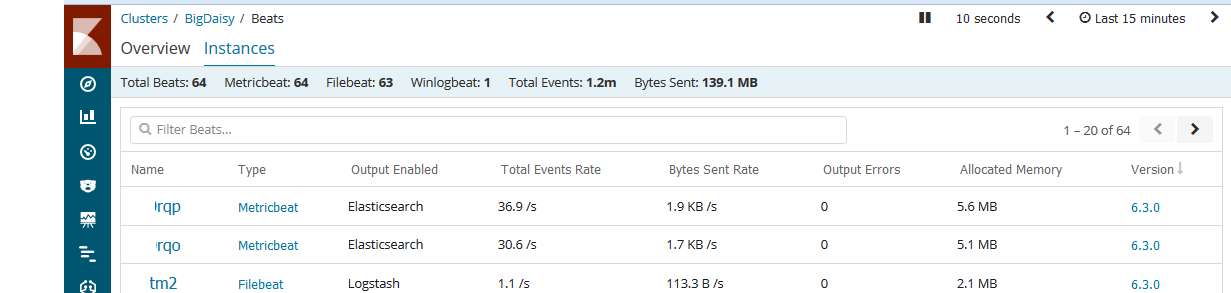
Total beats are 64 (instead of metric 64 + file 63 + winlog 1 = 128), so only the newest half of all beats are shown in the list (see 1-20 of 64, I would expect 1-20 of 128).
Moreover the list is fluctuating over time: sometimes 60 file- and 4 metricbeats are shown 5 minutes later it is vice versa.
Even if you use 'Filter beats' to show only e.q. metricbeats the number of really shown metricbeats vary from 0 to 64.
My recommendation is to extend the list that all beats can fit into it.
Steps to reproduce:
see abovesee above
Expected behavior:
see above
Screenshots (if relevant):
see above
Errors in browser console (if relevant):
see above
Provide logs and/or server output (if relevant):
Any additional context:
 kaem2111
All 17 comments
Hi @simianhacker, @nreese,
I was asked by the customer, what the status of this is. Can you please let me know, how we are proceeding with this issue?
Thanks a mil in advanced!
Marco
 luzidl
on 24 Sep 2018
luzidl
on 24 Sep 2018
@chrisronline Can you take a look at this?
 simianhacker
on 24 Sep 2018
simianhacker
on 24 Sep 2018
@simianhacker You got it!
 chrisronline
on 24 Sep 2018
chrisronline
on 24 Sep 2018
Hey @kaem2111,
I have a feeling there are some beats using the same uuid for some reason. To verify, can you run the following command in the dev console and reply with the result?
POST .monitoring-beats-6-*/_search?filter_path=aggregations.types.buckets.key,aggregations.types.buckets.uuids.buckets.key,aggregations.types.buckets.doc_count
{
  "size": 0,
  "query": {
    "bool": {
      "filter": {
        "term": {
          "type": "beats_stats"
        }
      }
    }
  },
  "aggs": {
    "types": {
      "terms": {
        "field": "beats_stats.beat.type",
        "size": 1000
      },
      "aggs": {
        "uuids": {
          "terms": {
            "field": "beats_stats.beat.uuid",
            "size": 10000
          }
        }
      }
    }
  }
}
Hey chrisronline,
I have change the sequence of the aggregations to make the result better understandable.
Here are the results (partially):
{
  "aggregations": {
    "uuids": {
      "buckets": [
        {
          "key": "bacbca55-e59a-47be-9ab5-ec5dd4920183",
          "doc_count": 250983,
          "types": {
            "buckets": [
              {
                "key": "metricbeat"
              },
              {
                "key": "filebeat"
              }
            ]
          }
        },
        {
          "key": "483ef274-e319-4d8d-8085-1c62f55e5b0b",
          "doc_count": 250677,
          "types": {
            "buckets": [
              {
                "key": "filebeat"
              },
              {
                "key": "metricbeat"
              }
            ]
          }
_.... same for another 43 different uuids ...._
    }
  }
}
This means, that (at least in my environment) different types of beats generate the same UUIDS, (probably) when running on the same node.
kaem2111
on 25 Sep 2018
@elastic/beats
This means, that (at least in my environment) different types of beats generate the same UUIDS, (probably) when running on the same node.
Any idea why this might happen?
chrisronline
on 25 Sep 2018
One reason could be that path.data is being set to the same value for different beats. For a given node, it would be helpful to know these two things:
How are
filebeatandmetricbeatbeing started? What is the exact command being used?The complete
filebeat.ymlandmetricbeat.ymlbeing used (with any sensitive information redacted, of course).
 ycombinator
on 25 Sep 2018
ycombinator
on 25 Sep 2018
The lib used in Beats to generate UUID has a critical bug. It generates non-random UUIDs. We already have an open issue to find an alternative: https://github.com/elastic/beats/issues/8077
 kvch
on 26 Sep 2018
kvch
on 26 Sep 2018
@ycombinator said:
One reason could be that
path.datais being set to the same value for different beats.
He is correct, this was the root cause of my issue. I have added different path.data and it works fine.
Maybe you think about adding a note to the docu or *beat.reference.yml like:
Note; when using multiple beats on same node ensure to specify different path.data to avoid conflicts
From my point of view this issue can be closed as 'user configuration error'
Thanks again for the help.
kaem2111
on 26 Sep 2018
@dedemorton What's a good place in our docs to put in @kaem2111's suggestion above? Would it make sense to create a Troubleshooting or similar section under https://www.elastic.co/guide/en/beats/libbeat/current/index.html?
ycombinator
on 26 Sep 2018
@ycombinator It should probably be mentioned in a couple of places:
- Where we document
path.data. The source is shared, so the content will be included in all the beats. You can conditionally code the info, if necessary. - The troubleshooting FAQ here. For example: https://www.elastic.co/guide/en/beats/filebeat/6.4/faq.html. This topic pulls content from a shared file (for all beats) plus adds beat-specific info.
Please open an issue in the beats github repo (with docs label) if you want me to take this over.
 dedemorton
on 26 Sep 2018
dedemorton
on 26 Sep 2018
Side note: The uuid bug is not nice but I don't think it can have such a major affect based on the number of Beats that people deploy. We need to fix the bug but I don't expect a very low number of conflict if it would happen.
 ruflin
on 27 Sep 2018
ruflin
on 27 Sep 2018
Created https://github.com/elastic/beats/pull/8461 for documentation.
ycombinator
on 27 Sep 2018
One followup question to make sure I understand the problem and its solution. In monitoring the UUID of the Beat is used not its ephemeral ID to identify it?
kvch
on 27 Sep 2018
@kvch For calculating the total number of beats we show in the UI, we use a cardinality agg, but to calculate the number of each beat, we use a terms agg off type with a sub terms agg off uuid. We use the ephemeral ID for other calculations but it's not used in the calculation of the total number of beats or the total number of each beat.
chrisronline
on 27 Sep 2018
Got it! Thank you.
kvch
on 27 Sep 2018
@kaem2111 Thanks for the suggestion to update the docs. This is done now:
https://www.elastic.co/guide/en/beats/filebeat/6.4/configuration-path.html#_literal_data_literal and https://www.elastic.co/guide/en/beats/filebeat/6.4/faq.html#monitoring-shows-fewer-than-expected-beats.
ycombinator
on 28 Sep 2018
Related issues
 celesteking
·
3Comments
celesteking
·
3Comments
 cafuego
·
3Comments
cafuego
·
3Comments
 spalger
·
3Comments
spalger
·
3Comments
 ynux
·
3Comments
ynux
·
3Comments
 ctindel
·
3Comments
ctindel
·
3Comments
Most helpful comment
@ycombinator said:
He is correct, this was the root cause of my issue. I have added different path.data and it works fine.
Maybe you think about adding a note to the docu or *beat.reference.yml like:
From my point of view this issue can be closed as 'user configuration error'
Thanks again for the help.