Kiali: Improve Istio Config Access Error Message When User Does Not Have Permission
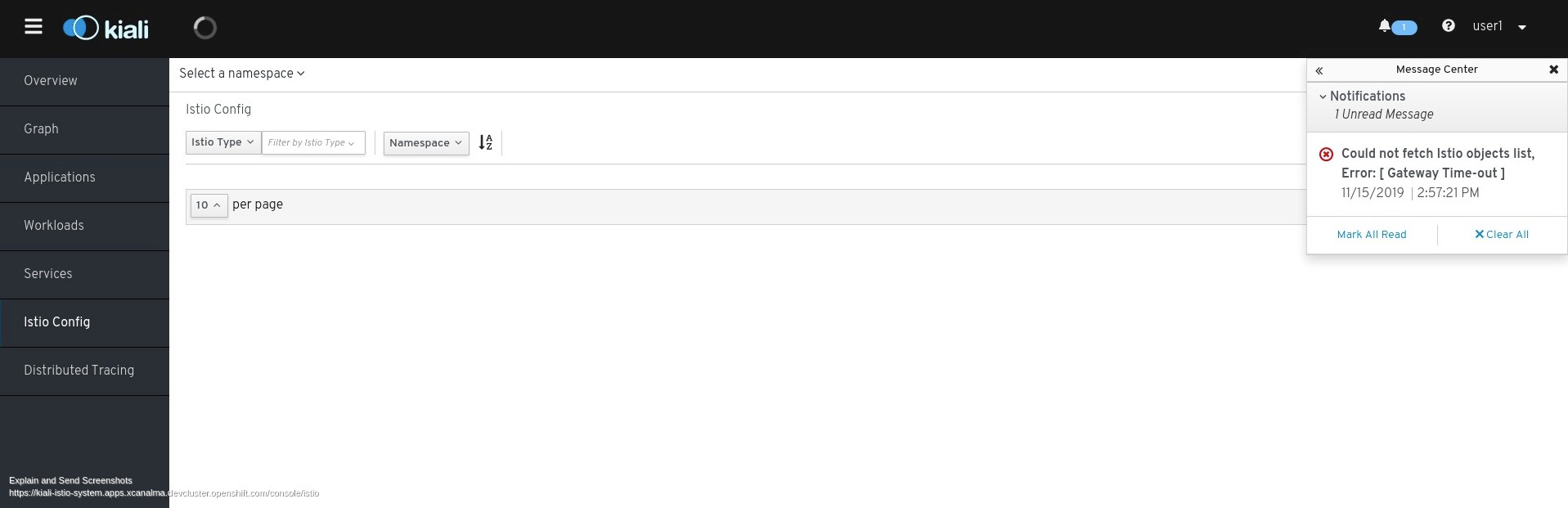
When a user does not have permission to access a namespace, attempting to access Kiali Istio Config eventually times out with error "Could not fetch Istio objects list, Error: [ Gateway Time-out ]". The message should be more user friendly as to why the timeout occurred, such as perhaps an access denied message.
Repro:
1) Create new OS user 'foo'
2) Create Role Binding for user 'foo' that has "Edit" role access to namespace 'bookinfo'
3) Log into Kiali as user 'foo', and click on Istio Config
 lucasponce
All 3 comments
Steps to reproduce using ./aws-openshift:
- Create a new user [1] / [2]
htpasswd -c -B -b users.htpasswd user user
htpasswd -b users.htpasswd user user
oc create secret generic htpass-secret --from-file=htpasswd=users.htpasswd -n openshift-config
cat <<EOF | oc apply -f -
apiVersion: config.openshift.io/v1
kind: OAuth
metadata:
name: cluster
spec:
identityProviders:
- name: my_htpasswd_provider
mappingMethod: claim
type: HTPasswd
htpasswd:
fileData:
name: htpass-secret
EOF
oc login -u user
- Create bookinfo:
./aws-openshift.sh bi-install
- Add bookinfo to ServiceMeshMemberRoll
cat <<EOF | oc apply -f -
apiVersion: maistra.io/v1
kind: ServiceMeshMemberRoll
metadata:
# name must be default
name: default
spec:
members:
# a list of projects/namespaces that should be joined into the service mesh
# for example, the bookinfo project/namespace
- bookinfo
EOF
- Create role and assign it to
user
cat <<EOF | oc apply -f -
apiVersion: rbac.authorization.k8s.io/v1
kind: Role
metadata:
name: my_configview
namespace: bookinfo
rules:
- apiGroups:
- ""
resources:
- configmaps
- endpoints
- namespaces
- nodes
- pods
- pods/log
- replicationcontrollers
- services
verbs:
- get
- list
- watch
- apiGroups:
- extensions
- apps
resources:
- deployments
- replicasets
- statefulsets
verbs:
- get
- list
- watch
- apiGroups:
- autoscaling
resources:
- horizontalpodautoscalers
verbs:
- get
- list
- watch
- apiGroups:
- batch
resources:
- cronjobs
- jobs
verbs:
- get
- list
- watch
- apiGroups:
- config.istio.io
resources:
- adapters
- apikeys
- bypasses
- authorizations
- checknothings
- circonuses
- cloudwatches
- deniers
- dogstatsds
- edges
- fluentds
- handlers
- instances
- kubernetesenvs
- kuberneteses
- listcheckers
- listentries
- logentries
- memquotas
- metrics
- noops
- opas
- prometheuses
- quotas
- quotaspecbindings
- quotaspecs
- rbacs
- redisquotas
- reportnothings
- rules
- signalfxs
- solarwindses
- stackdrivers
- statsds
- stdios
- templates
- tracespans
- zipkins
verbs:
- create
- delete
- get
- list
- patch
- watch
- apiGroups:
- networking.istio.io
resources:
- destinationrules
- gateways
- serviceentries
- sidecars
- virtualservices
verbs:
- create
- delete
- get
- list
- patch
- watch
- apiGroups:
- authentication.istio.io
resources:
- meshpolicies
- policies
verbs:
- create
- delete
- get
- list
- patch
- watch
- apiGroups:
- rbac.istio.io
resources:
- clusterrbacconfigs
- rbacconfigs
- servicerolebindings
- serviceroles
verbs:
- create
- delete
- get
- list
- patch
- watch
- apiGroups:
- apps.openshift.io
resources:
- deploymentconfigs
verbs:
- get
- list
- watch
- apiGroups:
- project.openshift.io
resources:
- projects
verbs:
- get
- apiGroups:
- route.openshift.io
resources:
- routes
verbs:
- get
- apiGroups:
- monitoring.kiali.io
resources:
- monitoringdashboards
verbs:
- get
- list
EOF
oc adm policy add-role-to-user my_configview user --role-namespace=bookinfo -n bookinfo
Kiali should show the following when visiting Istio Config list page:
[1] https://docs.openshift.com/container-platform/4.2/authentication/identity_providers/configuring-htpasswd-identity-provider.html
[2] https://docs.openshift.com/container-platform/4.2/authentication/identity_providers/configuring-htpasswd-identity-provider.html#identity-provider-configuring-using-the-web-console_configuring-htpasswd-identity-provider
 xeviknal
on 15 Nov 2019
xeviknal
on 15 Nov 2019
FWIW, just some side notes about using the aws-openshift.sh hack script.
Your step 3 shouldn't be needed, the aws hack script's bi-install command will put "bookinfo" in the SMMR for you. See: https://github.com/kiali/kiali/blob/v1.9.1/hack/aws-openshift.sh#L1099
Also, the AWS hack script creates a user with no permissions for you (username "johndoe", password "johndoe") - so I suspect you may not have to create your user either (unless the role has some permissions you need for this test - in which case, you can just add the role to the existing johndoe user to make it a little easier). See: https://github.com/kiali/kiali/blob/v1.9.1/hack/aws-openshift.sh#L893-L895. You can see what users are installed by running the status command of aws hack script:
$ aws-openshift.sh status
...
=====================================================================
kubeadmin password: aaa-bbb-ccc-ddd
kiali password:     kiali
johndoe password:   johndoe
=====================================================================
...
 jmazzitelli
on 15 Nov 2019
jmazzitelli
on 15 Nov 2019
Amazing @jmazzitelli ! Didn't realize.
And yes, I confirm that step 1 and 3 are not necessary. Step 4 has to be assigned to johndoe user instead.
xeviknal
on 18 Nov 2019
Related issues
 jwurm
·
6Comments
jwurm
·
6Comments
 abonas
·
5Comments
abonas
·
5Comments
 YuriyKrasilnikov
·
4Comments
lucasponce
·
5Comments
YuriyKrasilnikov
·
4Comments
lucasponce
·
5Comments
 denniseffing
·
3Comments
denniseffing
·
3Comments
Most helpful comment
FWIW, just some side notes about using the aws-openshift.sh hack script.
Your step 3 shouldn't be needed, the aws hack script's bi-install command will put "bookinfo" in the SMMR for you. See: https://github.com/kiali/kiali/blob/v1.9.1/hack/aws-openshift.sh#L1099
Also, the AWS hack script creates a user with no permissions for you (username "johndoe", password "johndoe") - so I suspect you may not have to create your user either (unless the role has some permissions you need for this test - in which case, you can just add the role to the existing johndoe user to make it a little easier). See: https://github.com/kiali/kiali/blob/v1.9.1/hack/aws-openshift.sh#L893-L895. You can see what users are installed by running the status command of aws hack script: