Kiali: Duplicate service node in graph view
I deployed a small sample application consisting of three services:
- mts-frontend
- mts-booking-order
- mts-dishes (3 instances, round robin load balancer)
The mts-booking-order service communicates with the mts-dishes service (mesh internal communication) while mts-booking-order, mts-dishes and mts-frontend can be reached from the outside via Istio ingress gateway configuration.
Today, I was testing the Istio failure injection which led to the following virtual service configuration:
################################################################################
# Istio virtual service configuration with injected outages for dishes service
################################################################################
apiVersion: networking.istio.io/v1alpha3
kind: VirtualService
metadata:
  name: mts-routes
spec:
  hosts:
  - mts.local
  - mts.local:31380
  - mts.local:31390
  - mts-dishes.default.svc.cluster.local
  gateways:
  - mesh
  - mts-gateway
  http:
  - match:
    - uri:
        prefix: /api/services/rest/dishmanagement/
      headers:
        username:
          exact: fault.injection
    - sourceLabels:
        app: mts-booking-order
    fault:
      abort:
        httpStatus: 500
        percent: 100
    rewrite:
      uri: /
    route:
    - destination:
        host: mts-dishes.default.svc.cluster.local
        port:
          number: 80
  - match:
    - uri:
        prefix: /api/services/rest/dishmanagement/
    rewrite:
      uri: /
    route:
    - destination:
        host: mts-dishes.default.svc.cluster.local
        port:
          number: 80
  - match:
    - uri:
        prefix: /api
    rewrite:
      uri: /mythaistar
    route:
    - destination:
        host: mts-booking-order.default.svc.cluster.local
        port:
          number: 8081
  - match:
    - uri:
        prefix: /
    route:
    - destination:
        host: mts-frontend.default.svc.cluster.local
        port:
          number: 80
Describe the bug
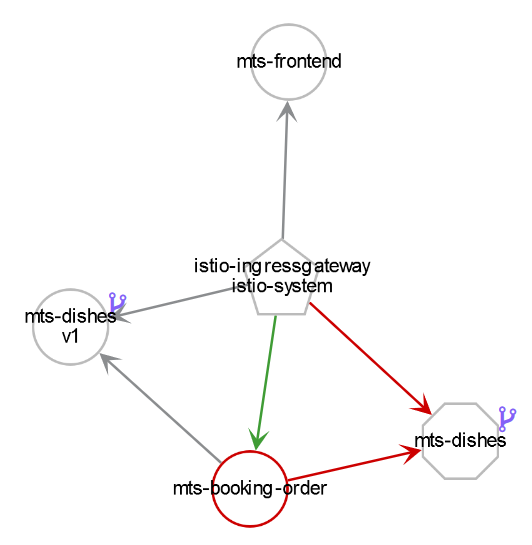
The resulting Kiali service graph visualization after issuing some requests looks like this:
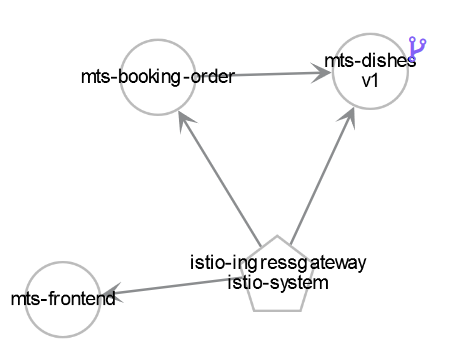
When not displaying any preceding requests, the service graph looks like this:
As you can see in the first picture, the service mts-dishes is drawn twice. I couldn't find any information about the octagon representation.
Is this intended behavior?
Versions used
Kiali: v0.6
Istio: v1.0.2
Kubernetes flavour and version: v1.10
To Reproduce
I am not sure how to reproduce this behavior yet.
Expected behavior
mts-dishes is only drawn once (i.e. one node).
Edit: The same issue does not occur when injecting delays.
 denniseffing
All 3 comments
On 19 Sep 2018, at 21:10, Dennis Effing wrote:
Is this intended behavior?
I think this is correct. The octagon (in master it is a tiny triangle)
indicates that there was traffic from the ingress and the booking-order
targeted at mts-dishes, but which never made it to it because of your
 fault:
       abort:
         httpStatus: 500
         percent: 100
rule, where Istio is not forwarding the request, but directly replying
with a 500 error code.
 pilhuhn
on 19 Sep 2018
pilhuhn
on 19 Sep 2018
This is to be expected. The octagon (to be shown as a triangle in the future - master has it this way) represents a literal "service" - notice only red edges into your dishes service - those requests never made it to any workload so never got processed - but we know it TRIED to go to that dishes service. Hence why it is rendered like this.
We have a new option (in master) - you can inject services into your graph so it would be more understandable (well, that's subjective) - this new option to show triangles for all your services, not just the ones where you had faults going to them.
Read this blog for details - this covers the EXACT thing you are asking about - hopefully, it makes sense: https://medium.com/kialiproject/different-mesh-visualizations-in-kiali-82a3428ae155
 jmazzitelli
on 19 Sep 2018
jmazzitelli
on 19 Sep 2018
Thanks for the explanation, that makes perfect sense. The option to inject services in the graph view is an excellent solution.
This issue can be closed.
denniseffing
on 20 Sep 2018
Related issues
 jwurm
·
6Comments
jwurm
·
6Comments
 abonas
·
3Comments
abonas
·
3Comments
 nabam
·
3Comments
nabam
·
3Comments
 dntosas
·
3Comments
dntosas
·
3Comments
 mtho11
·
5Comments
mtho11
·
5Comments
Most helpful comment
On 19 Sep 2018, at 21:10, Dennis Effing wrote:
I think this is correct. The octagon (in master it is a tiny triangle)
indicates that there was traffic from the ingress and the booking-order
targeted at mts-dishes, but which never made it to it because of your
rule, where Istio is not forwarding the request, but directly replying
with a 500 error code.