Keeweb: OneDrive popup for choosing account is showing when you are already logged in
Hi!
I see a little problem: when db is syncing, popup for OneDrive become opened. It does not require to login, I need only to choose logged in account. After some time (maybe when token expires) this popup is showing again.
KeeWeb v1.6.3 (cded8a4, 2017-12-11)
Environment: electron v1.7.9
User-Agent: Mozilla/5.0 (Windows NT 10.0; Win64; x64) AppleWebKit/537.36 (KHTML, like Gecko) KeeWeb/1.6.1 Chrome/58.0.3029.110 Electron/1.7.9 Safari/537.36
[INFO ] 2017-12-25T10:39:21.747Z [app] Started in 1034ms ¯_(ツ)_/¯
[INFO ] 2017-12-25T10:39:21.753Z [updater] Next update check will happen in 1s
[INFO ] 2017-12-25T10:39:22.255Z [updater] Checking for update...
[INFO ] 2017-12-25T10:39:22.256Z [transport] GET https://app.keeweb.info/manifest.appcache
[INFO ] 2017-12-25T10:39:23.604Z [transport] Request to https://app.keeweb.info/manifest.appcache without proxy
[INFO ] 2017-12-25T10:39:24.485Z [transport] Response from https://app.keeweb.info/manifest.appcache: 200
[INFO ] 2017-12-25T10:39:24.494Z [updater] Update check: # 2017-12-11:v1.6.3
[INFO ] 2017-12-25T10:39:24.498Z [updater] Next update check will happen in 86400s
[INFO ] 2017-12-25T10:39:24.500Z [updater] You are using the latest version
[INFO ] 2017-12-25T10:39:25.549Z [open:] File open request
[INFO ] 2017-12-25T10:39:25.549Z [open:] Open file from cache, will sync after load onedrive
[INFO ] 2017-12-25T10:39:25.557Z [open:] Loaded file from cache null
[INFO ] 2017-12-25T10:39:27.302Z [file] Opened file *: 1731ms, rounds, kB
[INFO ] 2017-12-25T10:39:27.484Z [open:] Sync just opened file
[INFO ] 2017-12-25T10:39:27.514Z [sync:] Sync started onedrive
[INFO ] 2017-12-25T10:39:27.515Z [sync:] Stat file
[DEBUG] 2017-12-25T10:39:27.516Z [storage-onedrive] OAuth: popup opened
[DEBUG] 2017-12-25T10:39:39.080Z [storage-onedrive] OAuth token received
[DEBUG] 2017-12-25T10:39:39.092Z [storage-onedrive] Stat
[DEBUG] 2017-12-25T10:39:40.200Z [storage-onedrive] Stated 1108ms
[INFO ] 2017-12-25T10:39:40.201Z [sync:] Stat found same version, not modified
[INFO ] 2017-12-25T10:39:40.201Z [sync:**] Sync finished no error
 gtrubach
All 36 comments
Hi,
What do you mean by _I need only to choose logged in account_?
I haven't seen this window in KeeWeb, maybe you're using several accounts?
 antelle
on 25 Dec 2017
antelle
on 25 Dec 2017
I have single account. The screenshot of popup window is below:
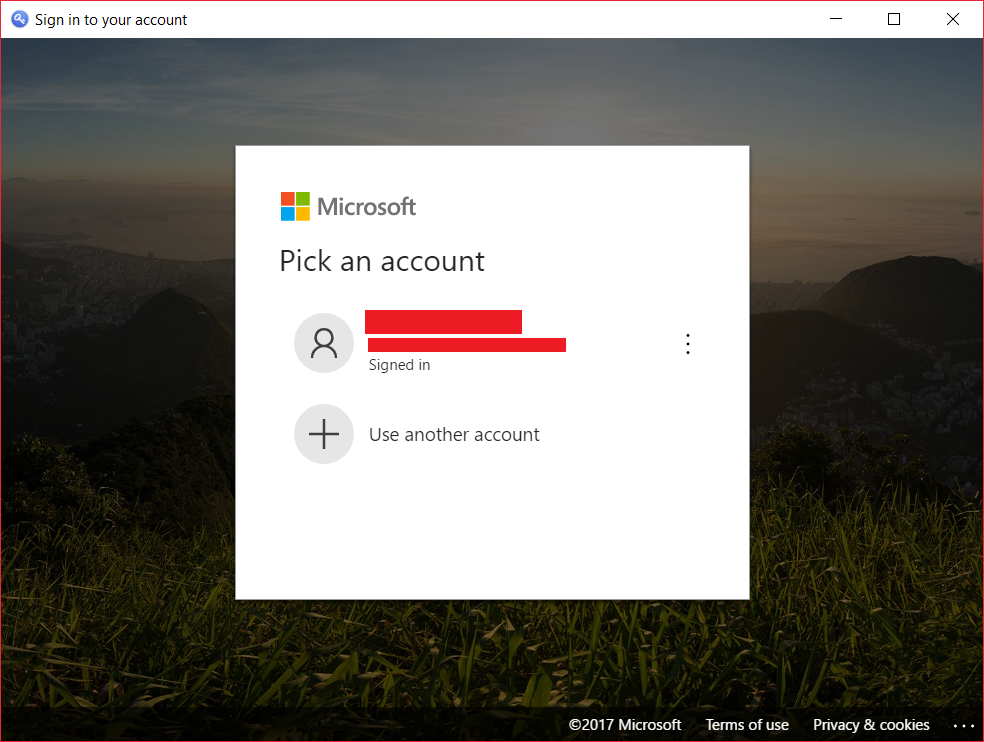
I've already signed in so I need only click on account.
gtrubach
on 25 Dec 2017
Interesting, I'll try to repeat it. Does it happen immediately (i.e. in an hour), or some days later after you link KeeWeb to OneDrive?
antelle
on 25 Dec 2017
Another question: have you checked _Keep me signed in_ checkbox on the first login?
antelle
on 25 Dec 2017
I cannot catch the periodic of this. Before it was something per day, but today it happened in an hour (I see this behavior only when application is reopened, not from the same session).
For the second question - yes, I checked remember me. I believe that if I didn't check this field I would have to enter my password again.
gtrubach
on 25 Dec 2017
Yeah I can repeat it, I'll try to understand the reason.
antelle
on 25 Dec 2017
I've just validated a possible fix (saving session cookies), and it doesn't work. Probably MS signs you out after a certain time, e.g. an hour or so. So, doesn't seem possible to fix, unless we trigger a click on the element (which is a bit weird) 😢
antelle
on 25 Dec 2017
Pushed a fix for it, however it's very dirty, we shouldn't do such things, but since it works... ¯\_(ツ)_/¯
Also it can (and probably will) break.
antelle
on 25 Dec 2017
Thanks.
As for me this behavior is not critical. Maybe we can wait, explore root cause and try to make a better solution
gtrubach
on 26 Dec 2017
I think there’s no other way. It also happens in browser, so it’s probably by design.
antelle
on 26 Dec 2017
I am experiencing this as well (OSX and Windows 10), however KeeWeb is the only program where this happens - e.g. KeePass2Android keeps the token just fine, so do other programs and apps... So @antelle I suspect it might well not be by design.
In addition to the auto-clicky-popup, I am observing this:
After Re-Starting KeeWeb and unlocking my DB, I am asked for my Microsoft Account again, although I had previously selected "keep me logged in".
I have, however, not yet dug into the code or logs.
 lukx
on 2 Jan 2018
lukx
on 2 Jan 2018
@lukx are there any examples of server-less webapps I can check? Apps can use code flow instead of token, that's a problem.
antelle
on 2 Jan 2018
From the top of my head, keepass2android has worked it out, starting here: https://github.com/PhilippC/keepass2android/blob/master/src/java/JavaFileStorage/app/src/main/java/keepass2android/javafilestorage/OneDriveStorage.java
Sure it is Java but the flow stays the same.
From my experience with oauth, it feels like there might be a token refresh missing or going wrong? (just a shot, have not looked into the code too deep)
lukx
on 2 Jan 2018
This is an app, not a webapp, that's the main problem. Webapps have certain limitations.
(and KeeWeb desktop now behaves exactly as a webapp, which could be customized for desktop)
antelle
on 2 Jan 2018
True, but still they have a client-only flow, which should be based on the implicit flow, and somehow get a refresh token.
cf https://github.com/OfficeDev/msa-auth-for-android/blob/master/src/main/java/com/microsoft/services/msa/LiveAuthClient.java#L473
Another interesting thing I found is the "display=none" property this random (unmaintained) library uses, however I have not found the documentation for that property.
https://github.com/hlomzik/onedrive-auth/blob/master/src/odauth.js#L187
lukx
on 5 Jan 2018
Most of OAuth providers (intentionally) limit tokens to apps, i.e. they put CORS restrictions on token request which makes it impossible to access it from web. This is not the case for Dropbox, that's why it works smoothly. I'll check if it's possible with MS Auth, because we switched to Graph API in v1.6, so it might be there now as well.
Interesting approach with iframe, looks more like a security hole exploited 🤣, but maybe it works, I'll check it as well.
antelle
on 5 Jan 2018
I use Keepas2Android on my phone, also set up to open a file from OneDrive, and it only asked me for credentials the first time I opened the file. After that, the file is remembered by the app (so I only have to input the file password), and it never asks for any OneDrive credentials anymore. Ever.
It would be really nice to see the same approach in KeeWeb.
EDIT: Looks like it uses the com.onedrive.sdk:onedrive-sdk-android:1.2+
 ericbn
on 7 Jan 2018
ericbn
on 7 Jan 2018
It looks like the offline_access scope is required to get a refresh token, they're not saying anything on CORS or disallowing web-apps from using that refresh token:
https://docs.microsoft.com/en/onedrive/developer/rest-api/getting-started/graph-oauth#step-3-get-a-new-access-token-or-refresh-token
I have checked out keeweb and will do some investigation so you can save your precious time in the meanwhile :-)
(edit:) That link points to the authorization grant, but earlier today I found a similar microsoft documentation on the implicit grant we are using.
lukx
on 8 Jan 2018
This requires client_secret unfortunately, exposing which is not so cool. Maybe for Microsoft Graph API is ok though, I'll check.
antelle
on 8 Jan 2018
Sorry, you are right, especially for using the Refresh token you need the client secret. I oversaw that.
However, I found this documentation https://docs.microsoft.com/en-us/azure/active-directory/develop/active-directory-v2-protocols-implicit
Look at the three documented properties starting with "prompt"
lukx
on 10 Jan 2018
Note: The popup does not appear with version 1.5.6 (at least when I was already logged in to OneDrive. I did not check if it appears after logging out.
However, since I updated to 1.6.3, the login popup appears.
Furthermore: I cannot sync with 1.6.3 > already getting error 413 when I try saving my changes. Not sure if this connected.
 rene-re
on 12 Jan 2018
rene-re
on 12 Jan 2018
Microsoft has a support library to help with OAuth and API integration. It should handle token caching and refresh when expired automatically. This is so people don't have to re-invent the same wheel to implement OAuth everytime.
https://github.com/AzureAD/azure-activedirectory-library-for-js
 TheUniquePaulSmith
on 14 Mar 2018
TheUniquePaulSmith
on 14 Mar 2018
@TheUniquePaulSmith it doesn't solve the problem mentioned above.
Token life time is a strategical decision by Microsoft. E.g. Dropbox doesn't invalidate tokens and we don't have such problems with Dropbox. If tokens are invalidated, no matter which library we use to communicate with server, it will require authorization. As it is said in Security section of the library,
You should prompt users to login again for important operations on your app.
and that's exactly what happens.
antelle
on 14 Mar 2018
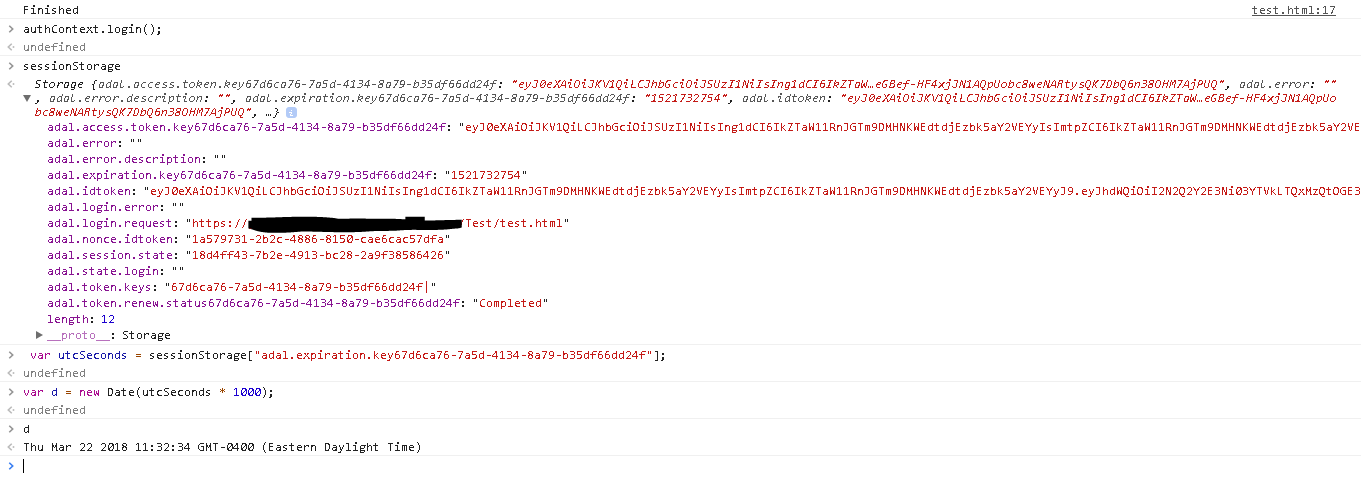
The ADAL js library will still help you though. Most of what i've seen implemented has been re-invention of the authentication process to Microsoft. You can see token expiry time in cache (but tokens can be invalidated at anytime from an Admin or User.
So for example, before making the calls to OneDrive (Graph) API you can do some quick sanity checks or simply call authContext.login();. If the user is already authenticated then a pop-up will temporarily show-up and disappear.
I can't tell, but I think you can pass an XHR object to the config for the ADAL JS, which will inject the bearer token or perform a refresh of the token
TheUniquePaulSmith
on 22 Mar 2018
@TheUniquePaulSmith I'll try to check how it works on a simple website and will take this method it into keeweb, if it doesn't show a popup.
antelle
on 22 Mar 2018
Hi,
Unfortunately the problem is still not solved ...
 almoha
on 30 May 2018
almoha
on 30 May 2018
Can we have option to use credentials stored in Keeweb to log in into OneDrive?
It would bypass this annoying popup.
 Gryxx
on 21 Nov 2018
Gryxx
on 21 Nov 2018
@Gryxx I don't think it's possible with implicit OAuth flow.
But if it was, it would be quite strange to save OneDrive password to local storage.
antelle
on 21 Nov 2018
@antelle I think i don't understand.
OneDrive kdbx file is cashed locally (or i assume so if i cam acces it without connection)
When i have OneDrive popup i'd just copy/paste credentials from just opened database.
I wsa thinking about something similar to Keepass autotype, or prefiling login form with credentials.
BTW, is there some autotype functionality? Besides extensions to browsers.
Gryxx
on 22 Nov 2018
The proposal was to process credentials locally, instead of doing thing on Microsoft's website and saving an access token (what we do now). They won't allow it, and I can understand why.
If there's a hack to process credentials (i.e. use auto-type, hack on html in desktop apps), we shouldn't do this in any case, it's not what can be expected from proper OneDrive integration. Maybe it makes sense to think about implementation of a code-flow, instead of transient one.
Desktop apps have auto-type, yeah.
antelle
on 22 Nov 2018
Hello @antelle.
I've checked the fix in the 1.7.1 version and found that this issue wasn't fixed well. When I opened the app it asked me to authenticate. After I finished authentication process I got the app in the app (see the screenshot below - I removed some sensitive data from it).
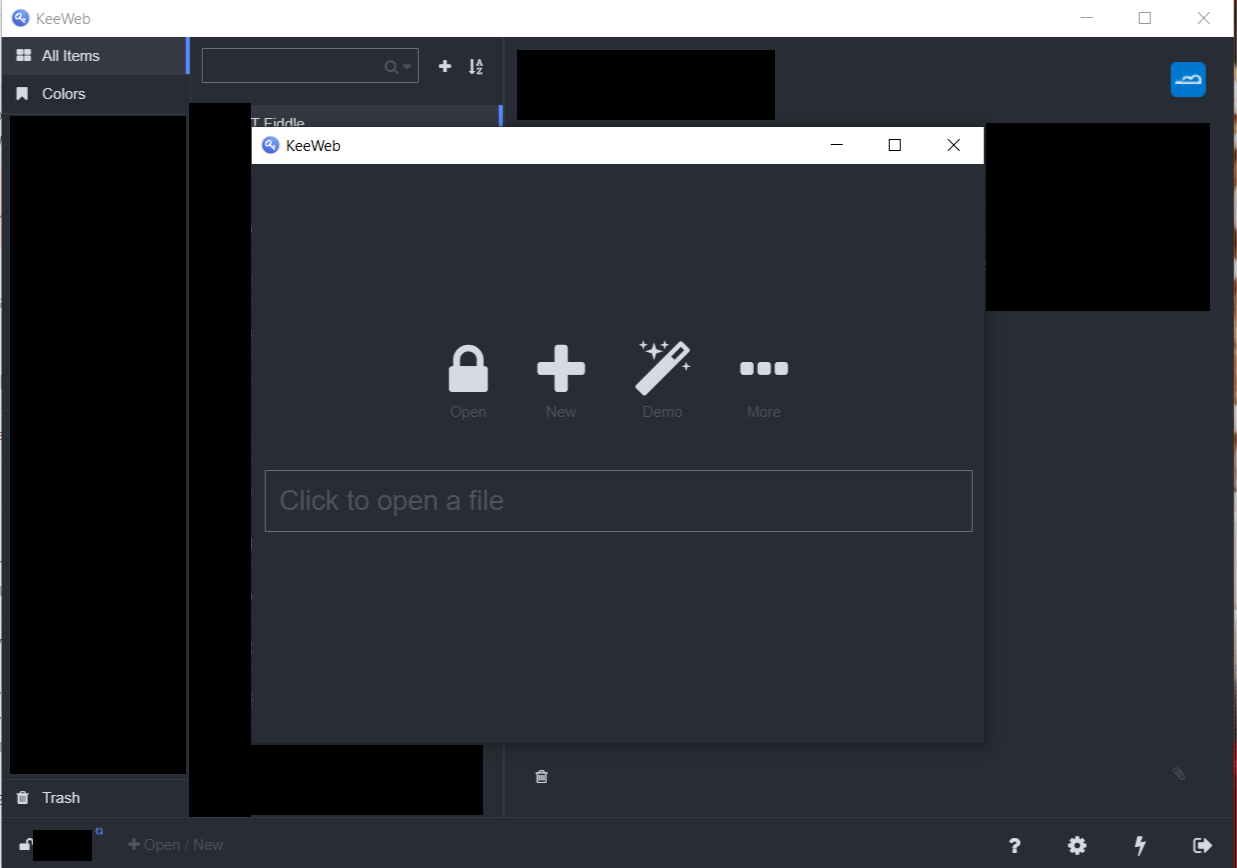
If I close the second window than sync to cloud storage fails.
gtrubach
on 6 Jan 2019
This are the logs.
[INFO ] 2019-01-06T18:52:55.582Z [app] Started in 713ms ¯_(ツ)_/¯
[INFO ] 2019-01-06T18:52:55.584Z [updater] Next update check will happen in 86177s
[INFO ] 2019-01-06T18:53:01.712Z [open:] File open request
[INFO ] 2019-01-06T18:53:01.712Z [open:] Open file from cache, will sync after load onedrive
[DEBUG] 2019-01-06T18:53:01.712Z [storage-cache] Load *
[DEBUG] 2019-01-06T18:53:01.725Z [storage-cache] Loaded 12ms
[INFO ] 2019-01-06T18:53:01.726Z [open:] Loaded file from cache null
[DEBUG] 2019-01-06T18:53:01.727Z [storage-file] Load .key
[DEBUG] 2019-01-06T18:53:01.730Z [storage-file] Loaded .key 2ms
[INFO ] 2019-01-06T18:53:06.855Z [open:] File open request
[INFO ] 2019-01-06T18:53:06.855Z [open:] Open file from cache, will sync after load onedrive
[DEBUG] 2019-01-06T18:53:06.855Z [storage-cache] Load
[DEBUG] 2019-01-06T18:53:06.863Z [storage-cache] Loaded 9ms
[INFO ] 2019-01-06T18:53:06.863Z [open:] Loaded file from cache null
[INFO ] 2019-01-06T18:53:07.876Z [file] Opened file : 1012ms, 16071936 rounds, 284 kB
[DEBUG] 2019-01-06T18:53:07.877Z [app] Add last open file onedrive
[INFO ] 2019-01-06T18:53:08.052Z [open:] Sync just opened file
[INFO ] 2019-01-06T18:53:08.083Z [sync:] Sync started onedrive {}
[INFO ] 2019-01-06T18:53:08.085Z [sync:] Stat file
[DEBUG] 2019-01-06T18:53:08.085Z [storage-onedrive] OAuth: popup opened
[ERROR] 2019-01-06T19:00:48.252Z [storage-onedrive] OAuth error popup closed
[INFO ] 2019-01-06T19:00:48.252Z [sync:] Stat error, not dirty OAuth: popup closed
[INFO ] 2019-01-06T19:00:48.252Z [sync:*] Sync finished OAuth: popup closed
gtrubach
on 6 Jan 2019
Thanks, fixed this, it will work in the next bugfix.
antelle
on 6 Jan 2019
This should be ok now, please check on the new version.
antelle
on 7 Jan 2019
Checked the last issue and can confirm that it was fixed.
Thanks, @antelle.
gtrubach
on 7 Jan 2019
Glad to know, thanks!
antelle
on 7 Jan 2019
Related issues
 blsz
·
31Comments
blsz
·
31Comments
 bittner
·
33Comments
antelle
·
62Comments
bittner
·
33Comments
antelle
·
62Comments
 elproducto
·
39Comments
elproducto
·
39Comments
 adatum
·
34Comments
adatum
·
34Comments
Most helpful comment
Hi,
Unfortunately the problem is still not solved ...