Keeweb: Google Drive file/folder listings
3 minor issues with the Google Drive file/folder listings in v.1.6.1.
Files and directories shared with other users are not displayed in the listing.
Files with a "/" in their name are truncated such that only characters following the last(?) "/" are displayed.
"Show all files" checkbox is not toggling upon click, It remains checked.
A field to paste the URL of the Google Drive file would be a useful workaround for these and other potential cases.
 blsz
blsz
All 31 comments
Hi,
Thanks for reporting, this is a new feature so there are issues indeed.
Could you please elaborate more about 3.? It works for me. Is there anything interesting in logs?
 antelle
on 4 Dec 2017
antelle
on 4 Dec 2017
"Show app logs" shows:
[INFO ] 2017-12-04T17:59:51.704Z [app] Started in 778ms ¯\_(ツ)_/¯
[INFO ] 2017-12-04T17:59:51.707Z [updater] Next update check will happen in 40997s
[DEBUG] 2017-12-04T18:00:39.409Z [storage-gdrive] OAuth: popup opened
[DEBUG] 2017-12-04T18:01:06.747Z [storage-gdrive] OAuth token received
[DEBUG] 2017-12-04T18:01:06.747Z [storage-gdrive] List
[DEBUG] 2017-12-04T18:01:07.069Z [storage-gdrive] Listed 321ms
Are there other logs that would be useful?
"Show all files" is checked by default upon logging into Google Drive. All root level folders and files other than those shared in Google Drive are displayed. Rolling over "Show all files" causes the checkbox to turn blue. Clicking on the checkbox or text has no effect. I'm using Windows 10 in this case but will also test in MacOS and Linux at some point.
blsz
on 4 Dec 2017
"Show all files" is checked by default upon logging into Google Drive.
Ah I see. It's fine, there are no kdbx files, so it shows all files by default, there's no issue with it: this checkbox switches between everything and kdbx files.
Shared folders and team drives are not implemented for now.
antelle
on 4 Dec 2017
Thanks. Just to clarify, it appears that shared kdbx files are not implemented either. The shared kdbx file in my root Google Drive folder (I am the owner of the file) does not appear in the listing. The work-around is to open this file from the local filesystem but it would be convenient to open shared kdbx files directly from Google Drive without installing the client.
Another minor note - I was running 1.5.6 and the interface prompted me to manually download the update. Once I manually installed 1.6.1 and started KeeWeb, the app was still at version 1.5.6 according to the About tab. Uninstalling and re-installing 1.6.1 fixed the issue. I saw this behavior on both Windows 10 desktops that I tried to update.
KeeWeb is great. Thank You!
blsz
on 4 Dec 2017
Implemented shared files :relaxed: also, fixed other issues you mentioned.
Deployed to beta.keeweb.info, will be available in the next release.
Don't know about the updater but let's see if it repeats.
antelle
on 4 Dec 2017
It appears not to be allowing the login at all when I tested Google Drive Shared with me folders on beta.keeweb.info. I can log into Google Drive and see the kbdx file, I can select it, but I can't actually log into it. Is this intended?
 VonChair
on 7 Dec 2017
VonChair
on 7 Dec 2017
@existstrategy thanks, this is a bug indeed, it broke later with another feature.
Fixed, uploaded to beta.
antelle
on 7 Dec 2017
Here's a weird related issue. First off though, thanks for the fix!
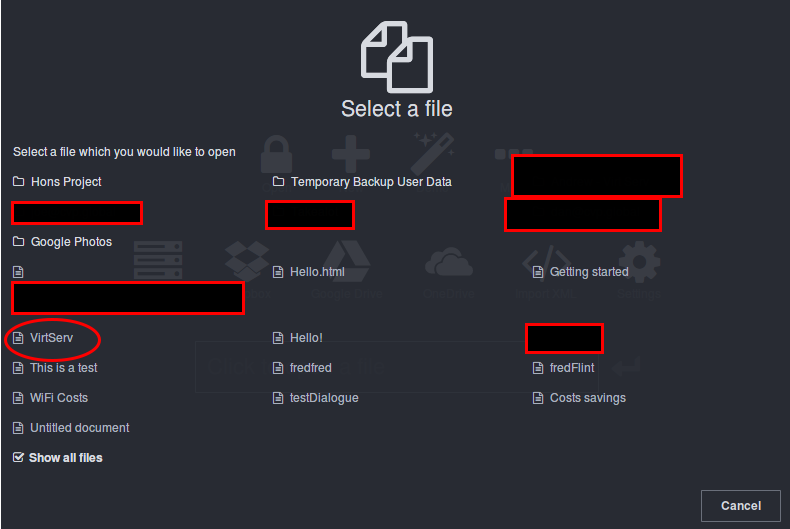
I can now see the shared files except for a folder that I shared... It is shown in the first screen and NOT in the "shared with me" screen. However, it appears as a file and not a folder, so when I select it, it tries to open it as a file. This is happening on beta and release versions, desktop and web.
Below is a screen shot of the release version. Beta does the same, but with no option to show show all files. The file circled in red is actually a folder with keepass files inside. Un-checking "show all" does nothing.
 ajcollett
on 9 Dec 2017
ajcollett
on 9 Dec 2017
@ajcollett what does it look like in your Google Drive?
I tried to share a folder and it appears in Shared with me in keeweb.
Could you please also execute this in Google Drive API explorer?
https://developers.google.com/apis-explorer/#search/drive/drive/v3/drive.files.list?q=parents%253D%2522root%2522+and+trashed%253Dfalse&fields=files(id%252Cname%252CmimeType%252CheadRevisionId)&_h=1&
Then find your folder name in the response and paste its mimeType here.
antelle
on 9 Dec 2017
Well there's your problem
  {
   "id": "<snip>",
   "name": "VirtServ",
   "mimeType": "application/vnd.google-apps.site"
  },
So somehow it's mimetype changed:-/
I fixed this for now by copying the files to a new folder, but how do I fix the mimetype?
ajcollett
on 9 Dec 2017
Wow, wtf? How did you manage to create this type of folder?
antelle
on 9 Dec 2017
But anyway, pushed the fix, it should be working on beta now.
antelle
on 9 Dec 2017
Absolutely no idea. I am not sure it should be like that... Thanks for the fix!
ajcollett
on 9 Dec 2017
I was thinking maybe there are other mime types, i.e. yours could be just one of them. Unfortunately there's no way to check if it's folder or not, the only way is to check the mime type. But let's, maybe somebody else will find other things.
antelle
on 9 Dec 2017
Actually, Google Drive API describes only one mime-type, so keeweb client was implemented according to it:
https://developers.google.com/drive/v3/web/folder
A folder is a file with the MIME type application/vnd.google-apps.folder and with no extension.
And it seems to be false.
antelle
on 9 Dec 2017
Just tested. The app finds nothing in the folder: "nothing found!".
I am pretty sure this is not correct behavior of my drive. So I don't think you should consider this an issue with keeweb. Reason being, my google websites have:
  {
   "id": "<snip>",
   "name": "test website",
   "mimeType": "application/vnd.google-apps.site"
  },
So this is an issue on Googles side. Somehow the element is screwed.
ajcollett
on 9 Dec 2017
Interesting.
What happens if you list folder in google drive api explorer? I.e. the link I posted above, but replace "root" in "parents" parameter with your folder id.
antelle
on 9 Dec 2017
Interestingly, it returns nothing. But this works in google drive.... So clearly there is something unhappy...
Oh wait...
This is my screw up.
I have a site called VirtServ too. So, the folder won't show up because, I assume, keeweb assumes there is only one object with one name?
ajcollett
on 9 Dec 2017
Probably keeweb will be screwed: it doesn't understand two objects with two names.
How come you have two files in the same folder in Google Drive? It doesn't allow me to do that, it just renames the second file when I upload it.
Seems to be an edge case.
antelle
on 9 Dec 2017
I assume you mean two files with the same name?
Google drive allows this. . . As far as I can tell. Just created 3 folders all with the same name.
The other tricky bit is this folder is shared, but owned by me.
ajcollett
on 9 Dec 2017
Just checked it, it's also fine in keeweb:
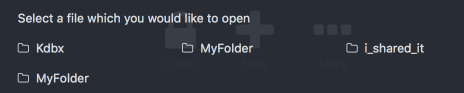
So, site is probably a special kind of file which is supported in GDrive but clients need to handle it in a special way, like zip archive. Reverted the change, let's display it as a file.
antelle
on 9 Dec 2017
Okay I am thoroughly confused. This must be some edged case, because multiple files with the same name works, files and folders with the same name works, but my folder refuses to show up.
Oh well. I'm going to delete and re-create it. Call it a day. Thanks for the efforts.
ajcollett
on 9 Dec 2017
This is now fixed.
The only issue should be Google Sites thingy, which is kinda edge case.
antelle
on 9 Dec 2017
Files & folders I share with others still don't show up for me anywhere. Files & folders shared with me do show up.
 superandrew213
on 1 Jan 2018
superandrew213
on 1 Jan 2018
@superandrew213 do you see them in Google Drive API explorer? Which MIME type is it?
https://developers.google.com/apis-explorer/#search/drive/drive/v3/drive.files.list?q=parents%253D%2522root%2522+and+trashed%253Dfalse&fields=files(id%252Cname%252CmimeType%252CheadRevisionId)&_h=1&
antelle
on 2 Jan 2018
@antelle the only file I've shared with others is the kbdx file. The rest is all folders. No files or folders that I have shared show on Google Drive API explorer.
The person I have shared the kbdx file with can see it in their Shared with me folder.
superandrew213
on 3 Jan 2018
@superandrew213 if you don't see it in API explorer, probably it won't be possible to get in KeeWeb. It's interesting that I can see files I shared.
antelle
on 3 Jan 2018
I think there are two small mistakes in the query: parents="root"and trashed=false
- there's a missing space before the
andhere - as stated in the docs your query should go like:
"<dir>" in parents and trashed=false. This is due to the fact that Drive files can have multiple folders as parents.
If I do the query like this on API Explorer, I will see the missing shared files.
As a workaround, one could use the Drive fileId in the files section of your config file.
 jalmeroth
on 3 Jan 2018
jalmeroth
on 3 Jan 2018
@jalmeroth 💯 🎁 wow! I completely forgot about files with multiple parents. Pushed the fix, uploaded to https://beta.keeweb.info.
antelle
on 3 Jan 2018
Any idea when this will get pushed to the full release?
VonChair
on 26 Feb 2018
@existstrategy together with other fixed in GDrive and OneDrive, we have some more stuff for the next release.
antelle
on 26 Feb 2018
Related issues
 elproducto
·
39Comments
elproducto
·
39Comments
 adatum
·
34Comments
adatum
·
34Comments
 benzkji
·
53Comments
antelle
·
62Comments
benzkji
·
53Comments
antelle
·
62Comments
 leolivier
·
46Comments
leolivier
·
46Comments
Most helpful comment
I think there are two small mistakes in the query:
parents="root"and trashed=falseandhere"<dir>" in parents and trashed=false. This is due to the fact that Drive files can have multiple folders as parents.If I do the query like this on API Explorer, I will see the missing shared files.
As a workaround, one could use the Drive fileId in the
filessection of your config file.