what were your actions?
This is not a Keepweb issue but probably the page loaded to Sign into Microsoft account. I attempted opening Enterprise One Drive KDBX file but was presented with an error. This way of signing in has worked in the past, but when I attempt to enter Enterprise email address into Sign in page it it mentions Microsoft Account doesn't exist. Seem something changed with the sign in page for Microsoftwhat was wrong? Unable to Sign into Enterprise One Drive account
- app version 1.54
- your user-agent (from Settings/Help section) Mozilla/5.0 (Macintosh; Intel Mac OS X 10.12; rv:52.0) Gecko/20100101 Firefox/52.0
- does it happen on Demo or New database? Existing DB
- if you are using a test db without your personal data, please attach it
- please, open dev tools in your browser and attach output log from Console tab
(if you are using desktop app, devtools can be opened from Settings/General/Advanced)
2017-07-13T16:39:51.671Z [app] Started in 743ms ¯\_(ツ)_/¯  app.keeweb.info:14:897
2017-07-13T16:39:56.527Z [storage-onedrive] List  app.keeweb.info:14:736
2017-07-13T16:39:56.850Z [storage-onedrive] Listed 323ms  app.keeweb.info:14:736
2017-07-13T16:40:05.387Z [plugin-gallery] Loading plugins...  app.keeweb.info:14:736
2017-07-13T16:40:08.824Z [plugin-gallery] Loaded 15 plugins 3437ms
 elproducto
All 39 comments
I don't have such account, so debug help is welcome.
 antelle
on 13 Jul 2017
antelle
on 13 Jul 2017
Quick Intro
Initially I was going to develop my own web KeePass with ASP.NET MVC, OWIN, and the SDK, but then I discovered this awesome version 🥇 . My original intention was to use OneDrive for Business & Microsoft ADAL with OpenIDConnect. I'm not much of a web developer and unfamiliar with the newer technology. I'm still trying to wrap my head around how you compiled this as a static page!
Regarding this issue
The main problem I see is that it's using the onedrive API instead of the Microsoft.Graph API. The Microsoft Graph API will accommodate both OneDrive personal and OneDrive for Business. The challenge with the Graph API is that you need to register your application (aka ClientID) and determine the FQDN Uri for the redirect (or localhost for development testing). I made a few changes to the storage-onedrive.js file to address these endpoint changes and got it to discover my .kdbx files, but not actually "load" them as it's referencing a bad url and not the @microsoft.graph.downloadUrl. This solution should be able to accommodate both personal and business editions. I'll attach the file changes so you can compare them.
@antelle I have a O365 Lab tenant for which I can provision you access if you need to debug and explore the API using Graph vs OneDrive. Just let me know if you are interested.
Suggestions
- Create 2 "OneDrive" storage, one configured for personal using the current API, and the other using Graph API for Business?
- Make a "Configuration" screen for OneDrive where users can put in their ClientID and redirectUri for self-hosted versions?
- Allow the user to log out and back in as another Oauth Identity?
 TheUniquePaulSmith
on 16 Jul 2017
TheUniquePaulSmith
on 16 Jul 2017
with the Graph API is that you need to register your application (aka ClientID)
But with OneDrive API it's the same.
Create 2 "OneDrive" storage, one configured for personal using the current API, and the other using Graph API for Business
But earlier you said that "The Microsoft Graph API will accommodate both OneDrive personal and OneDrive for Business", why do we need two implementations? I don't quite understand it. Does your proof-of-concept work with both personal business?
Make a "Configuration" screen for OneDrive where users can put in their ClientID and redirectUri
As with GDrive and Dropbox, it's available through settings API or config.
Allow the user to log out and back in as another Oauth Identity
This is for future. Now you can uncheck the checkbox in settings and check it again, to log out. Logouts is not something we support now.
So, to sum up, if there's an API that works both with OneDrive and OneDrive for business, we can just switch to it.
antelle
on 16 Jul 2017
You _should_ be able to use the Microsoft.Graph API to accommodate both, what I attached is most of the minor changes, except for the loading of the file from OneDrive for Business (works for Personal), not sure where it's getting the invalid Url from but should be referenced from @microsoft.graph.downloadUrl..
From what I understand the Graph API differentiates between a Personal \ Business on the backed service. There are some subtle oddities and differences in Microsoft.Graph vs OneDrive API queries\responses, but none that I can think of that would negatively affect how this application uses them. See here => https://dev.onedrive.com/direct-endpoint-differences.htm
Regarding your question on two implementations; I wasn't sure if it would be easier to have an implementation with each respective API so both could be used at same time, but from the documentation sounds like using Graph is their preferred choice. I personally was hoping I could use this application to easily switch between the two (Work / Personal) without logout
TheUniquePaulSmith
on 17 Jul 2017
Interesting, thanks. Probably we need to switch to Graph API, then, I'll look into it.
antelle
on 17 Jul 2017
Any updates yet on if you've had time to start looking into what it would take to switch over to the Graph API and support both OneDrive and OneDrive for Business? No rush, but just checking in for a status update. Thanks for your great work on KeeWeb!
 jpickerell
on 24 Sep 2017
jpickerell
on 24 Sep 2017
So, finally v1.6 will use Microsoft OneDrive Graph API. Not sure if it will work for business API, let's see.
antelle
on 26 Nov 2017
I'm trying to build this from the develop branch and grunt fails. I know next to nothing about NPM and Grunt & Electron, but could help with OneDrive Graph API.
ERROR in ./bower_components/pikaday/pikaday.js
Module build failed: SyntaxError: Unexpected token u in JSON at position 0
  at Object.parse (native)
  at Object.module.exports (/home/terminal/keeweb/node_modules/uglify-loader/index.js:55:26)
 @ multi jquery underscore backbone kdbxweb baron pikaday filesaver qrcode argon2-asm argon2-wasm argon2
NPM is version 3.10.10
TheUniquePaulSmith
on 11 Dec 2017
@TheUniquePaulSmith we have already switched to Graph API, what do you mean?
But I can't validate if it works because I don't have OneDrive for business.
antelle
on 11 Dec 2017
This is from KeeWeb.Info
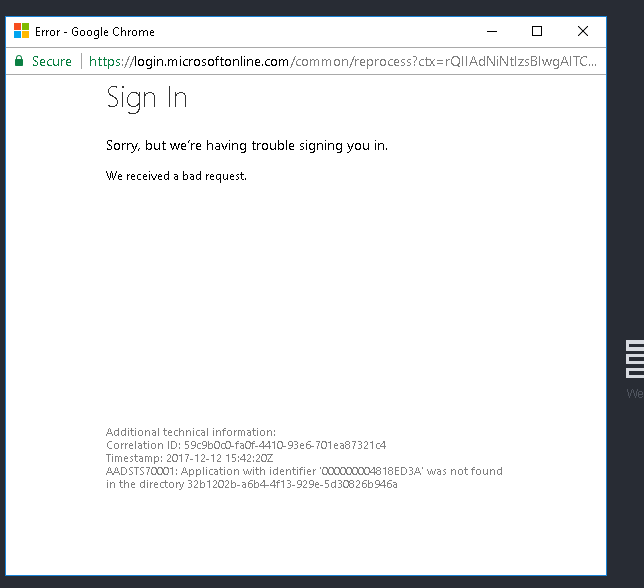
You published your application to https://apps.dev.microsoft.com?
Check out the information here: https://docs.microsoft.com/en-us/azure/active-directory/develop/active-directory-devhowto-multi-tenant-overview
Also, I can give you access to OneDrive for Business, just need an e-mail (junk or not) to send it to you.
TheUniquePaulSmith
on 12 Dec 2017
Yeah keeweb app is published there, I think otherwise it would not be possible to log in at all.
Do you understand this error (Application with identifier ... was not found in the directory ...) and what I should change to fix it? Quick googling gives me weird answers.
OneDrive auth url is here: https://github.com/keeweb/keeweb/blob/master/app/scripts/storage/storage-onedrive.js#L233
You can give it to antelle.[email protected] but I'm not sure it I'll get more detailed error description, probably it will be the same.
antelle
on 12 Dec 2017
@antelle sent you an e-mail with login details for OneDrive for Business access. Sorry for the delay, but that should hopefully help us close this issue
TheUniquePaulSmith
on 8 Jan 2018
@TheUniquePaulSmith Ok, I'll look into it, hopefully this weekend.
antelle
on 8 Jan 2018
@antelle were you able to make any progress?
TheUniquePaulSmith
on 23 Jan 2018
@TheUniquePaulSmith didn't have chance yet, but I'll check it soon
antelle
on 24 Jan 2018
I need to reclaim the license.. Have you made any progress or need info for me on making this work?
TheUniquePaulSmith
on 23 Feb 2018
@TheUniquePaulSmith sure. I believe there are dev tools to test it without a license, it would be very strange otherwise.
antelle
on 23 Feb 2018
Your registered client ID is invalid.. You should have a GUID such as 67d6ca76-7a5d-4134-8a79-b35df66dd24f in fact you should be able to use that for your testing. Since your OAuth endpoint is "common" this should work with any enterprise or personal account.
The redirect_Uri in the OAuth grant is also invalid, Microsoft explicitly validates the redirect_uri matches what is registered for in the application. Your code sets the redirect_uri dynamically based on where the application is currently running. Since it's a SPA that can be ran anywhere, the redirect_uri should be set to https://login.microsoftonline.com/common/oauth2/nativeclient. The OAuth token will be in the query parameter of that URI.
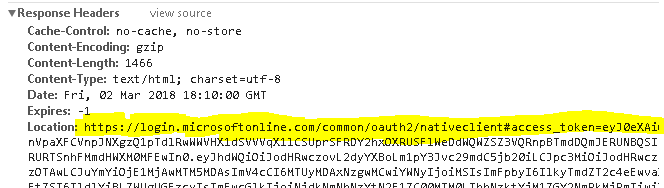
I'm trying to test these changes myself, but I can't get your grunt dev build to work as it's failing at pikaday script I mentioned earlier.
TheUniquePaulSmith
on 2 Mar 2018
- is the most interesting. Do you know how to get this ID? I mean, even if we support another OneDrive API, we still need to get this key somewhere, and I don't see any other option when creating an app in dev console.
antelle
on 2 Mar 2018
You can register it in apps.dev.microsoft.com. I'm not actually sure where you got the original ID from.
TheUniquePaulSmith
on 2 Mar 2018
Okay, now I see it. The app was registered as Live SDK API, however it has to be in "Converged applications" section. Such apps get new ClientIDs. I've created a new app, will test it if works tomorrow.
antelle
on 2 Mar 2018
New "Converged applications" seem to work in the same way as old ones, I haven't noticed issues with logging in.
So, about 2., the redirect_uri: isn't it where I get redirected after I log in? If I set it to https://login.microsoftonline.com/common/oauth2/nativeclient, it won't return back. I tried this and now after logging in it remains where it was and downloads nativeclient.dms with zero bytes.
antelle
on 4 Mar 2018
Correct the redirect_uri is where the application goes after successful login from Microsoft. You won't be able to dynamically set this since it's explicitly validated from app registration, and can be virtually anything given it's a SPA. I'm not sure what nativeclient.dms is, as I don't get that experience.
You need to extract it from the query parameters from the response from https://login.microsoftonline.com/common/oauth2/nativeclient (everything after the # symbol).
TheUniquePaulSmith
on 5 Mar 2018
Whar do you mean as “set dynamically”? It’s always set to app.keeweb.info or beta.keeweb.info, or your custom domain, and that’s set in microsoft app settings, otherwise it wouldn’t work.
You cannot “extract” anything from the url you want, you must redirect users to your domain in order to do that. In the page you provided, it’s explicitly said that the url you mentioned is “For native and mobile apps”.
This makes me think the problem is not in yhe redirect_url.
antelle
on 5 Mar 2018
Whar do you mean as “set dynamically”?
I specifically mean this line of code when running keeweb as a single page application
For app.keeweb.info, that should work fine since a copy of this program is hosted there and should have a well defined domain name listed in the app registration redirect_uri; but how do you plan to make this work for the desktop version or custom domains for people wanting to use this themselves? You would have to explicitly define a list of valid redirect_uri. When i'm testing this i'm running it right off of blob storage, not a web server.
I don't see any changes where you are allowing the "OneDrive" ClientID to be set. Therefore when performing OAuth, and passing in the redirect_uri Microsoft will validate against the URL parameters defined for that registered application Client ID. So I don't see how custom domains would work at all, unless you define them all in the app registration.
That is why your application is more like a native client \ mobile app in Microsoft's app registration world then a centrally hosted solution, because anyone can run it from practically anything anywhere.
TheUniquePaulSmith
on 5 Mar 2018
how do you plan to make this work for the desktop version
Desktop is using app.keeweb.info as well. It can actually read everything, so it catches stuff sent to app.keeweb.info and sends it to the app.
or custom domains for people wanting to use this themselves?
They must create an own OneDrive app and put redirect uri there in order to use OneDrive on own domain. The same applies to Dropbox and other providers. For Dropbox and GDrive it's documented, OneDrive is a bit underloved here, we need to do describe it as well.
i'm running it right off of blob storage, not a web server
Cloud storages don't work without a web server, supporting Dropbox from file:// is not in our scope and I'm not sure if it's possible at all.
I don't see any changes where you are allowing the "OneDrive" ClientID to be set
It can be set as onedriveClientId key in JSON app config.
antelle
on 5 Mar 2018
Ah, good to know, so the process will be very similar for Microsoft as you laid out for Google & Dropbox.
For my own understanding this stackoverflow question helps clear up why you cannot do this as a SPA that is serverless\domainless
So I thew this on my internal server, and setup the redirectUri in the Microsoft App config, and then using the config.json passed in the clientID.
However, there is an issue where the redirect_uri, is passing in query params, and should exactly match what the domain or token processing endpoint in the application. So if you can strip that then this should work.
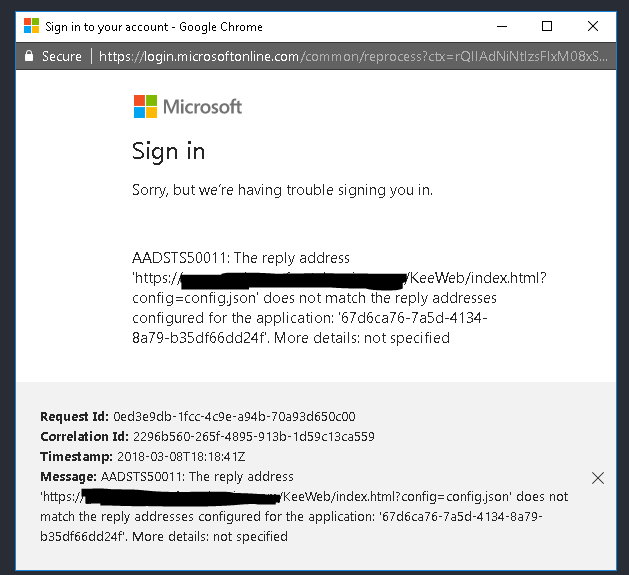
Microsoft doesn't allow you to register a redirect_uri with query params.
TheUniquePaulSmith
on 8 Mar 2018
Yeah, stripping url params makes sense of course, pushed it, uploaded to beta.
The same is true with Dropbox, OneDrive, etc...
antelle
on 8 Mar 2018
I re-tested and OAuth works now for both personal and business accounts. Once authenticated I can see the overlay list of files. The only remaining issue I have is loading a sample file from Business OneDrive doesn't work because the URI path is slightly off.
For example if you have a file called KeeTest.kdbx on your root folder then the path should be
https://graph.microsoft.com/v1.0/me/drive/root:/KeeTest.kdbx
The "me" is important, since without it you are referring to the Organizations SharePoint root document library and not your own (since OneDrive for business sort of lives inside SharePoint).
I tested it and it will work for both Personal and Business accounts with that path.
TheUniquePaulSmith
on 13 Mar 2018
Last thing (hopefully) is that the @microsoft.graph.downloadurl is a pre-authenticated URL based on queryparams so you should not send a Authorization header when obtaining the contents of the file because of CORS..
Details here:
https://docs.microsoft.com/en-us/onedrive/developer/rest-api/concepts/working-with-cors
The referenced url will look something like this
https://contoso-my.sharepoint.com/personal/employee_contoso/_layouts/15/download.aspx?UniqueId=1c1358c1-4017-4e17-bd41-5571f9c113b1&Translate=false&tempauth=eyJ0eXA...
TheUniquePaulSmith
on 13 Mar 2018
Added me and disabled Authorization header, uploaded to beta. Does it work for you now? It seems to be ok for me.
antelle
on 13 Mar 2018
It works. Able to login, and open KeePass file on both Personal and Enterprise OneDrive.
Just need to add documentation that it doesn't work serverless\locally, and that if you want a custom domain you have to either register it within your Azure Tenant (owned by your company) or create a new public apps.dev.microsoft.com application for OAuth token handling..
Thanks for making this work 👍
TheUniquePaulSmith
on 13 Mar 2018
Great, thanks for testing!
I'll add it to the wiki page, next to Google Drive and Dropbox. The fix will be available in the next release.
antelle
on 13 Mar 2018
Hi, so I am a little confused. Should OneDrive (O365) login work? I cannot get it to work on beta or normal. I am using app.keeweb.info, not server or desktop.
 ajcollett
on 5 Oct 2018
ajcollett
on 5 Oct 2018
Still getting the
AADSTS700016: Application with identifier '000000004818ED3A' was not found in the directory...
I must not understand whats going on.
Attempted to use the application through beta.keeweb.info but its still having problems.
 kcgaisford
on 28 Dec 2018
kcgaisford
on 28 Dec 2018
I guess, beta doesn't have OneDrive permissions configured (or it can be something else).
antelle
on 28 Dec 2018
@antelle, can you register the app in the Microsoft Application Registration Portal? You should have a application Id that is a GUID like 2abcac9c-bb59-4d4f-b7f2-82fb5a59c4b6 not the hex encoded one "000000004818ED3A". When registered it should have a "Web Platform" added with Redirect URL pointing to public hosted instance of KeeWeb https://app.keeweb.info/. I would also add any logo\TOS\Privacy statement where applicable.
Once done, users will see the Microsoft consent page when accessing application first time.
For enterprise users, Azure Tenant policies can dictate whether public applications are allowed to be registered which is beyond the scope and control of this application.

TheUniquePaulSmith
on 28 Dec 2018
Hi,
Sorry to post a comment on old issue but, we trie in my compagny to register Keeweb in our Azure Tenant. But I don't understand where we can find the application GUID. I have only the hex one such as :
Message: AADSTS700016: Application with identifier '000000004818ED3A' was not found in the directory
Can you help us ?
Thank you by advance for your response
 LePastis
on 12 Sep 2019
LePastis
on 12 Sep 2019
@LePastis it's on Azure Portal, App registrations section: https://portal.azure.com/#blade/Microsoft_AAD_RegisteredApps/ApplicationsListBlade
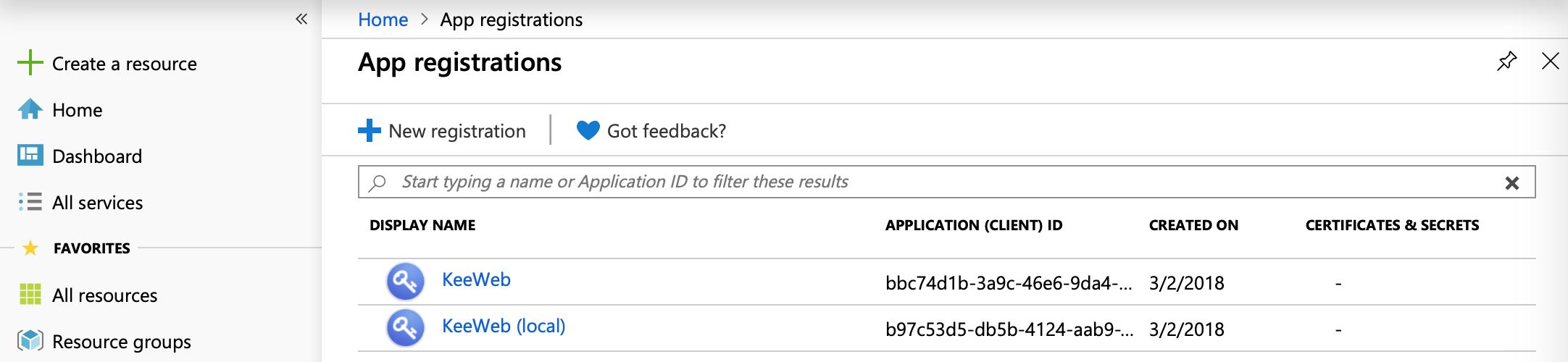
antelle
on 12 Sep 2019
Related issues
 TheSirC
·
52Comments
TheSirC
·
52Comments
 adatum
·
34Comments
adatum
·
34Comments
 ValentinH
·
87Comments
ValentinH
·
87Comments
 alexandru
·
27Comments
alexandru
·
27Comments
 tcz305
·
55Comments
tcz305
·
55Comments