Keeweb: [Feature Request] - Unlock database with Touch ID / Fingerprint
It would be really great to have the option to unlock the database using Touch ID on MacOS (or other fingerprint system if it exists). Keepass for Android has this feature and it's really neat.
Have you already consider this feature? What could be the hard parts to implement this?
 ValentinH
All 87 comments
First of all, we need electron to support it (and then check if it's a secure thing). I just checked electron API, haven't found touch id there for now. So, it's kinda blocked.
 antelle
on 8 Jul 2017
antelle
on 8 Jul 2017
Ok, I'll try to do some search for this in electron side. I have seen that there is already touchbar support but I don't know if touch id is linked with it .
ValentinH
on 8 Jul 2017
I think there might be some parts to reuse for fingerprints support
https://github.com/keeweb/keeweb/blob/master/app/scripts/comp/launcher-cordova.js#L176
 alex-shpak
on 10 Jul 2017
alex-shpak
on 10 Jul 2017
A possible workaround could be to create a native helper app which then calls the Touch ID API directly, and passes the information back to the app. Of course, the communication would have to be secure (so it wouldn't be possible for another app to interrupt and change the outcome).
 16patsle
on 2 Aug 2017
16patsle
on 2 Aug 2017
Or a native module, once we support them.
antelle
on 2 Aug 2017
I implemented a dynamic library to call the system api for touch id, intended to use it from nodejs.
Unfortunately when called from nodejs (using node-ffi to load the library) I get this error from the LocalAuthentication API : Error: Lost connection to coreauthd Code: -10
Although the code works fine when called from a native c++ application built with xcode or gcc.
I'll post the code, maybe somebody has more experience with the ffi library and might figure out what its it doing with the LAContext pointer
 vbaicu
on 29 Jan 2018
vbaicu
on 29 Jan 2018
Was this ever accomplished?
 trentrand
on 22 Sep 2018
trentrand
on 22 Sep 2018
No it wasn't.
ValentinH
on 22 Sep 2018
https://github.com/electron/electron/blob/master/docs/api/system-preferences.md#systempreferencesprompttouchidreason-macos Electron now supports touch id. can some one guide me how to get started in integrating it to keeweb. I would love to contribute with some guidance.
 rakesh1988
on 25 Feb 2019
rakesh1988
on 25 Feb 2019
This is so cool, thanks for sharing this link!
I'm also very interested in implementing this 🙂
I think we need to use https://github.com/atom/node-keytar/blob/master/README.md to store the master key but I don't know if it a good thing to store it on a local machine... I think we should look at the implementation of the Android Keepass app.
Also, we need to define the flow to ask the user for her fingerprint on the first time.
ValentinH
on 25 Feb 2019
How about storing on secure enclave?
https://developer.apple.com/documentation/security/certificate_key_and_trust_services/keys/storing_keys_in_the_secure_enclave
rakesh1988
on 25 Feb 2019
That’s pretty cool, however the API doesn’t support protecting user data with fingerprints. On cordova and mobile apps you can encrypt a password using it, here it’s just a question. Which means, we can use TouchID to unlock the db after sleep, but we shouldn’t do it after restart to avoid storing passwords.
antelle
on 25 Feb 2019
(this answer was not for you @antelle) Isn't it what node-keytar does?
Unlocking after sleep would already be pretty nice :)
ValentinH
on 25 Feb 2019
from node-keytar https://github.com/atom/node-keytar/blob/99d30585f5ae86153f71317ce24978fa9cede199/src/keytar_mac.cc#L62 this is using https://developer.apple.com/documentation/security/1398366-seckeychainaddgenericpassword?language=objc which stores it in keychain. However, storing it on secure enclave will store it on hardware and offers higher security. please correct my understanding.
rakesh1988
on 25 Feb 2019
We shouldn't store the password in keychain because it's not limited to one app and there are some concerns about its security with things like this happening from time to time.
SecureEnclave is a much better option, because it seems to be limited to one app and available only after authentication with Touch ID. Although we can't store our master key directly there, it's possible to generate a new keypair there and encrypt data using it.
antelle
on 25 Feb 2019
@antelle agree with you. here is what I am thinking. use atom's touch id to just validate -> check if password exists in secure enclave(not sure if we have a node package for secure enclave) -> if no password, then request password and store it on secure enclave -> decrypt DB.
rakesh1988
on 25 Feb 2019
@rakesh1988 we need several things here:
- understand how you can restrict SecureEnclave key usage to selected apps
- implement SecureEnclave key usage
- encrypt/decrypt data using SecureEnclave keys
antelle
on 25 Feb 2019
Electron now support TouchId https://github.com/electron/electron/pull/16707
 renatn
on 28 May 2019
renatn
on 28 May 2019
This issue has been automatically marked as stale because it has not had recent activity. It will be closed if no further activity occurs. Thank you for your contributions.
![stale[bot] picture](https://avatars.githubusercontent.com/in/1724?v=4&s=40) stale[bot]
on 9 Sep 2019
stale[bot]
on 9 Sep 2019
The bot was misconfigured, sorry for a wrong notification.
antelle
on 9 Sep 2019
Just as a status update on this issue, electron still does NOT have any API capable to read/write data on a secure storage using touch id. The API mentioned in a comment above is just a touch id prompt, which is not very useful. So, now it's blocked by #1253.
antelle
on 14 Sep 2019
May be it can be implemented by means of Web Authentication API? Which enables usage of build-in Touch ID sensor and any USB security keys.
 NaLLiFFuNT
on 29 Jan 2020
NaLLiFFuNT
on 29 Jan 2020
It can be implemented using WebAuthn, but only with server support, which would destroy the distributed nature of password managers using KeePass files.
antelle
on 29 Jan 2020
We shouldn't store the password in keychain because it's not limited to one app and there are some concerns about its security with things like this happening from time to time.
SecureEnclave is a much better option, because it seems to be limited to one app and available only after authentication with Touch ID. Although we can't store our master key directly there, it's possible to generate a new keypair there and encrypt data using it.
Just to clarify: is this limitation due to a web-only design decision of KeeWeb or something else?
I am asking because the Keychain documentation states that an app can access only its own keychain items. And it is the Secure Enclave that gates the access to a Keychain item that has an userPresence access control (which probably includes the encryption heavy lifting).
 thefonseca
on 1 Jun 2020
thefonseca
on 1 Jun 2020
@thefonseca keychain items can be limited to one app, you're right here. They can be created as shared, but by default they're for the app that created them. Regarding progress on this item:
- next version of KeeWeb will already encrypt all configs with a key stored in keychain using
node-keytarmodule - native modules support is implemented, so it will possible to write a module in C++ (not a plugin, but a module that will be built with KeeWeb)
- I have a macbook that supports touch id, so I can develop and test it
Probably now it's time to implement touch ID support with SecureEnclave.
antelle
on 1 Jun 2020
Thanks @antelle, that's great!
I also have a MacBook with Touch ID. If you need testers, I would be glad to help.
thefonseca
on 1 Jun 2020
The SecureEnclave API actually looks very similar to the keychain API (it IS keychain API, but with an extra parameter), which means that the implementation can be mostly copied from node-keytar (their license permits that).
antelle
on 1 Jun 2020
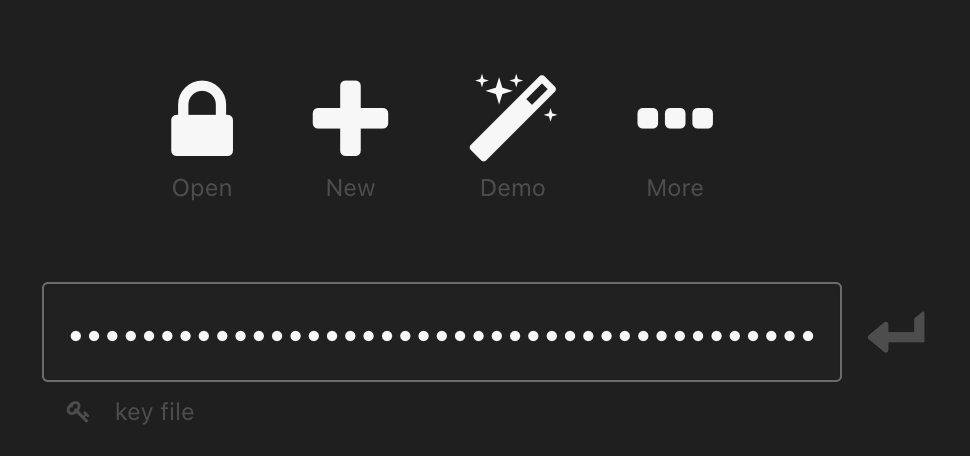
Is it possible to submit to this form using IPC? Until the SecureEnclave API gets implemented I want to use a separate KeeWeb launcher MacOS app that immediately fetches my password from the MacOS keychain (after Touch ID permission) then posts the password to the KeeWeb app.
 B43pMHvxH5yiTLAFBXqj3WDB
on 25 Jun 2020
B43pMHvxH5yiTLAFBXqj3WDB
on 25 Jun 2020
It's not possible.
antelle
on 25 Jun 2020
Hey guys,
Any updates regarding touch-ID w/ KeeWeb?
The last comment was two months ago, it would be interesting if someone experimented further into this issue :)
 PaulGoldschmidt
on 16 Aug 2020
PaulGoldschmidt
on 16 Aug 2020
If there were any updates, it would be reflected in this issue.
antelle
on 16 Aug 2020
Do you have a detailed specification of how you want the SecureEnclave implementation to work? I have a developer that can work on this task for a few weeks if you would like help on this feature.
 ghost
on 11 Sep 2020
ghost
on 11 Sep 2020
@mikewindow it should be implemented as a package similar to node-keytar module, however using SecureEnclave. However I'd like to warn you that it won't be accepted in KeeWeb until Electron resolves issues that allow any app run as if it was KeeWeb. This has already been brought up to them and they understand that the situation is not ideal. They also have a PR with a proposal ("electron fuses"), but it's still not ready.
While other apps can read our password from keychain, include those stored in SecureEnclave, it's very risky to store passwords there. To illustrate what I mean, try the following:
ELECTRON_RUN_AS_NODE=1 /Applications/KeeWeb.app/Contents/MacOS/KeeWeb
which gives you full access to Keychain items owned by KeeWeb, unfortunately.
antelle
on 11 Sep 2020
Thank you. We'll wait until electron resolves those issues.
ghost
on 13 Sep 2020
Electron issue for "electron fuses": https://github.com/electron/electron/pull/24241
ghost
on 13 Sep 2020
electron/electron#24241 has been merged.
ghost
on 30 Oct 2020
Yep, now we need to wait for it to be released, this will take some months...
antelle
on 30 Oct 2020
The "fuses" feature will be released in Electron v12, which is coming 03-2021. However that feature alone won't be enough since there are more possibilities to use electron apps this way. So, someone needs to add such feature toggles, or as they call it, "fuses", for these features:
--inspect-brk
👉 This is a critical one, it's not possible to make a workaround for it. Once it's fixed, we can proceed with this issue.
Other options that would be nice to have disabled, but there's a workaround:
I believe now it's a matter of contributing to Electron, so anyone interested in this feature can help this way, it would be much appreciated!
antelle
on 19 Nov 2020
I did some investigation and I was able to patch the electron binary to remove support for evil flags mentioned above. I'm not sure if we want to go this route though, but it's possible as a temporary measure.
antelle
on 21 Dec 2020
So, whoever decides to contribute, the feature should be opt-in (disabled by default), there should be a setting "Touch ID" that would allow selecting the following:
- Disable Touch ID (this is selected by default)
- Use Touch ID only after auto-lock (like in KeePassXC)
- Unlock with Touch ID instead of master password (like in 1Password)
If the last option is selected, there should be an additional field where you can select how often the master password must be required: 1 hour, 2 hours, 5 hours, 12 hours, 1 day, 1 week (default), 2 weeks, 1 month, never. For the second option it should be similar, but maybe with shorter intervals, I'm not sure yet.
If a file can be unlocked with Touch ID, the open screen should display an invitation button that will activate Touch ID, or it should happen automatically if Enter is pressed with empty password. Only password should be saved there, if a keyfile or a yubikey is in use, they should be also required to unlock the file.
Disabling Touch ID in settings should erase all passwords saved in Secure Enclave.
antelle
on 21 Dec 2020
For reference, here's my patch for Electron that disables all evil features: https://github.com/antelle/electron-evil-feature-patcher
antelle
on 25 Dec 2020
I might be interested in contributing this feature but I'm not sure what to use. @antelle could you please recap what API should be used to store/retrieve the master password? Or is it also part of the work to be done to find out what to use?
ValentinH
on 25 Dec 2020
You can inspect the code to check it, there are quite a lot of changes required and it's harder to explain rather than do. Otherwise, I'll implement it myself in the next release.
antelle
on 25 Dec 2020
What code to you refer to when saying "check the code"? Is there already some logic built in keeweb for storing in the secure enclave?
ValentinH
on 25 Dec 2020
Oh I thought you're referring to KeeWeb API and you asked if there's an internal API to get and save the master password. Now I see that your question was about macOS APIs. Regarding this, there's an answer, we'll use the Secure Enclave keychain API. The way it will be integrated, varies. If we manage to find a non-bloated (!), dependency-free (!) module that does it, we'll use it. Otherwise, since we have full support of native plugins now, we can make our own tiny node module exposing the API we need.
antelle
on 25 Dec 2020
I'm reading https://www.electronjs.org/docs/api/system-preferences#systempreferencesprompttouchidreason-macos for triggering TouchID.
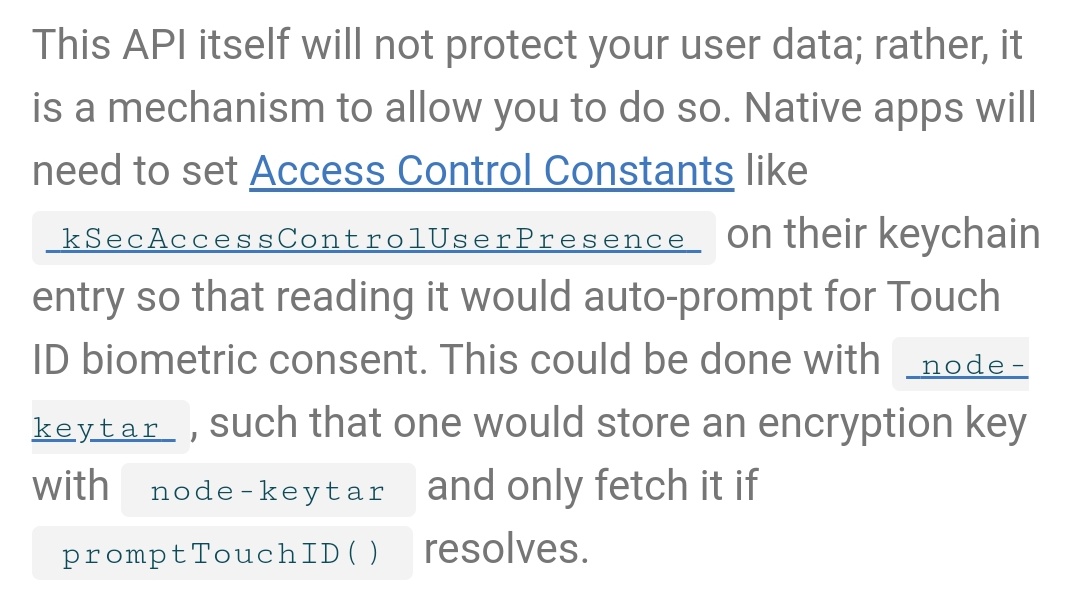
I understand that we could store/retrieve the password with https://github.com/atom/node-keytar if the TouchID resolved.
I'm not sure to understand what the Access Controls Constants thing is supposed to be done though.
ValentinH
on 25 Dec 2020
Ok nevermind my previous message regarding node-keytar. I should have read again the whole issue thread to understand that this is not secure enough. 🙈
ValentinH
on 25 Dec 2020
It's possible that they added Secure Enclave support to node-keytar by the way, I'll check if it's there now, how Touch ID is implemented, and where the key is stored in the way they describe it. It would be awesome if it's already there in node-keytar and we don't need anything!
However https://github.com/atom/node-keytar/issues/165#issuecomment-495926347 is not very promising, so I assume it will result in a regular keychain key with Touch ID checks in the app...
antelle
on 25 Dec 2020
Actually, while reading the doc about Secure enclave I had the same question as https://github.com/atom/node-keytar/issues/165#issuecomment-496344180.
If I understand correctly, we can't store the master password directly in the secure enclave. However, we might be able to encrypt it with a key coming from the secure enclave and then store it in the keychain. 🤔
ValentinH
on 25 Dec 2020
Of course, we'll create a new key in Secure Enclave and encrypt master passwords using symmetric encryption. That's what we're already doing with settings, but the key is in the normal macOS keychain. The difference here is that this key will be in Secure Enclave and it will have touch ID check on the hardware level required to access it.
antelle
on 25 Dec 2020
I've built a module for using Secure Enclave in Electron: https://github.com/antelle/node-secure-enclave#secure-enclave-module-for-nodejs-and-electron
You can also download the test app there and give it a try if you're interested.
Now the remaining part is to debug & test that thing and finally we'll be able to put it to KeeWeb soon.
If anyone would like to participate in testing the library, let me know!
antelle
on 27 Dec 2020
Implemented Secure Enclave encryption support in KeeWeb, what's left, is UI changes for touch id. It's going to be something like:
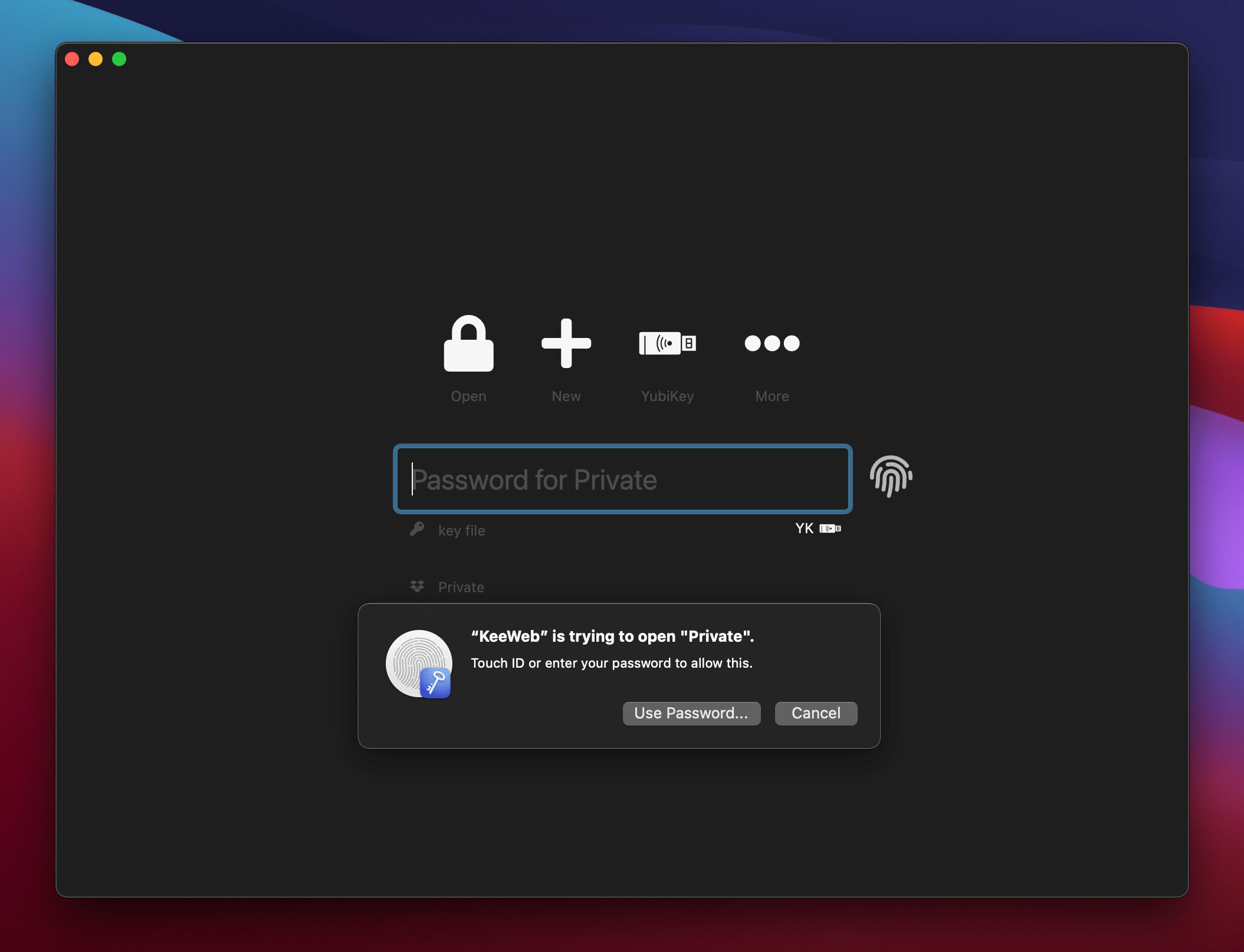

Unfortunately it's not possible to hide the "Use Password" button or I don't understand how, so this button just doesn't work, that's not great.
antelle
on 10 Jan 2021
I'm so excited to see this, I've been wishing for this for so long 😍
ValentinH
on 10 Jan 2021
@antelle awesome to see this being taken care of!
Unfortunately it's not possible to hide the "Use Password" button or I don't understand how, so this button just doesn't work, that's not great.
Do I get it right, that the "use password" button requests the OS user's password as an alternative to the touch id fingerprint?
 mrsimpson
on 12 Jan 2021
mrsimpson
on 12 Jan 2021
Do I get it right, that the "use password" button requests the OS user's password as an alternative to the touch id fingerprint?
It does, however it won't work, which is by design. The only issue is, I don't understand how to hide that button. I passed deviceOwnerAuthenticationWithBiometrics, but it doesn't seem to change the dialog.
antelle
on 12 Jan 2021
Ok, found it: https://developer.apple.com/documentation/localauthentication/lacontext/1514183-localizedfallbacktitle:
To eliminate the fallback option, set the fallback title to an empty string. This hides the button from the interface.
Now the "Use Password" button is hidden, as it should be
antelle
on 12 Jan 2021
Thanks for implementing this @antelle!
In the final version, could you add the kSecAccessControlWatch flag to enable unlocking with the Apple Watch?
You can find an example here.
thefonseca
on 17 Jan 2021
Unlocking with Apple Watch should be probably an option in settings, so that you can choose if you would like to use it, but it's of course possible.
antelle
on 17 Jan 2021
Touch ID is implemented, the settings will look like this:
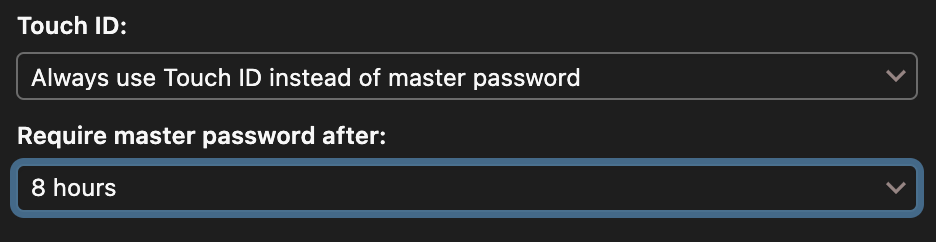

For now it will be opt-in, as in, you will need to go to settings and enable it manually to use it. When it becomes more stable, there will be some enrollment tooltips.
It will be released in v1.17, in March or April.
antelle
on 3 Feb 2021
If anyone would like to give it a try: http://beta.keeweb.info/KeeWeb.app.zip
But if it works, please don't use this version.
antelle
on 3 Feb 2021
@antelle just tried it and it works well. The only thing that wasn't super clear is that I had to restart the application after setting the Touch ID setting to "always use" to see the touch id button.
Could you explain why we should not use this version though? 😅
ValentinH
on 4 Feb 2021
Glad it worked! You don't have to restart, but you need to open a file once again after you set up Touch ID, then it will work. Probably this needs to be fixed, so that it's more obvious.
why we should not use this version
- It is unstable, for example, it has unfinished password audit code
- It's based on Electron v11, however the version that has necessary security features for Touch ID is v12, which is in beta. Now it's comparable with saving passwords in a text file.
antelle
on 4 Feb 2021
Thanks for the transparency, point 2 is quite scary indeed. Looking forward to the stable version, what I tested today is exactly what I was dreaming of when creating this issue three years ago. So happy to see this coming soon 😍
ValentinH
on 4 Feb 2021
I've uploaded a new version: http://beta.keeweb.info/KeeWeb.app.zip
This is based on v12 of Electron, so if you want, you can use it with Touch ID, it's safe.
Any reports about this version would be very welcome!
antelle
on 8 Feb 2021
I've uploaded a new version: http://beta.keeweb.info/KeeWeb.app.zip
This is based on v12 of Electron, so if you want, you can use it with Touch ID, it's safe.Any reports about this version would be very welcome!
Hello @antelle! The link seems to be broken.
I have a MBP without fingerprint sensor, and would love test it using the Apple Watch, if possible.
thefonseca
on 13 Feb 2021
@thefonseca thanks, I think it was deleted today when I rolled out beta. But for now it doesn't support Apple Watch, so I'll make a new build with it and upload it.
antelle
on 13 Feb 2021
By the way, are you sure macbooks without Touch ID have a possibility to store keys in Secure Enclave? I wonder how I should tell it to the API, that it must be Secure Enclave AND (biometry OR watch).
antelle
on 13 Feb 2021
I think I found a way to do it. Uploaded a new build: https://beta.keeweb.info/KeeWeb.app.zip, I don't have Apple Watch to test it though. And for reference, here's the source code: https://github.com/antelle/node-secure-enclave/blob/master/src/addon.cpp#L85
antelle
on 13 Feb 2021
By the way, are you sure macbooks without Touch ID have a possibility to store keys in Secure Enclave? I wonder how I should tell it to the API, that it must be
Secure Enclave AND (biometry OR watch).
I am not sure about the MacBooks, but several Mac mini and iMac models have the T2 chip. I'm pretty sure my MacBook does not have a Secure Enclave, but it supports Apple Pay because it is paired with the Apple Watch. So, I suppose there is some kind of delegation to the watch/iPhone Secure Enclave, and it would be interesting to see how the API handles this case (or if it just crashes).
You can use kSecAccessControlOr, which worked well for me in another MacBook (with Touch ID).
thefonseca
on 13 Feb 2021
Yes, kSecAccessControlOr is what I discovered, so I added it to kSecAccessControlPrivateKeyUsage.
If I read the code correctly, MacPass is not using Secure Enclave, they pass kSecAccessControlWatch | kSecAccessControlOr | kSecAccessControlBiometryCurrentSet without kSecAccessControlPrivateKeyUsage as it's said in the docs:
A critical aspect of this access control object is its privateKeyUsage flag. This flag indicates that the private key should be available for use in signing and verification operations inside the Secure Enclave.
So in this case it's a regular exportable private key, just protected with biometrics or watch. But I'm not 100% sure, Apple docs are sometimes hard to understand.
Let's see if this version of KeeWeb works fir you.
antelle
on 13 Feb 2021
I can't see the option in settings... do you test for some kind of compatibility to render the option? I am using Big Sur 11.0.1.
thefonseca
on 13 Feb 2021
Oh right, it actually checks if touch ID is available, so I need to change this piece too, thanks
antelle
on 13 Feb 2021
Disabled Touch ID check and re-uploaded the build, now it will be always enabled on macOS, which means it won't work in some cases, but those macbooks are becoming legacy.
antelle
on 14 Feb 2021
Now I can see the option, but nothing changes in the UI when opening the database (no fingerprint icon).
Also, why not having a never option for the 'require master password after'?
thefonseca
on 14 Feb 2021
Disabled Touch ID check and re-uploaded the build, now it will be always enabled on macOS, which means it won't work in some cases, but those macbooks are becoming legacy.
Instead of testing for the existence of Touch ID, maybe it would be better to verify the existence of the Secure Enclave itself? For instance, by trying to create a key pair as suggested here.
thefonseca
on 14 Feb 2021
Now I can see the option, but nothing changes in the UI when opening the database (no fingerprint icon).
Also, why not having a
neveroption for the 'require master password after'?
I personally had to select the option and then restart keeweb to have the touch id icon appear.
ValentinH
on 14 Feb 2021
@thefonseca for now it works like this:
- enable Touch ID
- open your file as usual - at this moment, if Touch ID is enabled, the password is saved
- close the file
- the open screen will show the fingerprint icon
antelle
on 14 Feb 2021
If it doesn't work, please try this test app built using the same library: https://github.com/antelle/node-secure-enclave/releases/download/0.4.1/test-app.app.zip
Click "Create key", click "Encrypt Data", enter something and press Enter, click "Decrypt Data", press Enter. If the decrypted text doesn't appear, Secure Enclave most likely doesn't work using this API
antelle
on 14 Feb 2021
If it doesn't work, please try this test app built using the same library: https://github.com/antelle/node-secure-enclave/releases/download/0.4.1/test-app.app.zip
Click "Create key", click "Encrypt Data", enter something and press Enter, click "Decrypt Data", press Enter. If the decrypted text doesn't appear, Secure Enclave most likely doesn't work using this API
Thanks for the link! When I click "Create key" I get this error:
Error: SecKeyCreateRandomKey: Function or operation not implemented.
Perhaps you can use this key creation as a test to hide/show the option in settings?
thefonseca
on 16 Feb 2021
Ok, so looks like we won't be able to use Secure Enclave on your macbook and what MacPass does, it most likely just saving the key to the regular Keychain.
antelle
on 16 Feb 2021
Ok, so looks like we won't be able to use Secure Enclave on your macbook and what MacPass does, it most likely just saving the key to the regular Keychain.
Oh, to be clear, I did not test MacPass on this Mac (it is not compatible with Big Sur yet).
But I do use Apple Pay and access password protected screens using the watch.
Thanks for trying this anyway.
One thing I would suggest is to have this configuration on a per-database basis. I would expect it appear next to the Yubikey options, but for me it appears in the "general" area.
thefonseca
on 16 Feb 2021
Maybe. For now, in the first implementation, it will be all-or-none, later we can consider different options depending on feedback and complexity.
antelle
on 16 Feb 2021
It's released 🎉
antelle
on 7 Mar 2021
Are there any plans for supporting the apple watch unlock? I am not sure from the comments and the new version does not seem to support it. Thank you.
 filipsuk
on 8 Mar 2021
filipsuk
on 8 Mar 2021
@filipsuk it should support unlocking with watch, but only on MacBooks with Secure Enclave. If you have a MacBook with Secure Enclave that works with Touch ID but doesn't work with watch, I'd be glad if you help with testing on it (I don't have a watch, so can't say if it's built properly).
antelle
on 8 Mar 2021
Unfortunately I have the MacBook Pro Early 2015 which probably does not have a security enclave. However I am able for example to unlock my computer with apple watch or confirm admin user actions.
But I understand this is a limitation of https://github.com/antelle/node-secure-enclave and I haven't found any other package which would solve my issue. I guess I need to buy a new computer :)
filipsuk
on 8 Mar 2021
Well, this limitation is built consciously. We would rather not store the password in a way that can be rather easily bypassed.
antelle
on 8 Mar 2021
Related issues
 jlundan
·
39Comments
jlundan
·
39Comments
 Rurik19
·
31Comments
Rurik19
·
31Comments
 AlexWayfer
·
30Comments
AlexWayfer
·
30Comments
 leolivier
·
46Comments
leolivier
·
46Comments
 kavolorn
·
38Comments
kavolorn
·
38Comments
Most helpful comment
Electron now support TouchId https://github.com/electron/electron/pull/16707