Keeweb: Password entry box is not always focused on app re-activation with 1.7.4 only
Describe the bug
New issue with 1.7.4.
When opening the app and then closing to Dock and clicking the Dock Icon, the focus always used to be in the password entry box.
With 1.7.4 this is not always the case. Sometimes you first have to click inside the password entry box. This happens occasionally, not always.
Previous versions did not have this problem.
To Reproduce
Steps to reproduce the behavior:
- Open App
- Close to Dock
- Click Dock Icon
- Instead of being able to type in password entry you first have to click inside password entry box
5** This behavior is intermittently random ...sometimes it works as expected, sometimes not
Expected behavior
After app is initially opened and then closed, when clicking dock icon expect typing entry to be focused on password entry
Screenshots
If applicable, add screenshots to help explain your problem.
Environment
KeeWeb v1.7.4 (f2303f44, 2019-01-17)
Environment: electron v4.0.1
User-Agent: Mozilla/5.0 (Macintosh; Intel Mac OS X 10_14_2) AppleWebKit/537.36 (KHTML, like Gecko) KeeWeb/1.7.4 Chrome/69.0.3497.106 Electron/4.0.1 Safari/537.36
 tcz305
All 55 comments
Thanks! This was changed in https://github.com/keeweb/keeweb/pull/1088
 antelle
on 21 Jan 2019
antelle
on 21 Jan 2019
I can confirm this behavior, in addition to that series of steps, activating auto-type when the app is locked pops up the app, but the password box is no longer focused. It's a very UX breaking issue.
 bdaroz
on 3 Feb 2019
bdaroz
on 3 Feb 2019
FWIW, I also find it a major usability issue because it completely breaks my usage pattern of using keyboard only. FYI, in 1.7.4 this is still happening.
Additionally - and this is a new thing - since 1.7.4 when I filter passwords and are left with just a few of them, using arrow down to "navigate" the list spikes the CPU for several seconds, though not always.
Very surprising to see these kinds of regressions, KeeWeb has been rock solid for me for years!
To end this note on a positive, apart from these few things, the app is absolutely awesome - use it across macOS and Windows and the dark theme(s) look great.
 ddotlic
on 4 Feb 2019
ddotlic
on 4 Feb 2019
As a workaround, after focusing the app, you should be able to focus the password entry box by pressing Tab and then Shift+Tab.
 DarwinAwardWinner
on 4 Feb 2019
DarwinAwardWinner
on 4 Feb 2019
@DarwinAwardWinner Thanks for the workaround, I tried pressing Tab multiple times to no avail 😉
ddotlic
on 4 Feb 2019
It should be fixed in v1.7.5, please give it a try.
antelle
on 4 Feb 2019
@antelle Looks like it's working like a charm! 🍾
Small nit: the about box still says 1.7.4 😕
ddotlic
on 4 Feb 2019
@antelle I mean, the one that shows when I use the macOS system menu. Otherwise, in-app one does show 1.7.5
ddotlic
on 4 Feb 2019
That's expected, we can't update the version in macOS's about box if we update only app content without downloading 60..70MB.
antelle
on 4 Feb 2019
@antelle Fine by me, just wanted to make sure that I indeed have the latest bits so the fix is definitely working great. Thanks a lot for this lovely app!
ddotlic
on 4 Feb 2019
LGTM - Thank you for the quick fix!!!! 👍
bdaroz
on 4 Feb 2019
This still seems to be a problem for me in 1.7.5.
DarwinAwardWinner
on 6 Feb 2019
@DarwinAwardWinner did it work well before 1.7.4?
antelle
on 6 Feb 2019
Yes, it was fine until 1.7.4.
DarwinAwardWinner
on 6 Feb 2019
@DarwinAwardWinner which OS are you using?
antelle
on 6 Feb 2019
Mac OS 10.14.2.
Do you know how to quickly reproduce the behavior? I only seem to see it when switching to Keeweb after it's been inactive for a while. But I'm definitely still seeing instances where versions prior to 1.7.4 would have had the password box focused, but 1.7.5 doesn't.
DarwinAwardWinner
on 6 Feb 2019
Do you know how to quickly reproduce the behavior?
That's the thing, I don't know how to reproduce it in v1.7.5 or
antelle
on 6 Feb 2019
Well, how was it reproduced in 1.7.4? I can test it out more easily if I can find a method besides "do something else for several hours and then activate Keeweb".
DarwinAwardWinner
on 6 Feb 2019
The fastest sequence is:
- Check "lock when minimized"
- Open a file
- Minimize
- Click the icon in dock
The app came from dock locked, but focus was not set.
antelle
on 6 Feb 2019
I think I know why it happens, would you be able to try the beta version?
antelle
on 6 Feb 2019
Uploaded a build with a possible fix to beta, please give it a try:
Settings > General > Advanced > Try beta version until restart
antelle
on 6 Feb 2019
I gotta say that indeed the previous fix does not work “after a while”.
I will test the beta tomorrow and report back.
ddotlic
on 6 Feb 2019
Ok, I'll try the beta version. It looks like the method you give to reproduce the issue doesn't reproduce it in 1.7.5, so I guess I'll have to just wait and see if it happens eventually.
DarwinAwardWinner
on 6 Feb 2019
Ok, with the beta version enabled, I'm still seeing the issue. Specifically, I saw it after the following sequence of actions:
- Reboot, launch Keeweb, and unlock it
- Used it to log into a website via Firefox extension
- Browsed the web in Firefox for a while until Keeweb auto-locks from inactivity. Keeweb is never minimized or hidden, just inactive.
- Command-Tab to focus Keeweb. The password entry is unfocused.
- Command-Tab back to FF, then back to Keeweb a second time. The password entry is focused now.
DarwinAwardWinner
on 7 Feb 2019
Using the beta version; for now, for my use-case, it appears to work (my use-case is fairly simple; I "jump" to KeeWeb using the spotlight).
Will report back if things change, but looking good for now.
ddotlic
on 7 Feb 2019
@DarwinAwardWinner FYI, I tried your scenario _exactly_, the focus is set correctly. I'm cautiosly optimistic that this might in fact work for me...
ddotlic
on 7 Feb 2019
Oh, I've just made a discovery! When switching back to Keeweb after allowing it to idle lock, it does actually focus the password box, but it only does so after about 3 seconds. Since Keeweb is running on Electron, which is based on Chromium, perhaps the culprit is some idle power-saving feature in the browser engine that limits the frequency of event triggers?
DarwinAwardWinner
on 7 Feb 2019
@DarwinAwardWinner I see, perhaps the patch from beta will fix it.
Let's release it and see...
antelle
on 7 Feb 2019
Please check if it works in v1.7.6, it should be better now.
antelle
on 7 Feb 2019
No, the behavior is the same as what I described in my previous comment: the first time focusing Keeweb after a long idle time, it takes several seconds before the password box is focused. The most recent time, it took about 7 seconds.
DarwinAwardWinner
on 8 Feb 2019
Could you please check if there’s anything interesting in devtools?
antelle
on 8 Feb 2019
I found the spot to enable the dev tools, but I'm not a web dev person, so I don't really know what to look for.
DarwinAwardWinner
on 8 Feb 2019
Click the Console tab. If there’s anything red, pleasee paste it here.
antelle
on 8 Feb 2019
I don't see anything in red, nor do I see any log messages around the time I saw the issue. The last log message before then is "sync finished no error" from several hours ago, and the next messages after that are from when I clicked the "check for updates" button.
DarwinAwardWinner
on 8 Feb 2019
Strange. Last time there was an error, which can be the reason of this. I can builod beta with more ligging tonight.
antelle
on 8 Feb 2019
After discovering that the password field actually is getting focused automatically if you wait long enough, my guess is that what I'm seeing now might be a completely different underlying issue from what this issue was originally about, which just happens to have similar-looking effects.
(Unless it turns out that the issue in 1.7.4 also shows similar delayed focusing behavior, but no one bothered to wait 10 seconds to see it until now.)
Anyway, like I said, my best guess is that the browser engine is entering an idle state, in which it is attempting to save energy by deferring all event triggers and then running in batchs every X seconds. And when the application gets focused again, it doesn't shift out of that idle state until the next batch.
DarwinAwardWinner
on 8 Feb 2019
Anyway, like I said, my best guess is that the browser engine is entering an idle state, in which it is attempting to save energy by deferring all event triggers
@DarwinAwardWinner Whatever it is, it's happening on my macOS too, I just had to wait long enough between the two focus switches to experience it.
At this point in time, we might have to clone the repo and run the app locally, IIUC the creator of this app @antelle isn't running a macOS thus the fixes are best-effort (or guess).
ddotlic
on 8 Feb 2019
@antelle I know this is painful, I've seen VS Code team struggling with this each time they try it: what was the last time you've upgraded underlying Electron? I'm still surprised by the amount of bugs/workarounds necessary for each major version, but the payoff is often a lot of issues fixed in the foundation of the app and most notably better compatibility with recent OS versions. It _seems_ to me that the only people reporting issues are those with the latest macOS version, maybe an upgrade of Electron would help?
ddotlic
on 8 Feb 2019
I’m using macos, but can’t repeat it, that’s the problem. If all else fails, I’ll just revert the change that caused it (that issue didn’t seem to affect a lot of people).
antelle
on 8 Feb 2019
I’m using macos, but can’t repeat it,
The latest version? 10.14.2?
ddotlic
on 8 Feb 2019
10.14.3 for me in fact...
ddotlic
on 8 Feb 2019
yes
antelle
on 8 Feb 2019
@antelle Just wanted to say - after finally looking a _bit_ more in-depth at the source code - wow, this is really, really clean and well organized project, kudos!
The package.json indicates that you're using latest electron (4.x) so my remark above is redundant. What was the commit (which started this whole thing) trying to do anyway (the one you're thinking about rolling back)?
ddotlic
on 8 Feb 2019
This was the change: https://github.com/keeweb/keeweb/pull/1088
Which fixed this issue: https://github.com/keeweb/keeweb/issues/423
Before the change, focus was set into the field in the background, and it caused issued for Alfred users.
So, now we have these options:
- try to understand wtf and fix
- revert and sacrifice alfred users
- leave it like this with a bug
I’d like to achieve 1., but if we don’t manage to, I would choose 2.
antelle
on 8 Feb 2019
IIUC, the issue is that KeeWeb is not _releasing_ the secure input (which is indirectly tied to having the focus at the password entry field).
Maybe you were looking at this the "other way around" - instead of conditionally taking focus, maybe you should ensure that secure input is _released_ whenever appropriate? IOW, instead of having this happen implicitly (assuming that password entry losing focus will relinquish secure input) maybe this can be done explicitly? Or is this too "low" in the stack from the app point of view?
ddotlic
on 8 Feb 2019
I've built a beta version with more logging about focus, please give it a try.
Expected output when the app locks on timeout:
2019-02-08T20:09:13.966Z [focus] has focus: false (launcher)
2019-02-08T20:09:13.976Z [focus] has focus: false (launcher)
And then when you switch to it:
2019-02-08T20:09:16.904Z [focus] focus
2019-02-08T20:09:16.904Z [focus] focus triggered
2019-02-08T20:09:16.905Z [open-view] input focused
To lock the app faster, run this in Dev Tools > Console:
setTimeout(() => Backbone.trigger('user-idle'), 10000 /* it means 10 seconds */);
After this you can close the devtools and switch to another app. Increase the timeout if you need more time.
antelle
on 8 Feb 2019
@ddotlic I don't think it's possible to release the "secure input", but put focus in the password input field.
antelle
on 8 Feb 2019
Ok, so after leaving Keeweb idle for a while and then switching back to it, no new log messages are generated. The only log messages are the periodic idle messages:
(index):12 2019-02-08T23:34:46.214Z [focus] has focus: false (launcher)
(index):12 2019-02-08T23:34:46.217Z [focus] has focus: false (launcher)
(index):12 2019-02-08T23:35:46.217Z [focus] has focus: false (launcher)
(index):12 2019-02-08T23:35:46.220Z [focus] has focus: false (launcher)
(index):12 2019-02-08T23:36:46.162Z [focus] has focus: false (launcher)
(index):12 2019-02-08T23:36:46.165Z [focus] has focus: false (launcher)
(index):12 2019-02-08T23:37:46.163Z [focus] has focus: false (launcher)
(index):12 2019-02-08T23:37:46.165Z [focus] has focus: false (launcher)
(index):12 2019-02-08T23:38:46.164Z [focus] has focus: false (launcher)
(index):12 2019-02-08T23:38:46.167Z [focus] has focus: false (launcher)
Then, if I switch away and switch back a second time, the following messages appear upon switching back:
(index):12 2019-02-08T23:39:10.175Z [focus] blur
(index):12 2019-02-08T23:39:10.623Z [focus] focus
(index):12 2019-02-08T23:39:10.625Z [focus] focus triggered
(index):12 2019-02-08T23:39:10.626Z [open-view] input focused
After focusing for the first time: 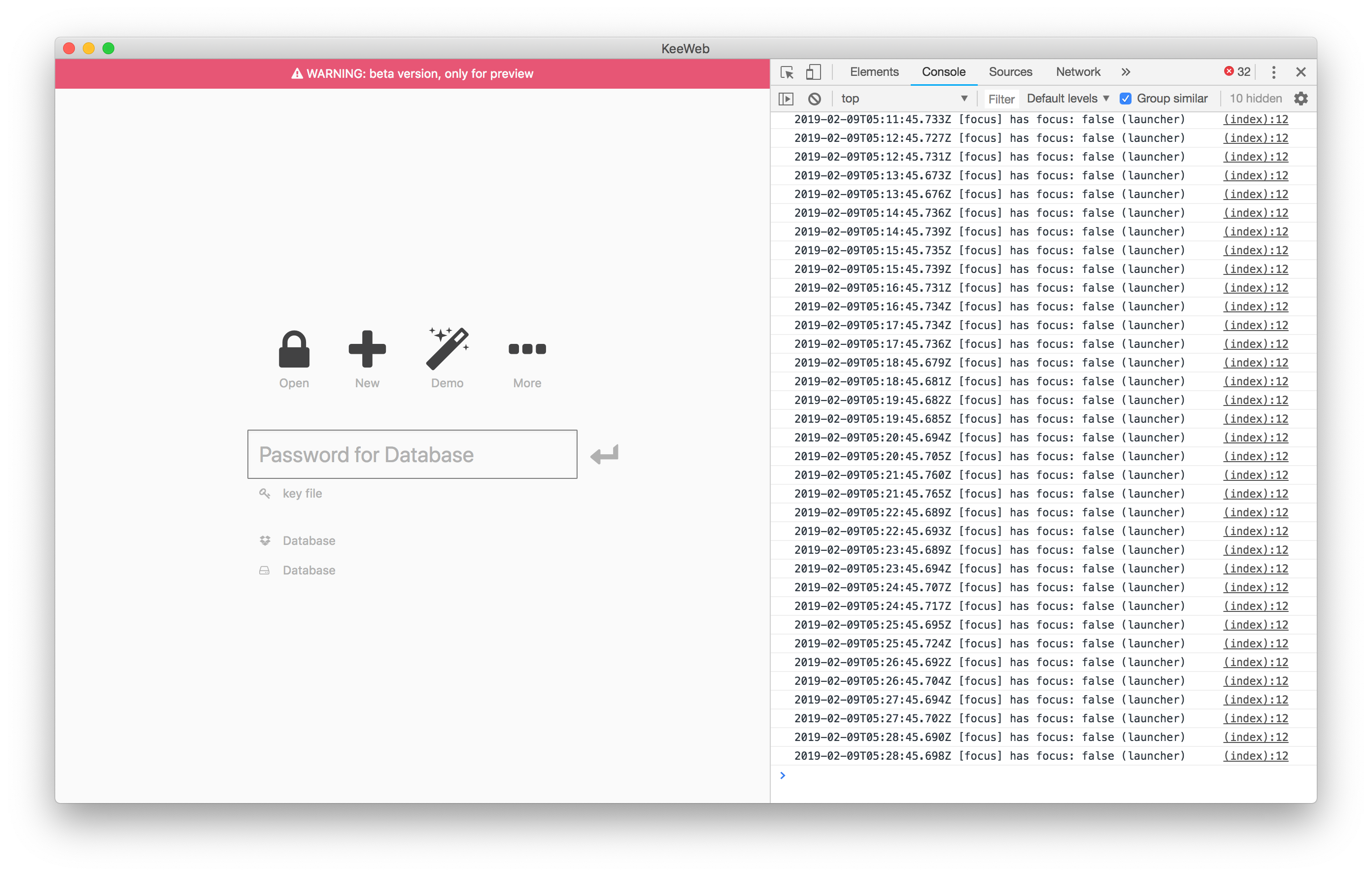
After focusing for the 2nd time: 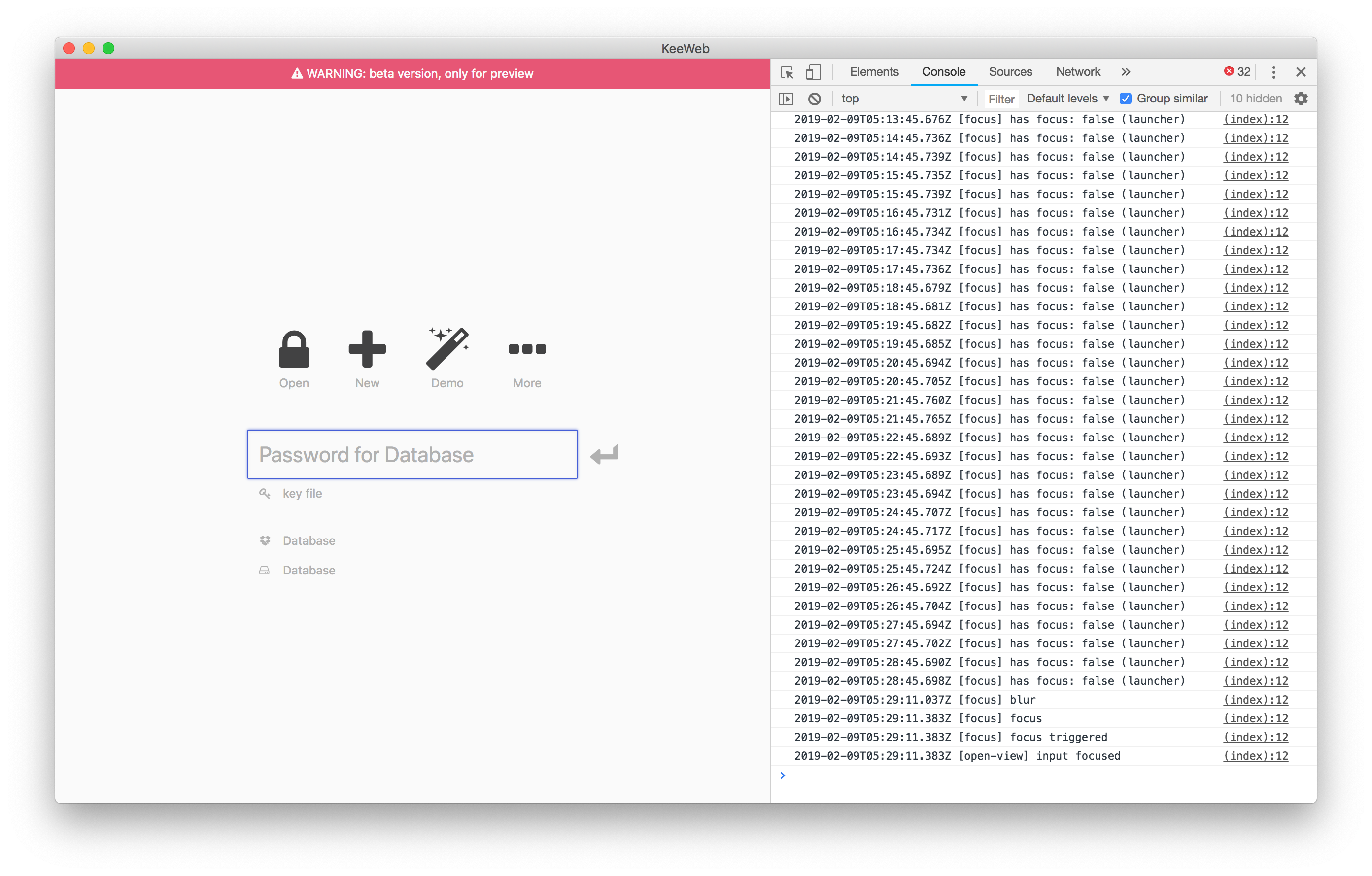
DarwinAwardWinner
on 9 Feb 2019
Thanks a lot, this explains the thing. I’ll make another beta update today, most likely it will fix the bug.
So the reason is that browser ‘focus’ event works in electron, but not always. If we use electron’s event, it will be probanly fixed.
antelle
on 9 Feb 2019
Uploaded a new build to beta, please check if it works for you now.
antelle
on 9 Feb 2019
Looks like the new build is working so far: 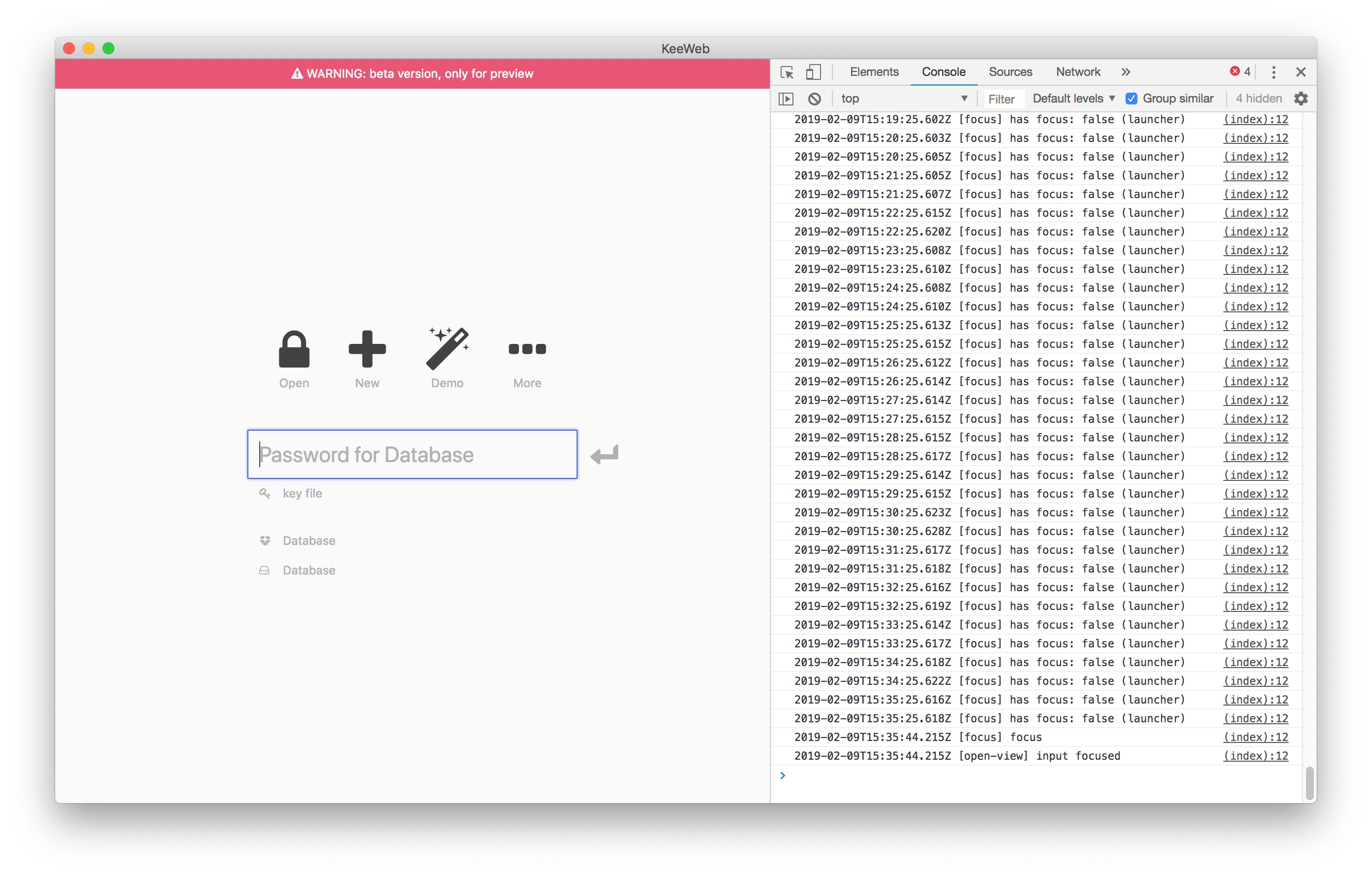
I'll keep testing some more throughout the day. (I could never get the bug to reproduce without leaving Keeweb idle for an extended period, so it'll take a while.)
DarwinAwardWinner
on 9 Feb 2019
Good, thanks! I'll make a release with it once you confirm it's working.
antelle
on 9 Feb 2019
Ok, after testing it a few more times, it seems to be working consistently.
DarwinAwardWinner
on 9 Feb 2019
Published a new version with this fix
antelle
on 9 Feb 2019
Related issues
 kavolorn
·
38Comments
kavolorn
·
38Comments
 ValentinH
·
87Comments
ValentinH
·
87Comments
 AlexWayfer
·
30Comments
AlexWayfer
·
30Comments
 leolivier
·
46Comments
leolivier
·
46Comments
 adatum
·
34Comments
adatum
·
34Comments
Most helpful comment
Published a new version with this fix