I stumbled upon this not only on first usage but multiple times, so I actually think this is something that might affect not just me.
When selecting a kdbx database from a remote source (OneDrive in my case) it'll have the available file(s) listed at the bottom right, next to the cancel button.

The issue is that everytime I've had this modal I thought that there is an empty list of files to pick from.
I read the instruction on the left but then I'm not even looking at the bottom right since my unconscious mind tells me that this bright blue thing clearly has to be the "Ok" button.
I think this clearly breaks with user expectations (as long as they have only one database file which seems pretty common to me).
Another possible layout may be to list databases aligned left below the instruction phrase.
It would be nice to hear opinions supporting this or if my mind's just a really strange place. :)
 loilo
loilo
All 2 comments
I totally agree, this dialog must not look like regular ok-cancel alert.
There must be a special folder selection dialog, with a possibility to display folders and files, go inside folders and back (and maybe a checkbox to display all file extensions, not only kdbx), so it's a subject to refactoring. There are two parts of this story:
- support folder listing technically (now we just have a plain list of files)
- redesign the dialog
This will be definitely done in future releases.
 antelle
on 24 Aug 2016
antelle
on 24 Aug 2016
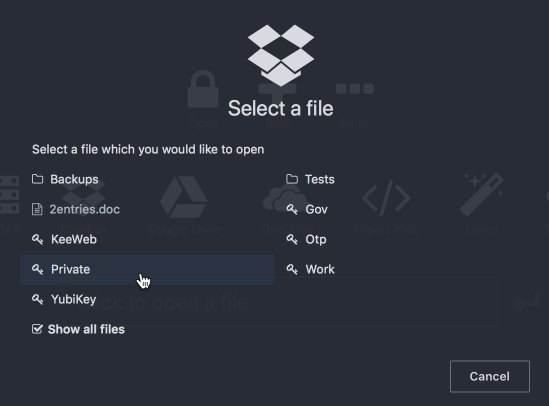
Finally, this dialog will have proper design soon:
antelle
on 26 Nov 2017
Related issues
 testgoofy
·
28Comments
testgoofy
·
28Comments
 leolivier
·
46Comments
leolivier
·
46Comments
 blsz
·
31Comments
blsz
·
31Comments
 ValentinH
·
87Comments
ValentinH
·
87Comments
 jlundan
·
39Comments
jlundan
·
39Comments
Most helpful comment
Finally, this dialog will have proper design soon:
